A command line, stack-based calculator with postfix notation that displays the stack contents at all times. As you type, the stack changes are reflected immediately.
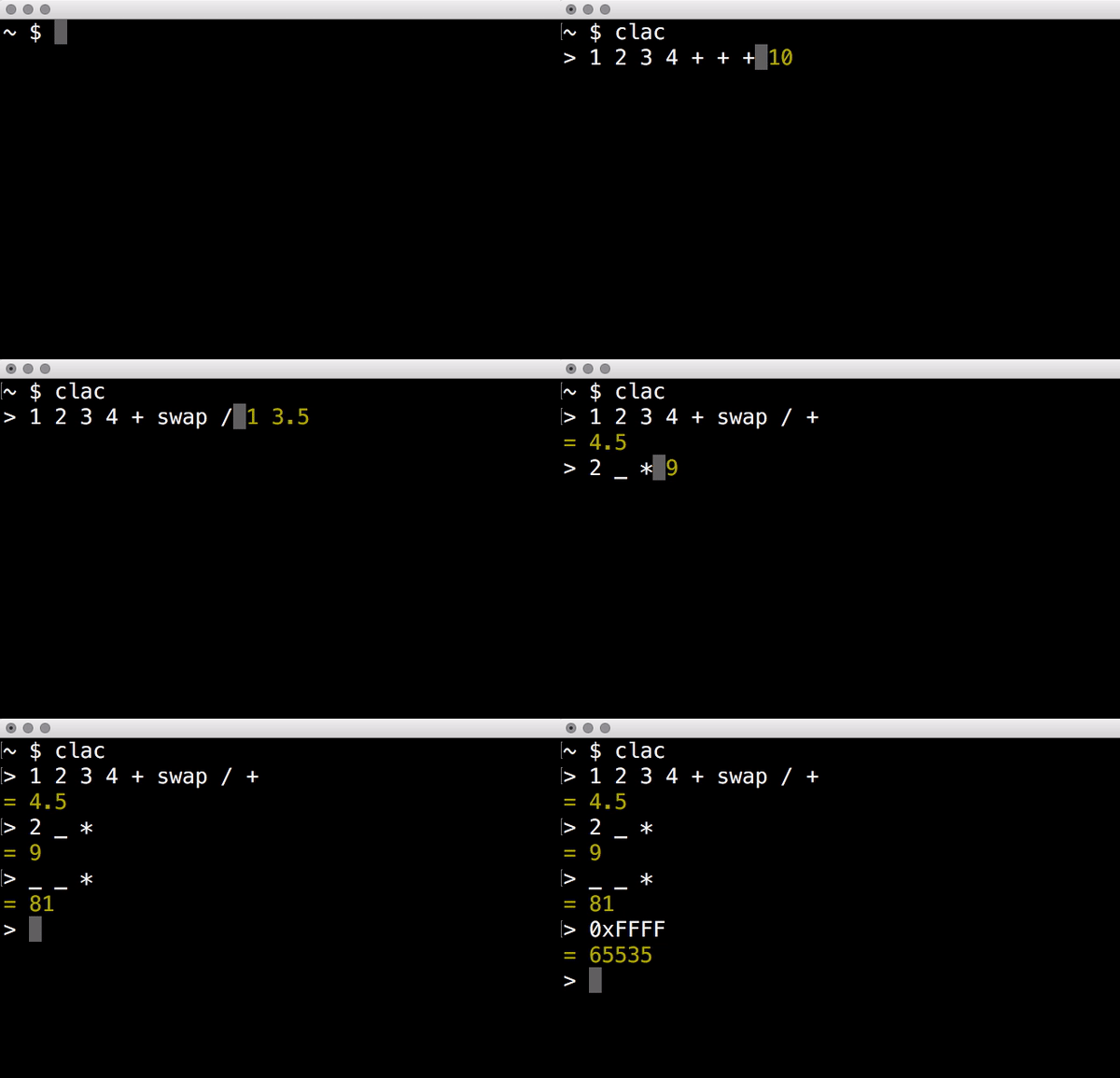
In a stack-based postfix calculator, entering a number pushes it on a stack, and arithmetic operations pop their arguments from the stack and push the result. As all the operations take a fix number of arguments, there's no room for ambiguity: parenthesis and operator precedence are not needed. Postfix notation is also known as reverse Polish notation, or RPN.
I like Forth and other stack based, concatenative languages, and
I've used the dc calculator a lot. Once I got used to dc, other
calculators seemed to be less powerful. While it has been extremely
useful for me, I've always found the UI a bit lacking. That's why
I decided to try this idea of an always-visible stack with realtime
updates.
Download the latest release or check the available packages. You can also compile the source code in the master branch.
Install clac into /usr/local/bin with the following command:
$ make install
You can use make PREFIX=/some/other/directory install if you wish
to use a different destination. If you want to remove clac from
your system, use make uninstall.
When a command requires an argument, it pops a value from the stack.
If the stack is empty, a zero is provided instead. In the descriptions
below, the top of the stack (and thus the first value popped) is
represented by the letter a, while the second value popped is
represented by the letter b. For example, if the stack is composed
of the number 1, 2 and 3 (with 3 at the top of the stack),
when we describe the sum then a will be 3 and b will be 2.
It is important to note that subtraction and division invert the
order of the arguments before performing the operation: with 1,
2 and 3 in the stack, when you type - it will pop the values
3 and 2 and push the result of 2 - 3. This is in the tradition
of other postfix calculators and programming languages.
Here's a description of the available commands:
+
Pop two values a and b and push the result of a + b.
-
Pop two values a and b and push the result of b - a.
*
Pop two values a and b and push the result of a * b.
/
Pop two values a and b and push the result of b / a.
%
Pop two values a and b and push the remainder of the Euclidean
division of b by a.
^
Pop two values a and b and push the result of b ^ a.
ln
Pop the value a and push its natural logarithm.
log
Pop the value a and push its logarithm to base 10.
!
Pop the value a and push its factorial.
sin
Pop the value a and push its sine.
cos
Pop the value a and push its cosine.
tan
Pop the value a and push its tangent.
asin
Pop the value a and push its arc sine.
acos
Pop the value a and push its arc cosine.
atan
Pop the value a and push its arc tangent.
atan2
Pop two values a and b and push the arc tangent of b / a,
using the signs of a and b to determine the quadrant.
erf
Pop the value a and push its error function.
sum
Pop all the values in the stack and push their sum.
add
Pop the value a and remove that many items from the stack. Push
their sum.
ceil
Pop the value a and push the smallest integer value greater than or
equal to a.
floor
Pop the value a and push the largest integer value less than or
equal to a.
round
Pop the value a and push the integer value closest to a.
abs
Pop the value a and push the non-negative value of a.
swap
Pop two values a and b and push the values a, b.
dup
Pop the value a and push the values a, a.
roll
Pop two values a and b and rotate b elements in the stack a
times.
drop
Remove the top of the stack.
clear
Remove all the elements in the stack.
count
Push the number of items in the stack.
_
Push on the stack the result of the last operation.
stash
Pop the value a and move that many items to the stash.
fetch
Pop the value a and move that many items from the stash.
.
Stash the top of the stack.
,
Fetch one stashed item.
:
Stash all the items in the stack.
;
Fetch all stashed items.
Use <C-p>/<C-n> or the <Up>/<Down> arrow keys to navigate
the history.
It is possible to define operations (or words, as they are usually
called in stack based programming languages) by editing the words
configuration file. It is not created by default, but clac will use
some environment variables in order to search for word definitions.
$CLAC_WORDS
If set, it should point to a file containing word definitions.
$XDG_CONFIG_HOME
If set, clac will search for $XDG_CONFIG_HOME/clac/words.
$HOME
If set, clac will search for $HOME/.config/clac/words.
Words are defined as aliases, with one alias on each line. Empty lines are ignored. Here are some examples:
pi 3.14159265358979323846
tau "pi 2 *"
sqrt "0.5 ^"
Note that an alias has two parts: a word to be defined and its
meaning. That's why the tau and sqrt definitions are enclosed
in double quotes. If the double quotes are removed, clac will
complain that it can't parse the command. For example, if we remove
the double quotes from sqrt and start clac, we will get this error
message:
Incorrect definition: sqrt 0.5 ^
(~/.config/clac/words:3)
User defined words can be used as if they were built-in commands:
$ clac "42 dup * pi *"
5541.76944093239If you type words and hit enter, clac will list the defined words.
If you type reload and hit enter, clac will reload the words file.
While the most interesting aspect of clac is the ability to visualize the stack as it is updated with each key press, at some point you may want use clac just to get a quick result or call it from a script. For that reason, clac can be used in non-interactive mode by invoking it with an argument.
Here are some examples of non-interactive invocations:
$ clac "3 4 +"
7

$ clac "2 3 4 +"
7
2
When clac finishes evaluating the expression "2 3 4 +", there are two elements in the stack: the number 7 at the top of the stack and the number 2 at the bottom of the stack. The elements are printed in order, one per line, starting from the top of the stack.
This other example uses the stashing features. Let's say we want to push two numbers and get the result of their multiplication plus the square of the second number.
$ clac "4 3 dup dup * . * , +"
21
Another example that uses the stash would be to get the average of all the elements in the stack:
$ clac "1 2 3 4 count . sum , /"
2.5
In fact, if you find yourself calculating averages very often, you
can define the word avg as "count . sum , /".
In many countries the comma is the decimal separator. Furthermore a thousands separator is often used (in India it's a bit more complicated, but let's still call it like that). The following could be prices in three different countries:
1,234,567.89 $1.234.567,89 €12.34.56.789 ₹
Clac has a total of 5 separator modes, that can be selected by
starting it with one of the following options (if more are provided,
the last one wins; if none is provided, -d is implied):
-
-b: "both" mode: both the.and the,are accepted as decimal separators. No thousands separator can be used. In the output, the.is used as the decimal separator. -
-c: "comma" mode: only the,is accepted as the decimal separator. No thousands separator can be used. In the output, the,is used as the decimal separator. -
-C: "super comma" mode: the,is the decimal separator, while the.is completely ignored in numbers. In the output, the,is used as the decimal separator. -
-d: "dot" mode (default): only the.is accepted as the decimal separator. No thousands separator can be used. In the output, the.is used as the decimal separator. -
-D: "super dot" mode: the.is the decimal separator, while the,is completely ignored in numbers. In the output, the.is used as the decimal separator.
$ clac -b "1.2 3,4 *"
4.08

$ clac -c "1,2 3,4 *"
4,08

$ clac -C "1.234.567,89"
1234567,89

$ clac -D "1,234,567.89"
1234567.89
The definition of words in the configuration file is always parsed in "dot" mode, i.e., numbers therein may only use the dot as the decimal separator and may not use any thousands separator. This way the configuration file doesn't change its meaning depending on the options clac is started with.
If you find a bug, please create an issue detailing the ways to reproduce it. If you have a suggestion, create an issue detailing the use case.