MacReplay is an improved version of STB-Proxy, designed for seamless connectivity between MAC address portals and media platforms like Plex or M3U-based software.
This cross-platform solution works on Windows, Linux, and macOS, with both standalone executable and Python script options for maximum flexibility.
- 🛠️ Cross-Platform: Works on Windows, Linux, and macOS
- 🎯 Enhanced Playlist Editor: Advanced filtering, duplicate management, and smart autocomplete
- 🔗 MAC Portal Integration: Connect MAC address portals directly with Plex or M3U software
- 🐦🔥 Multiple MACs: Rotate between MAC addresses across a single portal, allowing for multiple connections simultaneously
- 🦕 Multiple Portals: Add multiple portal URLs to get channels from different providers in the same playlist
- 🚀 Smart Fallback System: Automatic failover to backup channels when primary streams fail
- 📊 Intelligent Duplicate Detection: Only considers enabled channels as duplicates for cleaner management
- 🎮 One-Click Duplicate Cleanup: Remove duplicate enabled channels while preserving the first occurrence
- 🔍 Multi-Level Filtering: Portal, Genre, and Duplicate filters work together for precise channel selection
- ✨ Autocomplete Fallbacks: Smart suggestions for setting up channel failover systems
The playlist editor features a completely redesigned interface with powerful management tools:
- Portal Filter: Isolate channels from specific portals for focused management
- Genre Filter: Filter by Sports, Movies, News, Entertainment, and more
- Enabled Duplicates Filter: Show only channels with multiple enabled instances
- Combined Filtering: All filters work together for laser-focused channel selection
- Real-time Search: Built-in text search across all channel names
- Enabled-Only Detection: Only counts active channels as duplicates (ignores disabled channels)
- Visual Highlighting: Duplicate enabled channels highlighted in yellow for easy identification
- Count Badges: Shows "3x enabled" indicators next to channel names with multiple instances
- One-Click Cleanup: "Deactivate Enabled Duplicates" button keeps first occurrence, removes the rest
- Intelligent Logic: Focuses on channels you're actually using, not all available channels
- Autocomplete Dropdown: Type or click to see all available channel names for easy selection
- Cross-Portal Fallbacks: Set backup channels from any portal to cover for any other channel
- Smart Suggestions: Dropdown populated with all channel names (including custom names)
- Seamless Failover: When primary channel fails, automatically switches to designated backup
- Example Use: Set "ESPN SD" as fallback for "ESPN HD" - viewers get uninterrupted content
- Auto-Loading Data: Channels load automatically when page opens (no manual refresh needed)
- DataTables Integration: Professional table with sorting, pagination, and bulk actions
- Real-Time Updates: All filters and changes apply instantly without page reloads
- Bulk Operations: Select All checkbox for mass enable/disable operations
- Persistent Settings: All configurations saved automatically for future sessions
- Python 3.7+ (for Python script) or download pre-built executable
- FFmpeg installed on your system
- Plex Pass (if connecting to Plex) - may no longer be required with recent Plex updates
- Windows: Download
.exeor install Python + FFmpeg - Linux: Install Python, pip, and FFmpeg via package manager
- macOS: Install via Homebrew or download pre-built executable
- Download the latest release for your platform from the Releases page
- Run the executable
- Open your browser to the server URL shown in console
- Clone or download this repository
- Install dependencies:
pip install -r requirements.txt - Run:
python3 app.py - Open your browser to
http://localhost:13681
- Add Portals: Go to Portals page and add your portal URLs and MAC addresses
- Configure Channels: Use the enhanced Playlist Editor to:
- Filter channels by portal or genre
- Enable/disable channels with checkboxes
- Set up custom channel names and numbers
- Configure fallback channels for reliability
- Remove duplicate channels with one click
- Setup Plex:
- In Plex settings, go to Live TV and DVR
- Click Set Up Plex Tuner
- Select Have an XMLTV guide
- Enter:
http://YOUR_SERVER_IP:13681/xmltv - Use playlist:
http://YOUR_SERVER_IP:13681/playlist.m3u
MacReplay includes a test suite to ensure code quality and prevent regressions.
-
Install test dependencies (if not already installed):
pip install -r requirements.txt
-
Run all tests:
pytest
-
Run tests with verbose output:
pytest -v
The test suite includes:
- App Initialization: Verifies basic routes and redirects work correctly
- Channel Streaming: Tests successful channel lookup and streaming functionality
- Fallback Logic: Ensures fallback channels work when primary streams fail
- Error Handling: Regression tests to prevent crashes (e.g.,
UnboundLocalErrorfixes)
Tests use mocking to avoid dependencies on external services or filesystem configuration, making them fast and reliable.
- Filter by Portal: Select specific portal to focus on its channels
- Filter by Genre: Show only Sports, Movies, News, etc.
- Search: Type channel names to find specific channels quickly
- Bulk Actions: Use "Select All" checkbox for mass enable/disable
- Find backup channel: Use filters to locate a reliable backup (e.g., "ESPN SD")
- Configure fallback: In the backup channel's "Fallback For" field, type or select the primary channel name (e.g., "ESPN HD")
- Automatic failover: If "ESPN HD" fails, viewers automatically get "ESPN SD"
- View duplicates: Select "Enabled Duplicates Only" filter
- Review highlighted channels: Yellow rows show duplicate enabled channels
- One-click cleanup: Click "Deactivate Enabled Duplicates" to keep only the first occurrence
- Manual selection: Or manually uncheck unwanted duplicates
The TV guide is not being populated:
Check the XMLTV guide.
If it just shows the list of channels with nothing below them, the provider likely does not supply a guide.
Try switching to a different provider.
I've modified the channels, but Plex isn't changing:
You must delete the DVR from Plex and re-add it to see changes.
Error getting channel data for [Portal], skipping or Error making XMLTV for [Portal], skipping:
Go to the Portals page, select the malfunctioning portal and click "Retest". You likely have an expired MAC address.
Channels not loading in editor:
Ensure your portals are configured correctly and MAC addresses are valid. Check the Dashboard logs for specific errors.
Duplicate detection not working:
The system only considers enabled channels as duplicates. Disable a channel to remove it from duplicate detection.
Channel logos may not display when viewed in a browser. This is likely due to your browser's security settings related to HTTP files being served on an HTTPS domain.
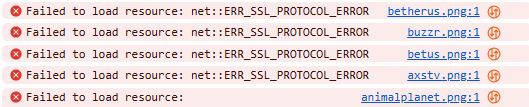

This issue does not occur with PLEX HTPC, the mobile apps, or the TV app. To watch from a PC, use PLEX HTPC. If any logos are still missing, it means the provider isn't supplying them.
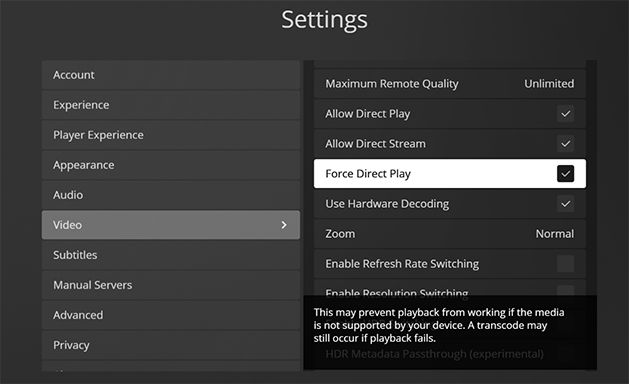
For Plex HTPC, you must enable Force Direct Play in the settings.
MacReplay is based on the incredible work done by Chris230291 with the original STB-Proxy.
This tool is provided as-is and is intended for educational purposes only. Use responsibly and in compliance with applicable laws and terms of service.