





The Fanuc SDK enables seamless integration with Fanuc robots for automation, data exchange, and remote control. Ideal for industrial automation, research, and advanced robotics applications.
It allows you to connect to a real robot, but also to ROBOGUIDE.
🔗 More Information: https://underautomation.com/fanuc
🔗 Also available for 🟨 LabVIEW & 🐍 Python
👁️ Watch to be notified of latest updates !
- ✔️ PCDK Alternative: No need for Fanuc’s PCDK or Robot Interface
- 📖 Read/Write Variables: Access and modify system variables.
- 🔄 Register Control: Read/write registers for positions, numbers, and strings.
- 🎬 Program Control: Run, abort, and reset programs.
- 🔔 Alarm Management: Reset alarms and view alarm history.
- ⚡ I/O Control: Manage ports and I/O values (UI, UO, GI, GO, etc.).
- 🔍 State Monitoring: Get safety status, position, diagnostics, and more.
- 📂 File Management: Easily manipulate files.
- 🌐 CGTP Web Server: Access registers, I/O, programs, and variables via HTTP.
- 🏎️ Remote motion: Remote move the robot.
- 🔄 Stream Motion: Real-time joint streaming at up to 250 Hz.
- 📐 Kinematics Calculations: Perform forward and inverse kinematics offline.
No additional installations or Fanuc options are required to use this SDK.
Explore the Fanuc SDK with fully functional example applications and precompiled binaries for various platforms. See Github releases
A Windows Forms application demonstrating all the features of the library.
📌 Download: 📥 UnderAutomation.Fanuc.Showcase.Forms.exe
Read variables :

Move the robot :

High speed Read & Write registers :

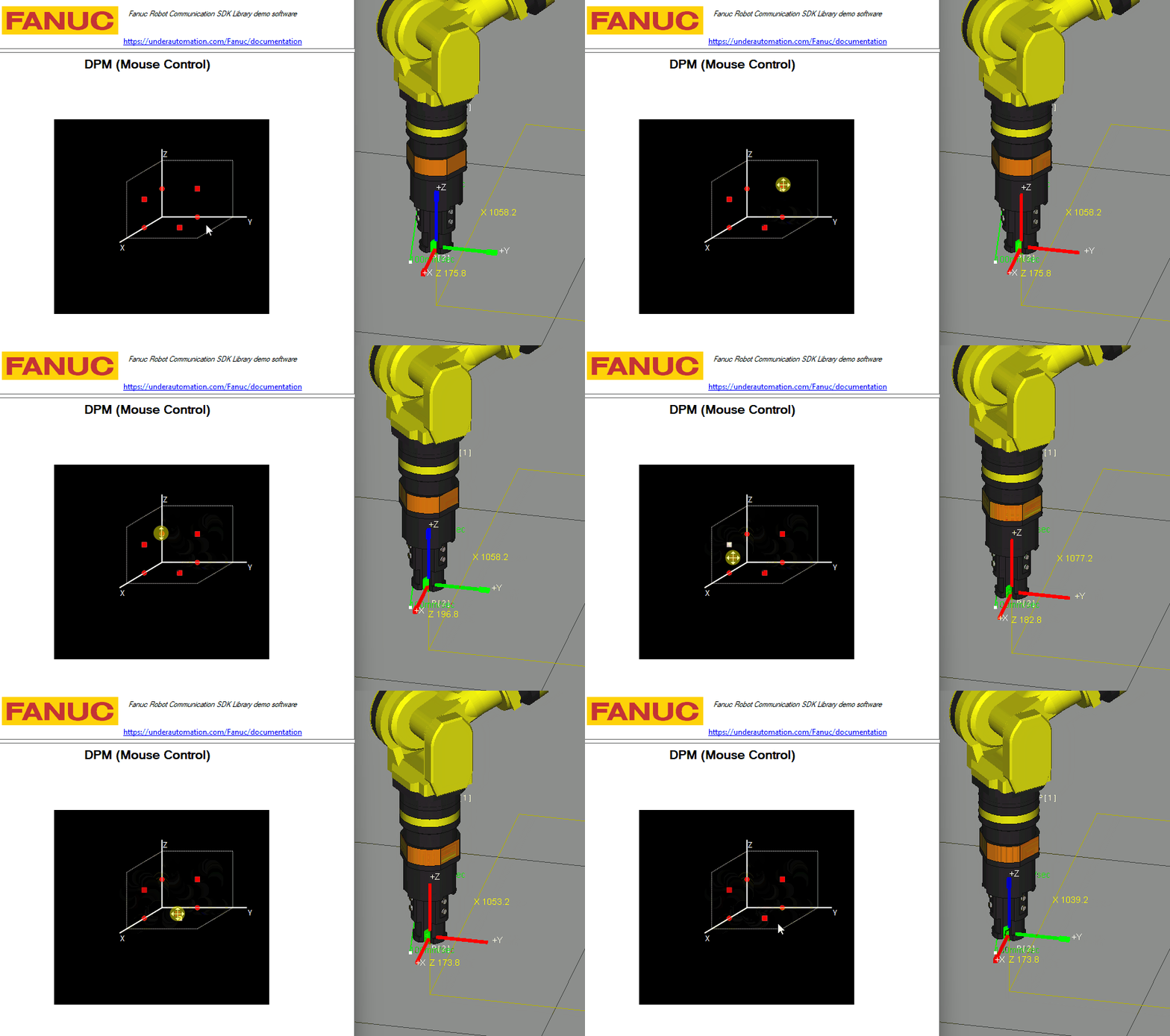
Live remote control with Jostick or 3D Mouse:
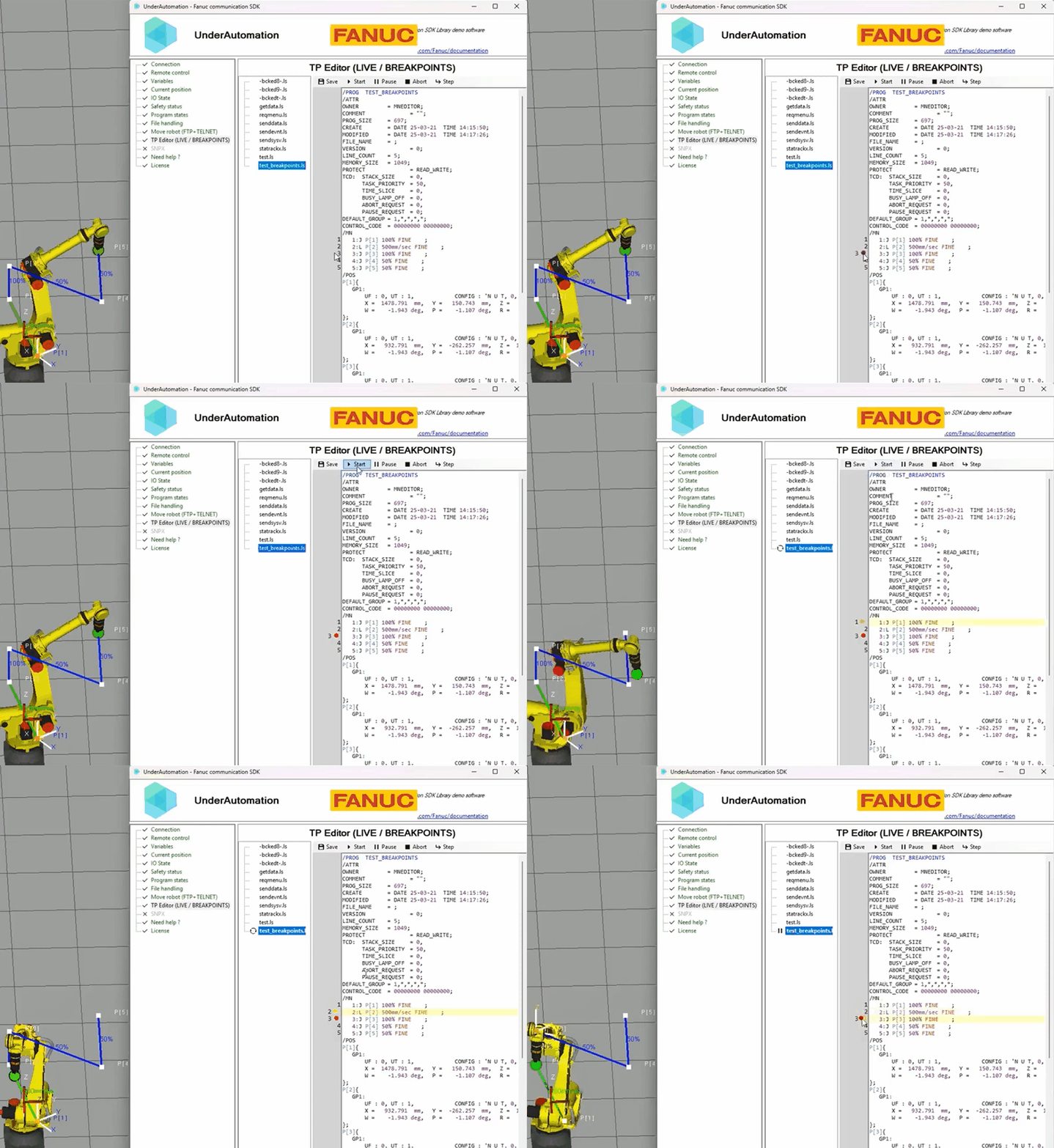
TP Editor with breakpoints:
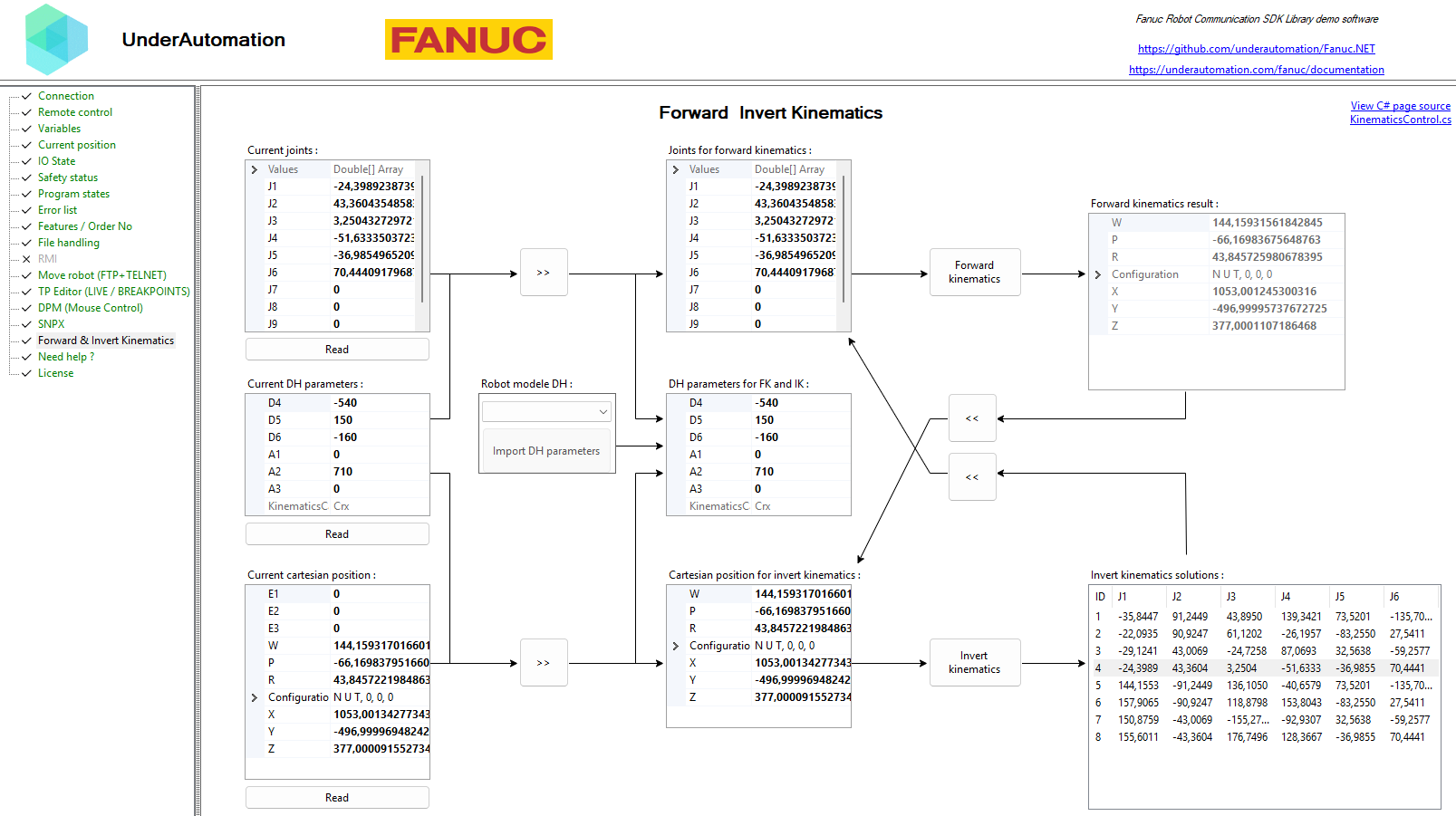
Forward and Inverse Kinematics:
Telnet KCL (Keyboard Command Line) allows sending commands to control the robot remotely:no additional options needed on the controller.
robot.Telnet.Reset();robot.Telnet.Run("MyProgram");
robot.Telnet.Pause("MyProgram");
robot.Telnet.Hold("MyProgram");
robot.Telnet.Continue("MyProgram");
robot.Telnet.Abort("MyProgram", force: true);robot.Telnet.SetVariable("my_variable", 42);
robot.Telnet.SetVariable("$RMT_MASTER", 1);// Set an output port (example: DOUT port 2 = 0)
robot.Telnet.SetPort(KCLPorts.DOUT, 2, 0);
// Simulate an input port (example: DIN port 3 = 1)
robot.Telnet.Simulate(KCLPorts.DIN, 3, 1);
robot.Telnet.Unsimulate(KCLPorts.DIN, 3);SNPX (also known as SRTP/RobotIF) enables fast, structured data communication with the robot.
It is used to read/write registers, monitor alarms, and check robot status.
// Read position register 1
Position register1 = robot.Snpx.PositionRegisters.Read(1);

// Write a Cartesian position to register 2
robot.Snpx.PositionRegisters.Write(2, new CartesianPosition { X = 100, Y = 50, Z = 25, W = 180, P = 0, R = 0 });// Read register R[1]
float value = robot.Snpx.NumericRegisters.Read(1);
// Write a value to R[2]
robot.Snpx.NumericRegisters.Write(2, 123.45f);// Read a User Input (UI) state
bool UI1 = robot.Snpx.UI.Read(1);
// Set a User Output (UO) signal
robot.Snpx.UO.Write(3, true);// Write a system variable
robot.Snpx.IntegerSystemVariables.Write("$RMT_MASTER", 1);
robot.Snpx.StringSystemVariables.Write("$ALM_IF.$LAST_ALM", "No alarms");
robot.Snpx.PositionSystemVariables.Write("$CELL_FLOOR", cellFloor);
// Write a Karel program variable
robot.Snpx.IntegerSystemVariables.Write("$[KarelProgram]KarelVariable", 1);// Clear alarms
robot.Snpx.ClearAlarms();// Read current joint and cartesian position
Position position = robot.Snpx.CurrentPosition.ReadWorldPosition();
// Read User frame cartesian position
robot.Snpx.CurrentPosition.ReadUserFramePosition(1);The SDK provides direct FTP access to the robot's memory for file transfer, variable reading, and configuration management.
// Upload a TP program to the controller
robot.Ftp.DirectFileHandling.UploadFileToController(@"C:\Programs\MyPrg.tp", "md:/MyPrg.tp");

// Download a file from the robot
robot.Ftp.DirectFileHandling.DownloadFileFromController(@"C:\Backup\Backup.va", "md:/Backup.va");

// Delete a file on the robot
robot.Ftp.DirectFileHandling.DeleteFile("md:/OldProgram.tp");var allVariables = robot.Ftp.GetAllVariables();
foreach (var variable in allVariables)
{
Console.WriteLine($"{variable.Name} = {variable.Value}");
}// Read system variable $RMT_MASTER
int remoteMode = robot.Ftp.KnownVariableFiles.GetSystemFile().RmtMaster;SafetyStatus safetyStatus = robot.Ftp.GetSafetyStatus();
Console.WriteLine($"Emergency Stop: {safetyStatus.ExternalEStop}");
Console.WriteLine($"Teach Pendant Enabled: {safetyStatus.TPEnable}");CurrentPosition currentPosition = robot.Ftp.GetCurrentPosition();
GroupPosition group = currentPosition.GroupsPosition[0];
Console.WriteLine($"Cartesian Position: X={group.WorldPositions[0].X}, Y={group.WorldPositions[0].Y}, Z={group.WorldPositions[0].Z}");
Console.WriteLine($"Joint Position: J1={group.JointsPosition.J1}, J2={group.JointsPosition.J2}");- Go to
SETUP > Host Comm - Select
TELNETand press[DETAIL] - Set a password and restart the robot
- Go to
SETUP > Host Comm > FTP - Set a username & password
- Perform a cold start
-
If Your Robot Uses "FANUC America Corp." Parameters (R650 FRA): You need to enable option R553 ("HMI Device SNPX") in the robot's software configuration.
-
If Your Robot Uses "FANUC Ltd." Parameters (R651 FRL): No additional option is required:SNPX is included by default.
CGTP (Controller Gateway Transfer Protocol) communicates with the robot controller's built-in HTTP web server. It provides a comprehensive API for program management, variable access, register operations, I/O control, and kinematics.
string value = robot.Cgtp.ReadVariableAsString("$MCR.$GENOVERRIDE");
robot.Cgtp.WriteVariable("$MCR.$GENOVERRIDE", 50);// Numeric registers
robot.Cgtp.WriteNumericRegisterAsInteger(1, 42);
var reg = robot.Cgtp.ReadNumericRegisterWithComment(1);
// String registers
robot.Cgtp.WriteStringRegister(1, "Hello CGTP");robot.Cgtp.SelectProgram("MAIN", 1);
robot.Cgtp.RunProgram("MAIN");
robot.Cgtp.PauseAllPrograms();
robot.Cgtp.AbortTask("MAIN");// List all TP programs on the controller
string[] allTp = robot.Cgtp.ListTpPrograms();
// List Karel macros only
string[] macros = robot.Cgtp.ListPrograms(CgtpProgramType.Karel, CgtpProgramSubType.Macro);// Insert a line before line 3
robot.Cgtp.InsertSourceLine("MY_PROGRAM", "L P[5] 100mm/sec FINE", 3);
// Replace line 5
robot.Cgtp.ReplaceSourceLine("MY_PROGRAM", "J P[1] 50% FINE", 5);
// Delete 2 lines starting at line 4
robot.Cgtp.DeleteSourceLines("MY_PROGRAM", 4, 2);int ioValue = robot.Cgtp.ReadIo(CgtpIoPortType.DO, 1);
robot.Cgtp.WriteIo(CgtpIoPortType.DO, 1, 1);
robot.Cgtp.SimulateIo(CgtpIoPortType.DI, 3);
robot.Cgtp.UnsimulateIo(CgtpIoPortType.DI, 3);Stream Motion enables real-time joint streaming at up to 250 Hz, providing precise motion control for advanced applications.
var parameters = new ConnectionParameters("192.168.0.1");
parameters.StreamMotion.Enable = true;
robot.Connect(parameters);

robot.StreamMotion.Start();robot.StreamMotion.SendJointCommand(
new MotionData { J1 = 10, J2 = 20, J3 = 30, J4 = 0, J5 = -45, J6 = 90 },
isLastData: false
);robot.StreamMotion.StateReceived += (sender, e) =>
{
var state = e.State;
Console.WriteLine($"J1={state.JointPosition.J1:F3}° Ready={state.Status.ReadyForCommands}");
};RMI (Remote Motion Interface) allows sending motion commands to the robot, including linear, joint, and circular motions.
robot.Rmi.Initialize();

Frame target = new Frame { X = 500, Y = 200, Z = 300, W = 0, P = 90, R = 0 };
MotionConfiguration config = new MotionConfiguration { UToolNumber = 1, UFrameNumber = 0 };

robot.Rmi.LinearMotion(
    sequenceId: 1, config: config, position: target,
    speedType: SpeedType.MmSec, speed: 100,
    termType: TerminationType.Fine, termValue: 0,
    acc: null, offsetPr: null, visionPr: null, wristJoint: false, mrot: false,
    lcbType: null, lcbValue: null, portType: null, portNumber: null, portValue: null
);The SDK includes tools for performing forward and inverse kinematics calculations offline, allowing you to compute the robot's end-effector position based on joint angles and vice versa, from DH parameters.
using UnderAutomation.Fanuc.Kinematics;

JointsPosition position = new JointsPosition(10, 20, 120, 0, 0, 25);

// ---- Get DH parameters ----
// Example: CRX-10iA/L
DhParameters dh = new DhParameters(-540, 150, -160, 0, 710, 0);

// From a known arm model
dh = DhParameters.FromArmKinematicModel(ArmKinematicModels.CRX10iA);

// From OPW parameters: M10iA/7L
dh = DhParameters.FromOpwParameters(0.15, -0.20, 0.60, 0.86, 0.10);

// From an online robot (SYSMOTN file)
dh = DhParameters.FromSymotnFile(robot.Ftp.KnownVariableFiles.GetSymotnFile())[0];

// ---- Forward kinematics ----
CartesianPosition pose = KinematicsUtils.ForwardKinematics(position, dh);

// ---- Inverse kinematics with multiple solutions ----
JointsPosition[] positions = KinematicsUtils.InverseKinematics(pose, dh);Choose the installation method that works best for you:
| Method | NuGet (Recommended) | Direct Download |
|---|---|---|
| How to Install | Install via NuGet. See on Nuget | Download and reference the DLL manually |
dotnet add package UnderAutomation.Fanuc |
📥 Download ZIP |
using UnderAutomation.Fanuc;var robot = new FanucRobot();
var parameters = new ConnectionParameters("192.168.0.1");
parameters.Language = Languages.English; // Japanese and Chinese controllers are also supported
parameters.Telnet.Enable = true;
parameters.Telnet.TelnetKclPassword = "your_telnet_password";
parameters.Ftp.Enable = true;
parameters.Ftp.FtpUser = "";
parameters.Ftp.FtpPassword = "";
parameters.Snpx.Enable = true;
parameters.Rmi.Enable = true;
robot.Connect(parameters);✅ Supported Robots: R-J3iB, R-30iA, R-30iB
✅ Operating Systems: Windows, Linux, macOS
✅ .NET Versions: .NET Framework (≥3.5), .NET Standard, .NET Core, .NET 5/6/8/9
We welcome contributions! Feel free to:
- Report issues via GitHub Issues
- Submit pull requests with improvements
- Share feedback & feature requests
🔗 Learn more: UnderAutomation Licensing
If you have any questions or need support:
- 📖 Check the Docs: Documentation
- 📩 Contact Us: Support