Modern editor tooling for the Alan interactive-fiction language — a language server (built with Xtext) plus a VS Code extension. It is the successor to the older Eclipse-RCP AlanIDE.
Alan IF, not the M-industries Alan application platform — same name, different language. This project is for the interactive-fiction Alan (
alan-if.github.io).
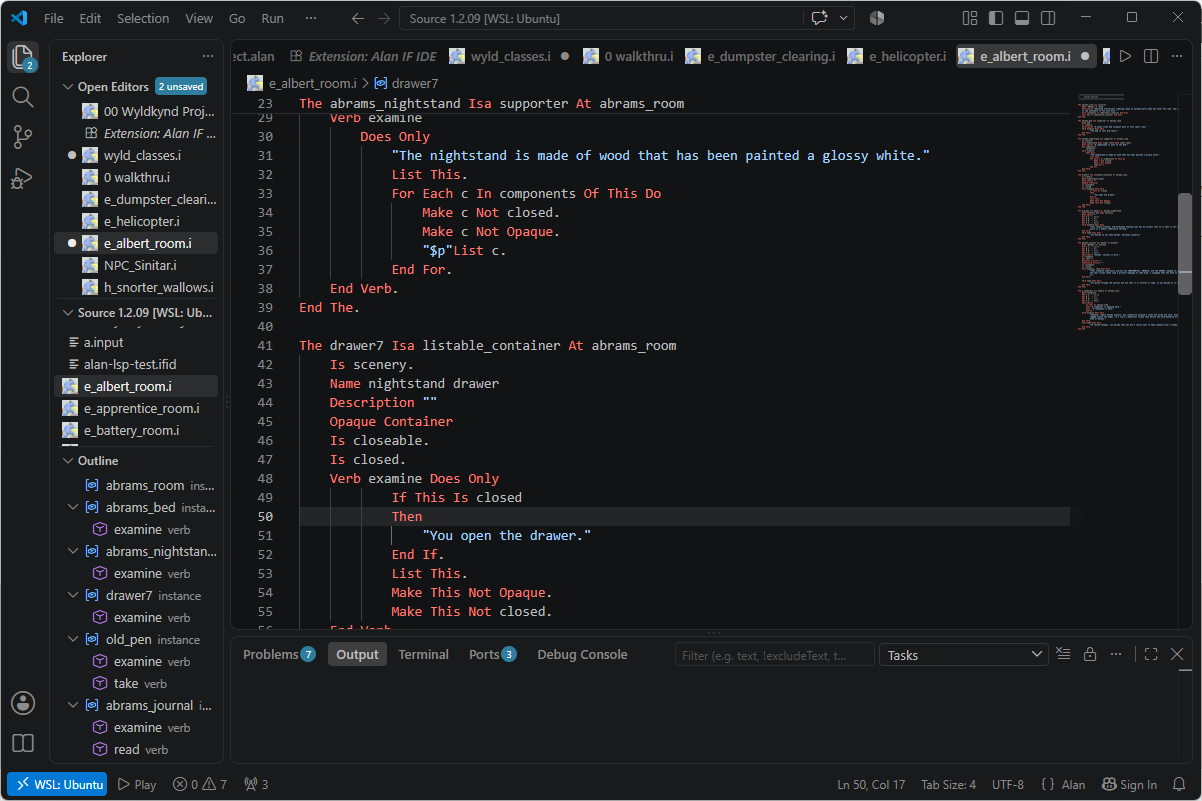
- Syntax highlighting for
.alanand.ifiles. - Document outline — classes, instances, additions, events, imports, verbs, syntax, scripts and synonyms, nested and with distinct icons.
- Go to Definition (F12) — across files, for every declaration kind, resolved
by name (works from the many places Alan references things:
isa,locate,describe, exits, …). - Find All References (Shift+F12) — by name, across the project.
- Compiler diagnostics — the real Alan compiler's errors, in-editor, for a whole multi-file adventure (it compiles the main and routes each error to its file).
- Run / Play (▶) — compile the project and launch the game in an integrated terminal.
- Format Document — a structure-aware indenter with optional keyword-case normalization; never reflows the interior of a string.
Division of labour: the Alan compiler is the source of truth for diagnostics; the language server provides the ergonomics (navigation, outline, formatting).
- Java 21+ — the language server runs on the JVM. The platform-specific builds
bundle a trimmed runtime, so authors need install nothing; the platform-neutral
build uses
alanif.java.home, thenJAVA_HOME, thenjavaon yourPATH. - The Alan compiler (
alan, 3.0beta8) — for diagnostics and Play. Setalanif.compiler.path, or havealanon yourPATH. Without it, editing features still work; diagnostics are simply skipped. arun— the Alan interpreter, for Play. Found next to the compiler, or onPATH.
From the Open VSX Registry — search for Alan IF IDE in the Extensions view of VSCodium, Gitpod, Cursor or any editor that uses Open VSX. The build for your platform is selected automatically, and it bundles a Java runtime, so there is nothing else to install.
Or import the author profile — alanif.code-profile
from the release page. It installs this extension and a calmer, prose-oriented VS Code
set up for writing adventures rather than code. Import it with File → Preferences →
Profiles → Import Profile…. It resolves the extension through whatever registry your
editor uses, so it is one-click on Open VSX-based editors.
Not yet for stock VS Code. VS Code looks the extension up in Microsoft's Marketplace, does not find it, and skips it without saying so — and because a profile decides which extensions are switched on, the result is a profile with Alan settings and no Alan extension:
.ifiles go back to being C, and nothing else works either. Until this is on the Marketplace, VS Code users should install the extension from a.vsixand skip the profile.
VS Code itself uses Microsoft's Marketplace, which this is not published to yet. Until then, install the packaged extension directly:
- Download the
.vsixfor your platform from the Releases page — e.g.alan-if-ide-linux-x64-<version>.vsix. These bundle a Java runtime. The unsuffixedalan-if-ide-<version>.vsixdoes not, and expects Java 21+ of your own. - In VS Code: Extensions view →
…menu → Install from VSIX…, and pick the file. - Reload the window.
| Setting | Purpose |
|---|---|
alanif.compiler.path |
Path to the Alan compiler (else found automatically). |
alanif.arun.path |
Path to arun (else next to the compiler, or on PATH). |
alanif.mainFile |
The .alan file to compile and Play (else auto-detected). |
alanif.format.keywordCase |
off (default) / lower / upper / capitalize. |
alanif.java.home |
JDK/JRE 21+ home (else the bundled runtime). |
Every one of these can be left empty; clearing a path setting always returns to finding the tool automatically. Alan IF: Check Setup (Command Palette) reports what was found and where, and the language status bubble in the status bar shows the same while an Alan file is open.
A plain Maven-Central build (no Tycho). Needs JDK 21, Maven, and Node 20+
(vsce, which packages the extension, requires it).
./build.sh                                    # server jar + compiled extension
cd vscode-extension && npx vsce package       # packages the .vsix
build.sh deliberately does not build the bundled Java runtime — the dev loop falls
back to java on your PATH, so paying for it on every build would be waste. To
produce a platform build the way CI does:
cd vscode-extension
./build-jre.sh                                # jlink a runtime for this machine
npx vsce package --target linux-x64
build.sh runs the Xtext generator (MWE2), builds the language server, stages its jar
into the extension, and compiles the TypeScript. reload.sh does all of that, packages
the .vsix, and installs it into your local VS Code.
se.alanif.alan/— the language runtime: grammar (Alan.xtext), the generated ANTLR parser + EMF model, and hand-written services (validation, scoping, formatting).se.alanif.alan.ide/— the LSP server and its Alan-specific service overrides (navigation, outline, formatting).vscode-extension/— the VS Code client (thin: launches the server, ships the grammar, icon, and Run/Play command).
The Xtext grammar was bootstrapped from the Alan compiler's own grammar
(alan.pmk) via tools/pmk2xtext.py, then hand-authored from there;
grammar-baseline/ snapshots the compiler grammar at handoff so later drift can be
audited.
MIT © Thomas Nilefalk.