
- node v18
npm i
npm start- REACT_APP_REGION - aws region of graphql
- REACT_APP_ACCESS_KEY_ID - aws access key id for graphql
- REACT_APP_SECRET_ACCESS_KEY - aws secret access key for graphql
- REACT_APP_API_URL - url to graphql
- REACT_APP_CONTROLLER_URL - qr code url redirect

-
there are 8 types of food
-
scoreboard keeps top score for the whole game as well as per life


-
React, Typescript
-
AWS AppSync


<>
    <NavBar>
      <Logo/>
      <QR code/> {/*redirects to you to conroller with correct screenID*/}
    <NavBar/>
    <Game> {/*Game logic (ticking, growing, food, scores, players...)*/}
      <NewPlayerLogic/> {/*handles graphQL subscription and mutations*/}
      { players ?
        <Rules/> : // show rules if no players, otherwise show scoreboard
        <Scoreboard>
          <Player/> {/*Player score details*/}
        <Scoreboard/> }
      <Board/> {/*rendering of snakes, foods, board*/}
    <Game/>
</>- type:
number - ensures that the game renders at each tick rather than at change of other states
type TDirections = 'UP' | 'DOWN' | 'RIGHT' | 'LEFT';

interface IPlayerSchema {
    direction: TDirections,
    color: string,
    playerId: string,
    screenId: string,
    name: string,
    toGrow: number,
    __typename: string,
}

interface IRealTimeData {
    data: {
        onPositionUpdated: IPlayerSchema
    }
}- stores all players that ever joined the game, does not delete the ones that died
- allows for them to rejoin without the need to refresh the controller (
playerIdstays the same);
export interface IPositionSchema {
    row: number,
    col: number,
}

export interface IAllPositions {
    [key: string] : IPositionSchema[],
}- most up-to-date position of all active players and the snakes
- snake body is an array of coordinates
export type TFood = 'apple' | 'banana' | 'cherries' | 'lemon' | 'mango' | 'orange' | 'pineapple' | 'watermelon'

export interface IFood {
    position: IPositionSchema,
    type: TFood,
}- most up-to-date position of all foods
export type TBoard = ({[key: string]:string } | string | null)[][]- abstract representation of the board in the form of array of arrays (rows and cols)
- if there is
food = 'banana' | ... - if there is
player = {[playerId]: 'BODY' | 'HEAD}
export interface IScore {
    food: number,
    status: boolean,
    highest: number,
}

export interface IScores {
    [key: string]: IScore,
}- keeps tabs on highest score as well as current score
- sorted by current score
FOOD_COEFFICIENT- amount of food spawnedMIN_LENGTH- starting length of snakesTICK- speed of the gameKILL_BONUS- points for killing a snake
- there are only 3 directions a snake can go (forward, left, right; no backwards)
- by "killing" a snake (if a snake runs into you and dies) you can get extra points
- Doing U turn too fast (i.e. within one tick) will result in the direction being ignored and the snake would continue as previous direction.
- If both snakes will hit the same spot at the same time, they pass through each other - for each of them the algorithm determined that the next cell is empty
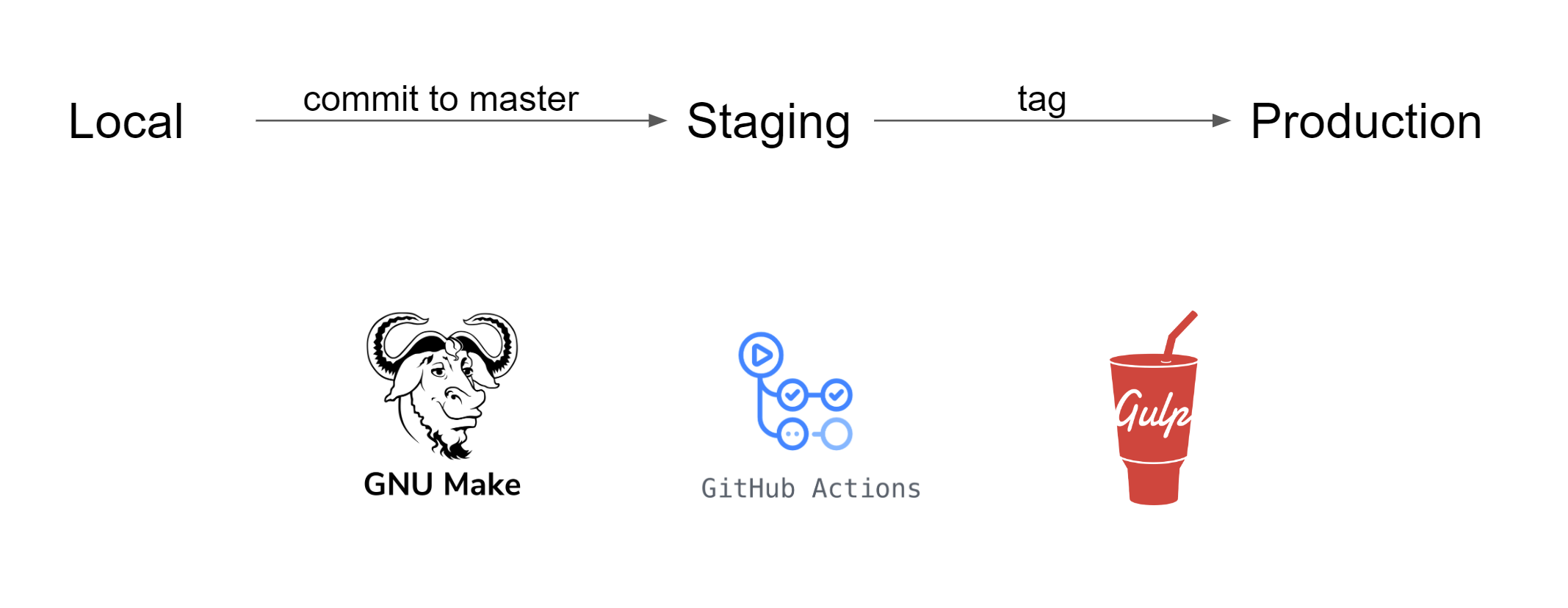
- github workflow on feature branches to build a package - using makefile to execute the commands
- github workflow on master branch to build a package as well as release to S3 - release dev bucket - using makefile to execute commands as well as gulpfile for zipping
- github workflow on tag to build a package and release to both S3 - release stable bucket
In simple words, everytime I push something to a feature branch, github will try to build a package that is ready to be deployed (npm run build). Everytime I push to master branch, not only will a package be created but a version file will be added to the build. This build is then saved as an artifact on github as well as saved to the S3 release bucket
- on push to master, deploy to staging - happening in the infrastructure repository
Everytime I push to master (merge pull from feature), a workflow on my infrastructure repository is triggered. This will copy latest version from the S3 release bucket and deploy it to the public staging bucket. From there the static files are served.