A curated set of dark and light, eye-friendly themes for Visual Studio Code, inspired by forest ash textures and anime mood boards. Each palette is designed for readability across long coding sessions.
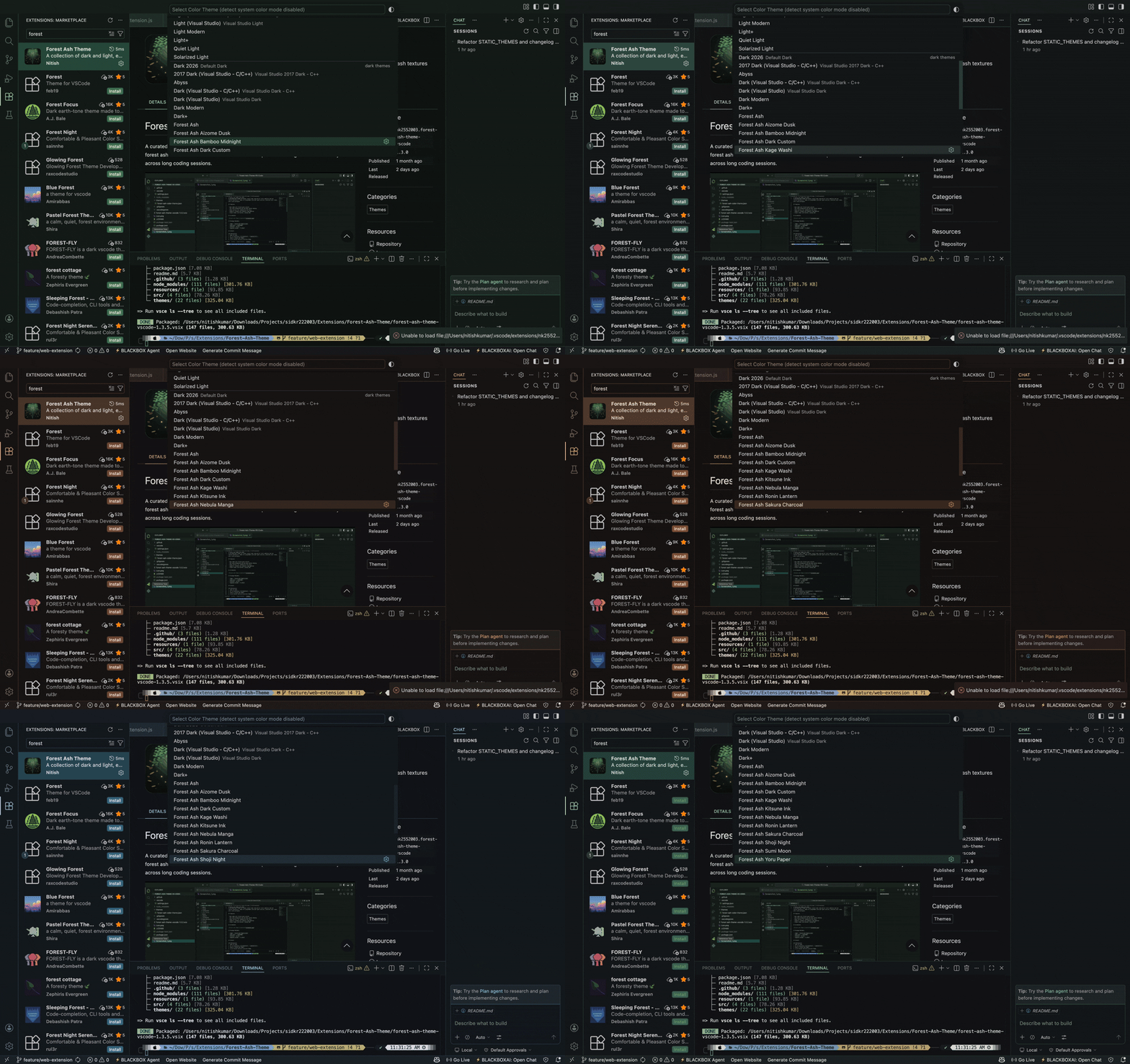
This extension includes 21 hand-crafted themes plus unlimited custom themes you can generate yourself.
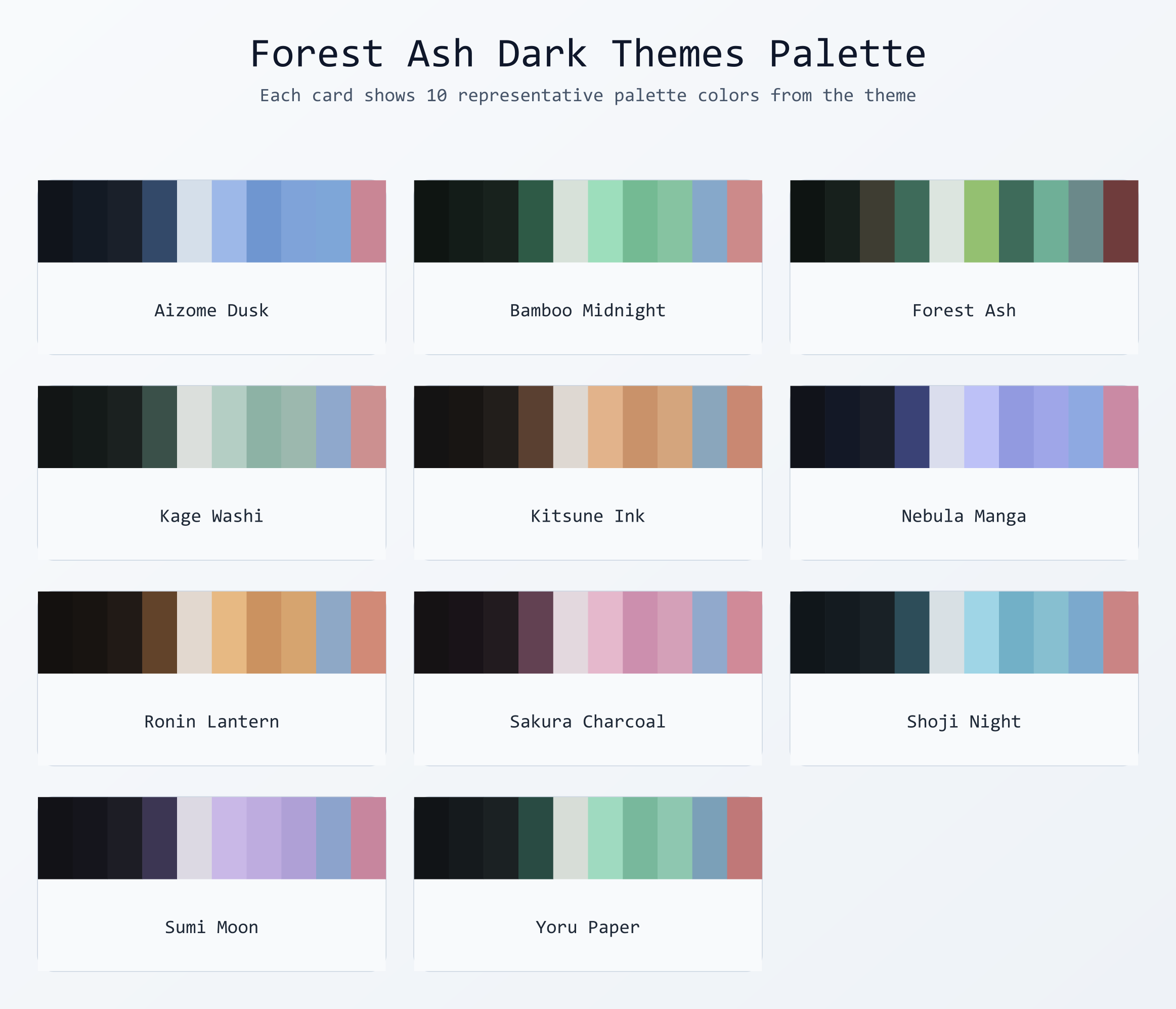
- Forest Ash
- Forest Ash Yoru Paper
- Forest Ash Sumi Moon
- Forest Ash Kitsune Ink
- Forest Ash Shoji Night
- Forest Ash Aizome Dusk
- Forest Ash Ronin Lantern
- Forest Ash Bamboo Midnight
- Forest Ash Nebula Manga
- Forest Ash Sakura Charcoal
- Forest Ash Kage Washi
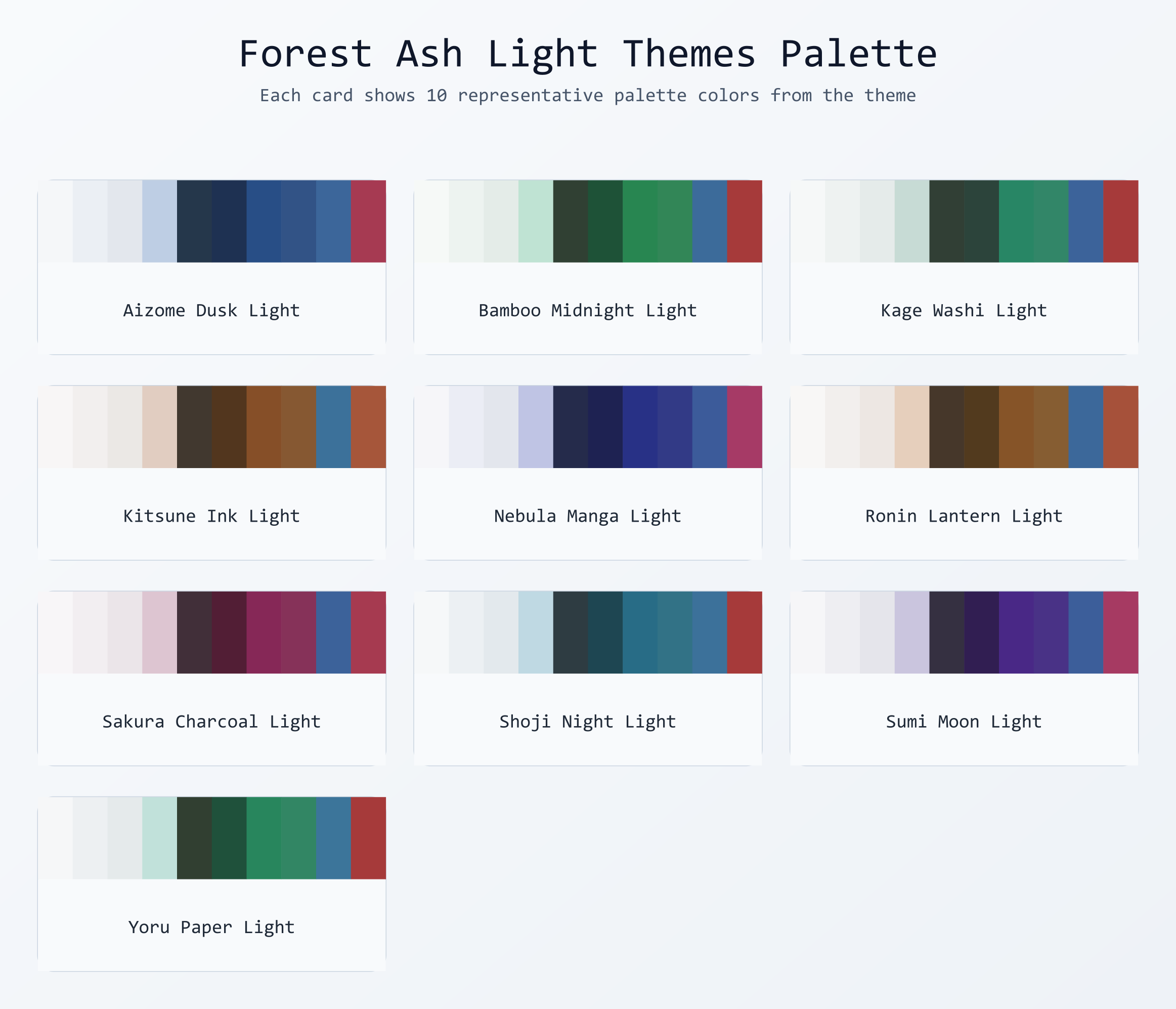
- Forest Ash Yoru Paper Light
- Forest Ash Sumi Moon Light
- Forest Ash Kitsune Ink Light
- Forest Ash Shoji Night Light
- Forest Ash Aizome Dusk Light
- Forest Ash Ronin Lantern Light
- Forest Ash Bamboo Midnight Light
- Forest Ash Nebula Manga Light
- Forest Ash Sakura Charcoal Light
- Forest Ash Kage Washi Light
Forest Ash includes a built-in dynamic theme generator that creates fully unique themes from any hex accent color. Every input color — including its hue, saturation, and lightness — influences the entire generated palette, so no two colors ever produce the same theme.
The generator extracts all three HSL components from your chosen color:
- Hue → drives the base color family and split-complementary triad (keywords, strings, functions, types)
- Saturation → scales how vivid or muted the entire palette is
- Lightness → shifts tonal weight across backgrounds, foregrounds, and syntax tokens
Contrast and readability are preserved automatically for both dark and light variants.
| Method | Instructions |
|---|---|
| Command Palette (Recommended) | Press Ctrl+Shift+P / Cmd+Shift+P, type Forest Ash: Generate Custom Theme, press Enter. |
| Right-Click (Editor) | Right-click inside any open editor tab and select Generate Custom Theme. |
| VS Code Settings | Go to Preferences > Settings, search Forest Ash, and set your default accent color and variant. |
- Enter a hex accent color (e.g.
#4a9eff) - Choose Dark or Light variant
- Give your theme a unique name
- VS Code will prompt you to Reload — after reloading, your theme appears in the native theme picker (
Cmd+K Cmd+T/Ctrl+K Ctrl+T) alongside all built-in themes
| Command | Description |
|---|---|
Forest Ash: Generate Custom Theme |
Create a new theme from a hex color, variant, and name |
Forest Ash: Apply Custom Theme |
Quickly switch between your saved custom themes |
Forest Ash: Delete Custom Theme |
Permanently remove a generated theme |
Forest Ash: List Saved Custom Themes |
View all custom themes in a webview panel with color swatches |
Forest Ash: Quick Theme Picker |
Browse and apply all Forest Ash themes (built-in + custom) in one picker |
Forest Ash: Toggle Focus Mode |
Dim everything except the active function or block |
Forest Ash: Toggle Italic Mode |
Toggle italics for italic-capable token scopes |
Forest Ash: High Contrast Boost |
Increase contrast across Forest Ash tokens |
Forest Ash: Preview Themes |
Preview all 21 Forest Ash themes side-by-side |
Forest Ash: Show Active Palette |
Inspect and copy every color token in the active theme |
Forest Ash: Export Palette as CSS |
Export the active palette as CSS variables |
Forest Ash: Export Custom Theme |
Export a saved custom theme to a JSON file |
Forest Ash: Share Custom Theme |
Copy a custom theme into the community share folder and prepare a PR note |
Forest Ash: Import Custom Theme |
Import a custom theme JSON file into Forest Ash |
Forest Ash: Apply Circadian Theme Now |
Apply the correct day/night theme right now |
Forest Ash: Theme of the Week |
Show the weekly theme spotlight panel |
Toggle a deep-focus mode that dims everything except the active function or block. It also softens CodeLens and inactive selection contrast for a calmer view.
- Command:
Forest Ash: Toggle Focus Mode - Settings:
forestAsh.focusMode.enabled,forestAsh.focusMode.dimOpacity
Automatically switch between a light day theme and warm night theme based on your time zone.
- Command:
Forest Ash: Apply Circadian Theme Now - Settings:
forestAsh.circadian.*
Pin a unique accent color per language via settings.
"forestAsh.languageAccents": {
	"python": "#B48EAD",
	"go": "#8FBCBB",
	"rust": "#D08770"
}Instantly toggle italics for token styles (useful with italic-friendly fonts).
- Command:
Forest Ash: Toggle Italic Mode - Setting:
forestAsh.italicMode.enabled
Boosts contrast across all Forest Ash foregrounds and tokens to improve accessibility.
- Command:
Forest Ash: High Contrast Boost - Setting:
forestAsh.highContrast.enabled
Export the active Forest Ash theme as a CSS file with :root variables.
- Command:
Forest Ash: Export Palette as CSS
Preview all 21 Forest Ash themes side-by-side without switching.
- Command:
Forest Ash: Preview Themes
Open a searchable grid of all color tokens in the active theme with copy-on-click.
- Command:
Forest Ash: Show Active Palette
Export a custom theme JSON for sharing, import one from the community, or copy a theme into the share folder with a PR note ready on your clipboard.
- Commands:
Forest Ash: Export Custom Theme,Forest Ash: Share Custom Theme,Forest Ash: Import Custom Theme - Community sharing: add JSON files to the share folder and open a PR.
Once per week, Forest Ash surfaces a hand-picked theme with a short mood description, plus a live preview, palette swatches, and syntax token legend.
- Command:
Forest Ash: Theme of the Week - Setting:
forestAsh.themeOfWeek.enabled
Note: Advanced commands (Focus Mode, preview, export, import) run in the desktop app. The web version focuses on theme browsing and switching.
Generated themes are saved inside the extension's themes/custom/ folder and registered in package.json automatically. They survive VS Code restarts and are restored silently on every activation. If a theme file goes missing (e.g. after reinstall), the extension cleans up stale metadata automatically.
Note: After generating or deleting a custom theme, a window reload is required for the change to appear in VS Code's native color theme picker.
- Dark and low-glare backgrounds for reduced eye fatigue
- Calm, desaturated accents with anime-inspired mood
- Distinct identity per theme without harsh neon contrast
- Balanced syntax tokens for comments, strings, keywords, functions, types, and punctuation
- Full semantic highlighting support
- Clean terminal ANSI colors that match each palette
- Bracket pair colorization built in
- Open VS Code
- Go to Extensions (
Ctrl+Shift+X/Cmd+Shift+X) - Search for
Forest Ash Theme - Install and switch via
Preferences: Color Theme
- Clone this repository
- Run
npm install - Run
npm run package(requiresvsce) - Install the generated
.vsixviaExtensions > ... > Install from VSIX
| Field | Value |
|---|---|
name |
forest-ash-theme |
displayName |
Forest Ash Theme |
publisher |
NK2552003 |
version |
1.4.0 |
engines.vscode |
^1.70.0 |
npm install          # install dependencies
npm run package      # build .vsix with vsce
npm run publish # publish to VS Code Marketplaceforest-ash-theme/
├── extension.js # extension entry point, all commands
├── package.json # manifest, contributes.themes, commands
├── src/
│ ├── extension.js # desktop entry point, commands
│ ├── extension-web.js # web entry point
│ ├── themeGenerator.js # dynamic palette + theme JSON builder
│ ├── themeReading.js # shared theme JSON loader
│ └── themeWebviews.js # preview/palette webview helpers
├── themes/
│ ├── *.json # 21 hand-crafted static themes
│ └── custom/ # runtime-generated user themes (git-ignored)
│ └── .gitkeep
├── docs/
│ └── 1.4.0-features.md # feature walkthrough for 1.4.0
├── share/
│ └── README.md # community theme submissions
├── resources/
│ ├── icon.png
│ ├── Preview.png
│ ├── dark.png
│ └── light.png
└── README.md
MIT