⚠️ This extension is under active development. Frequent changes and updates are expected.



Analyze Java code with SpotBugs directly in VS Code. View findings in a dedicated tree view, jump to offending lines, and track issues with VS Code diagnostics.
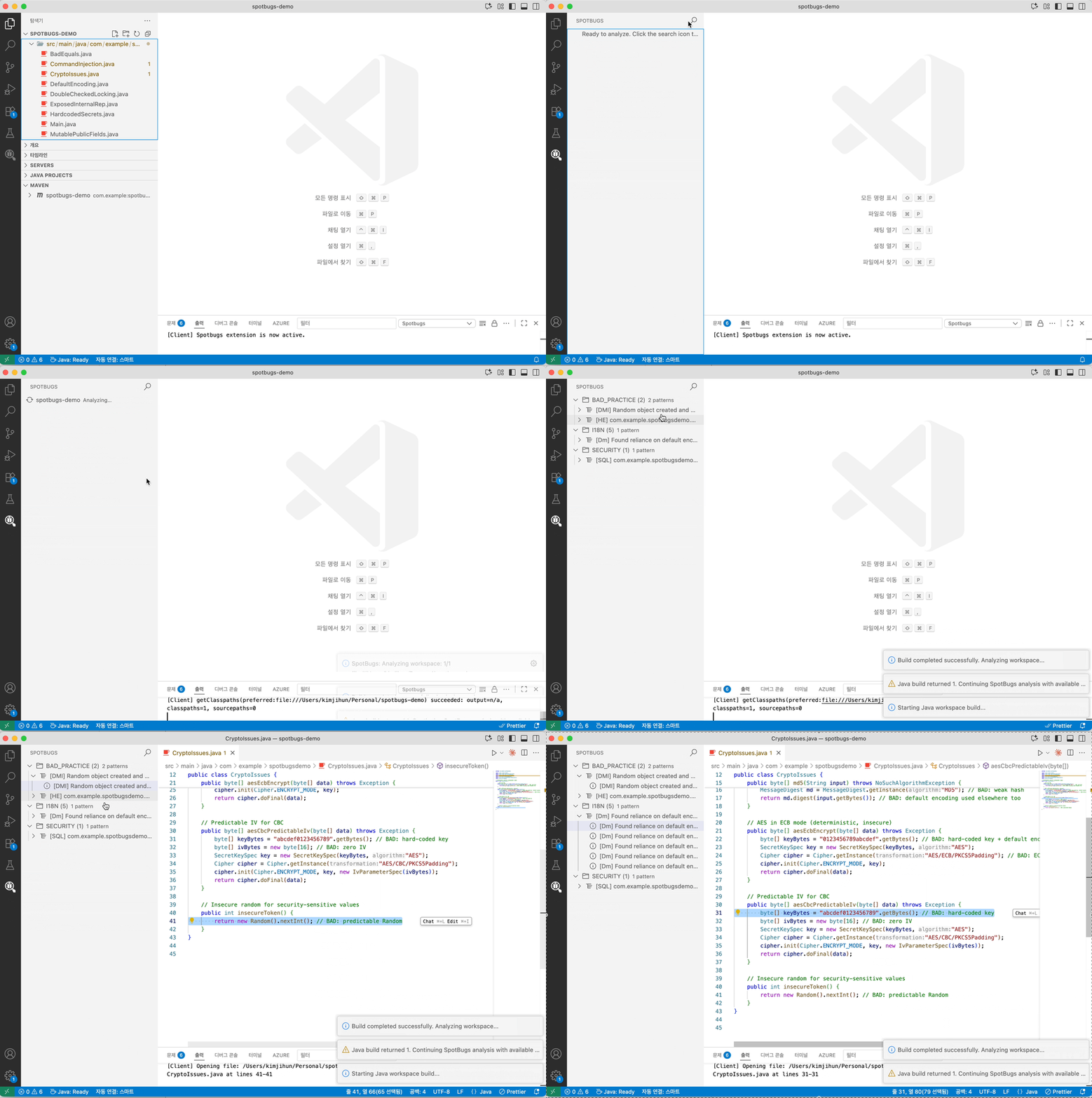
- Analyze a single file or an entire workspace (Maven/Gradle projects)
- Group findings by category and pattern with severity icons
- Navigate to bug locations in source files with matching diagnostics/squiggles
- Export filtered findings to SARIF for code scanning tools
- Java 11 or later (JDK)
- VS Code extension: “Language Support for Java by Red Hat” (redhat.java)
- Open a Java project folder in VS Code
- Run a command:
- “SpotBugs: Analyze this workspace” (
spotbugs.runWorkspace) - “SpotBugs: Analyze File/Folder” (context menu,
spotbugs.run)
- “SpotBugs: Analyze this workspace” (
- Review results in the “SpotBugs” view (Activity Bar)
SpotBugs: Analyze File/Folder— Analyze selected file or folderSpotBugs: Analyze this workspace— Build then analyze all projects in the workspaceSpotBugs: Export SpotBugs Findings (SARIF)— Save current findings to a SARIF reportSpotBugs: Reset SpotBugs Results— Clear the SpotBugs view and diagnostics
spotbugs.analysis.effort: SpotBugs effort level (min,default,max). Default:default.spotbugs.analysis.priorityThreshold: Report bugs with rank less than or equal to this value (1 = most severe, 20 = least). Default:9.spotbugs.analysis.extraAuxClasspaths: Additional SpotBugs aux classpath entries appended after Java LS runtime classpath entries. Supports absolute and workspace-relative jar/directory paths.
Source target resolution stays separate from aux classpath configuration. SpotBugs uses Java LS runtime classpaths plus any extraAuxClasspaths entries for aux analysis, and falls back to the runner's system classpath only when neither source provides any entries.
spotbugs.filters.includePaths: SpotBugs XML include filter paths (-include). Supports absolute and workspace-relative paths.spotbugs.filters.excludePaths: SpotBugs XML exclude filter paths (-exclude). Supports absolute and workspace-relative paths.spotbugs.filters.excludeBaselineBugsPaths: SpotBugs XML baseline bug collection paths (-excludeBugs). Supports absolute and workspace-relative paths.
If any configured filter file is invalid, analysis stops immediately and an error is shown with a code.
CFG_FILTER_NOT_FOUNDCFG_FILTER_NOT_FILECFG_FILTER_UNREADABLECFG_FILTER_XML_INVALIDCFG_BASELINE_XML_INVALID