███████╗ ███╗ ██╗ ████████╗ ███████╗ ██████╗ ██████╗ ██╗ ███████╗ ███████╗ ██╔════╝ ████╗ ██║ ╚══██╔══╝ ██╔════╝ ██╔══██╗ ██╔══██╗██║ ██╔════╝ ██╔════╝ █████╗ ██╔██╗██║ ██║ █████╗ ██████╔╝ ██████╔╝██║ ███████╗ █████╗ ██╔══╝ ██║╚████║ ██║ ██╔══╝ ██╔══██╗ ██╔═══╝ ██║ ╚════██║ ██╔══╝ ███████╗ ██║ ╚███║ ██║ ███████╗ ██║ ██║ ██║ ██║ ███████║ ███████╗ ╚══════╝ ╚═╝ ╚══╝ ╚═╝ ╚══════╝ ╚═╝ ╚═╝ ╚═╝ ╚═╝ ╚══════╝ ╚══════╝███████╗ █████╗ ██████╗ ██████╗ ╚════██║ ██╔══██╗ ██╔══██╗ ██╔══██╗ ██╔╝ ███████║ ██████╔╝ ██████╔╝ ██╔╝ ██╔══██║ ██╔═══╝ ██╔═══╝ ███████╗ ██║ ██║ ██║ ██║ ╚══════╝ ╚═╝ ╚═╝ ╚═╝ ╚═╝
Zap the stale. Secure the rest.
Free, open-source Entra ID enterprise app hygiene scanner



Enterprise-Zapp scans your Microsoft Entra ID tenant for enterprise app hygiene issues — expired credentials, stale apps, orphaned registrations, over-privileged service principals, and Conditional Access coverage gaps — and produces a detailed, self-contained HTML report you can open in any browser, share with your team, or drop into an audit package.
Enterprise-Zapp has a three-phase lifecycle. Each phase has a distinct impact on your tenant:
| Phase | Command | Tenant impact | Who runs it |
|---|---|---|---|
| 1. Setup | .\setup.ps1 |
Creates one app registration (Enterprise-Zapp) with read-only Graph permissions. This is the only write operation. |
Privileged Role Administrator or Global Administrator |
| 2. Scan | python -m src.cli |
Read-only. Queries Graph API and writes a report to your local machine. Zero changes to the tenant. | Anyone with an Entra ID account in the tenant |
| 3. Cleanup | .\setup.ps1 -Cleanup |
Deletes the app registration created in step 1. | Application Administrator or Global Administrator |
Cleanup requires a different role from setup. Privileged Role Administrator (needed to grant admin consent during setup) cannot delete app registrations. Deletion requires Application Administrator or Global Administrator. See Required Entra ID Roles.
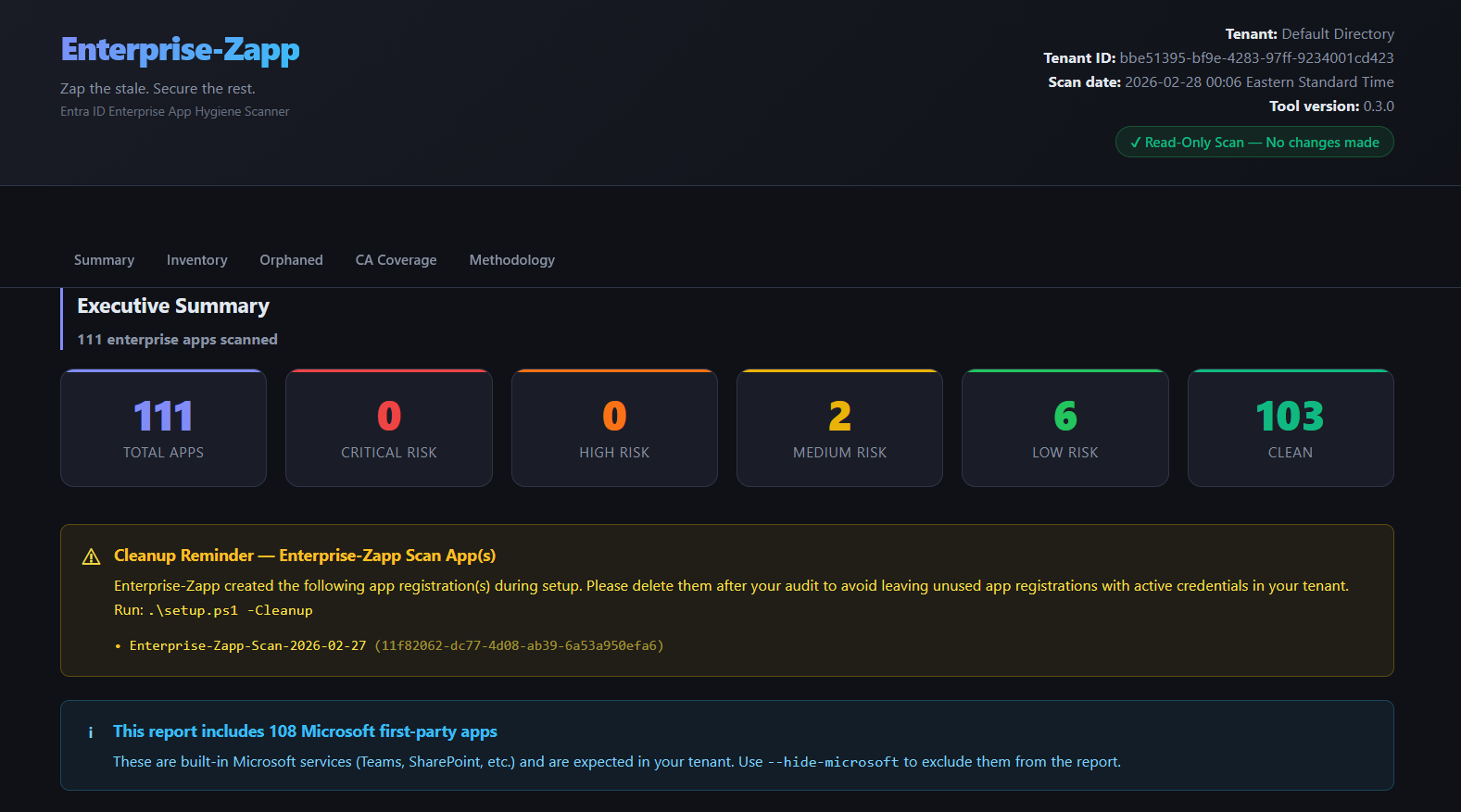
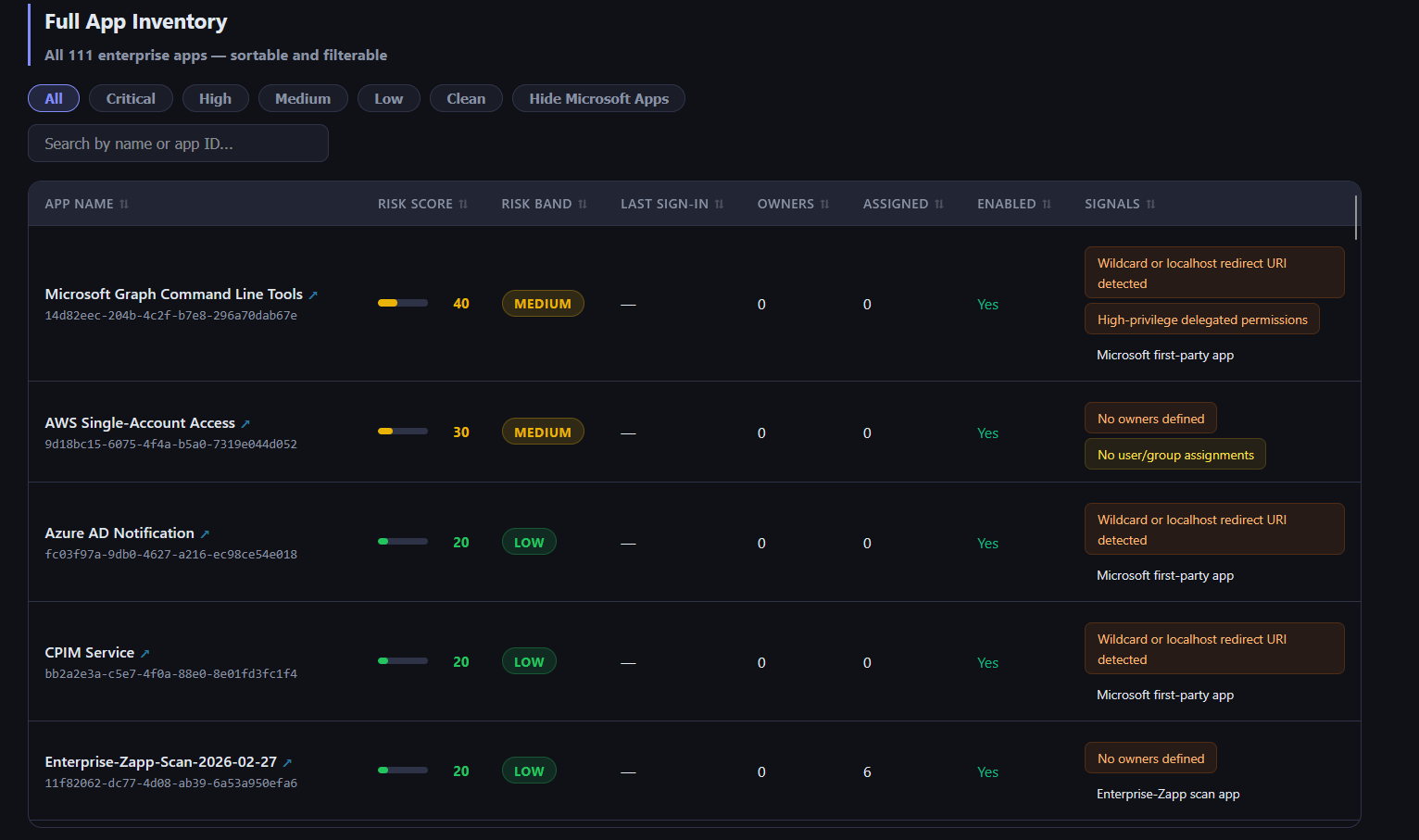
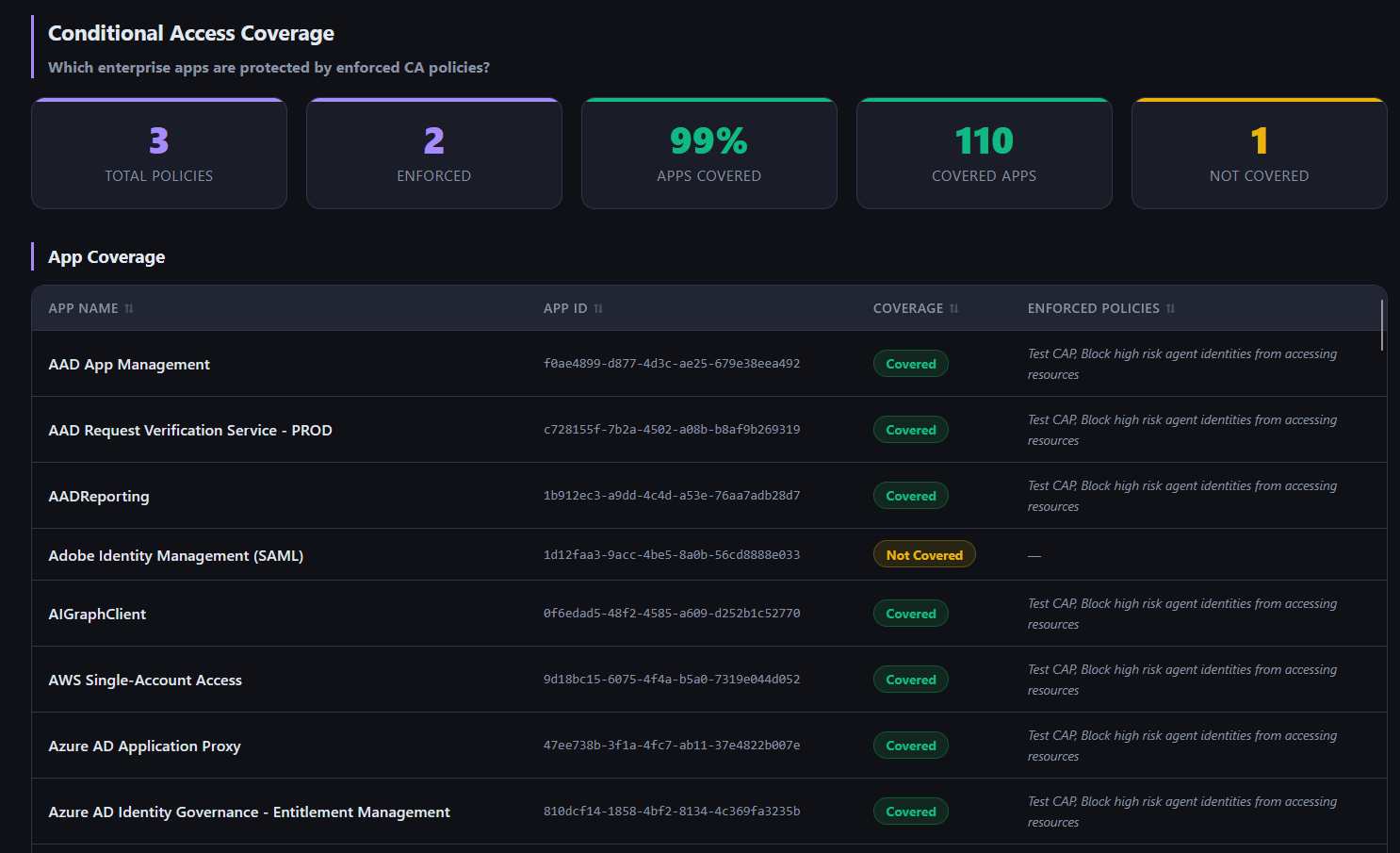
What the terminal output looks like:
                    Risk Summary — 67 apps scanned
┌───────────┬───────┬──────────────────────────────────────────────────────────────────────────────────┐
│ Risk Band │ Count │ Apps                                                                             │
├───────────┼───────┼──────────────────────────────────────────────────────────────────────────────────┤
│ Critical  │     0 │                                                                                  │
│ High      │     0 │                                                                                  │
│ Medium    │    66 │ AAD App Management, AAD Request Verification Service - PROD, AADReporting, Adobe │
│ Low       │     1 │ Enterprise-Zapp-Scan-2026-02-27                                                  │
│ Clean     │     0 │                                                                                  │
└───────────┴───────┴──────────────────────────────────────────────────────────────────────────────────┘
The HTML report includes:
- 📊 Risk distribution summary with band counts
- 🔍 Filterable, sortable full app inventory (filter by risk band, hide Microsoft apps, search by name)
- 🚨 Critical & High risk app drill-down
- 💀 Stale and never-used apps
- 🔑 Expired and near-expiry credential tracker
- 👻 Orphaned apps (no owners, or disabled-account owners)
⚠️ High-privilege apps with no recent activity- 🔐 Conditional Access coverage — which apps are protected by enforced CA policies, which are not
- 🛠️ Cleanup reminder for apps created by Enterprise-Zapp itself
- 📋 Per-app signals with remediation recommendations
| Signal | Severity |
|---|---|
| Expired client secrets or certificates | Critical |
| High-privilege app permissions on a stale app | Critical |
| High-privilege delegated permissions on a stale app | Critical |
| App has never signed in | High |
| Stale app — no sign-in in 90+ days | High |
| No owners defined | High |
| Owners are disabled/deleted accounts | High |
| Client secret or cert expiring within 30 days | High |
| Multi-tenant app with high-privilege permissions | High |
| Wildcard or localhost redirect URI | High |
| High-privilege delegated permissions | High |
| Service principal is disabled but not deleted | Medium |
| No user/group assignments | Medium |
| Credentials expiring within 30–90 days | Medium |
| Implicit grant flow enabled | Medium |
| No redirect URIs configured (credentials present) | Medium |
| Multi-tenant app | Medium |
| Long-lived client secrets (>1 year) | Low |
| Mixed credential types (secrets and certificates) | Low |
Each app receives a risk score (0–100) and a risk band (Critical / High / Medium / Low / Clean), with a prioritised primary recommendation.
What counts as "high-privilege"? Enterprise-Zapp considers a permission high-privilege if it grants broad write or administrative access to the tenant or its data. Examples include:
Directory.ReadWrite.All,User.ReadWrite.All,Mail.ReadWrite,Files.ReadWrite.All,RoleManagement.ReadWrite.Directory,Application.ReadWrite.All,GroupMember.ReadWrite.All, and similar*.ReadWrite.Allscopes. Read-only variants of these permissions (e.g.User.Read.All) are not treated as high-privilege.
The scan (phase 2) never modifies your tenant. It does not:
- Modify, disable, or delete any app or service principal
- Revoke credentials or permissions
- Send data to any external service
- Require persistent infrastructure or a deployed application
- Store credentials — authentication uses Microsoft's device code flow
Setup (phase 1) creates one app registration, and cleanup (phase 3) deletes it. These are the only write operations. See How It Works for the full lifecycle.
Other tools exist in this space. Here is an honest look at where Enterprise-Zapp fits:
| Tool | Focus | Notes |
|---|---|---|
| Entra ID portal (native) | General tenant management | App hygiene information exists but is scattered across multiple blades. No consolidated risk view, no exportable report. |
| Maester | Entra configuration compliance | Excellent open source PowerShell framework for testing configuration drift against known baselines. Different focus than app inventory and risk scoring. |
| AzureHound / BloodHound | Attack path analysis | Heavier to run, different use case. Useful for understanding attack paths, not for app hygiene inventory. |
| Commercial SSPM tools (AppOmni, Obsidian, Varonis, etc.) | Full SaaS security posture | Do this well and more. Require vendor relationships and significant budget. Enterprise-Zapp is a free alternative for teams that need visibility without a procurement process. |
| Enterprise-Zapp | App and service principal hygiene | Lightweight, free, Python-based. Risk-rated inventory with a shareable HTML report, focused specifically on Entra app sprawl. |
If you are already running a commercial SSPM that covers Entra, Enterprise-Zapp is probably redundant. If you are not, it fills a gap that does not have a clean free alternative.
| Requirement | Notes |
|---|---|
| PowerShell 7+ | For setup.ps1 — one-time app registration |
| Microsoft.Graph PowerShell module | Auto-installed by setup.ps1 |
| Privileged Role Administrator (or Global Administrator) | Required to run setup.ps1 and grant admin consent |
| Security Reader | Minimum role to authenticate and run the scan |
| Python 3.10+ | For the scan tool |
git clone https://github.com/scottalt/Enterprise-Zapp.git
cd Enterprise-ZappOpen PowerShell as a Privileged Role Administrator (or Global Administrator) and run:
.\setup.ps1This creates a temporary app registration in your tenant, grants admin consent for the required read-only Graph permissions, and saves the client ID and tenant ID to enterprise_zapp_config.json.
Takes ~30 seconds. No persistent infrastructure. Deletable immediately after the scan.
pip install -r requirements.txtpython -m src.cliOptional — install as a CLI command:
pip install -e .
enterprise-zapp
Windows note: on Microsoft Store Python,
pip install -e .puts theenterprise-zappscript in a user Scripts folder that isn't on PATH by default, so the command may not be found.python -m src.clialways works without any PATH changes.
You'll be prompted to authenticate via Microsoft's device code flow — no passwords stored, no service accounts required:
To sign in, use a web browser to open https://microsoft.com/devicelogin
and enter the code: ABCD-1234
Reports are written to ./output/ when the scan completes.
Two options:
Option A — PowerShell (recommended if you have a separate admin account for cleanup):
.\setup.ps1 -CleanupOption B — built into the scan (convenient for single-admin workflows):
enterprise-zapp --cleanup-afterAdd --cleanup-after to your scan command and you'll be prompted at the end of the scan whether to delete the app registration. A second sign-in is required for this step.
Cleanup requires a different role than setup. Deleting an app registration requires Application Administrator or Global Administrator. The Privileged Role Administrator role used during setup (to grant admin consent) cannot delete app registrations. See Required Entra ID Roles.
Usage: enterprise-zapp [OPTIONS]

Options:
  -t, --tenant TENANT_ID           Entra tenant ID or domain. Reads from config if omitted.
  -c, --client-id CLIENT_ID        Azure app registration client ID. Reads from config if omitted.
  --config PATH                    Path to enterprise_zapp_config.json. [default: ./enterprise_zapp_config.json]
  --stale-days DAYS                Days without sign-in before an app is stale. [default: 90]
  -o, --output DIR                 Output directory for reports. [default: ./output]
  --from-cache CACHE_FILE          Re-use collected data without re-querying Graph API.
  --hide-microsoft / --show-microsoft
                                   Exclude Microsoft first-party apps from the report.
  --output-format [all|html|csv]
                                   Report format(s) to generate. [default: all]
  --filter-band [all|critical|high|medium|low|clean]
                                   Only include apps at or above this risk band. [default: all]
  --quiet                          Suppress banner, disclaimer, and decorative output. Only print errors and output paths.
  --json-output                    Print a structured JSON summary to stdout after the scan.
  --cleanup-after                  After generating the report, prompt to delete the Enterprise-Zapp
                                   app registration. Requires a second sign-in as Application
                                   Administrator or Global Administrator.
  -V, --version                    Show version.
  --help                           Show help.
Enterprise-Zapp exits with a meaningful code so pipelines can branch on severity:
| Code | Meaning |
|---|---|
0 |
No apps above Medium risk (all apps are Low or Clean) |
1 |
At least one Medium-risk app found |
2 |
At least one High-risk app found |
3 |
At least one Critical-risk app found |
This makes Enterprise-Zapp easy to integrate into CI/CD pipelines — for example, fail a pipeline stage if any Critical or High risk apps are detected.
# Standard scan
enterprise-zapp

# Exclude Microsoft built-in apps (Teams, SharePoint, etc.) from the report
enterprise-zapp --hide-microsoft

# Tighten the staleness threshold to 60 days
enterprise-zapp --stale-days 60

# Re-generate the report from cached data — instant, no auth or API calls
enterprise-zapp --from-cache ./output/raw_contoso_<date>.json

# Write reports to a custom folder
enterprise-zapp --output ./reports/q1-audit/

# Only include Critical and High risk apps in the report
enterprise-zapp --filter-band high

# Generate only the HTML report (skip CSV and PDF)
enterprise-zapp --output-format html

# CI/CD-friendly: quiet output + JSON summary to stdout
enterprise-zapp --quiet --json-output
--json-output schema — the JSON printed to stdout has the following structure:
{
  "tenant": "Contoso",
  "scanned_at": "2026-02-27T10:00:00+00:00",
  "total_apps": 67,
  "filtered_to": "all",
  "bands": { "critical": 0, "high": 2, "medium": 45, "low": 3, "clean": 17 },
  "outputs": {
    "html": "./output/enterprise_zapp_contoso_2026-02-27.html",
    "csv": "./output/enterprise_zapp_contoso_2026-02-27.csv"
  }
}| File | Description |
|---|---|
enterprise_zapp_<tenant>_<date>.html |
Self-contained HTML report — works offline, no CDN. Open in any browser and use Ctrl+P → Save as PDF to produce a PDF. |
enterprise_zapp_<tenant>_<date>.csv |
Flat CSV for Excel, Power BI, or ticketing systems |
raw_<tenant>_<date>.json |
Raw collected data — use with --from-cache to re-run reports instantly |
Enterprise-Zapp requests the following application, read-only Microsoft Graph permissions — the minimum required to perform each API call:
| Permission | Purpose | Required by |
|---|---|---|
Application.Read.All |
Read service principals, their owners, and app role assignments | Core scan |
Directory.Read.All |
Read delegated permission grants (oauth2PermissionGrants) |
Delegated grant analysis |
AuditLog.Read.All |
Read service principal sign-in activity (beta endpoint) | Staleness detection |
Reports.Read.All |
Read service principal sign-in activity reports | Staleness detection |
User.Read.All |
Read disabled/deleted user accounts for orphan detection | Owner validation |
Policy.Read.All |
Read Conditional Access policies | CA coverage analysis |
Entra ID P1/P2 required for sign-in activity. The underlying
servicePrincipalSignInActivitiesAPI requires an Entra ID Premium P1 or P2 license. Without it the scan still runs, but staleness signals will be unavailable. The report notes clearly when this data is missing.
Policy.Read.Allis optional. If this permission is not granted, the Conditional Access coverage section will be hidden from the report. All other hygiene signals are unaffected.
Enterprise-Zapp involves two separate authentication steps, each with its own role requirement.
setup.ps1 creates an app registration and grants admin consent for Microsoft Graph application permissions. This requires the ability to consent on behalf of the organisation.
| Role | Notes |
|---|---|
| Privileged Role Administrator | Minimum required role. Can grant admin consent for Graph application permissions. |
| Global Administrator | Also works, but broader than necessary. |
Application Administrator and Cloud Application Administrator are not sufficient. These roles can create app registrations but cannot grant admin consent for Microsoft Graph application permissions. Only Privileged Role Administrator and Global Administrator have this capability.
The scan authenticates as the app registration (device code flow) and calls read-only Microsoft Graph endpoints. No elevated directory role is required at runtime — permissions were pre-consented in Step 1.
However, the person authenticating needs an Entra ID account in the tenant. No specific Entra ID directory role is required to complete device code authentication as a user, as long as admin consent was granted in Step 1.
Tip for auditors: A dedicated Security Reader service account is a clean fit for running scans. Security Reader covers read access to security-related data including sign-in activity reports.
Cleanup deletes the app registration created in Step 1. Deleting app registrations is a different operation from granting admin consent and requires a different role.
| Role | Notes |
|---|---|
| Application Administrator | Can delete app registrations. Minimum required for cleanup. |
| Global Administrator | Also works. |
Why is this different from setup? Privileged Role Administrator can grant admin consent for application permissions, but it does not grant the ability to delete app registrations. Cleanup requires
Application.ReadWrite.Allwrite-delete rights, which are only held by Application Administrator and above.
Does this require a persistent app registration?
No. setup.ps1 creates a named, temporary registration (e.g. Enterprise-Zapp-Scan-2026-02-27) that you delete immediately after the scan. The HTML report includes a cleanup reminder.
Can this be run against Azure Government or other sovereign clouds?
The current version targets the commercial Azure cloud (graph.microsoft.com). Sovereign cloud support is planned.
How long does a scan take? For a tenant with ~100 apps, expect 1–2 minutes. For 500+ apps, 4–8 minutes. A progress bar is shown throughout.
Can I re-run the report without re-authenticating?
Yes. Use --from-cache ./output/raw_<tenant>_<date>.json to re-render the report from previously collected data — instant, no API calls, no auth.
What happens if I don't have AuditLog.Read.All or lack P1/P2 licensing?
The scan still runs. Sign-in activity data will be unavailable, so staleness signals will be limited. The report clearly notes which data was skipped and why.
Why does my report show mostly Microsoft apps?
Microsoft first-party apps (Teams, SharePoint, Viva, etc.) are service principals in every tenant. Use --hide-microsoft or click the "Hide Microsoft Apps" toggle in the report to focus on your own apps.
The Conditional Access section is missing from my report.
The CA coverage analysis requires the Policy.Read.All permission. If setup.ps1 was run before this permission was added, re-run it to update the app registration and re-consent. If you intentionally skipped this permission, the section is hidden and all other signals are unaffected.
My scan was interrupted before the report was generated — do I need to re-authenticate?
No. If a raw_<tenant>_<date>.json file already exists in ./output/, you can recover without re-authenticating. Simply re-run with --from-cache:
enterprise-zapp --from-cache ./output/raw_<tenant>_<date>.jsonThis re-renders the full report from the previously collected data — no API calls and no device code prompt required.
enterprise-zapp/
├── setup.ps1                  # PowerShell: create/delete temp app registration
├── src/
│   ├── auth.py                # MSAL device code authentication
│   ├── graph.py               # Graph API client (pagination, retry, rate limiting)
│   ├── collector.py           # Data collection orchestration
│   ├── analyzer.py            # Signal evaluation + risk scoring engine
│   ├── ca_analyzer.py         # Conditional Access coverage analysis
│   ├── reporter.py            # HTML / CSV / PDF generation
│   └── cli.py                 # Click CLI entrypoint + banner
├── templates/
│   └── report.html.j2         # Self-contained Jinja2 HTML report template
├── tests/
│   ├── test_analyzer.py       # Unit tests (no network calls)
│   └── fixtures/              # Sample data for tests
├── requirements.txt
├── pyproject.toml
└── LICENSE                    # MIT
pip install pytest
pytest tests/ -vContributions are welcome. Please open an issue before submitting a large pull request.
- Bug reports: GitHub Issues
- Feature requests: open an issue with the
enhancementlabel
Scott Altiparmak scottaltiparmak.com · linkedin.com/in/scottaltiparmak
Read the writeup: Why Your Entra Tenant Has Orphaned Apps
MIT License — free to use, modify, and distribute. Attribution appreciated.
IMPORTANT — READ BEFORE USE
Enterprise-Zapp is provided "as-is", without warranty of any kind, express or implied. The author, Scott Altiparmak, accepts no responsibility or liability for any issues, damages, data loss, security incidents, tenant disruptions, compliance violations, or any other consequences arising from running this tool in your environment.
- This tool is provided for informational and educational purposes only and does not constitute security advice.
- You are solely responsible for validating all findings before taking any remediation action.
- Always follow your organisation's change management, security review, and approval processes.
- Test in a non-production environment before running against any sensitive tenant.
- By using this tool you agree that you do so entirely at your own risk.