Data and Science for Decision Making in Transboundary Waters in Latin American and the Caribbean (LAC)


This repository contains the agenda, installation instructions, and training materials for the Interagency Water Working Group (ISAT) workshop, Building Capacity on Scientifically Robust Tools and Methodologies for IWRM in La Plata Basin: Data Access. This worksop was conducted in Buenos Aires in November, 2022, and was organized in partnership with the Organization of American States (OAS) and the Comité Intergubernamental Coordinador de los Países de la Cuenca del Plata (CIC).
Click to collapse agenda
| Introductions | |||
| Time | Title and Topics | Type | Presenter |
|---|---|---|---|
| 09:00-10:30 | Opening Session | Discussion | CIC |
| 10:30-11:30 | Break | ||
| 11:00-12:00 | Introduction to the ISAT Partnership | Discussion | ISAT |
| 12:00-1:00 | Lunch | ||
| Session 1: Introduction to Hydrological Remote Sensing | |||
| Time | Title and Topics | Type | Presenter |
|---|---|---|---|
| 1:00-2:00 | Fundamentals of Remote Sensing | Presentation | NASA |
| 2:00-3:00 | Overview of Land Cover Remote Sensing | Presentation | NASA |
| 3:00-3:30 | Break | ||
| 3:30-4:30 | Accessing and Examining Land Cover | Exercise | NASA |
| 4:30-5:00 | End-of-day Discussion | Discussion | ISAT |
| 5:30-6:15 | Opening Day Welcome Reception | Event | CIC |
| Session 2A: Precipitation | |||
| Time | Title and Topics | Type | Presenter |
|---|---|---|---|
| 09:00-09:15 | Welcome/Agenda | Discussion | ISAT |
| 09:15-10:00 | GPM Mission Overview | Presentation | UVA |
| 10:00-11:00 | Precipitation Analysis and Discussion | Excercise | UVA |
| 11:00-11:30 | Break | ||
| 11:30-12:00 | Introduction to MODIS | Presentation | NASA |
| 12:00-1:00 | Access & Analysis of MODIS NDVI | Excercise | NASA |
| 1:00-2:00 | Lunch | ||
| Session 2B: Soil Moisture & Evapotranspiration | |||
| Time | Title and Topics | Type | Presenter |
|---|---|---|---|
| 2:00-2:30 | Introduction to SMAP | Presentation | NASA |
| 2:30-3:30 | SMAP Data Access & Analysis | Exercise | NASA |
| 3:30-4:00 | Break | ||
| 4:00-4:30 | Introduction to Evapotranspiration Access | Presentation | USACE |
| 4:30-5:00 | Access Landsat-Based ET | Exercise | USACE |
| 5:00-5:30 | Questions/End-of-day Discussion | Discussion | ISAT |
| Session 3A: Water Height / Aerial Extent | |||
| Time | Title and Topics | Type | Presenter |
|---|---|---|---|
| 09:00-09:15 | Welcome/Agenda | Discussion | ISAT |
| 09:15-10:00 | Introduction to MOGWAI | Presentation | USACE |
| 10:00-11:00 | MOGWAI Example | Exercise | USACE |
| 11:00-11:30 | Break | ||
| 11:30-12:00 | Introduction to AWS | Presentation | AWS |
| 12:00-12:30 | Q&A | Discussion | ISAT |
| 12:30-1:30 | Lunch | ||
| Session 3B: Water Quality | |||
| Time | Title and Topics | Type | Presenter |
|---|---|---|---|
| 1:30-2:00 | Freshwater Health Index (FHI) | Presentation | CI |
| 2:00-2:30 | Introduction to Water Quality Remote Sensing | Presentation | NASA |
| 2:30-3:00 | Break | ||
| 3:00-4:00 | Water Quality Rmote Sensing Applications | Exercise | NASA |
| 4:00-4:30 | Q&A | Discussion | ISAT |
| 4:30-5:00 | Questions/End-of-day Discussion | Discussion | ISAT |
| Field Visit | |||
| Time | Title and Topics | Type | Presenter |
|---|---|---|---|
| 08:00-12:00 | INA's Laboratory and Field Visit | Field Visit | CIC |
| 1:00-2:00 | Lunch | ||
| Session 4: Introduction to Land Surface Modeling | |||
| Time | Title and Topics | Type | Presenter |
|---|---|---|---|
| 2:00-2:45 | Overview of Global Land Data Assimilation (GLDAS) | Presentation | USACE |
| 2:45-3:30 | Summary of Surface Water Budget Components | Presentation | UVA |
| 3:30-4:00 | Break | ||
| 4:00-5:00 | Access & Analysis of GLDAS Runoff | Exercise | USACE |
| 5:00-5:30 | Questions/End-of-day Discussion | Discussion | ISAT |
| Session 5A: Introduction to Modeling Frameworks | |||
| Time | Title and Topics | Type | Presenter |
|---|---|---|---|
| 09:00-10:30 | La Plata Decision Support System (SSTD) | Discussion | Deltares |
| 10:30-11:00 | Break | ||
| 11:00-12:00 | Introduction to SWAT-Online & NASAaccess | Presentation | NASA |
| 12:00-1:00 | Intro to Hydrologic Modeling System (HEC-HMS) & Land Information System (LIS) | Presentation | USACE/NASA |
| 1:00-2:00 | Lunch | ||
| Session 5B: Training Debrief & Future Directions | |||
| Time | Title and Topics | Type | Presenter |
|---|---|---|---|
| 2:00-3:00 | DSS Case Study: Lima, Peru | Presentation | RTI |
| 3:00-4:00 | Training Debrief (Reflections on the week, Directions for future trainings) | Discussion | ISAT/CIC |
| 4:00 | Close Out | Discussion | ISAT/CIC |
Operating system:
- Windows 8 or newer, 64-bit
- macOS 10.13+
- If you are unsure which chip you have (Intel vs. M1), check here.
- Minimum 5 GB disk space to download and install
Anaconda is an open-source package and environment management system that runs on Windows, macOS, and Linux. Conda quickly installs, runs, and updates packages and their dependencies. It also easily creates, saves, loads, and switches between environments on your local computer. It was created for Python programs, but it can package and distribute software for any language. This training will use a simplified installation called Miniconda.
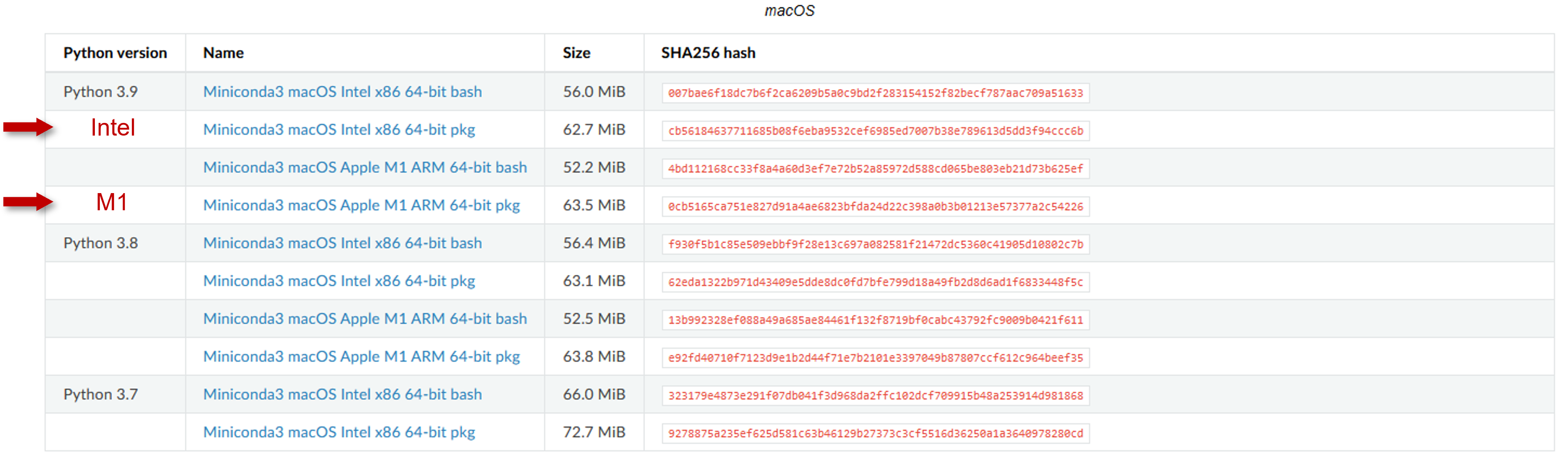
- Navigate to the installation page and download the installer for your operating system.
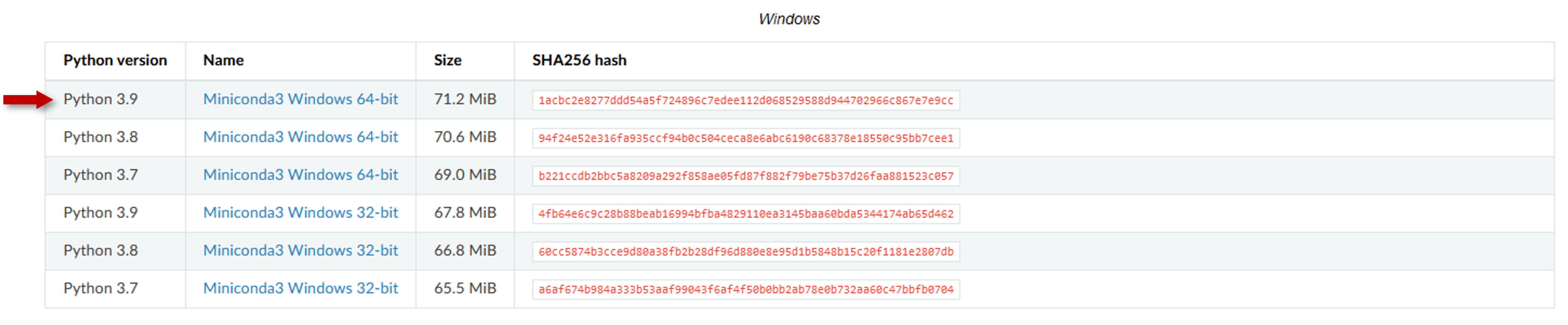
Mac OS Installers. For Mac OS users, choose the pkg installer option.
- Go to your Downloads folder and double-click the installer to launch.
- Read the licensing terms and click I Agree.
- Select Installation Type. On Windows, it is recommended that you install for Just Me as this does not require administrator rights. For Mac OS users, choose the "Standard Install" option:
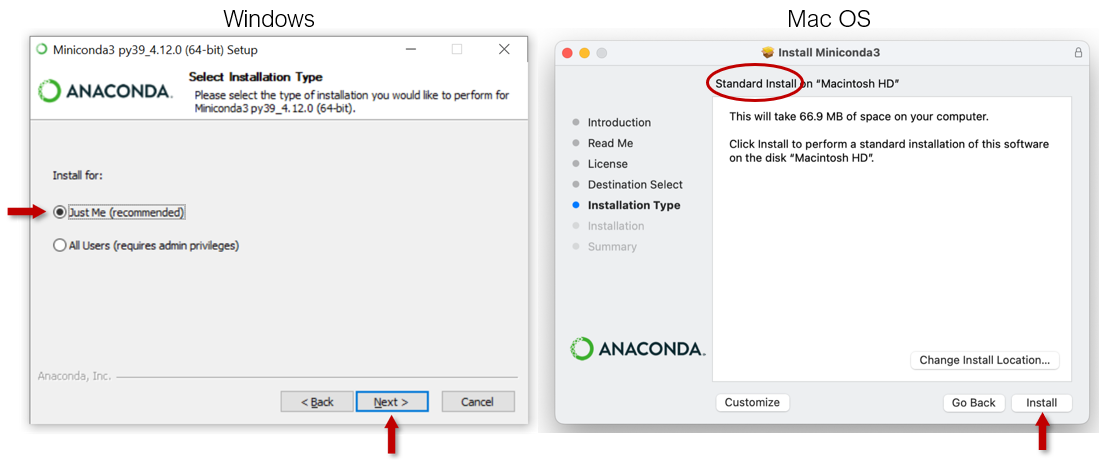
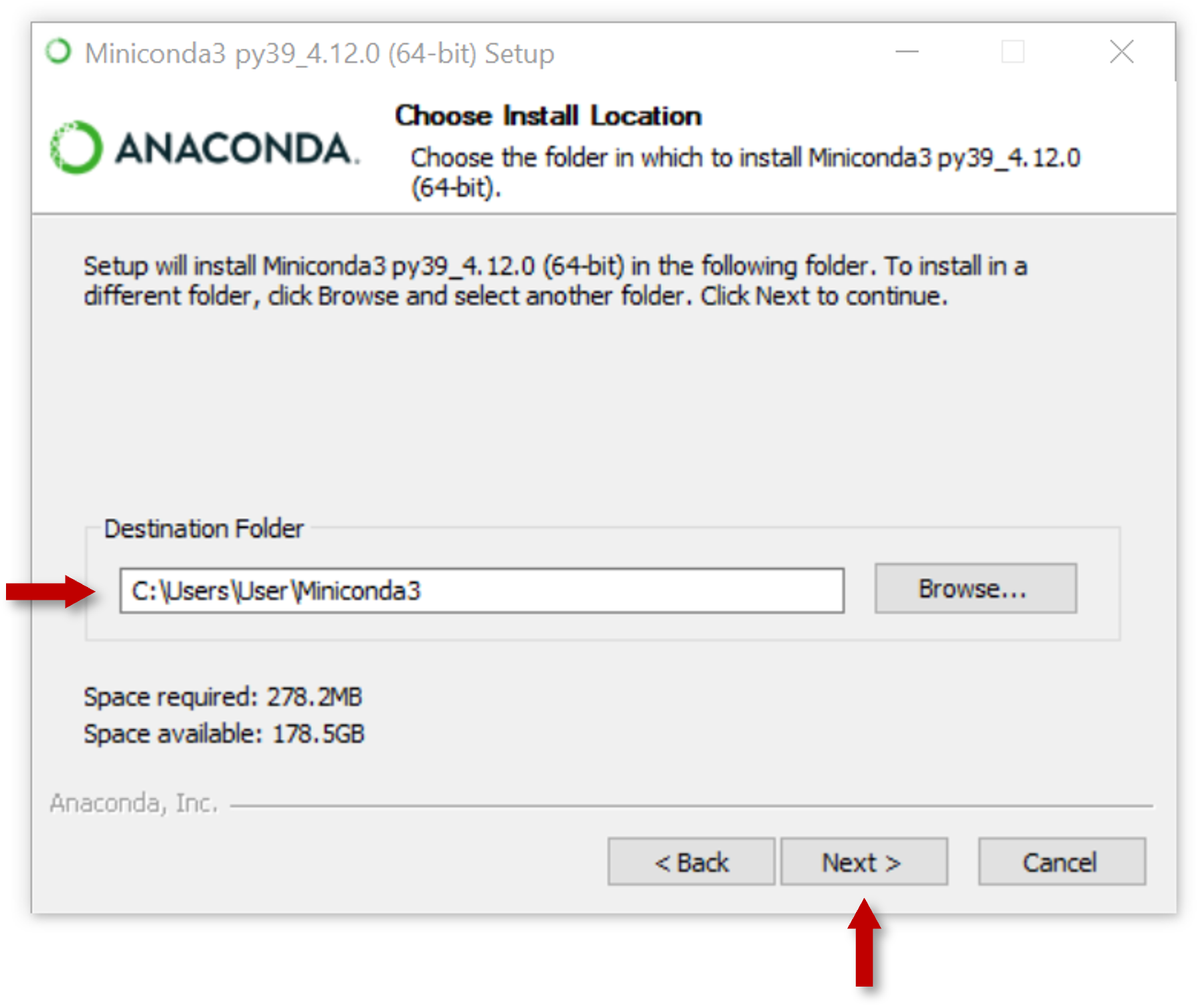
- For Windows installations, select a destination folder to install Miniconda and click Next.
- Choose whether to add Miniconda to your PATH environment variable or register Miniconda as your default Python. We don’t recommend adding Miniconda to your PATH environment variable, since this can interfere with other software.
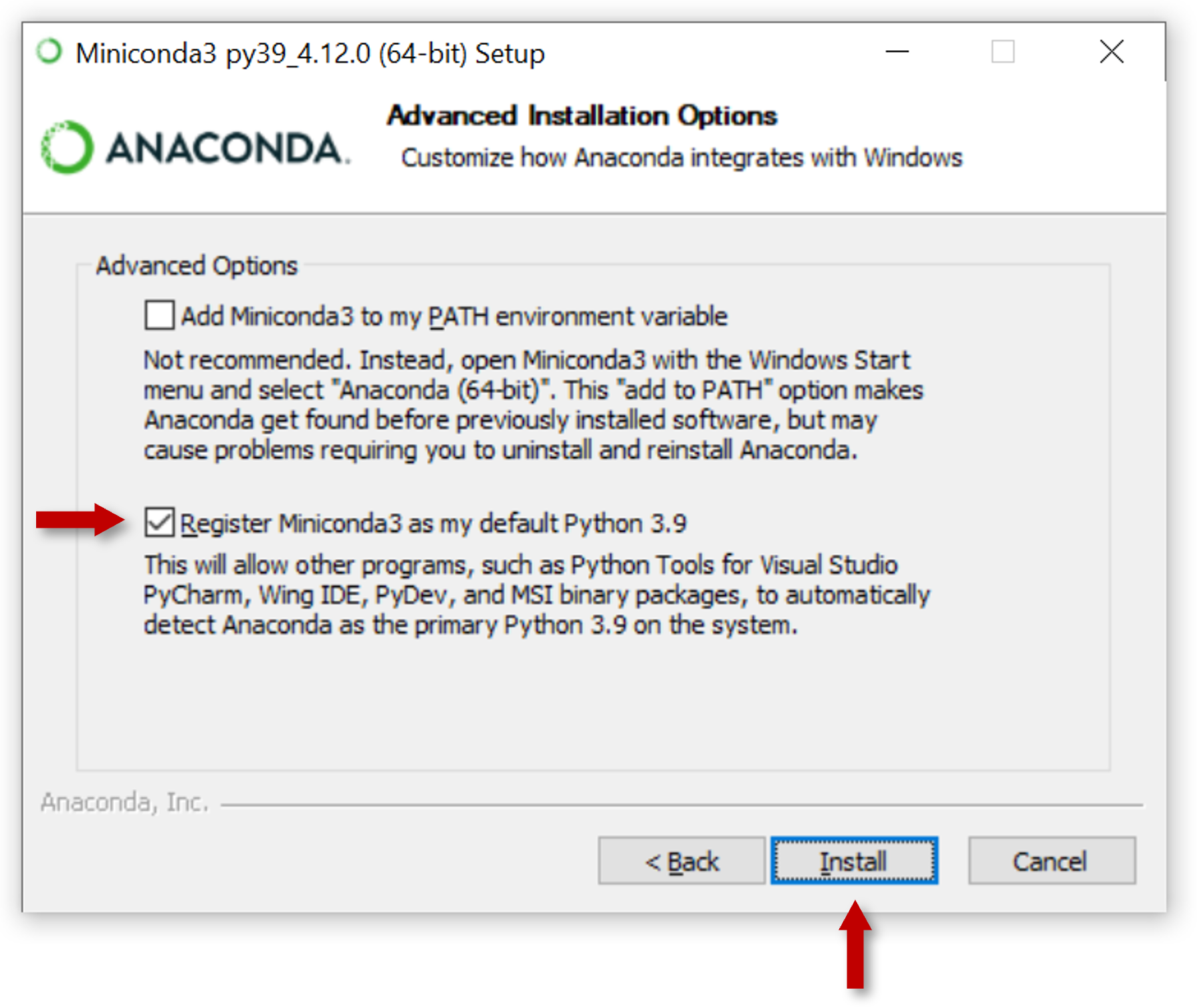
- Click Install. If you want to watch the packages Miniconda is installing, click Show Details.
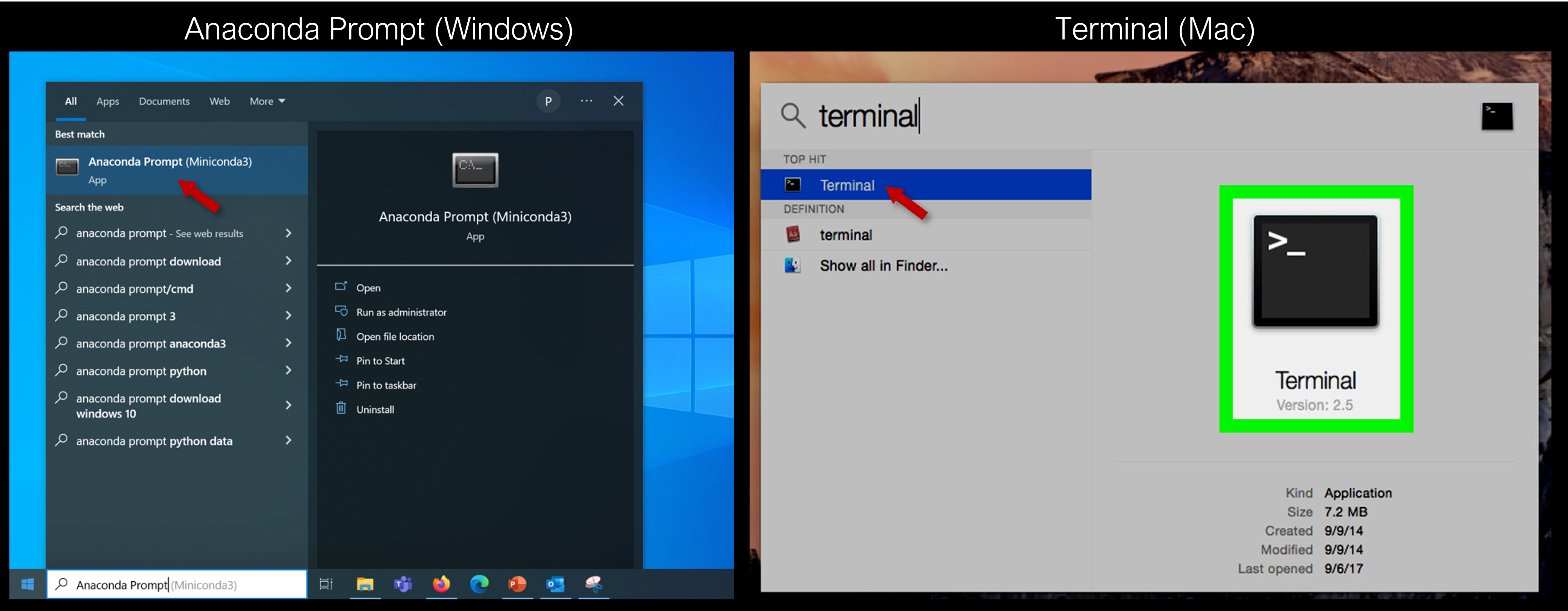
- Open terminal window ("Anaconda Prompt" on Windows, "Terminal" on Mac)
- Install git through terminal. This allows your computer to download the training materials hosted on Github:
conda config --add channels conda-forge
conda install -c conda-forge git
When asked to Proceed, type "y"
- Navigate to desired working directory (e.g. "C:\Users\Name\Documents"):
cd Documents- Clone repository to working directory:
git clone https://github.com/pcoddo/ISAT-Training-LaPlata.gitCreate conda environment using provided environment.yml file:
cd ISAT-Training-LaPlata

conda env create -f environment.yml
This environment should install all necessary software and packages for the training. Depending on internet and processor speeds, this may take several minutes.
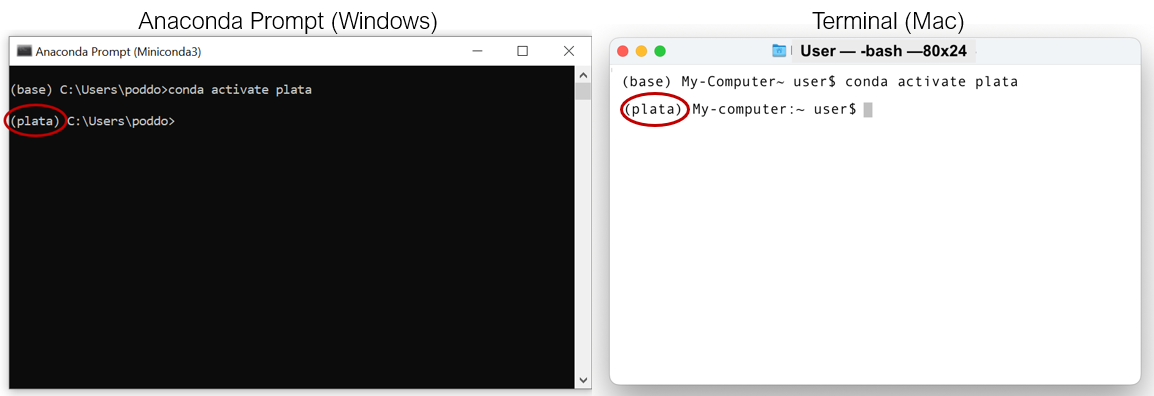
Activate new environment:
conda activate plataThe terminal should now display the activated environment:
Check to see if QGIS installed successfully:
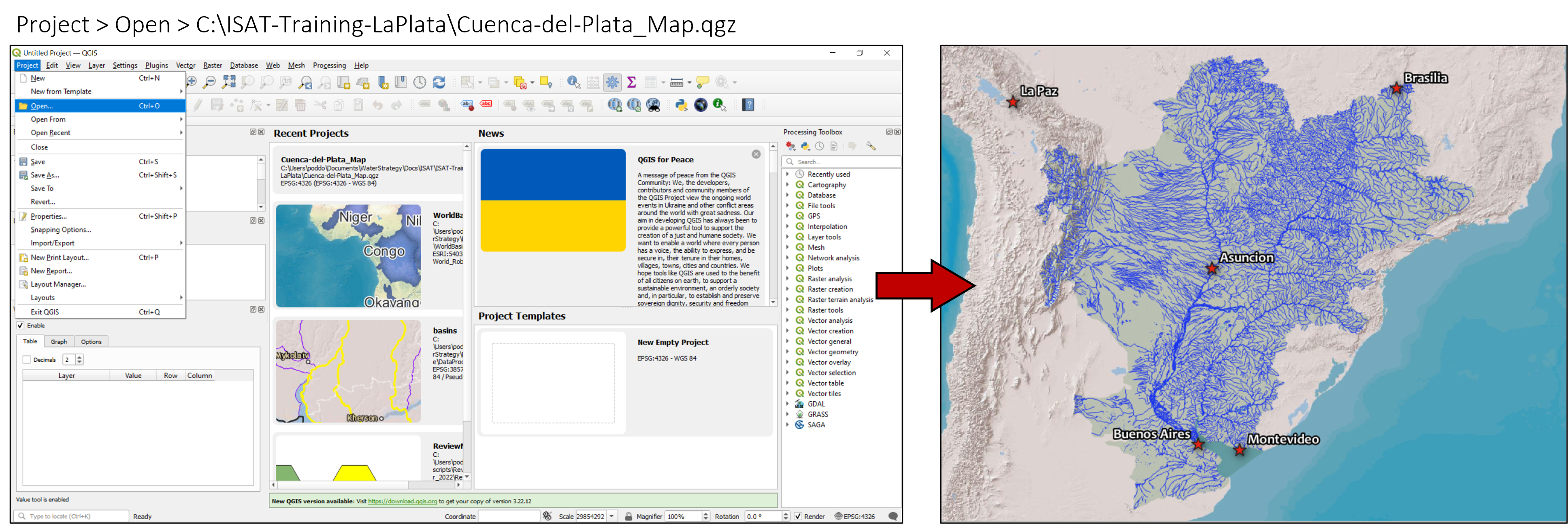
qgisThe application should open in a new window. Once it does, try opening the Cuenca-del-Plata_Map.qgz map file:
The presenters may make updates to this repository as the workshop progresses. To ensure you have the latest version of the materials, you may need to update your local files with any recent changes.
- First, ensure "plata" environment is activated:
conda activate plata- Next, navigate to the training folder (e.g. "C:\Users\Name\Documents\ISAT-Training-LaPlata") and download latest files:
cd Documents
cd ISAT-Training-LaPlata- Finally, download latest files:
git pull- USGS Earth Explorer
- Copernicus Open Access Hub
- Sentinel-1 - Synthetic Aperture Radar (SAR)
- Sentinel-2
- Sentinel-3
- Sentinel-5P
- NASA EARTHDATA
- Alaska Satellite Facility, a source for current and historic RADAR data
- GEO on AWS
- NASA Worldview
- Satellite data
- NOAA View
- Ocean, land and atmospheric data
- Resource Watch
- Hundreds of data sets on the state of the planet’s resources and citizens
- Global Forest Watch
- Data, technology and tools tobetter protect forests
- Google Earth Engine
- Cloud-based implementation with dozens of available datasets
- Planet
- High temporal resolution
- Relatively high spatial resolution
- Relatively low spectral resolution
- Maxar
- High resolution RGB and synthetic-aperture radar data.
- Iceye
- High spatial and temporal resolution synthetic-aperture radar data
- Airbus
- High resolution RGB and synthetic-aperture radar imagery.
- Blacksky
- Plan for high temporal resolution
- Relatively high spatial resolution
- Relatively low spectral resolution
Some of the above sources were drawn from the nicar20-imagery-sources repository by Tim Wallace
These materials draw on previous trainings developed by the NASA Advanced Remote Sensing Training (ARSET) Program. Special thanks to Dr. Amita Mehta, Dr. Erika Podest, Dr. Ana Prados and the rest of the ARSET team for providing those materials! Thanks also to Aarti Arora for helping to design the meeting agenda.