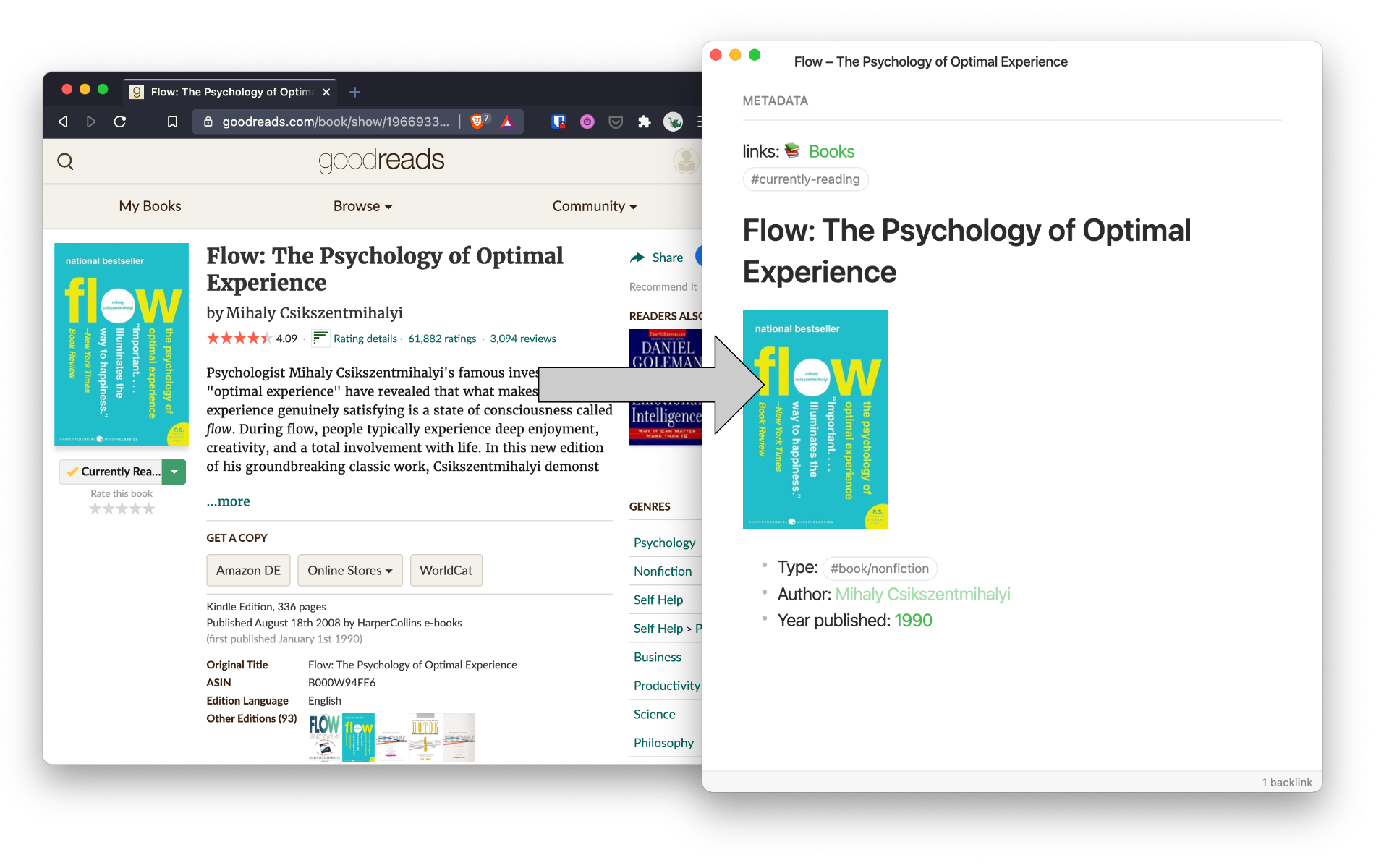
Goodsidian takes information from your shelves on Goodreads and formats them to notes in Obsidian.
This script is made to work on Bash for Windows. Feedback and contributions are very welcome :)
Goodsidian extracts data from your "currently-reading" and "read" Goodreads RSS feeds. That data then gets formatted and creates (new book) or updates (read book) a note in your Obsidian vault.
Disclaimer: Never run a script without knowing what it does. Make sure you understand the script and back up your vault. I use this script on my own vault but it is not guaranteed that no data will be lost or unintended changes will be made.
You can find the URL to your Goodreads RSS feed by navigating to the corresponding shelf and clicking the "RSS" button at the bottom of the page.
- for
readingurlenter the Goodreads RSS URL for the "currently-reading" shelf - for
readurlenter the Goodreads RSS URL for the "read" shelf - for
vaultpathenter the path to your vault, like in the example
Open your Goodreads RSS feed. It will say something like "{yournamehere}'s bookshelf" in the beginning. Replace Nikolaj.s bookshelf in line 24 in the script with the name of your bookshelf (notice the dot).
For your use case you will surely want to change the look of the output. You can do so with the following variables:
${title}: Title of the book.${bookid}: The Goodreads bookid. The script checks for a line containing 'bookid: xxx', so it's required to have a line identical to that in the note.${imglink}: The link to the book cover.${author}: The author's name.${published}: Year of publishing.
When a book appears in the 'read' RSS feed, the script checks if a note has a corresponding Goodreads bookid. If so, it replaces the #currently-reading tag with a #read tag. It also appends the line "Year read: " after the "Year published: " line.
When tinkering with the formatting, be aware that the script targets the bookid and the "Year read" lines. If you delete or change these around, check if you need to change other lines as well.
If you have not yet installed Git Bash, do so here.
After having downloaded and modified the script, go into your Git Bash shell and navigate to the folder you've saved the script in.
Type the following into the console
./goodreads-to-obisidian.shand hit enter. Messages on the screen will inform you about what's happening behind the scenes.
First, the script sets the URLs and the path to your vault as variables. It also assigns the current time to variables.
# URL for "Currently reading":
readingurl="your_url"
# URL for "Read":
readurl="your_url"

# enter path to your Vault
vaultpath="path_to_your_vault"

# gets current date and assign to variable
year=$(date +%Y) # yyyy
nummonth=$(date +%m) # mm
month=$(date +%B) # Mon
Next up, the script grabs the data from the RSS feed and filters out the needed items. First from the "currently-reading" shelf and then from the "read" shelf:
# grabs title, cover image, author name, publishing year and book id
# from 'currently reading' RSS feed and removes all HTML and tabs
# sed syntax: sed -e 's/contenttoreplace/contenttoinsert/'
echo "Getting 'Currently Reading' data."
IFS=$'\n' readingfeed=$(curl --silent "$readingurl" | \
egrep 'title|book_large_image_url|author_name|book_published|book_id' | \
...
tail +3 | \
fmt -u # uniform spacing
)

# grabs book id from 'read' RSS feed and removes all HTML and tabs
echo "Getting 'Read' data."
IFS=$'\n' readfeed=$(curl --silent "$readurl" | \
egrep 'book_id' | \
...
fmt -u # uniform spacing
)
Next up we turn the data into an array. The items that were pulled from the RSS feed get split up, and the whitespace gets removed.
# turns the data into an array, by substituting '|' for a new-line character
echo "Putting the data into an array."
readingarr=($(echo $readingfeed | tr "|" "\n")) # outer pair of brackets is necessary for array definition
readarr=($(echo $readfeed | tr "|" "\n"))

# removes tabs at the beginning and end of item
for (( i = 0 ; i < ${#readingarr[@]} ; i++ ))
do
  readingarr[$i]=$(echo "${readingarr[$i]}" | sed -e 's/^[ \t]*//' -e 's/[ \t]*$//')
done
for (( i = 0 ; i < ${#readarr[@]} ; i++ ))
do
  readarr[$i]=$(echo "${readarr[$i]}" | sed -e 's/^[ \t]*//' -e 's/[ \t]*$//')
done
Since there are five extracted elements (title, bookid, author, image link and year published) we can divide the length of our list by five and get the amount of new books.
# gets the amount of books by dividing array by 5
readingamount=$((${#readingarr[@]} / 5))
A loop is started, that on each iteration checks if a note for the current book exists already (by checking looking for a note with the corresponding bookid). If there is one, the book is deleted from the array (so no duplicates appear).
# checks if book is in directory, otherwise removes it
echo "Removing books that already have a note:"
for (( i = 0 ; i < ${readingamount} ; i++ ))
do
  # temporary counter variable
  # multiplication necessary -> 5 fields per book
  counter=$(($i * 5))

  # Sets bookid
  bookid=${readingarr[$(($counter + 1))]}

  # grep scans all notes in vaultpath for an appearance of bookid
  if grep -q "${bookid}" -r "${vaultpath}"; then
    # removes the book from the array
    echo "  '${readingarr[$counter]}'"
    unset readingarr[$counter]
    unset readingarr[$(($counter + 1))]
    unset readingarr[$(($counter + 2))]
    unset readingarr[$(($counter + 3))]
    unset readingarr[$(($counter + 4))]
  fi
done
As this cleaned-up array possibly has empty spots, it has to be reindexed. By dividing through five again, we can then see how many books we have left.
# readingarr now might have gaps, because of unset values
# creates an updated array with no gaps
echo "Cleaning up the array."
for i in "${!readingarr[@]}"
do
    new_array+=("${readingarr[i]}")
done
readingarr=("${new_array[@]}")
unset new_array

# gets the amount of (remaining) books by dividing array by 5
readingamount=$((${#readingarr[@]} / 5))
If all the books have been removed from the array, no new notes will be created.
if (("$readingamount" == 0)); then
  echo "Currently Reading: No new books found."
  echo
Otherwise, variables are set for the remaining books. The script also deletes illegal characters that interfere with file naming.
else
  echo "--- Starting Process ---"
  echo
  # creates a note for each book
  for (( i = 0 ; i < ${readingamount} ; i++ ))
  do
    # temporary counter variable
    # multiplication necessary -> 5 fields per book
    counter=$(($i * 5))

    # sets variables
    title=${readingarr[$counter]}
    bookid=${readingarr[$(($counter + 1))]}
    imglink=${readingarr[$(($counter + 2))]}
    author=${readingarr[$(($counter + 3))]}
    published=${readingarr[$(($counter + 4))]}

    # replaces illegal ':' with '-'
    # removes all other illegal characters
    cleantitle=$(echo "${title}" | sed -e 's/:\ / - /' -e 's/[\\\/:*?"<>|#]//g')

    # time of note creation, cut used for formatting of weekday
    creationdate=$(date +"%a %m-%d-%Y %H:%M" | cut -c1-2,4-)
Now the note creation process starts. This part is where you will most likely want to change stuff.
# writes the contents for the book file
if [[ "$cleantitle" == "" ]]; then
echo "Error! Failed to create note due to faulty title."
echo
else
echo "---
bookid: '${bookid}'
---
${creationdate}
Status: #reference #currently-reading
Tags: [[Book]]
Author: [[${author}]]
Year published: ${published}
Universe/Series: *ADD SERIES*
Link to reference:
# 📚${title}

---
" >> "${vaultpath}/${cleantitle}.md"
# displays a notification when file was created
echo "Booknote created with title '${cleantitle}'"
echo
fi
done
fiNow the script checks if any notes that have the "#currently-reading" tag have now been read.
It checks if a bookid that is in the 'read' array, also appears in a note. If that occurs, it replaces the "#currently-reading" in that note with "#read", and inserts a line for "Date read" after "Year published"
The updatecounter variable is used later to display a nice message to the user.
# if a book was read, change the tag and add read date
echo "--- Updating read books ---"
updatecounter=0
for i in ${!readarr[@]}
do
  # return path of book with matching bookid
  readbookpath=$(find "${vaultpath}" -type f -print0 | xargs -0 grep -li "bookid: '${readarr[$i]}'")

  # add Year read and replace #currently-reading with #read
  if [ "$readbookpath" != "" ]; then
    # if the read book was already marked as read, skip to the next book
    if [ $(echo $(grep -ci "#read" "$readbookpath")) == "0" ]; then
      sed -i -e "/Year published: [0-9][0-9][0-9][0-9]/a Date read: ${month} ${year}" "$readbookpath"
      sed -i -e 's/#currently-reading/#read/' "$readbookpath"
      ((updatecounter++))
    fi;
  fi
done
At last, the script returns a message, updating the user.
# user friendly update message
if (( updatecounter > 1 )); then
  echo "$updatecounter books updated."
elif (( updatecounter == 1 )); then
  echo "1 book updated."
else
  echo "No new read books."
fi