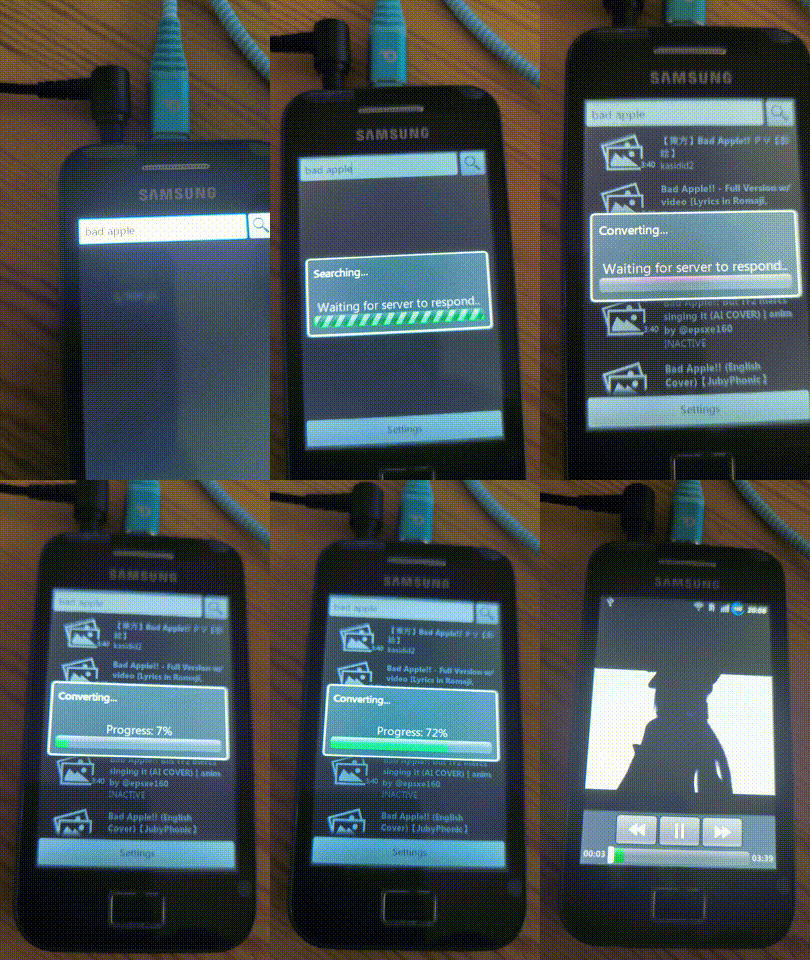
OurTube is a lightweight media app designed for Android devices, feature phones and everything else that can access the web. It enables users to search, stream, and watch videos from YouTube, SoundCloud and other platforms on legacy hardware that normally can't access them.
⚠️ Disclaimer
Using this software to download or stream content from media platforms may violate their respective Terms of Service.
This project is intended for educational and personal use only. The maintainers are not responsible for any misuse and do not condone illegal or unauthorized use of the software.
- Works on Android version 1.0 to 15 (tested from Android 2.3.4 to 16)
- Compatible with J2ME phones (tested on Nokia 6300 and Nokia N85)
- WAP 1.0, HTML 3.2 and XHTML websites for other devices
- Server handles:
- YouTube and SoundCloud search
- Playback from yt-dlp supported websites via HTTP progressive download and RTSP
- Thumbnail loading (Android only)
- No login or API key required
It uses yt-dlp for fetching content and FFmpeg for transcoding.
- "Load more" button introduces duplicate results (unfixable)
- Android fullscreen mode
If your OS is macOS or Linux-based, try running this in terminal:
git clone https://github.com/ndrnmnk/ourtube;
cd ourtube;
setup.sh
For Docker, use this: docker run -p 5001:5001 -p 8554:8554 -d ndrnmnk/ourtube:latest
If you are on Windows or the command has failed, check out MANUAL-INSTALLATION.md.
Make sure FFmpeg is installed, functional and available in you system PATH.
Edit config.yaml and DeadRTSP/config.yaml if you want to change server settings (default ones usually work fine).
You’ll see both your local and public IP printed on launch — those will be used in the client app.
Download the client from the Releases tab and transfer it to your device.
After installing it, enter the server IP. On Android, click Settings to see field for it.
Now, you should be able to watch videos and listen to music, but it's recommended to play with other settings.
Most Java phones only support h263 codec, which restricts available resolutions. Videos may not scale to full screen.
If your device supports mpeg4 (e.g., Symbian-based phones), enable it to get better quality and proper scaling.
Some devices do support h264 codec, which completely avoids conversion, significantly reducing wait times.
You should try enabling it in the settings.
RTSP allows playback before full conversion (almost no wait time), but it works only with external players and sacrifices seeking.
Website can be accessed at http://{your_ip}:5001/ and WAP version at http://{your_ip}:5001/wap.
It's heavily recommended to use HTML version if possible for better experience.
Cookies in HTML version aren't necessary - they just save settings, so you don't have to re-enter these every time.
This was recorded with an office laptop with 10 Mbps internet.
Device doesn't support h264 codec or RTSP.
Also note that thumbnails now load within 1-3 seconds.