





Open security scanner and self-hosted control plane for AI/MCP infrastructure.
Headless agent primitives and human cockpit surfaces over the same evidence model.
Docs · First Run · Self-host · GitHub Action · Docker · Changelog
agent-bom scans local and fleet AI infrastructure, builds an AI BOM across
agents, MCP servers, tools, packages, credential environment names, cloud,
runtime, and skills, then turns that inventory into findings, compliance
evidence, and graph-backed exposure paths.
The same evidence is available through CLI/CI, REST API, MCP tools, and a self-hosted dashboard. Runtime proxy/gateway controls are optional and scoped to environments where enforcement is worth the operational cost.

package
  -> vulnerability finding
  -> MCP server
  -> tools + credential refs
  -> agent
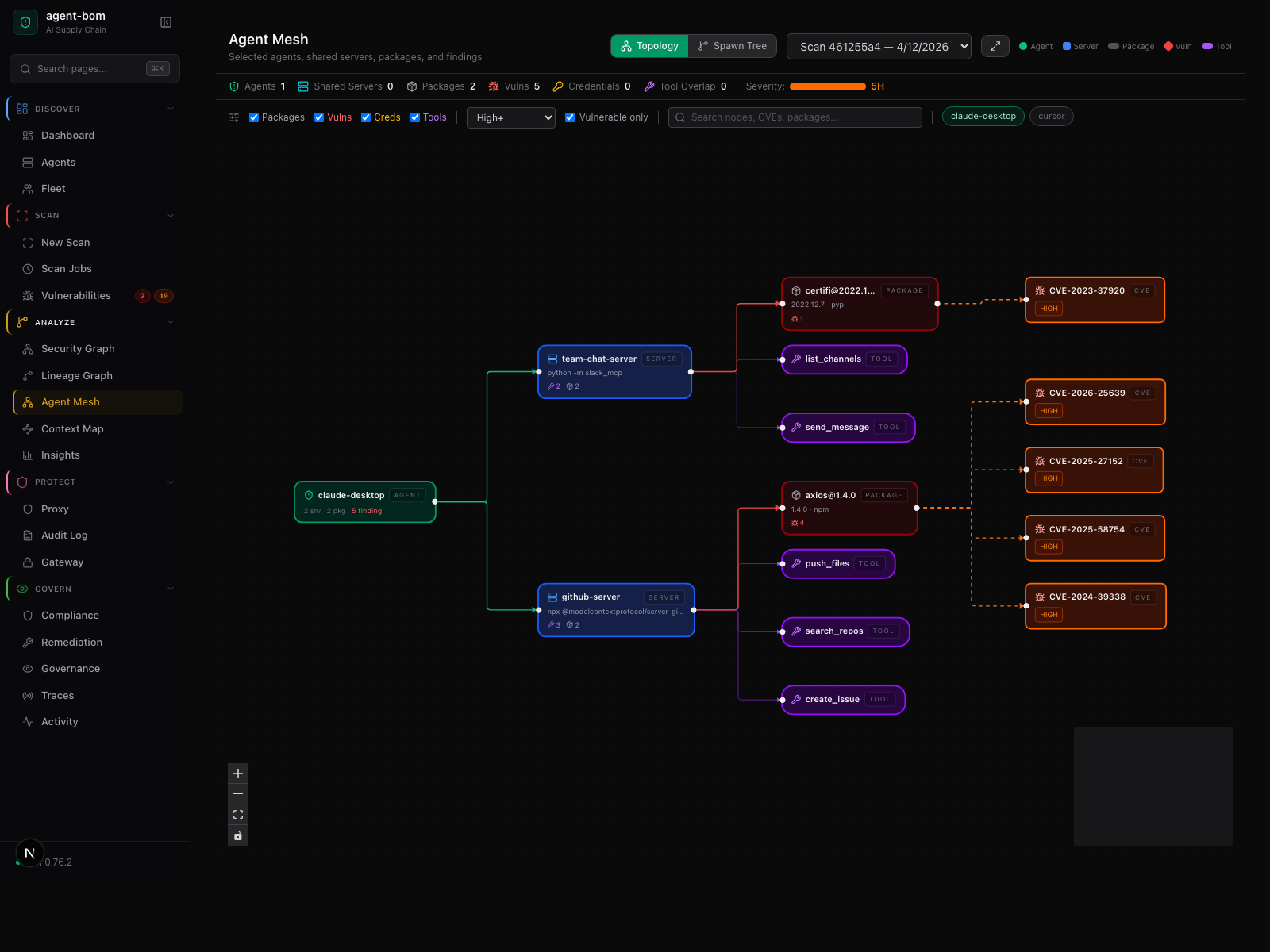
Blast radius is the core idea. A vulnerable package is not just a CVE row; it is linked to the MCP server that loads it, the tools exposed by that server, the credential environment names in reach, and the agents that can call it.

pip install agent-bom
agent-bom quickstart --dry-run --offline   # print the onboarding plan
agent-bom quickstart --run --offline        # write sample, scan, seed gateway policy, populate the cockpit
agent-bom agents --demo --offline
The demo uses real OSV/GHSA advisories against intentionally vulnerable sample packages and produces graph-ready inventory without touching your source tree. For a real local scan:
agent-bom agents -p . -f html -o agent-bom-report.htmlWant an inspectable sample stack first?
agent-bom samples first-run
agent-bom agents --inventory agent-bom-first-run/inventory.json -p agent-bom-first-run --enrich
See docs/FIRST_RUN.md for the guided path from CLI output to the dashboard.
To reproduce the dashboard screenshots from a clean local control-plane store:
make build-ui
uv run agent-bom serve --persist /tmp/agent-bom-demo.db --allow-insecure-no-auth
uv run agent-bom agents --demo --offline --no-auto-update-db -f json -o /tmp/agent-bom-demo.json
curl -sS -H 'content-type: application/json' --data-binary @/tmp/agent-bom-demo.json \
  http://127.0.0.1:8422/v1/results/push

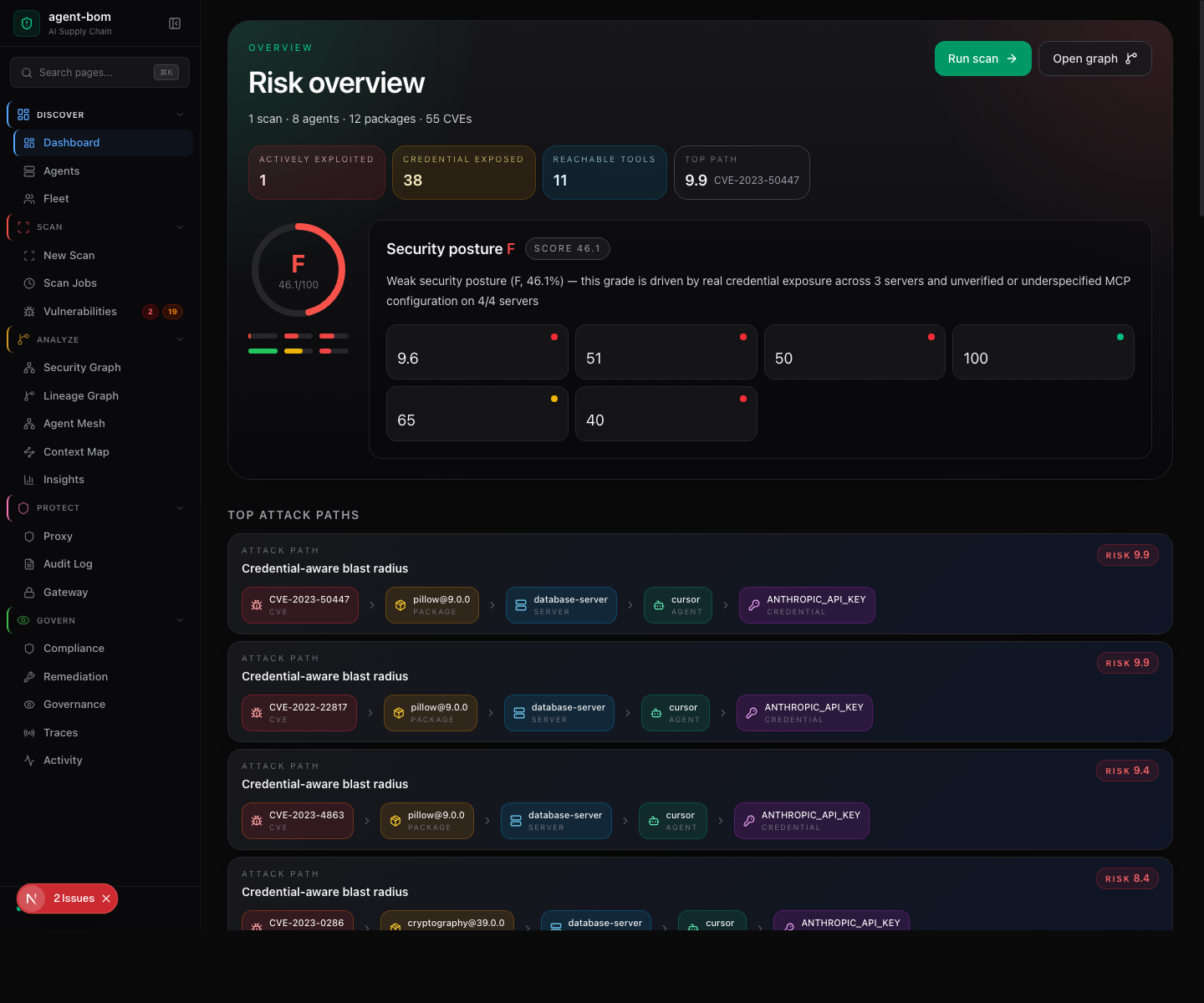
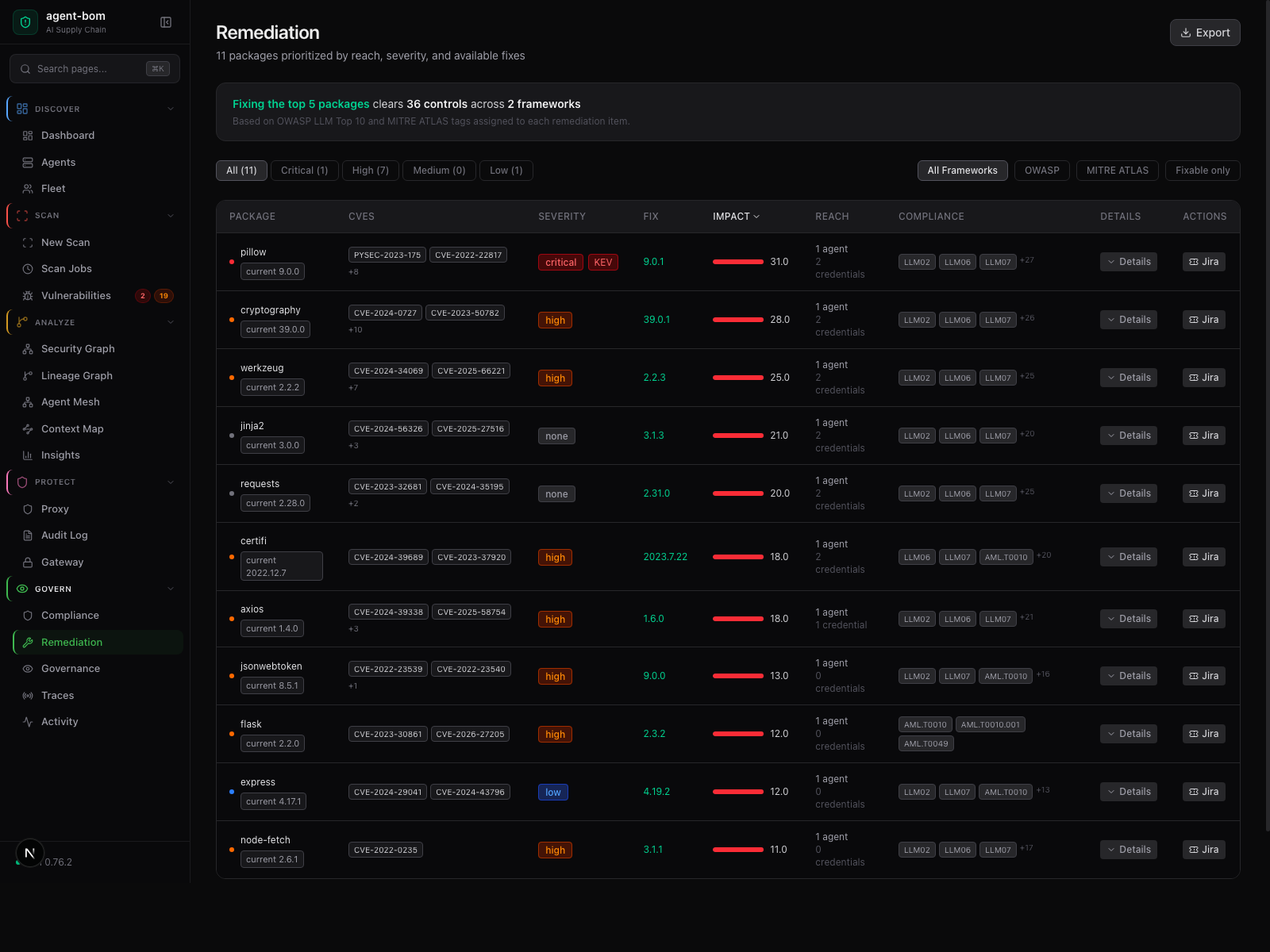
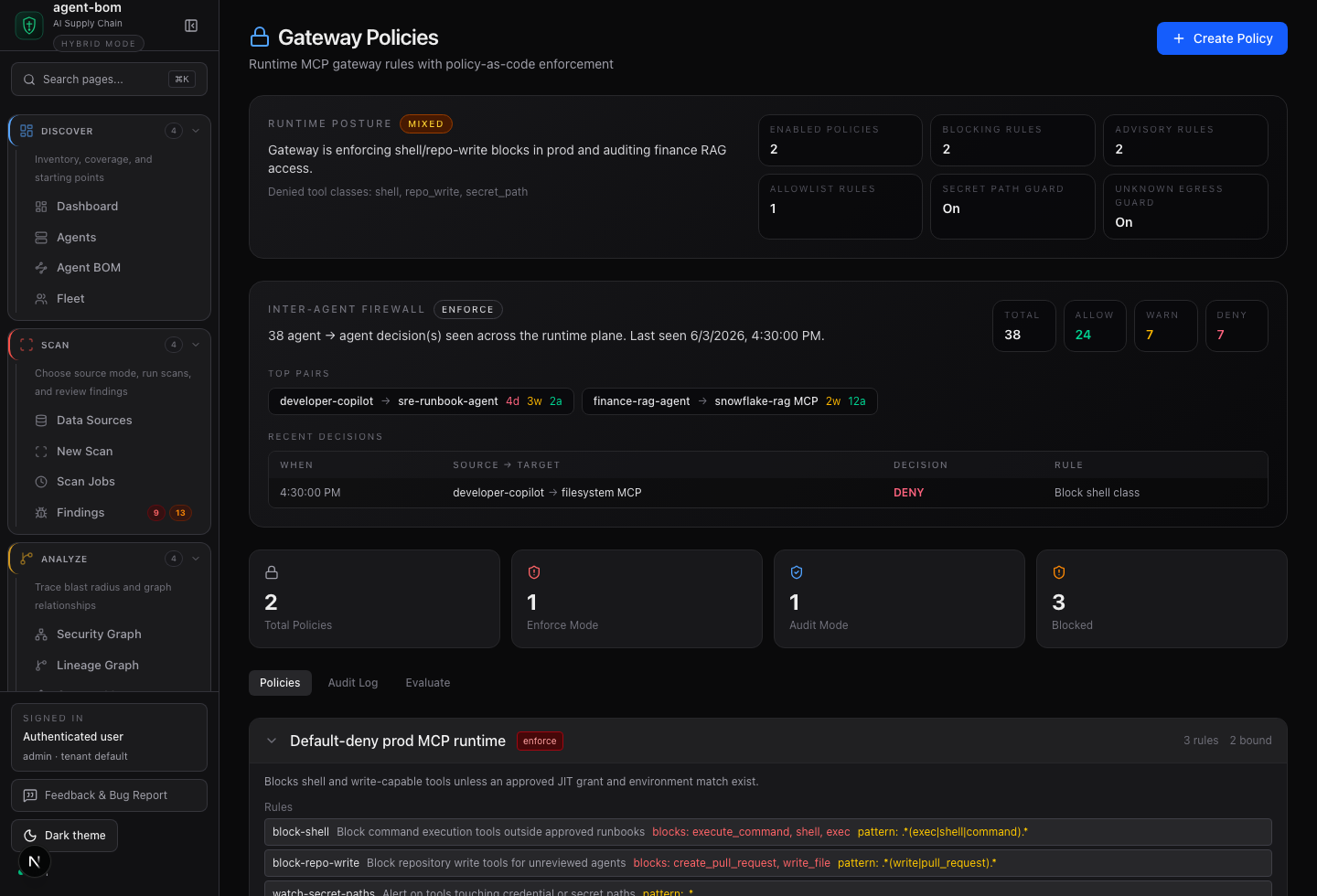
The dashboard screenshots below are captured from the packaged UI with bundled demo scan data and seeded control-plane records, not static mockups. The data is synthetic where needed, but the routes are the real scan, graph, fleet, identity, audit, and gateway surfaces. The README keeps the first screen focused; expand the gallery when you want to inspect the control-plane surfaces.
Evidence cockpit and agent mesh
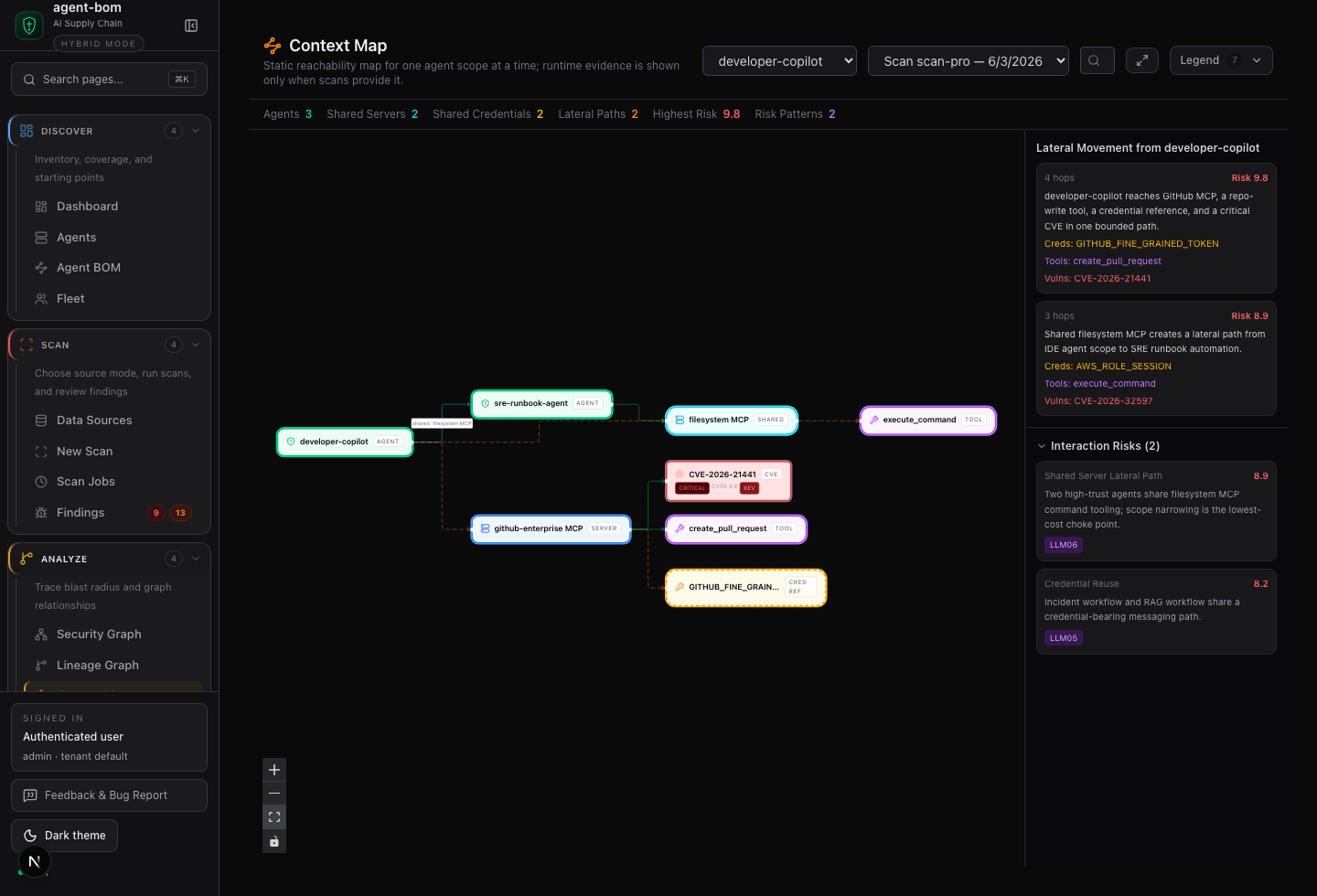
Graph views beyond the agent mesh
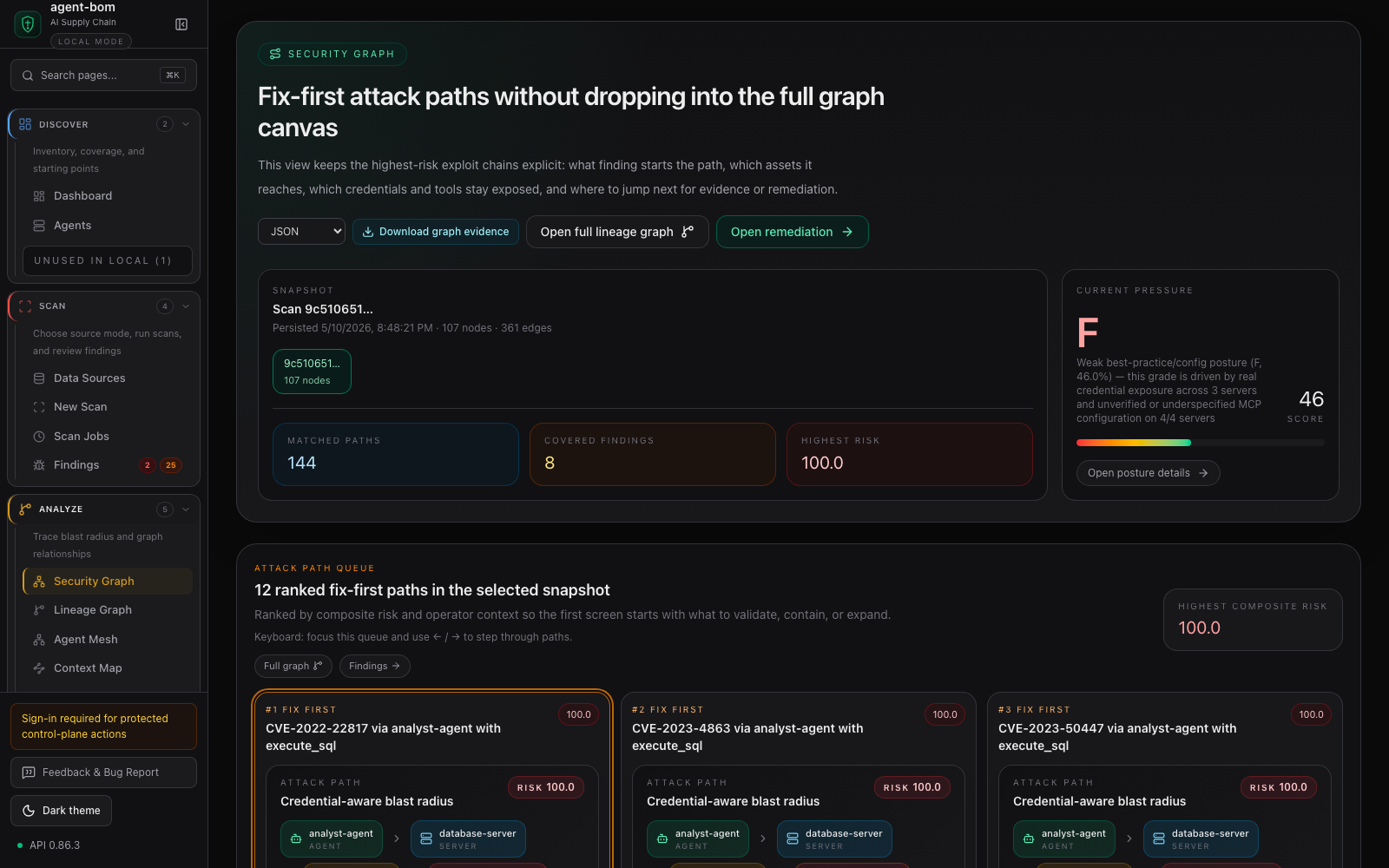
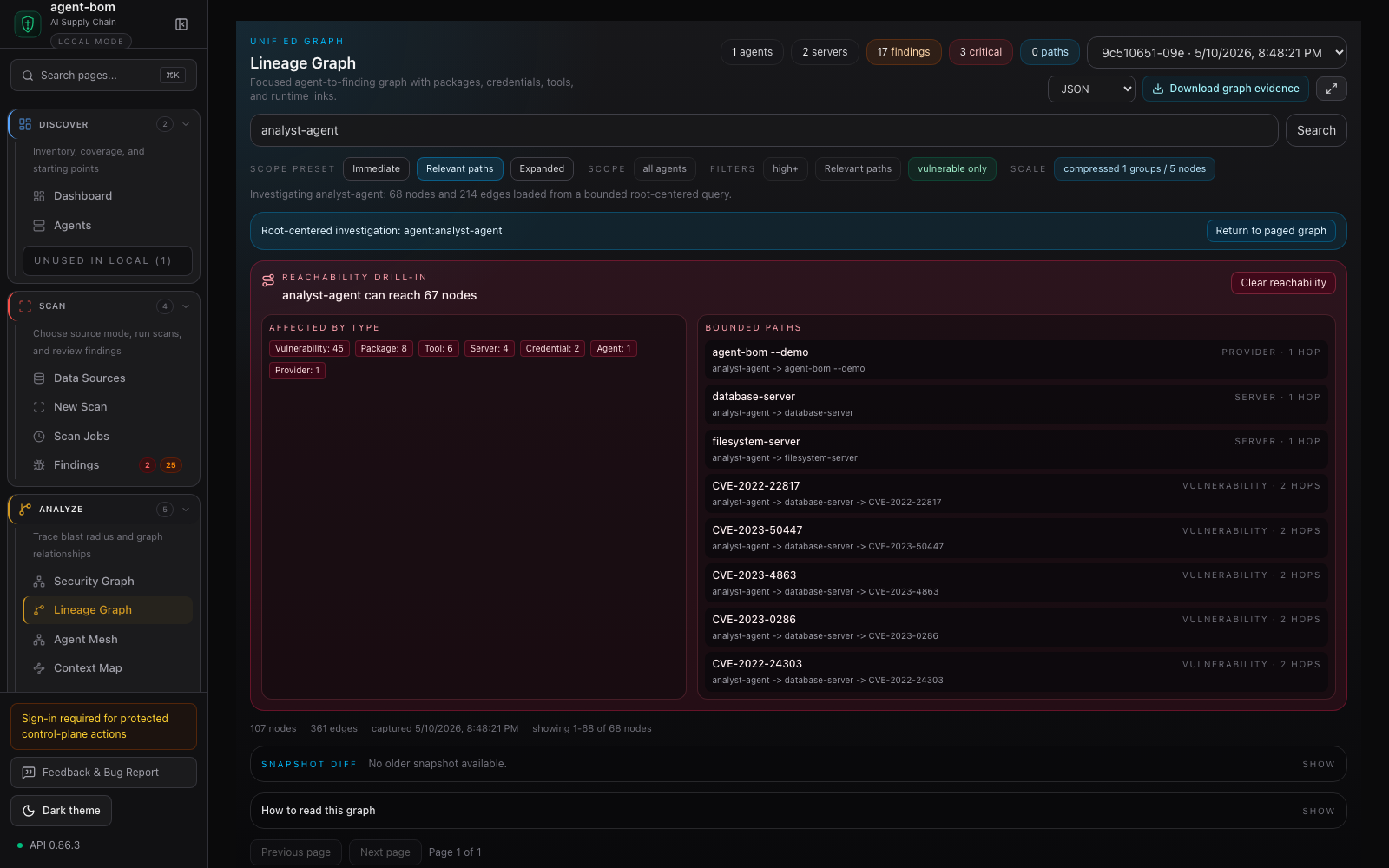
The graph proof set is intentionally split across modes: fix-first exposure paths, root-centered lineage, lateral context, and package risk distribution. That keeps each view readable instead of forcing every relationship into one sprawling canvas.
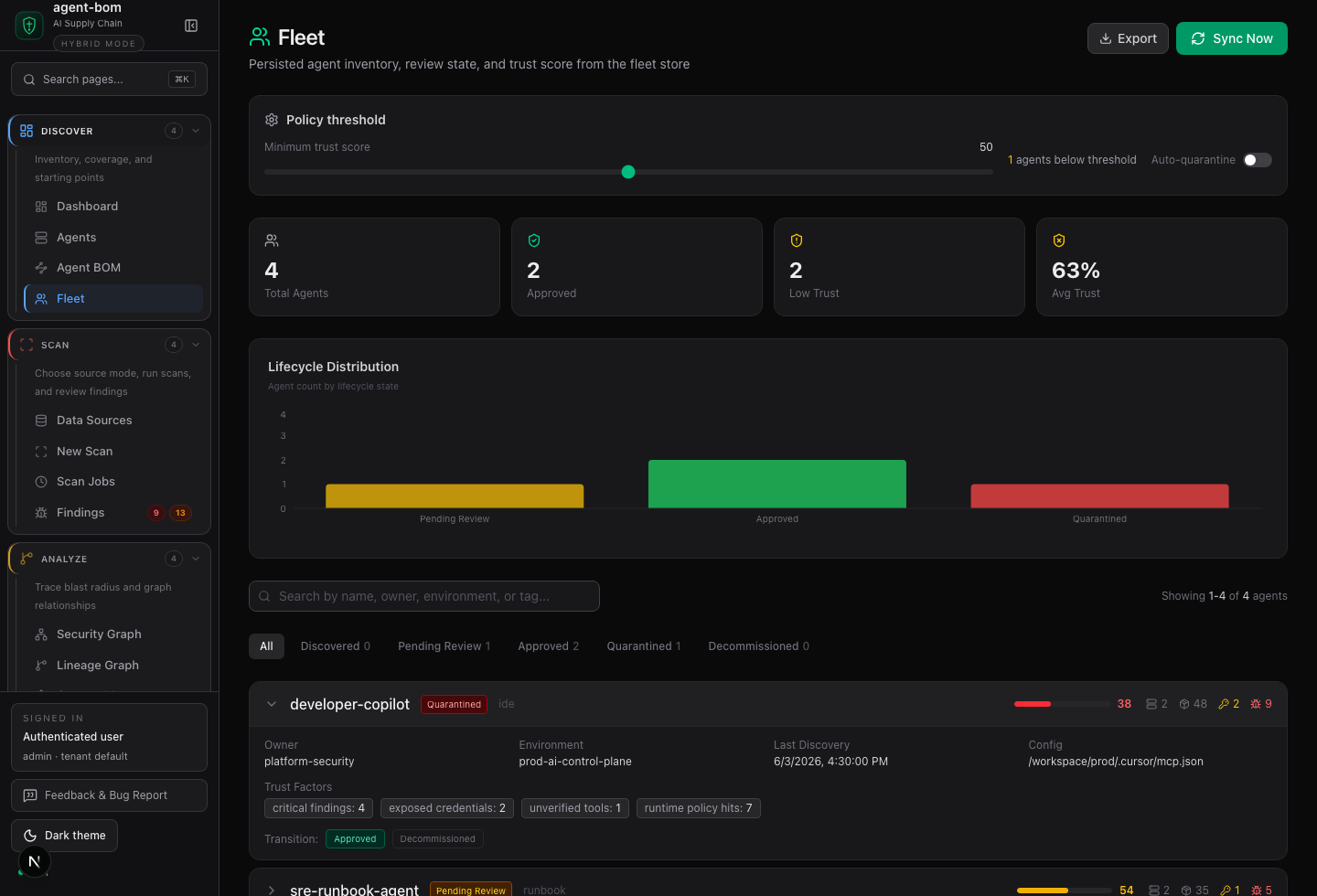
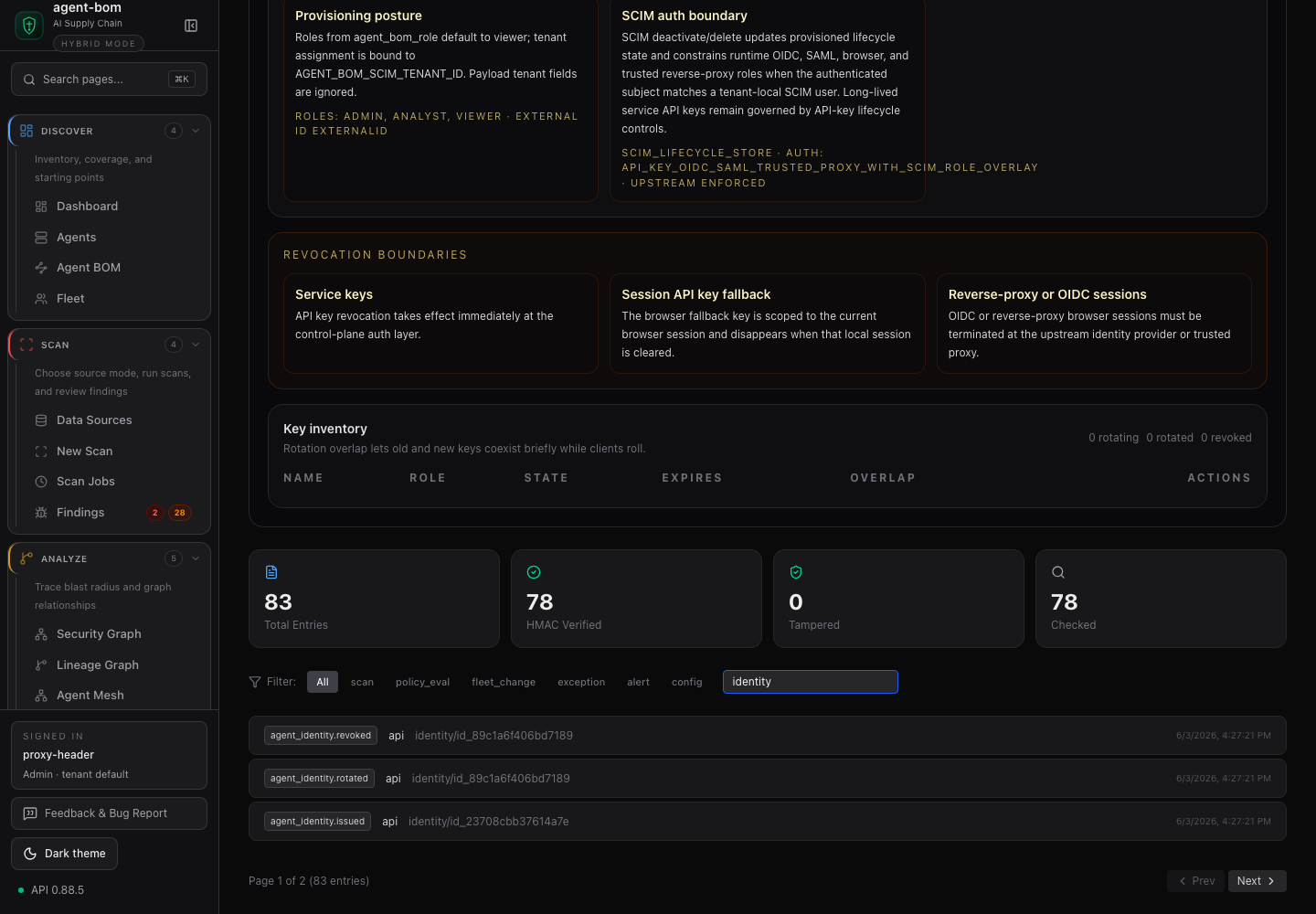
Environment state and identity lifecycle
Fleet and identity views use the same control-plane APIs that operators use for customer-owned deployments. The sample below seeds environment, owner, lifecycle state, and agent identity events so the screenshots show how local scan evidence connects to reviewable governance records.
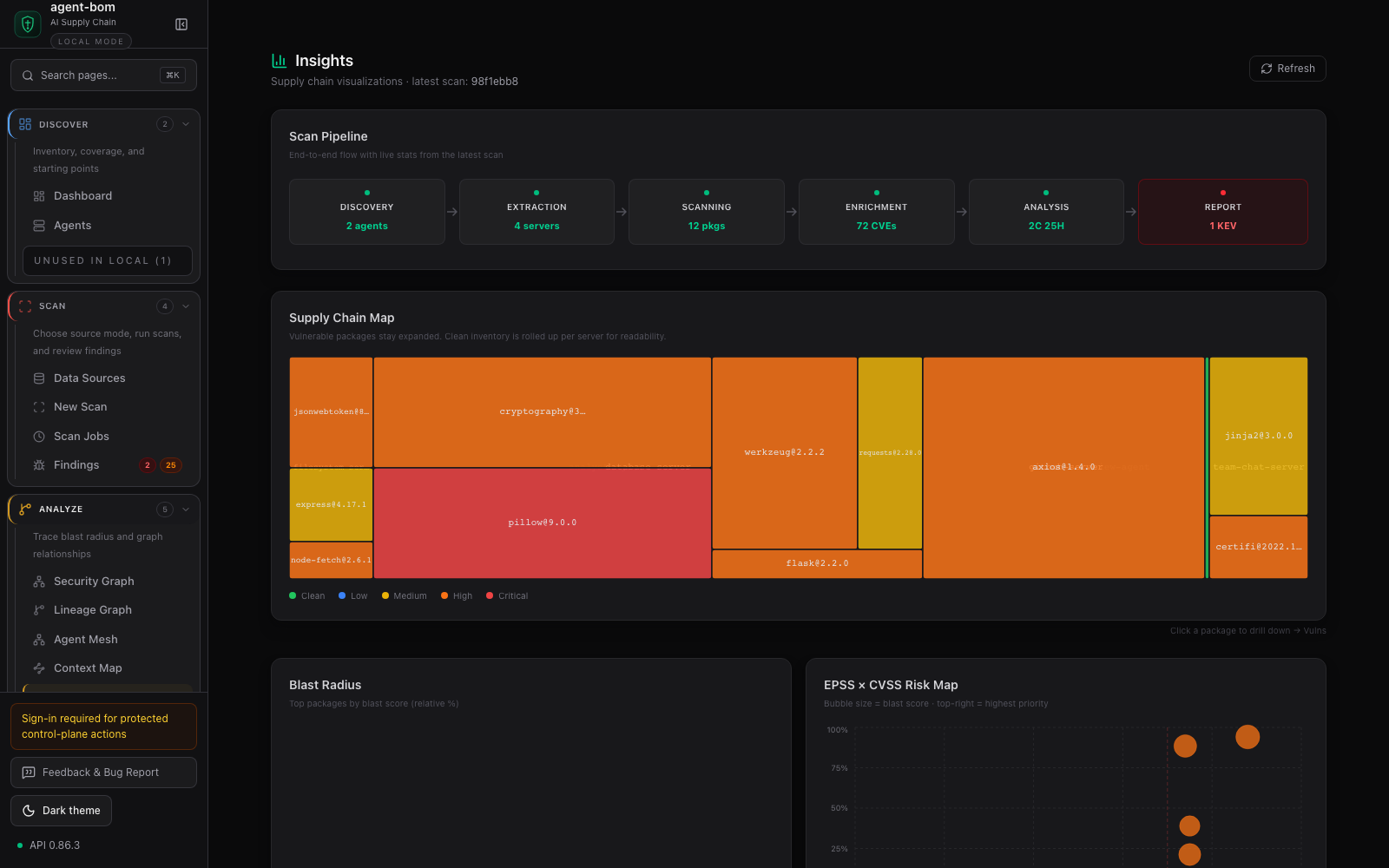
Dependency and remediation views
Runtime policy and audit posture
Screenshot capture rules and the full manifest live in docs/CAPTURE.md and docs/images/product-screenshots.json.
| Goal | Command | Artifact |
|---|---|---|
| Local agent and MCP inventory | agent-bom agents |
findings, AI BOM, graph-ready JSON |
| Guided local onboarding | agent-bom quickstart --dry-run --offline |
scan, sample-data, and local API/UI next steps |
| One-command onboarding | agent-bom quickstart --run --offline |
writes sample, runs a graph-persisting scan, seeds a baseline gateway policy |
| Repo and lockfile scan | agent-bom agents -p . |
package findings, SARIF/SBOM/HTML when requested |
| Pre-install guard | agent-bom check flask@2.0.0 --ecosystem pypi |
deterministic allow/warn/block result |
| Container image scan | agent-bom image nginx:latest |
image findings and remediation |
| IaC scan | agent-bom iac Dockerfile k8s/ infra/main.tf |
IaC findings and policy context |
| Cloud posture check | agent-bom cis-benchmark --provider aws |
runtime CIS posture evidence |
| CI gate | uses: msaad00/agent-bom@v0.88.6 |
SARIF, PR summary, optional code-scanning upload |
| MCP tools | pip install 'agent-bom[mcp-server]' && agent-bom mcp server |
strict-args security tools for MCP clients |
| Local API/UI | pip install 'agent-bom[ui]' && agent-bom serve |
API plus bundled dashboard |
| First-run extras | pip install 'agent-bom[all]' |
supported onboarding extras; MLflow remains separately installed |
| Self-hosted pilot | docker compose -f docker-compose.pilot.yml up -d |
API and dashboard in your environment |
The base wheel is the scanner and CLI path. Optional runtime surfaces fail fast with install hints when their extras are missing.
MCP registry publishing is tracked through the committed Smithery manifest and other registry metadata; install and liveness checks stay in the linked integration docs instead of this front door.
| Surface | Primary user | Current boundary |
|---|---|---|
| CLI / CI | developers and release gates | local scans, SARIF/SBOM/HTML/JSON, deterministic exit codes |
| REST API | control-plane integrations | scans, bulk findings, dataset versions, evaluation runs, graph evidence, audit, runtime summaries |
| MCP tools | agents and assistants | strict arguments, read-mostly security queries, exposure paths, deploy decisions, audited Shield actions |
| Dashboard | security teams and operators | inventory, findings, graph cockpit, compliance, evidence, runtime posture |
| Runtime proxy/gateway | runtime operators | scoped MCP traffic inspection, policy decisions, redacted audit evidence |
| Python client | services, notebooks, and automation | typed helper for stable REST endpoints in the packaged wheel |
| TypeScript client | services and agent runtimes | typed helper for stable REST endpoints |
MCP server mode advertises 63 MCP tools, 6 resources, and 6 workflow prompts.
Most tools are read-only. The three Shield write actions fail closed unless
the caller supplies operator_role=admin, operator_scopes=shield:write, and
an audit reason.
CLI scan commands run local scan pipelines today. They share lower scanner and discovery libraries with the API, but they are not API wrappers yet.
Runtime enforcement is explicit. Proxy mode either wraps a target MCP server for audit and policy decisions, or runs that server through Docker/Podman isolation when a sandbox image is supplied:
agent-bom proxy --no-isolate --policy policy.json --detect-credentials --block-undeclared -- npx @mcp/server-github
agent-bom proxy --sandbox-image ghcr.io/acme/mcp-runtime@sha256:<digest> \
--sandbox-image-pin-policy enforce --block-undeclared -- npx @mcp/server-postgresagent-bom is designed for customer-controlled deployment: local CLI, Docker,
GitHub Action, Helm, EKS, Postgres, and optional runtime proxy/gateway.
curl -fsSL https://raw.githubusercontent.com/msaad00/agent-bom/main/deploy/docker-compose.pilot.yml -o docker-compose.pilot.yml
docker compose -f docker-compose.pilot.yml up -d
# Dashboard -> http://localhost:3000
Production self-hosting starts with the deployment chooser:
There is no managed cloud offering in this repository today. Product lane boundaries are documented in docs/PRODUCT_BOUNDARIES.md.
- Read-only discovery by default for cloud and local inventory.
- No mandatory telemetry.
- Credential values are redacted; credential environment names are preserved as evidence so exposure paths stay explainable.
- Findings can export as JSON, SARIF, CycloneDX, SPDX, Markdown, HTML, and compliance evidence bundles.
- API and runtime paths are designed for tenant scope, auth boundaries, and audit evidence.
- OpenAPI artifacts are committed for SDK and client contract checks.
Security and release references:
- Threat model
- Pentest readiness
- Python API and control-plane client
- Go control-plane client
- Product metrics
- Release verification
- GitHub Action
The docs site carries the deployment-oriented walkthroughs behind those screenshots:
Contributions are welcome. Start with:
License: Apache-2.0.