A command line tool that reads the management model of a WildFly instance or feature pack and stores it as a graph in a Neo4j database. The resulting graph makes it easy to explore resources, attributes, operations, capabilities, and their relationships -- enabling analysis, visualization, and consistency checks across the management model.
- Java 25 or later
- Neo4j database (tested with Neo4j 5.x, using the Bolt protocol on port 7687)
- Maven is bundled via the Maven Wrapper (
./mvnw), so no separate installation is needed
Build the project and run all tests:
./mvnw verifyBuild a fat JAR (skipping tests):
./mvnw package -DskipTestsThe build produces a self-contained shaded JAR in target/ that can be run directly with java -jar.
The analyzer supports two mutually exclusive data sources for reading the management model:
Connects to a running WildFly server using the native management protocol (default port 9990). This is useful when you want to analyze the live configuration of a running server, including runtime-only resources.
Use the -w / --wildfly option to specify the server address. If the server requires authentication, provide credentials with
-u and -p.
Reads the management model from a Galleon documentation ZIP artifact. These ZIPs are published as part of WildFly feature packs and contain the full model description as JSON files. This is useful for offline analysis or when you want to analyze a specific WildFly version without running a server.
Use the -z / --doc-zip option to specify the path to the ZIP file.
java -jar target/model-graph-analyzer-<version>.jar [OPTIONS] [RESOURCE]model-graph-analyzer (([-w=<host>] [-u=<username>] [-p=<password>]) | [-z=<filename>])
[-n=<neo4jHost>] [-s=<neo4jUsername>] [-t=<neo4jPassword>]
[-acdhvV]
[RESOURCE]| Option | Description |
|---|---|
-w, --wildfly <host>[:<port>] |
WildFly instance to connect to (default port: 9990) |
-u, --wildfly-user <username> |
WildFly admin username |
-p, --wildfly-password <password> |
WildFly admin password |
-z, --doc-zip <file> |
Path to a documentation ZIP file |
-n, --neo4j <host>[:<port>] |
Neo4j database to connect to (default: localhost:7687) |
-s, --neo4j-user <username> |
Neo4j username |
-t, --neo4j-password <password> |
Neo4j password |
-c, --clean |
Remove all existing data from Neo4j before analyzing |
-a, --append |
Only add new resources; skip resources that already exist |
-d, --dry-run |
Analyze the source without writing to Neo4j. Logs Cypher statements that would be executed |
-v, --verbose |
Print detailed information about each processed resource |
-V, --version |
Display version information |
-h, --help |
Display the help message |
The RESOURCE parameter specifies the root resource address to start the analysis from. It defaults to
/ (the entire management model tree). You can limit the analysis to a subtree by specifying a resource address like
/subsystem=undertow.
Analyze a local WildFly instance and store the full model in a local Neo4j database:
java -jar target/model-graph-analyzer-0.1.2.jar -w localhostAnalyze only the Undertow subsystem of a remote WildFly instance with authentication:
java -jar target/model-graph-analyzer-0.1.2.jar \
    -w 192.168.1.10:9990 -u admin -p secret \
    -n neo4j-host:7687 -s neo4j -t neo4j \
    /subsystem=undertow
Clean the database first, then analyze from a documentation ZIP:
java -jar target/model-graph-analyzer-0.1.2.jar \
    -c -z wildfly-galleon-pack-35.0.0.Final-doc.zip
Append a second feature pack to an existing graph (resources already present are skipped):
java -jar target/model-graph-analyzer-0.1.2.jar \
    -a -z wildfly-ee-galleon-pack-35.0.0.Final-doc.zip
Preview the Cypher statements without connecting to Neo4j (dry run):
java -jar target/model-graph-analyzer-0.1.2.jar \
-d -v -z wildfly-galleon-pack-35.0.0.Final-doc.zipThe analyzer recursively walks the management model tree (up to a depth of 10 levels) and translates every resource, attribute, operation, parameter, and capability into nodes and relationships in Neo4j. The goal is to represent the management model in a way that supports tasks such as:
- Visualizing the resource tree or specific subtrees
- Exploring relationships between resources, capabilities, operations, and attributes
- Finding attributes deprecated since a given WildFly version
- Identifying inconsistencies, missing descriptions, or optimization opportunities
- Performing cross-cutting queries over the entire management model
| Node | Description |
|---|---|
Identity |
The WildFly instance or feature pack that was analyzed |
Resource |
A management model resource (e.g., /subsystem=undertow/server=default-server) |
Attribute |
An attribute of a resource, with metadata like type, default value, and access type |
Capability |
A management model capability declared or referenced by resources |
Operation |
A management operation (e.g., add, remove, read-resource) |
Parameter |
A parameter accepted by an operation |
Version |
A WildFly version used to track deprecation |
Constraint |
A sensitivity constraint on an attribute |
| Relationship | Description |
|---|---|
CHILD_OF |
Links a resource to its parent resource |
HAS_ATTRIBUTE |
Links a resource to its attributes |
PROVIDES |
Links a resource to the operations it provides |
ACCEPTS |
Links an operation to the parameters it accepts |
DECLARES_CAPABILITY |
Links a resource to the capabilities it declares |
REFERENCES_CAPABILITY |
Links an attribute or parameter to a capability it references |
DEPRECATED_SINCE |
Links a deprecated element to the version it was deprecated in |
CONSISTS_OF |
Links a complex/nested attribute or parameter to its child elements |
ALTERNATIVE |
Links two attributes or parameters that are mutually exclusive |
REQUIRES |
Links an attribute or parameter to another it depends on |
IS_SENSITIVE |
Links an attribute to a sensitivity constraint |
Global operations (like read-resource or
write-attribute) are created once and shared across all resources to avoid duplication.
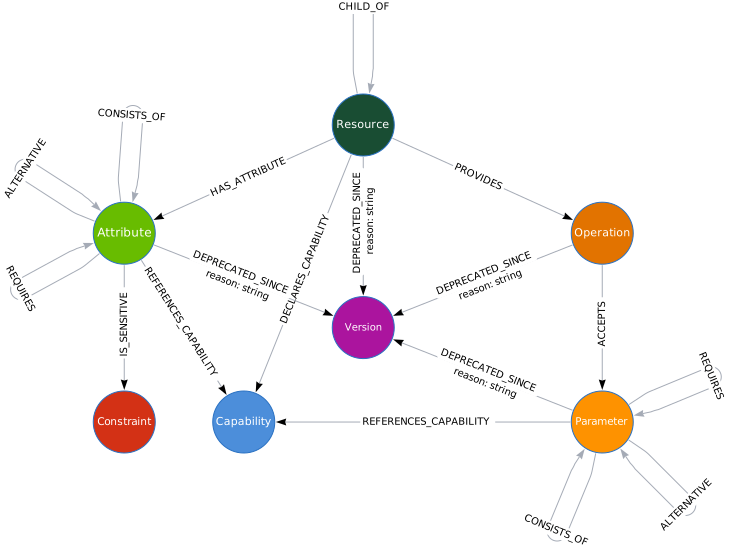
Find all resources in the Undertow subsystem:
MATCH (r:Resource)
WHERE r.address STARTS WITH '/subsystem=undertow'
RETURN r.name, r.address
List all attributes deprecated since WildFly 25.0.0 or earlier:
MATCH (a:Attribute)-[d:DEPRECATED_SINCE]->(v:Version)
WHERE v.ordinal <= (25 * 1048576 + 0 * 1024 + 0)
RETURN a.name, d.reason, v.major, v.minor, v.patch
ORDER BY v.ordinal DESC
Find all capabilities declared in the EJB subsystem:
MATCH (r:Resource)-[:DECLARES_CAPABILITY]->(c:Capability)
WHERE r.address STARTS WITH '/subsystem=ejb3'
RETURN r.address, c.name
Show which attributes reference a specific capability:
MATCH (a:Attribute)-[:REFERENCES_CAPABILITY]->(c:Capability {name: 'org.wildfly.security.security-domain'})
MATCH (r:Resource)-[:HAS_ATTRIBUTE]->(a)
RETURN r.address, a.name
Find resources with sensitive attributes:
MATCH (r:Resource)-[:HAS_ATTRIBUTE]->(a:Attribute)-[:IS_SENSITIVE]->(c:Constraint)
RETURN r.address, a.name, c.name AS constraintThis project is licensed under the Apache License 2.0.