



A local htop-style dashboard for headless AI-agent processes. It groups each
agent's process tree, tracks CPU/RAM/GPU and sustained hot/idle/churn/leak
states, and provides an allowlisted, token-gated stop control.
Per-node only: AUM is not a scheduler or multi-host control plane. It runs on macOS and Linux; per-process GPU memory is currently NVIDIA/Linux only.
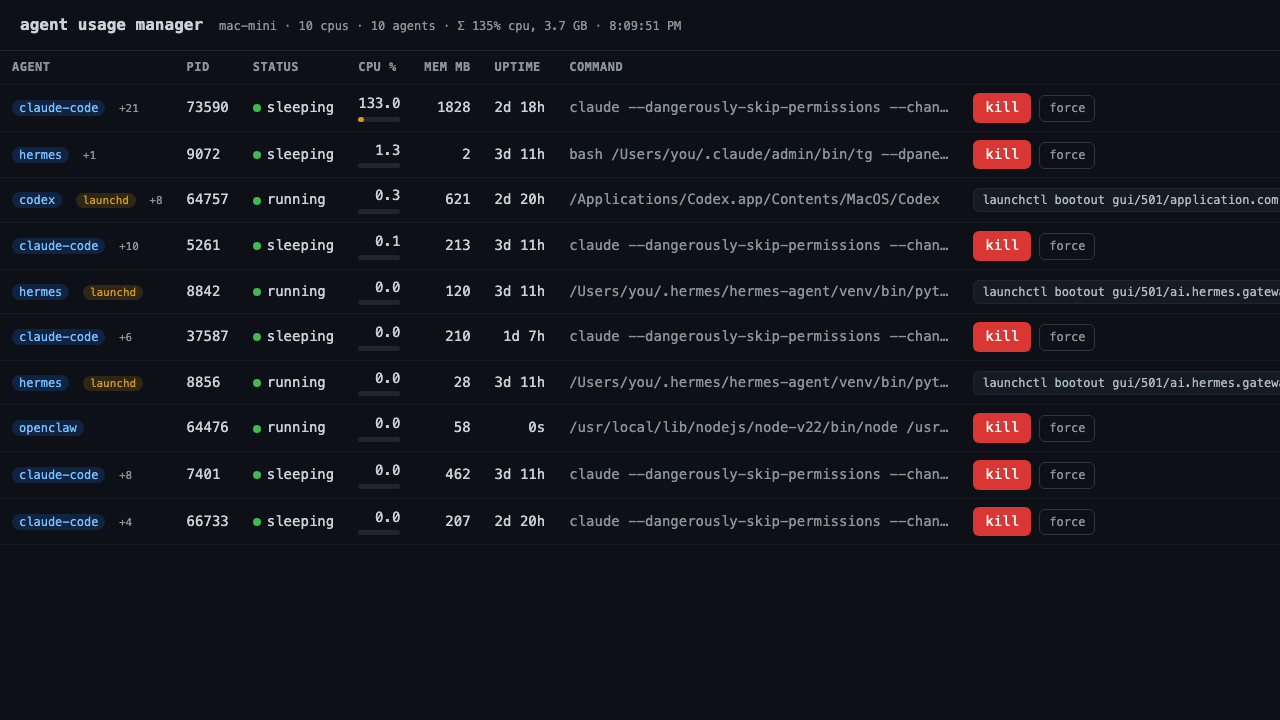
Sanitized capture from a real macOS run. Host, path, and command details are replaced; Apple Silicon does not expose per-process GPU memory.
uvx agent-usage-managerThe dashboard opens at http://127.0.0.1:8765. No database or hosted service is
required. The bundled config recognizes common tools including Claude Code,
Codex, OpenClaw, Hermes, Ollama, vLLM, llama.cpp, Kiro, Aider, and Cline.
Other install options:
pipx install agent-usage-manager
# or, inside a virtual environment:
pip install agent-usage-manager- One row per agent. Child inference processes, MCP servers, and helpers are rolled into the owning agent's row. CPU, memory, and GPU values are tree totals.
- Shows change over time. CPU sparklines and
hot,idle,churn, andleak?states surface sustained problems rather than one noisy sample. - Supports alerts. A state transition can call a local command with
$AUM_*environment variables.agent-usage-manager test-alertproves the path first. - Stops the process tree.
killsends SIGTERM and escalates after three seconds;forcesends SIGKILL. launchd-supervised jobs get the command that actually stops the service. - Exposes read-only telemetry. Use
agent-usage-manager list --json,GET /api/agents, or Prometheus-compatibleGET /metrics. - Keeps the control local. The default bind is
127.0.0.1; there is no account, remote collector, or central coordinator.
AUM complements process and telemetry tools:
htopsees processes, but not ownership of a spawned agent tree or agent states.- Grafana and Prometheus are useful fleet telemetry; AUM can feed them without requiring that stack for a single machine.
- GenAI traces describe sessions, tokens, and cost. AUM covers the host-process side: liveness, resource pressure, restart churn, and local stop control.
Create agents.yaml in the directory where you launch AUM, or pass
--config /path/to/agents.yaml:
agents:
  - label: claude-code
    match: "claude(\\s|$|-code)"
    regex: true
  - label: ollama
    match: ollama

protect:
  - uvicorn

ignore:
  - crashpad
Only matched processes are listed or stoppable. protect: keeps a matched
process visible but disables stopping it; ignore: removes a false match
entirely. Edits hot-reload while the server runs.
Advanced matching, per-instance tmux/launchd labels, alerts, API details, service setup, and troubleshooting are in the operator reference.
A web page that can stop processes needs a narrow boundary:
- The server re-checks the allowlist before every signal. PID 1, AUM itself, and
configured
protect:matches are always refused. - Every stop request requires an
X-Kill-Token. AUM creates the token in a mode-0600state file and never serves it over HTTP. - Browser requests are checked for DNS-rebinding and cross-origin state changes.
- Non-loopback binds fail closed unless
--unsafe-exposeis explicit. - Every stop attempt and refusal is appended to a local action log.
- Common token and key shapes are redacted before command lines reach the UI. Redaction is not a substitute for reviewing screenshots and issue attachments.
- Read-only endpoints still expose process metadata. Keep AUM on a trusted machine or put an authenticated boundary in front of any proxy.
Report vulnerabilities privately through the security policy. Do not open a public issue for a kill-path, authorization, redaction, or package-privacy defect.
| Area | Current boundary |
|---|---|
| Process matching | Heuristic; use ignore: for false positives |
| GPU | Per-process values require nvidia-smi; unavailable on Apple Silicon |
| Supervision | launchd user jobs detected; systemd supervision is not |
| Permissions | AUM can only signal processes accessible to its OS user |
| History | In memory and reset when the server restarts |
| Windows | Untested; CI covers macOS and Linux |
agent-usage-manager                     # dashboard
agent-usage-manager list                # one-shot table
agent-usage-manager list --json         # scriptable snapshot
agent-usage-manager test-alert          # verify configured alert delivery
The HTTP surface is documented in the operator reference. External controllers should consume the read-only endpoints and own their own scheduling or irreversible decisions.
- Operator reference: configuration, alerts, API, services, proxying, and troubleshooting
- Changelog: current release and unreleased changes
- Security policy: supported versions and private reporting
- Contributing: setup, scope, and privacy requirements
- Architecture and implementation design
If AUM misclassifies a process or behaves differently on macOS or Linux, open a bug report with sanitized output. Never attach a live config, token file, or unreviewed process command line.
AUM is a personal open-source project. Maintenance and support are best-effort.
MIT