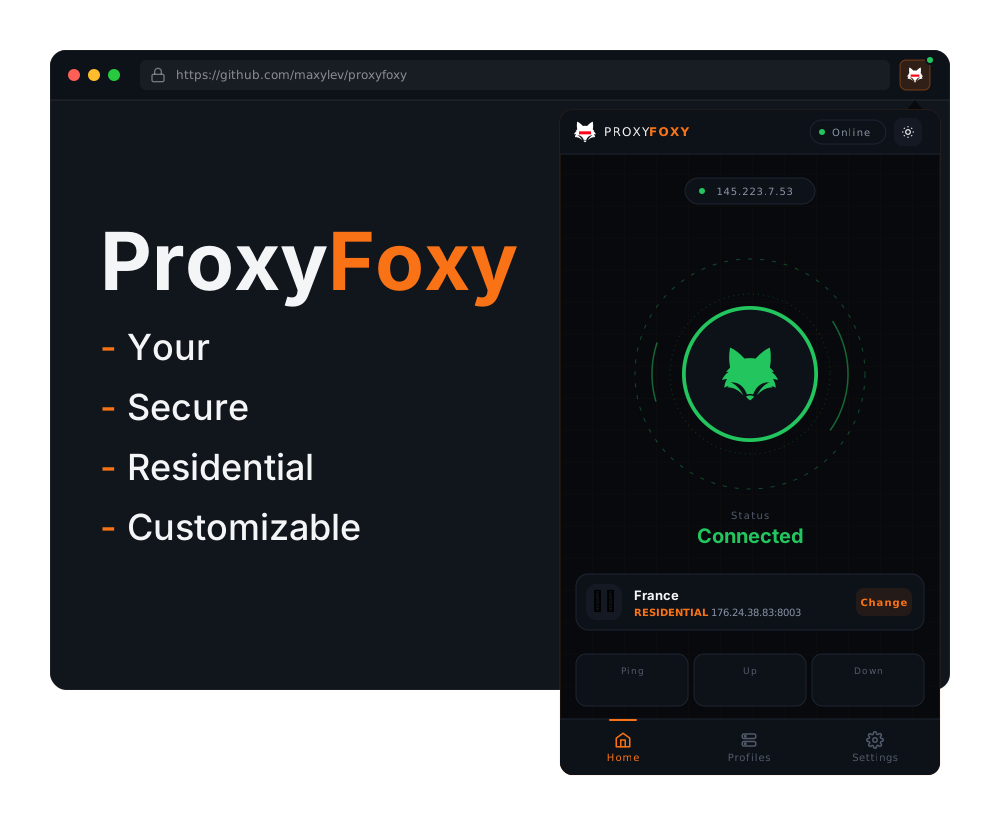


A dependency-free Node.js CLI for VPS proxy management, plus a Chromium browser extension for profile-based proxy routing.
The npm package itself has no JavaScript dependencies. On Linux hosts it installs and configures system tools such as Squid, Dante, MTG, iptables, and the host firewall as needed.
- 4 Protocols Supported Native: HTTP, SOCKS5, MTProto, and Custom Residential.
- Lightweight Analytics: Uses kernel
iptablescounters for system proxies and app-level counters for residential relay traffic. - Create Your Own Residential Network: Link home computers to your VPS and route consumer traffic strictly through designated geographic locations.
- Hot-Reloading: Change passwords and add new proxies without disconnecting currently active users.
- Provider Management: Blacklist, whitelist, and auto-penalize misbehaving residential providers.
- Dual-Protocol Consumers: Residential proxies accept SOCKS5 and HTTP proxy traffic on the same port.
- Instant Output: Formats proxies beautifully into
user:pass@ip:portfor immediate copy-pasting.
Connect to your VPS and run proxyfoxy instantly via npx (Requires Node.js):
npx proxyfoxy add myuser supersecret123 8000🚀 Deploying HTTP Proxy → Port 8000...
✅ Proxy is live.
🌐 Ready to use: myuser:supersecret123@203.0.113.50:8000
You can specify the protocol flag to deploy different proxy architectures natively:
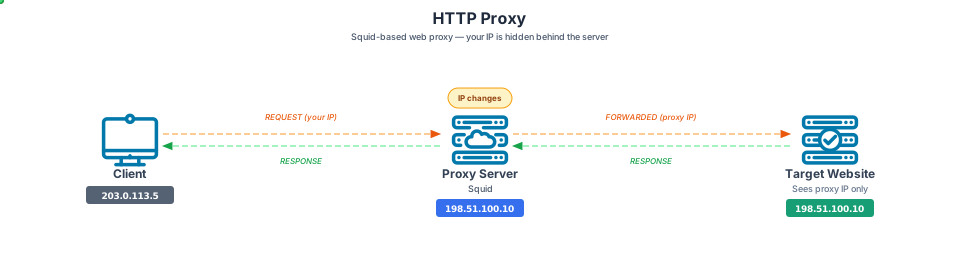
npx proxyfoxy add myuser mypass 8000 http🚀 Deploying HTTP Proxy → Port 8000...
✅ Proxy is live.
🌐 Ready to use: myuser:mypass@203.0.113.50:8000
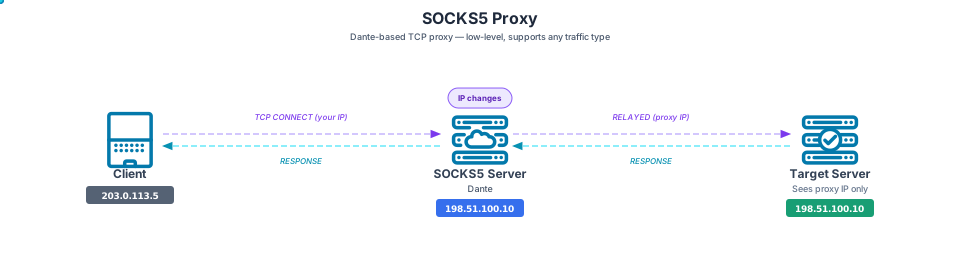
npx proxyfoxy add myuser mypass 8001 socks5🚀 Deploying SOCKS5 Proxy → Port 8001...
✅ Proxy is live.
🌐 Ready to use: myuser:mypass@203.0.113.50:8001
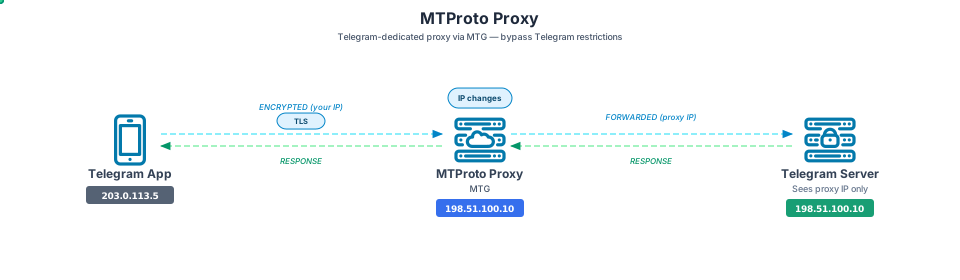
npx proxyfoxy add myuser skip 8002 mtproto🚀 Deploying MTPROTO Proxy → Port 8002...
✅ Proxy is live.
🌐 TG Link: tg://proxy?server=203.0.113.50&port=8002&secret=ee...bHM
npx proxyfoxy add res_user res_pass 8003 residential --country=US --limit=2GB🚀 Deploying RESIDENTIAL Proxy → Port 8003...
✅ Proxy is live.
🌐 Proxy: res_user:res_pass@203.0.113.50:8003
🏠 Provider: npx proxyfoxy provider 203.0.113.50:9000:PROVIDER_TOKEN
🌍 Country: US
📊 Limit: 2 GB
You can specify a required country code (--country=XX), a strict data limit (--limit=XGB), and a custom gateway port (--gateway=PORT, default 9000). If the data limit is hit, connections are instantly severed.
# Custom gateway port (providers connect here instead of 9000)
npx proxyfoxy add res_user res_pass 8003 residential --gateway=5000
# → Provider: npx proxyfoxy provider 203.0.113.50:5000:PROVIDER_TOKEN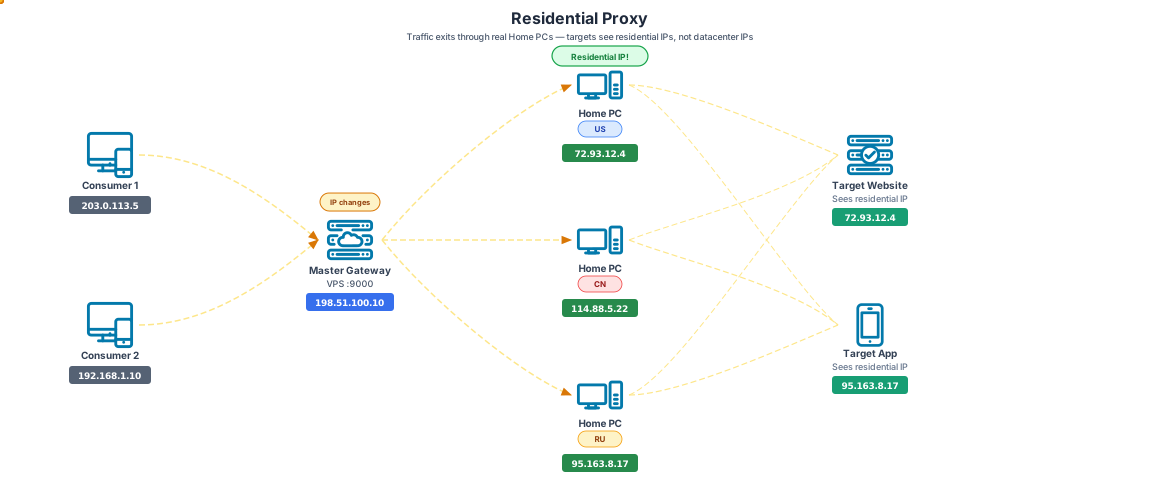
ProxyFoxy allows you to create your own distributed residential proxy pool (similar to BrightData or Honeygain). Home PCs connect to your Master VPS and donate their IPs. Consumers connect to your VPS, which invisibly relays the traffic to the Home PC.
Providers must use the token printed by proxyfoxy add ... residential. ProxyFoxy will auto-detect the Home PC's country using public IP APIs.
npx proxyfoxy provider <VPS_IP>:<GATEWAY_PORT>:<PROVIDER_TOKEN>✅ Connected! Proxying traffic globally...
# Suppress reconnect messages (useful for Docker / PM2 / systemd)
npx proxyfoxy provider < VPS_IP > : < GATEWAY_PORT > : < PROVIDER_TOKEN > --quiet

# Run it in the background / on boot
npm install -g pm2 \
  && pm2 start "npx proxyfoxy provider <VPS_IP>:<GATEWAY_PORT>:<PROVIDER_TOKEN>" --name "proxy-exit-node" --quiet \
  && pm2 startup
Providers that gracefully stop (SIGTERM/SIGINT) are disconnected without penalty. Providers that abruptly disconnect too often (>5 times in 10 minutes) are automatically blacklisted.
Residential proxies accept SOCKS5, HTTP CONNECT, and plain HTTP proxy requests on the same consumer port:
# SOCKS5
curl --socks5-hostname res_user:res_pass@ https://icanhazip.com < VPS_IP > :8003

# HTTP / HTTP CONNECT
curl -x http://res_user:res_pass@ https://icanhazip.com < VPS_IP > :8003
TLS traffic remains encrypted end-to-end between the client and destination. Provider control traffic uses an authenticated TCP channel; do not run untrusted providers unless you understand the metadata and non-TLS traffic risk.
Control which providers can join your network with blacklists and whitelists.
npx proxyfoxy providers                           # List connected / blacklisted providers
npx proxyfoxy providers block <ip> [reason]       # Blacklist a provider IP
npx proxyfoxy providers unblock <ip>              # Remove IP from blacklist
npx proxyfoxy providers whitelist <ip>            # Restrict to only whitelisted IPs
npx proxyfoxy providers unwhitelist <ip>          # Remove IP from whitelist
🏠 Provider Management
══════════════════════════════════════════════════════════
🟢 Connected (2):
└─ 198.51.100.22 [US] — since Apr 28 14:30 UTC
└─ 203.0.113.85 [DE] — since Apr 28 14:32 UTC
🚫 Blacklisted (1):
└─ 192.0.2.66 — suspicious (Apr 28 15:00 UTC)
══════════════════════════════════════════════════════════
npx proxyfoxy list🦊 ProxyFoxy — Active Proxies
══════════════════════════════════════════════════════════
🟢 HTTP → myuser:mypass@203.0.113.50:8000
🟢 SOCKS5 → myuser:mypass@203.0.113.50:8001
🟢 MTPROTO → tg://proxy?server=203.0.113.50&port=8002&secret=ee...bHM
🟢 RESIDENTIAL [US] → res_user:res_pass@203.0.113.50:8003 (15% of 2 GB)
🟡 RESIDENTIAL [DE] → res_user2:res_pass2@203.0.113.50:8004 (85% of 1 GB)
🔴 RESIDENTIAL [US] → res_user3:res_pass3@203.0.113.50:8005 ✖ LIMIT REACHED (500 MB)
══════════════════════════════════════════════════════════
npx proxyfoxy status📊 ProxyFoxy — Status & Analytics
══════════════════════════════════════════════════════════
🛠️ Core Services:
├─ HTTP (Squid): 🟢 RUNNING
├─ SOCKS5 (Dante): 🟢 RUNNING
├─ Master Gateway: 🟢 RUNNING
└─ MTProto :8002 🟢 RUNNING
📈 Traffic by Port:
├─ Port 8000 [HTTP]
│ └─ Data: 1.2 GB IN / 856.4 MB OUT
├─ Port 8001 [SOCKS5]
│ └─ Data: 512.0 KB IN / 256.0 KB OUT
└─ Port 8003 [RESIDENTIAL]
├─ Limit: [████░░░░░░░░░░░░░░░░░] 450.2 MB / 2 GB (22%)
└─ Data: 450.2 MB IN / 312.8 MB OUT
🏠 Residential Provider Pool:
🌍 US: 2 Nodes Active
├─ 198.51.100.22 — 85.3 MB IN / 52.1 MB OUT
├─ 203.0.113.85 — 43.2 MB IN / 32.1 MB OUT
└─ Subtotal: 128.5 MB IN / 84.2 MB OUT
🌍 DE: 1 Node Active
├─ 192.0.2.10 — 42.0 MB IN / 31.2 MB OUT
└─ Subtotal: 42.0 MB IN / 31.2 MB OUT
📊 Total: 3 Nodes — 170.5 MB IN / 115.4 MB OUT
══════════════════════════════════════════════════════════
📊 PROXYFOXY STATUS & ANALYTICS
═════════════════════════════════════════════════════════
🛠️  CORE SERVICES:
   ├─ HTTP (Squid):    🟢 RUNNING
   ├─ SOCKS5 (Dante):  🟢 RUNNING
   ├─ Master Gateway:  🟢 RUNNING
   └─ MTProto :8002    🟢 RUNNING

📈 TRAFFIC BY PORT:
   ├─ Port 8000 [HTTP]
   │  └─ Data: 1.2 GB IN / 856.4 MB OUT
   ├─ Port 8001 [SOCKS5]
   │  └─ Data: 512.0 KB IN / 256.0 KB OUT
   ├─ Port 8003 [RESIDENTIAL] (Limit: 2.00 GB)
   │  └─ Data: 450.2 MB IN / 312.8 MB OUT

🏠 RESIDENTIAL PROVIDER POOL:
   🌍 US: 2 Nodes Active
      ├─ 198.51.100.22 — 85.3 MB IN / 52.1 MB OUT
      ├─ 203.0.113.85 — 43.2 MB IN / 32.1 MB OUT
      └─ Subtotal: 128.5 MB IN / 84.2 MB OUT
   🌍 DE: 1 Node Active
      ├─ 192.0.2.10 — 42.0 MB IN / 31.2 MB OUT
      └─ Subtotal: 42.0 MB IN / 31.2 MB OUT

   📊 Total: 3 Nodes — 170.5 MB IN / 115.4 MB OUT
═════════════════════════════════════════════════════════
npx proxyfoxy change myuser newsecret456✅ Updated 'myuser': password.
Live-updates the password across all protocols for that user without dropping active connections.
For residential proxies, you can also hot-reload the data limit and country filter:
npx proxyfoxy change res_user --limit=5GB
npx proxyfoxy change res_user --country=DE
npx proxyfoxy change res_user newpass --limit=5GB --country=DE
Remove a limit or clear the country filter:
npx proxyfoxy change res_user --limit=0
npx proxyfoxy change res_user --country=npx proxyfoxy delete myuser 8000✅ Deleted http proxy on port 8000.
Deletes the proxy, closes the firewall port, and only removes shared OS/auth users when no remaining proxy still uses them.
npx proxyfoxy stop 8000        # Stop a specific port
npx proxyfoxy start http       # Start all HTTP proxies
npx proxyfoxy stop residential # Stop the master gateway (disconnects all providers)
npx proxyfoxy stop             # Stop everything
✅ Stopped requested services.
Note: stop residential stops the master gateway daemon (all providers disconnect). stop <port> stops a specific consumer proxy but keeps the gateway running (providers stay connected).
npx proxyfoxy uninstall⚠️ Removing ProxyFoxy...
✅ Uninstallation complete. System is clean.
Removes all proxies, databases, firewall rules, and service files.
The extension/ folder contains a Chromium MV3 extension for browser-only proxy profiles.
- Routes browser traffic through HTTP, SOCKS5, residential, include/exclude, or PAC profiles.
- Handles proxy authentication in the background service worker.
- Uses declarative rules for tracker blocking and supported request-header changes.
- Injects lightweight page-level fingerprint masking for navigator, screen, timezone, canvas, audio, WebGL, and selected permission APIs.
- The kill switch avoids direct fallback in generated PAC rules by routing blocked/failing cases to
127.0.0.1:9.
Limitations: browser APIs do not provide full VPN-level protection. The extension does not claim OS-wide WebRTC, DNS-over-HTTPS, cookie container, or notification-leak protection.
If you prefer containers, ProxyFoxy has an optimized Alpine-based Docker image available. Each container runs exactly one proxy — map the port with -p.
docker run -d -p 8000:8000 --name http-proxy ghcr.io/maxylev/proxyfoxy:latest myuser mypass 8000 httpUse: curl -x http://myuser:mypass@<VPS_IP>:8000 https://example.com
docker run -d -p 8001:8001 --name socks-proxy ghcr.io/maxylev/proxyfoxy:latest myuser mypass 8001 socks5Use: curl --socks5-hostname myuser:mypass@<VPS_IP>:8001 https://example.com
docker run -d -p 8002:8002 --name mtproto-proxy ghcr.io/maxylev/proxyfoxy:latest myuser mtpass 8002 mtprotoThe generated tg://proxy?... link appears in the container logs: docker logs mtproto-proxy
Residential mode runs two ports inside one container:
- Gateway port (default 9000) — where Home PC providers connect
- Consumer port (e.g., 8003) — accepts SOCKS5 and HTTP proxy traffic, relays through providers
Both ports must be published. You can pass --country=, --limit=, and --gateway= flags:
# Default gateway (9000)
docker run -d \
  -p 8003:8003 \
  -p 9000:9000 \
  --name residential-proxy \
  ghcr.io/maxylev/proxyfoxy:latest \
  res_user res_pass 8003 residential --country=US --limit=2GB

# Custom gateway port (5000)
docker run -d \
  -p 8003:8003 \
  -p 5000:5000 \
  --name residential-proxy \
  ghcr.io/maxylev/proxyfoxy:latest \
  res_user res_pass 8003 residential --country=US --gateway=5000
Read the provider token from the container logs or /etc/proxyfoxy.json, then on a Home PC, run the provider to donate your IP:
# Use the gateway port from the --gateway flag (or 9000 by default)
npx proxyfoxy provider <VPS_IP>:9000:<PROVIDER_TOKEN>
# SOCKS5
curl --socks5-hostname res_user:res_pass@ https://icanhazip.com < VPS_IP > :8003
# HTTP / HTTP CONNECT
curl -x http://res_user:res_pass@ https://icanhazip.com < VPS_IP > :8003Manage providers from inside the container:
docker exec residential-proxy proxyfoxy providers
docker exec residential-proxy proxyfoxy providers block 1.2.3.4 suspicious
docker exec residential-proxy proxyfoxy providers whitelist 5.6.7.8Install development tooling once:
npm installFormat all project files supported by Prettier:
npm run formatCheck formatting without writing changes:
npm run format:checkThe repository uses Husky + lint-staged. After npm install, staged js, json, md, yml, yaml, css, html, and sh files are automatically formatted before each commit. Large generated directories such as chrome/ are excluded by .prettierignore.
Run the Node sanity tests:
npm testProxyFoxy includes a full Docker-based E2E test suite that validates all protocols, traffic analytics, data limits, password hot-reloading, provider management (blacklist/whitelist/graceful disconnect), and the complete residential relay flow.
npm run test:e2eRun the separate two-container residential simulation:
npm run test:e2e:residentialThe suite spins up a Server container (runs all proxy services) and a Provider container (simulates a Home PC exit node), then runs a comprehensive test battery covering every CLI command and network flow.
This project is licensed under the MIT License.