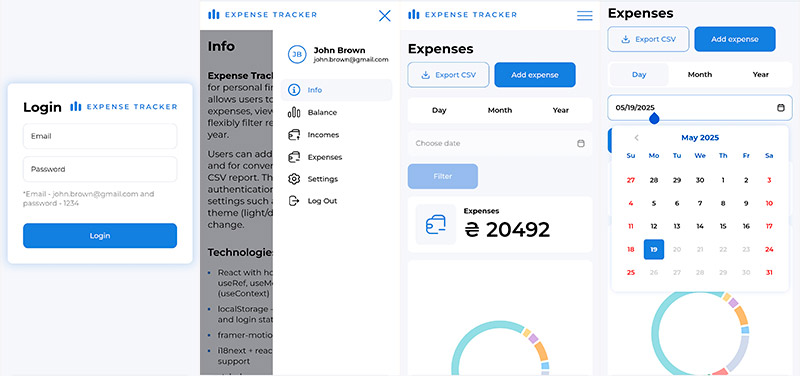
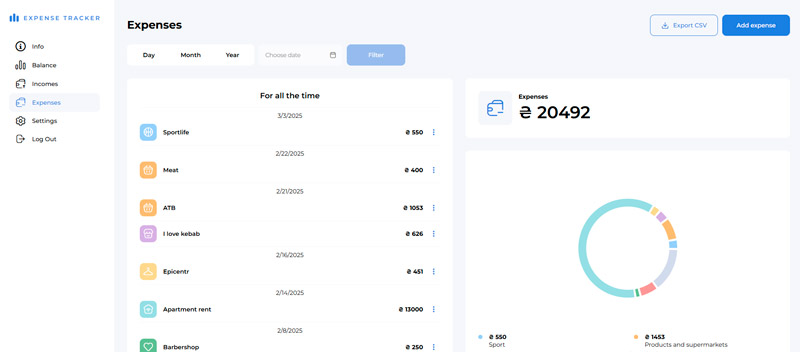
Expense Tracker is a web application for personal financial management. It allows users to easily track incomes and expenses, view overall balance, and flexibly filter records by day, month, or year.
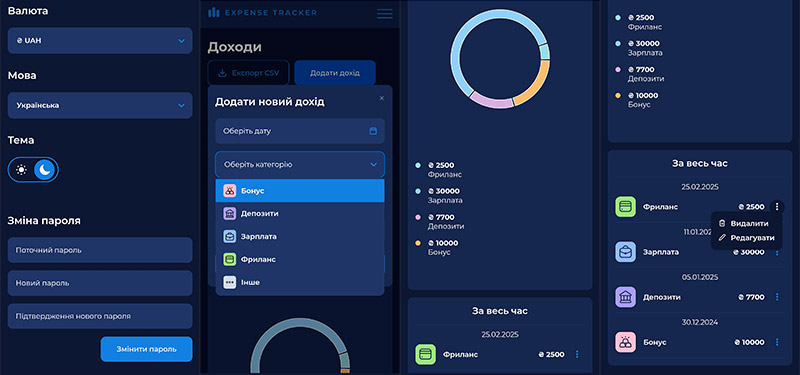
Users can add, edit, and delete records, and for convenience, export them to a CSV report. The app also includes authentication and personalized settings such as language, currency, theme (light/dark mode), and password change.
- React with hooks (useState, useEffect, useRef, useMemo)
- Context API (useContext)
- JavaScript (ES6+)
- HTML5
- CSS3
- Vite
- styled-components (component-level styling)
- prop-types (props validation)
- framer-motion (smooth UI animations)
- uuid (generating unique record IDs)
- i18next + react-i18next (full localization support)
- recharts (visualizing data with charts)
- react-select (custom select)
- react-datepicker (flexible date picker)
Expense Tracker is published on Netlify. You can try the website directly by visiting the link!
To get a local copy of the project running on your computer, follow these steps:
git clone https://github.com/lvog/expenses-tracker.gitcd expenses-trackerEnsure that Node.js is installed on your machine. If you haven't installed it yet, you can download and install Node.js. For stable operation with this build, it's recommended to use v20.17.0.
Once Node.js is installed, run the following command to install the necessary dependencies:
npm installStart the development server with:
npm run devThis will start the server in development mode. You can access the project at http://localhost:3000.
To create a production-ready version of the project, run:
npm run buildDistributed under the MIT License. See LICENSE for more information.
Feel free to contact me via email at levchuk.oleg21@gmail.com. You can also visit my website to see more of my works or LinkedIn.