



Trino query monitoring from the terminal. CLI commands for listing and inspecting queries, a live TUI dashboard, and a progress-tracking library for use in Python scripts.
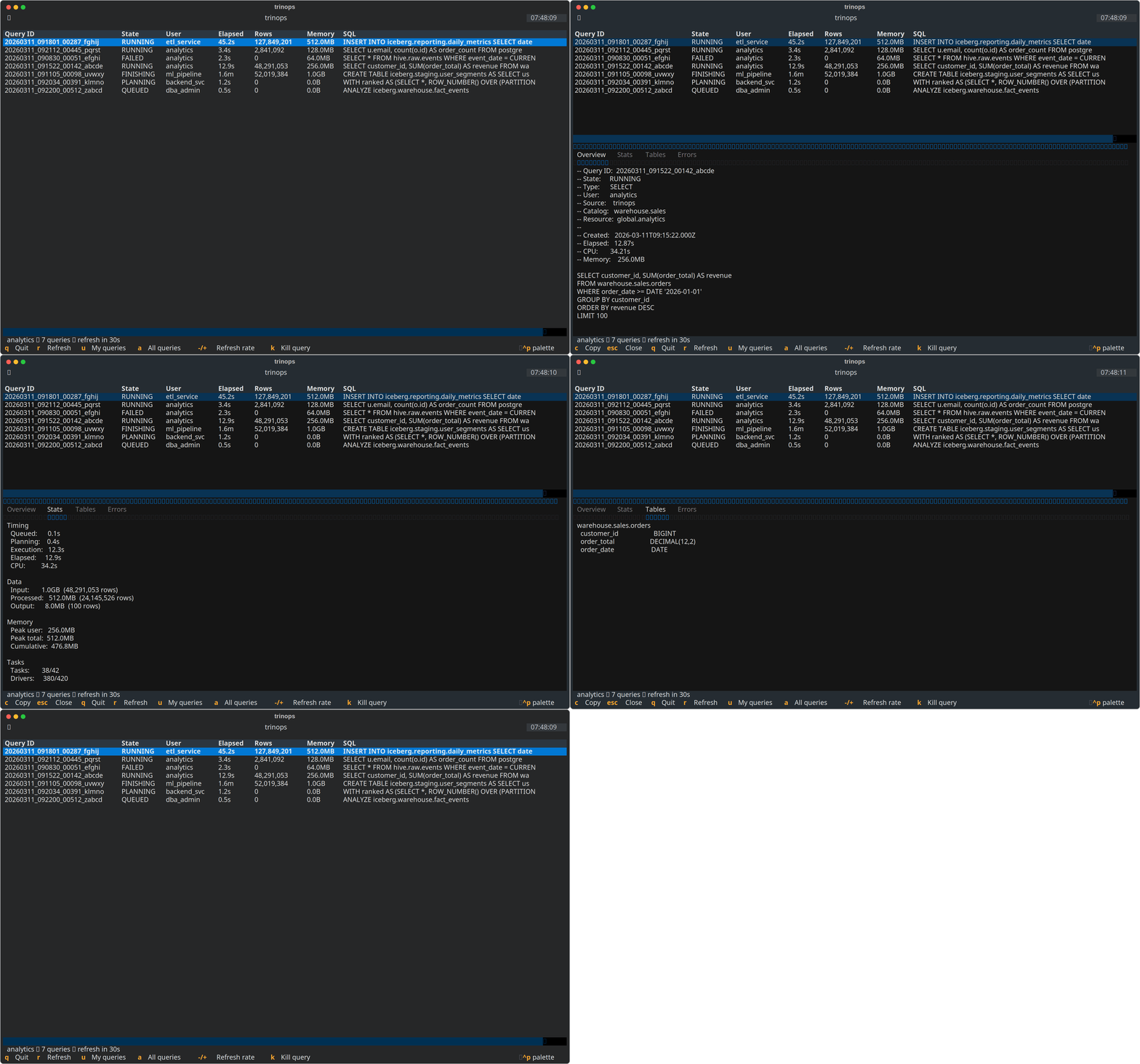
Try it without installing:
uvx trinops topOr install permanently:
pip install trinopsFor tqdm progress bars in library usage:
pip install trinops[tqdm]Point at a cluster and go:
trinops top --server trino.example.com --user myuserOr configure once and skip the flags:
trinops config init --server trino.example.com --user myuser --auth none --yes
trinops top
Environment variables work too:
export TRINOPS_SERVER=trino.example.com
export TRINOPS_USER=myuser
trinops top# Your recent queries
trinops queries
# All users' queries
trinops queries --query-user all
# Filter by state
trinops queries --state RUNNING
# JSON output (pipe to jq, etc.)
trinops queries --json
# Select specific fields
trinops queries --select query_id,state,user,elapsed_time# Rich formatted detail
trinops query <query-id>
# Full REST API response as JSON
trinops query <query-id> --json
# Select specific fields from the raw response
trinops query <query-id> --select queryId,state,queryStats.elapsedTime,queryStats.peakUserMemoryReservationCache catalog metadata locally and search across tables and columns:
# Cache a specific catalog
trinops schema refresh --catalog tpch

# Cache all discoverable catalogs
trinops schema refresh --all

# Search for tables
trinops schema search "lineitem"
trinops schema search "order*"

# Search for columns
trinops schema search --columns "customer_id"

# Browse the hierarchy
trinops schema show              # list catalogs
trinops schema show tpch         # list schemas
trinops schema show tpch.sf1     # list tables

# Show table columns
trinops schema show tpch.sf1.lineitem

# Expand a full tree
trinops schema show tpch --recursive

# Dump everything as JSON
trinops schema show --json
All schema commands support --json output and --profile for multi-cluster setups.
trinops tui
trinops top  # alias
The dashboard shows a live-updating table of queries with sorting, a tabbed detail pane, and configurable refresh interval.
Keybindings:
| Key | Action |
|---|---|
r |
Force refresh |
u |
Toggle user filter |
a |
Show all users |
- / + |
Adjust refresh interval |
Enter |
Open detail pane for selected query |
Escape |
Close detail pane |
k |
Kill selected query (when enabled) |
Tab / Shift+Tab |
Cycle focus between table and detail pane |
q |
Quit |
When the detail pane is open:
| Key | Action |
|---|---|
Up / Down |
Scroll tab content |
Left / Right |
Switch between tabs |
PgUp / PgDn |
Page scroll |
Home / End |
Jump to top/bottom |
c |
Copy current tab content to clipboard |
Click column headers to sort; click again to reverse. Default sort is by Elapsed time, descending.
Config file lives at ~/.config/trinops/config.toml:
[default]
server = "trino.example.com"
scheme = "https"
user = "myuser"
auth = "none"
query_limit = 50

[profiles.prod]
server = "trino-prod.example.com:443"
auth = "oauth2"
Manage config from the CLI:
# Set individual values
trinops config set server trino.example.com
trinops config set user myuser
trinops config set query_limit 100

# Configure a named profile
trinops config set server trino-prod:443 --profile prod
trinops config set auth oauth2 --profile prod

# View current config
trinops config show
trinops config show --profile prodSupported methods: none, basic, jwt, oauth2, kerberos.
# Check auth status
trinops auth status

# Run OAuth2 flow
trinops auth login
For basic auth, use password_cmd to fetch credentials from a secret manager (e.g., pass, 1password-cli) rather than storing passwords in the config file. For oauth2, install keyring to cache tokens across sessions.
Wrap a trino cursor or connection to get live progress display during query execution:
import trino
from trinops import TrinoProgress

conn = trino.dbapi.connect(host="trino.example.com", port=443, user="myuser")
cursor = conn.cursor()

with TrinoProgress(cursor) as tp:
    tp.execute("SELECT * FROM catalog.schema.table")
    rows = tp.fetchall()
You can also monitor an already-running query by passing a connection and query ID:
with TrinoProgress(conn, query_id="20260310_143549_08022_abc") as tp:
    tp.start()
tp.wait()trinops ships with a Claude Code skill that teaches Claude how to query and inspect Trino cluster activity. If you have trinops installed in a project, Claude can use trinops queries --select and trinops query <id> --select to investigate query performance, find long-running queries, and diagnose failures with minimal context usage.
A Claude Code plugin is also included for marketplace discoverability.
Completed:
Kill query support— cancel running queries from CLI and TUI (#1)Enriched TUI detail— tabbed detail view with overview, stats, tables, and errors (#2)Schema cache and search— cache catalog metadata locally, search tables/columns (#3)
Planned:
- Query plan visualization — render the stage tree from the REST API in both CLI and TUI (#5)
- MCP server — Model Context Protocol server for AI assistant integration (#4)
- Multi-cluster support — switch between profiles in the TUI, unified multi-cluster view (#6)
- Notifications and alerts — desktop notifications and webhooks for long-running queries and failures (#7)
- Worker/node health — cluster node monitoring via
/v1/node(#8)
- Python 3.10+
- A running Trino cluster with the REST API accessible