Mathematical Model Simulator — a JavaFX-based application to visualize, simulate, and analyze mathematical models interactively.
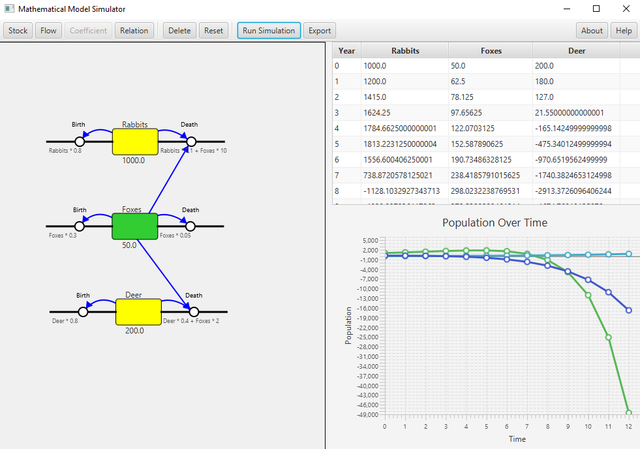
This tool allows users to explore mathematical models, input parameters, and observe the resulting simulations in real time. Key features:
-
Dynamic Elements: Stocks, Flows, Coefficients, Relations
-
Custom Formulas: Define behavior using mathematical expressions
-
Predefined Models: Includes sample models for quick start
-
Real-time Simulation: Table & chart updates as simulation runs
-
Export: Save diagrams as PNG for documentation or assignments
-
Interactive GUI: Drag, rename, edit, and connect elements visually
-
Java 17 (JDK or JRE)
-
Maven
mvn clean installAfter building, run the application from the IDE or via command line:
mvn javafx:runor just execute the generated JAR in the target folder:
java -jar target/simplesimulator-1.0.jarThe current setup exports a fat/uber JAR that includes most dependencies. However, if you still see the error:
JavaFX runtime components are missing, and are required to run this application
this means your system’s Java does not have JavaFX available. In that case, follow these steps:
-
Download JavaFX SDK 17: From Gluon or your preferred source.
-
Unzip it to a folder (for example C:\javafx-sdk-17.0.17).
-
Run the application using the module path:
java --module-path "C:\javafx-sdk-17.0.17\lib" --add-modules javafx.controls,javafx.fxml,javafx.swing -jar target/simplesimulator-1.0.jarThis ensures the JavaFX runtime is available even if it wasn’t bundled in the JAR.
For convenience, an executable version of the application is available, which includes a bundled JRE. This allows you to run the application out of the box without additional setup.
To use the executable, simply rename the file extension from .zi_ to .zip and extract it.