This project was created as part of the 42 curriculum by tpinto-v.
This project implements a function that takes a file descriptor associated with a file or input stream and returns a string containing the next line read from it, including the newline character '\n' when one is found. The goal of this project is not just being more used to file descriptors but also to learn about and make use of a static variable.
A file descriptor is an integer identifier for an open file or another input/output resource. Typically, file descriptors are non-negative integers. In traditional Unix-like systems, file descriptors index into a per-process file descriptor table maintained by the kernel. Each entry in that table points to an entry in the open file table, which ultimately references the underlying file object, such as an inode on Unix-like file systems.

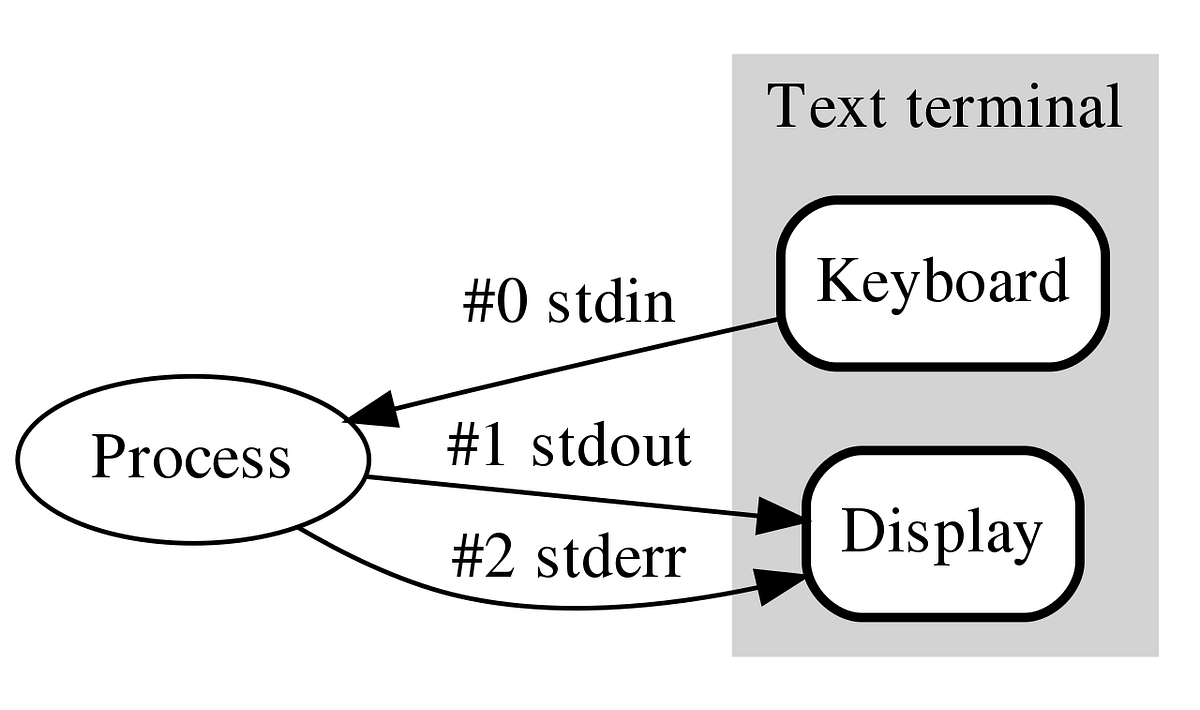
Another important detail: the first three file descriptors are standardized as the standard streams:
| FD | Name | Meaning |
|---|---|---|
| 0 | stdin | Standard input |
| 1 | stdout | Standard output |
| 2 | stderr | Standard error |
The mandatory part is implemented using a static char buffer. Static variables reside in the BSS segment (if zero-initialized) or the data segment (if explicitly initialized), rather than on the stack. This means they persist across function calls — when the function returns, the variable retains its value for the next invocation.
The buffer is declared as follows:
static char buffer[BUFFER_SIZE + 1];BUFFER_SIZE is a macro specified by the user at compile time (see the Instructions section). It controls how many bytes are read into the buffer per iteration inside get_next_line.
char *get_next_line(int fd);The parameter fd is the file descriptor to read from.
At each call, the function first checks whether the buffer already contains data left over from a previous read(). Because buffer has static storage duration, it is initialized to zero before the program starts. Therefore, testing whether buffer[0] == '\0' tells us whether the buffer is currently empty. If data remains, the function checks for a newline; otherwise, it reads more data from the file descriptor.
The internal workhorse is:
char *ft_get_line(int fd, char *buf, char **s)where buf is a pointer to the static buffer and s is a double pointer to the line string, which will hold the returned line. A double pointer is used because the function needs to reassign the pointer itself; passing a single pointer would only modify a local copy.
All helper functions are declared static because they are only used within this source file:
| Function | Description |
|---|---|
static int ft_strlen(char *s, char term) |
Returns the length of s up to term. Falls back to '\0' if term is not found. |
static int ft_findnl(char *s) |
Returns non-zero if s contains a newline '\n'. |
static char *ft_strjoin(char *s1, char *s2) |
Concatenates s2 onto s1, treating '\n' as the end of s2 (or '\0' if no newline is found). The result is heap-allocated via malloc(). s1 is freed via free() before returning, since it was a previous dynamic allocation. Returns the new string. |
static void ft_shift_buffer(char *buf) |
Shifts all characters after the first '\n' to the beginning of buf, then null-terminates the remainder so stale data is not re-read. |
File reading is done with the read() function from <unistd.h>.
When the mandatory version of get_next_line is called with different file descriptors in the same program, the shared static buffer causes them to interfere with each other. This can mix data between files and produce incorrect results.
The bonus version fixes this by storing a separate buffer for each file descriptor. Change the buffer from:
static char buffer[BUFFER_SIZE + 1];to:
static char buffer[FD_MAX + 1][BUFFER_SIZE + 1];FD_MAX = 1024 is commonly used in 42 projects as an upper bound for file descriptors. However, production code should still check that fd is valid before indexing the array. When calling ft_get_line, pass buffer[fd] instead of buffer to isolate each file descriptor's state.
-
Download or clone the project files.
-
In your
.cfile, include the appropriate header:- Mandatory part:
#include "get_next_line.h" - Bonus part:
#include "get_next_line_bonus.h"
If the header is not in your current directory, use a relative path, such as
#include "../path/to/get_next_line.h", or provide the header directory with the-Iflag when compiling. - Mandatory part:
-
Compile (mandatory example):
cc -D FD_MAX=42 BUFFER_SIZE=42 -Wall -Wextra -Werror -I/path/to/header_directory \
    get_next_line_utils.c get_next_line.c your_file.c -o your_program
Replace
42with your desired buffer size/maximum file descriptor and adjust the paths as needed. If you forget to give values to the macros, I let the default value beingBUFFER_SIZE = 1andFD_MAX = 1023. -
Run the executable:
./your_program
- Limit on file descriptors in a file descriptor table
- File descriptor — Wikipedia
- What are file descriptors? (Stack Overflow)
- GeeksforGeeks — tutorials on C and many other computing topics
- CS50x — introductory course covering C and programming fundamentals
- Standard streams — Wikipedia