A standalone FastDL client for Source games that provides fast and reliable content downloads from game server FastDL repositories.



Download the latest release from the Releases page, or download the application directly: FastDLX.exe
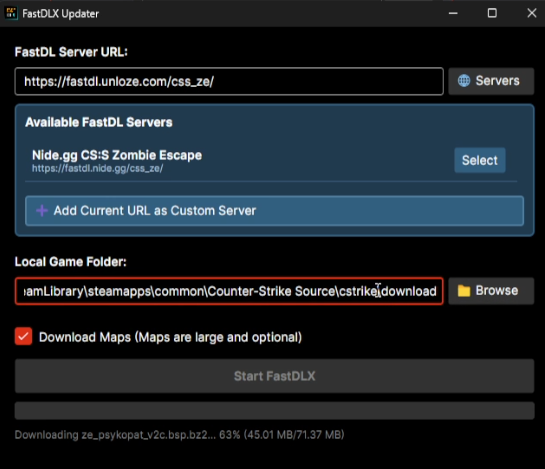
FastDLX is an independent desktop application that allows you to download game content (maps, materials, models, sounds, etc.) directly from FastDL servers without needing to connect to the game server first. This is particularly useful for:
- Pre-downloading content before joining a server
- Resuming interrupted downloads
- Managing content from multiple FastDL servers
- Downloading only what you need (optional map downloads)
✨ Smart Download Management
- Resume interrupted downloads automatically
- Download only missing or outdated files
- Optional map file downloads (saves bandwidth)
🎮 Game Integration
- Automatic Source game directory detection
- Proper file structure preservation
- Compatible with standard FastDL server formats
🌐 Server Management
- Built-in preset servers
- Add and manage custom FastDL servers
- Rename and organize server list
- Quick server selection
📊 Progress Tracking
- Real-time download progress with percentage
- File counting during scan phase
- Detailed status messages
- Logging for troubleshooting
- Only tested on CS:S, need to know if it works well in TF2, GMOD, etc.
- L4D2 has different download method, not sure if i'd work on it.
- Waiting for new suggestions, language support can wait.
- Windows 10 or later (x64)
- .NET 8.0 Runtime (included in portable version)
- Internet connection
Maps are typically very large (10-100+ MB each). If you're on a limited connection or just want to download materials/sounds/models, uncheck the "Download Maps" option before starting.
- .NET 8.0 SDK
- Windows 10 or later
- Visual Studio 2022 or JetBrains Rider (optional)
# Clone the repository
git clone https://github.com/yourusername/FastDLX.git
cd FastDLX

# Run the build script
.\build-release.ps1
The executable will be in bin\Release\net8.0\win-x64\publish\FastDLX.exe
dotnet clean -c Release
dotnet restore
dotnet publish -c Release -r win-x64 --self-contained true ^
  /p:PublishSingleFile=true ^
  /p:IncludeNativeLibrariesForSelfExtract=true ^
/p:EnableCompressionInSingleFile=trueFastDLX/
├── Models/ # Data models (FileEntry, DownloadProgress)
├── Services/ # Core services (FastDL download logic)
├── ViewModels/ # MVVM view models
├── Views/ # Avalonia UI views
├── Assets/ # Application assets
├── .github/ # GitHub Actions workflows
├── build-release.ps1 # Portable build script
├── build-msi.ps1 # MSI installer build script
└── README.md # This file
- Framework: .NET 8.0
- UI: Avalonia UI (Cross-platform XAML-based UI)
- MVVM: CommunityToolkit.Mvvm
- Compression: SharpCompress
- CI/CD: GitHub Actions
- Manually browse to your CS:Source installation
- The path should end with
cstrike\download - Typical location:
C:\Program Files (x86)\Steam\steamapps\common\Counter-Strike Source\cstrike\download
- Limited by the FastDL server's bandwidth
- Bad internet
- Use VPN
- The first scan counts all files on the server
- This is normal and happens once per session
- Update maps only if you use it frequently
Logs are stored in the Logs\ folder next to the executable:
bin\Debug\net8.0\win-x64\Logs\FastDLX_YYYY-MM-DD_HH-MM-SS.txt
Contributions are welcome! Please feel free to submit a Pull Request.
- Fork the repository
- Create your feature branch (
git checkout -b feature/AmazingFeature) - Commit your changes (
git commit -m 'Add some AmazingFeature') - Push to the branch (
git push origin feature/AmazingFeature) - Open a Pull Request
This project is licensed under the MIT License - see the LICENSE file for details.
- Built with Avalonia UI
- Thanks to Chujoy for map only update suggestion (v1.1)
- Thanks to the Counter-Strike: Source community
Note: This is an independent client and is not affiliated with Valve Corporation.