Control Claude Code remotely through Telegram. Built specifically for Claude Code.
Handy to set up, powerful to use, and secure with no open ports. Inherits your Claude Code permission policies as-is, and gives you full control over every project and session on your host -- all from Telegram.
You (Anywhere) <--> RemoteCode (Host) <--> Claude Code (Host)
- Text chat -- Send any message, get Claude Code responses with Markdown formatting
- Image analysis -- Send photos or image documents, optionally with a caption prompt
- Voice messages -- Transcribed locally via whisper-cli (offline, free), then sent to Claude Code
- Session management -- Multiple sessions, switch between them, browse by project
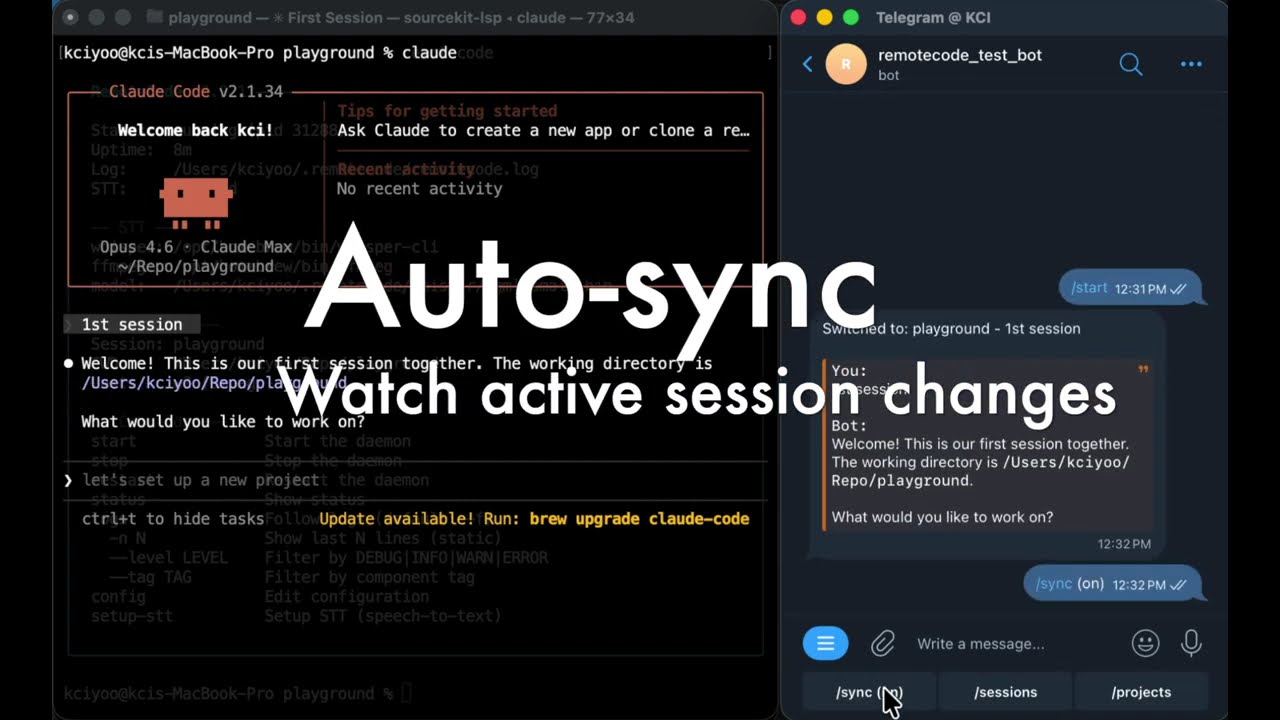
- Auto-sync -- Watch active session files and forward new messages in real-time
- Background daemon -- Runs as a detached process with log rotation
- User access control -- Restrict access by Telegram user ID or username
- Smart permissions -- Follows your host Claude Code
settings.jsonpermission rules automatically. When a tool needs approval, you get the same Allow / Deny buttons on Telegram -- with per-tool "allow for session" so you don't have to tap the same thing twice - Session takeover -- Kicked off a task in the terminal and stepped away? If Claude is stuck waiting for permission or asking a question, open Telegram and pick up right where it stopped. You'll see exactly what it needs, tap to respond, and Claude keeps going
- Cross-session scanner -- Running multiple sessions? RemoteCode watches all of them in the background. If any session is waiting for your input, you get a notification -- even if it's not the one you're currently looking at
| Platform | Status | Notes |
|---|---|---|
| macOS | Supported | Homebrew for STT dependencies |
| Linux | Supported | STT currently not supported |
| Windows | Not tested |
- macOS or Linux
- Node.js >= 18
- Claude Code CLI installed and authenticated (
claudecommand available) - Telegram Bot Token -- create a bot via @BotFather on Telegram (send
/newbot, follow the prompts, copy the token). See Telegram's official guide for details
npm install -g @kcisoul/remotecodeOr from source:
git clone https://github.com/kcisoul/remotecode.git
cd remotecode
npm install && npm run build
npm linkremotecodeThe interactive setup wizard will prompt for:
- TELEGRAM_BOT_TOKEN -- validated against Telegram API
- REMOTECODE_ALLOWED_USERS -- comma-separated user IDs or @usernames
- REMOTECODE_YOLO --
Yenables autonomous mode (Claude Code runs without permission prompts). SetNto get Allow / Deny / Allow all prompts via Telegram inline buttons for each tool action - STT setup -- optional offline voice transcription. Installs
whisper-cliandffmpegvia your system's package manager, and downloads a local Whisper model (~466 MB). Runs entirely on your machine -- no API calls, completely free
Config is saved to ~/.remotecode/config.
sequenceDiagram
    participant U as 📱 Telegram
    participant T as ☁️ Telegram API
    participant D as ⚙️ RemoteCode
    participant C as 🤖 Claude Code

    U->>T: Send message
    T->>D: Long polling (getUpdates)
    D->>D: Auth check & route

    alt Text message
        D->>C: SDK query (prompt)
    else Image
        D->>T: Download file
        D->>C: SDK query (prompt + image path)
    else Voice
        D->>T: Download audio
        D->>D: ffmpeg → whisper-cli transcription
        D->>C: SDK query (transcription)
    end

    C-->>D: Streaming response
    D->>D: Markdown → Telegram HTML
    D->>T: sendMessage (HTML)
    T-->>U: Formatted response
| Command | Description |
|---|---|
remotecode |
Start daemon (or show status if already running) |
remotecode start |
Start the background daemon |
remotecode stop |
Stop the daemon |
remotecode restart |
Restart the daemon |
remotecode status |
Show daemon status, active session, uptime |
remotecode logs |
Follow logs in real-time (default) |
remotecode logs -n 50 |
Show last 50 log lines (static) |
remotecode logs --level ERROR |
Filter by log level (DEBUG/INFO/WARN/ERROR) |
remotecode logs --tag claude |
Filter by component tag |
remotecode config |
Edit configuration (auto-restarts daemon) |
remotecode setup-stt |
Install whisper-cli, ffmpeg, and download model |
| Flag | Description |
|---|---|
-v, --verbose |
Enable verbose (DEBUG) logging |
Send these as messages in your Telegram chat with the bot:
| Command | Description |
|---|---|
/start, /help |
Welcome message with quick action buttons |
/sessions |
Browse and switch between recent sessions |
/projects |
Browse sessions grouped by project directory |
/new |
Start a new Claude Code session |
/history |
Show conversation history of current session |
/cancel |
Cancel the current task |
/resume |
List sessions in the current project |
/model |
Switch Claude model (Sonnet / Opus / Haiku) |
/sync |
Toggle auto-sync notifications on/off |
/<skill> |
Invoke any Claude Code skill (auto-discovered) |
Any /command not recognized as a built-in bot command is automatically forwarded to Claude Code as a skill invocation. RemoteCode discovers skills from:
~/.claude/skills/*/SKILL.md-- standalone skills installed in the skills directory- Enabled plugins -- skills bundled with plugins listed in
~/.claude/settings.jsonunderenabledPlugins
Discovered skills are registered as Telegram bot commands on startup, so they appear in Telegram's / command menu alongside built-in commands.
Example:
/last30days AI video tools      → Invokes the last30days skill with "AI video tools"
/mem_search auth implementation → Searches claude-mem memory for "auth implementation"
When invoked, the skill's SKILL.md content is loaded and injected into the prompt as context, so Claude follows the skill's instructions. If no matching skill file is found, the command is forwarded as a generic skill invocation request.
After /sessions or /projects, interactive inline keyboards let you:
- Switch to any session with one tap (old task continues silently in background)
- Create new sessions (globally or per-project)
- Delete sessions
- Navigate between project views
When YOLO mode is off, Claude Code tool actions trigger an inline keyboard:
- Allow -- permit this single action
- Deny -- reject and interrupt the task
- Allow for session -- auto-allow this specific tool for the rest of the session
- Allow all -- auto-allow all actions for the rest of this session (resets on session switch)
Permission rules from your host Claude Code settings.json are respected automatically. If you've already configured tool permissions locally, RemoteCode follows the same rules.
Send any text message. If it's not a /command, it's forwarded to Claude Code as a prompt. Responses are rendered as Telegram HTML with code blocks, bold, italic, and more.
Send a photo or image document (PNG, JPG, etc.). The bot downloads the image, saves it to a temp directory, and includes the file path in the Claude Code prompt. Add a caption to provide context.
Send a voice message or audio file. The bot:
- Downloads the audio file
- Converts to WAV via
ffmpeg - Transcribes via
whisper-cli(local, offline) - Sends the transcription as a prompt to Claude Code
- Returns both your transcription and Claude's response in a blockquote
Requires STT setup:
remotecode setup-stt
RemoteCode discovers sessions from ~/.claude/projects/*/ by scanning .jsonl files. Each session maps to a Claude Code conversation.
- Active session is stored in
~/.remotecode/local - Session CWD determines which directory Claude Code runs in
- Sessions are auto-created on first message if none exists
- Switching sessions while a task is running keeps the old task working silently in the background -- only the active session's messages are shown. Use
/cancelto stop a task
When enabled (/sync), RemoteCode watches the active session's .jsonl file and forwards new messages from Claude Code in real-time. This means if you use Claude Code on your host machine, you'll see the conversation in Telegram too.
The watcher polls for session changes every 3 seconds and uses fs.watch for file-level changes with 500ms debouncing.
~/.remotecode/config -- simple key=value format:
TELEGRAM_BOT_TOKEN=123456:ABC-DEF
REMOTECODE_ALLOWED_USERS=12345678,@username
REMOTECODE_YOLO=true| Variable | Required | Description |
|---|---|---|
TELEGRAM_BOT_TOKEN |
Yes | Bot token from @BotFather |
REMOTECODE_ALLOWED_USERS |
Yes | Comma/space-separated user IDs or @usernames |
REMOTECODE_YOLO |
No | true to auto-approve all tool actions. false to get Allow / Deny / Allow all prompts via Telegram |
REMOTECODE_VERBOSE |
No | true to enable DEBUG-level logging |
RemoteCode uses whisper.cpp for local, offline speech-to-text.
remotecode setup-sttThis auto-detects your package manager and installs:
- whisper-cpp -- C++ inference engine for Whisper
- ffmpeg -- audio format conversion
- ggml-small.bin -- Whisper small model (~466 MB, downloaded from HuggingFace)
Supported package managers: Homebrew (macOS/Linux), apt (Ubuntu/Debian), dnf (Fedora/RHEL), yum (CentOS), pacman (Arch), apk (Alpine).
- Audio downloaded from Telegram (
.ogaformat) - Converted to 16kHz mono WAV via
ffmpeg - Transcribed via
whisper-cli -m ggml-small.bin -l auto - Blank audio detection filters out silence/noise
- Transcription sent to Claude Code as a regular prompt
- User allowlist -- Only configured user IDs and usernames can interact
- Repeat block -- Unauthorized users are warned once, then silently blocked
- No webhook -- Uses long polling, no public endpoints needed
- Local STT -- Voice transcription runs entirely offline via whisper.cpp
- YOLO mode -- Enables autonomous mode where all tool actions are auto-approved. When off, each action shows Allow / Deny / Allow all buttons in Telegram. "Allow all" grants session-level auto-approval that resets on session switch
# Run in development mode
npm run dev

# Build TypeScript
npm run build

# Run tests
npm test

# Watch tests
npm run test:watch