
This is a fork of kanflo/opendps with firmware improvements and an accompanying ESPHome component that replaces the original ESP8266 proxy with a modern ESP32-based integration.
A huge, heartfelt thank you to the people without whom this project would not exist in its current form:
Johan Kanflo (kanflo) — for creating OpenDPS in the first place. Reverse-engineering the DPS5005, writing a clean open-source firmware replacement, and maintaining it for years is no small feat. This fork stands entirely on his shoulders.
Mallow (Discord) — for invaluable help with the LVGL UI configuration and for creating the custom LVGL 9.5 component that overrides ESPHome's bundled LVGL version, enabling LVGL 9.5 features on ESP32-P4. Without that work the display integration simply would not have been possible.
OpenDPS is awesome — so why not make the most of it? This fork pairs OpenDPS with a co-host ESP32 device to bring all of its functions together on a nice big display, with full network integration, datalogging, firmware management and plenty of room to extend further. Flash both devices once, and everything is there.
For the best experience, a display-equipped ESP32-P4 tablet (such as the Guition JC1060P470_I_W_Y) is recommended — but the ESPHome component works on any ESP32, including headless setups integrated into Home Assistant.
Follow the original project's flashing guide (Wiki or the upstream blog post) to unlock and flash your DPS device.
Recommended: use the firmware from this fork — it includes baud rate switching, improved ADC accuracy and calibration fixes (see Our additions below). Build and flash with:
git clone --recursive https://github.com/p1ngb4ck/opendps.git
cd opendps
make -C libopencm3
make -C dpsboot flash   # only needed for a fresh device or to update the bootloader
make -C opendps flash
Already running upstream OpenDPS? That's fine — the ESPHome component is backwards compatible with any OpenDPS version that has a working bootloader. You can always upgrade the main firmware later directly from the ESPHome device UI (no PC, no JTAG required), as long as the original dpsboot bootloader is intact.
Note: Reflashing the bootloader (
dpsboot) requires JTAG/SWD access. The main application firmware can be upgraded over UART by the ESPHome device at any time.
Install ESPHome if you haven't already, then compile and flash using our config:
# Install ESPHome (if needed)
pip install esphome

# Compile and flash (USB connected)
esphome run esphome-config/esphome_config_opendps_JC1060P470_I_W_Y.yaml
Or use the ESPHome web installer / ESPHome dashboard if you prefer a GUI.
The config uses external_components to pull the opendps component from this project's companion ESPHome repository — no manual component installation needed.
Wire the DPS serial interface to your ESP32:
| DPS pin | ESP32 pin |
|---|---|
| TX | RX (see config) |
| RX | TX (see config) |
| GND | GND |
Exact GPIO assignments are defined in the ESPHome config file. Logic level is 3.3V on the ESP32 side — check your DPS model's serial voltage before connecting.
The provided config targets the Guition JC1060P470_I_W_Y (ESP32-P4, 10.6" MIPI DSI display, IP101 Ethernet). If you use a different device:
- Another ESP32-P4 tablet with display: adjust display, touch and pin assignments in the YAML. Be aware that the UI currently has hardcoded sizes and positions throughout the LVGL config, so it will require manual layout adjustments to fit a different display resolution. Displays of 1024×600 or larger (e.g. 10.1") are the intended target — see the ToDo section for planned auto-sizing support.
- Any other ESP32 (no display): strip out the
display,lvglandtouchscreensections and keep only theopendpscomponent with your sensors and automations. All control and monitoring works headlessly via Home Assistant or MQTT.
The opendps ESPHome component itself has no display dependency — the UI is purely additive.
Features planned for future implementation (not yet available):
- UI auto-sizing — refactor the LVGL config to derive all sizes and positions from the configured display resolution, so any display of 1024×600 or larger works without manual layout adjustments
- BLE remote / keyboard support — control the DPS via Bluetooth keyboard or remote
- USB-HID support — use a USB keyboard or gamepad connected to the ESP32 for local control
- Minor UI fixes — ongoing polish of the LVGL interface
- Configurable UART baud rate — runtime baud rate switching; default changed to 115200 for faster host communication (
b92f6de,31a1114) - ADC oversampling — averages 420 ADC samples per reading (~50 Hz update rate, ~21 kHz ADC rate) for significantly smoother voltage/current readings (
cdf97dd) - Current noise floor clamp — output current is clamped to zero below the 10 mA noise floor, eliminating false micro-amp readings at idle (
dc26352) - ADC calibration fixes — corrected
ADC_CHA_IOUT_GOLDEN_VALUEfor the DPS5005 and fixed double-offset bug in current averaging (963fe78,bca649f,1f3b9ab) - Vin display — input voltage now shown with 2 decimal places (
1f3b9ab) - Splash screen disabled — faster boot (
b92f6de) - dpsctl
--set-baud/--upgrade-baud— CLI support for baud rate management and baud-rate-aware firmware upgrades (b76bc6f) - dpsboot LTO + size trim — link-time optimisation enabled in the bootloader;
hw_set_baudrate_boottrimmed to fit in the 5 KB flash budget (4a9a172) - Status response fix — corrected status response code handling (
e53fd42)
The original project used a separate ESP8266 as a Wi-Fi proxy. This fork adds a native ESPHome component (opendps) that talks directly to the DPS over UART from any ESP32, replacing the proxy entirely.
Features:
- Real-time V_in, V_out, I_out, power and temperature sensors
- Output enable/disable, voltage/current set, function selection, lock, brightness
- OTA firmware upgrade of the DPS from USB, SD, LittleFS or network storage (NFS/SMB/FTP) — directly from the device, no PC needed
- High-speed datalogger with PSRAM-backed triple-buffering (CSV or binary output)
- Full Home Assistant integration via native API or MQTT
- Ethernet support (e.g. IP101) for wired connectivity
The component lives in the p1ngb4ck/esphome repository under esphome/components/opendps/. See its README for full documentation, configuration schema and examples.
A complete, ready-to-use ESPHome configuration for the Guition JC1060P470_I_W_Y is provided in esphome-config/esphome_config_opendps_JC1060P470_I_W_Y.yaml.
Target hardware:
- SoC: ESP32-P4 @ 400 MHz
- Display: 10.6" MIPI DSI, 1024×600, model JC1060P470
- Touch: GT911 (I2C)
- Flash: 16 MB
- PSRAM: Octal, 200 MHz
- Ethernet: IP101
What the config provides:
- Full LVGL UI with main control screen (voltage, current, power, Vin, temperatures, output toggle)
- Settings page with network config, calibration editor, OTA firmware upgrade browser (USB/SD), and system info
- Datalogger integration with start/stop from the UI
- Calibration read/write with per-field numpad editing
- Ethernet connectivity (no Wi-Fi dependency)
This config is the reference implementation and is actively running on real hardware.
Screenshots and photos coming soon.
The OpenDPS firmware (and by extension this ESPHome integration) supports the following operating modes on compatible DPS devices:
| Function | Description |
|---|---|
cv |
Constant Voltage — hold output voltage at setpoint, current limited |
cc |
Constant Current — hold output current at setpoint, voltage limited |
cp |
Constant Power — hold output power at setpoint (model dependent) |
Supported devices: DPS3003, DPS3005, DPS5005, DPS5015, DPS5020, DP50V5A and variants. Hardware revisions may vary — see the upstream project for compatibility notes.
Monitored values (all modes):
- V_in — input voltage
- V_out — output voltage
- I_out — output current
- Power — calculated output power (V_out × I_out)
- Temperature 1 & 2 — internal sensors
Control:
- Enable / disable output
- Set voltage setpoint
- Set current limit
- Switch operating function
- Lock / unlock front panel
- Adjust display brightness
- Upgrade DPS firmware over UART (from ESP32, no PC required)
- Calibrate ADC/DAC coefficients
OpenDPS is a FOSS firmware replacement for the DPS5005 (and DPS3003, DPS3005, DPS5015, DP50V5A, DPS5020 and possibly others) that has the same functionality, has a less cluttered user interface and is remote controllable via WiFi (ESP8266) or via a serial port.
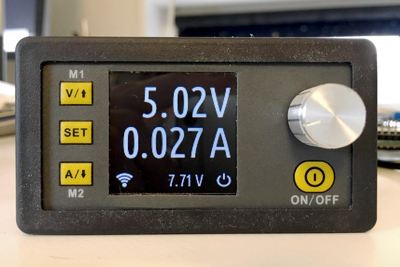
There are three accompanying blog posts you might find of interest:
- Part one covers the reverse engineering of the DPS5005.
- Part two describes the design of OpenDPS.
- Part three covers the process of upgrading stock DPS5005:s to OpenDPS.
git clone --recursive https://github.com/kanflo/opendps.git
cd opendps
make -C libopencm3
make -C opendps flash
make -C dpsboot flash
Check the blog for instructions on how to unlock and flash your DPS5005.
The script runs with python2 and python3. The libraries pycrc and pyserial are required:
pip install -r requirements.txt
A vanilla OpenDPS device will support two functions, constant voltage (cv) and constant current (cc). A tool called dpsctl.py can be used to talk to an OpenDPS device to query functionality and supported parameters for each function.
Once upgraded and connected to an ESP8266, type the following at the terminal to find its IP address:
% dpsctl.py --scan
172.16.3.203
1 OpenDPS device found
Enable constant voltage (cv) at 3.3V limited to 500mA:
% dpsctl.py -d 172.16.3.203 -f cv
Changed function.

% dpsctl.py -d 172.16.3.203 -p voltage=3300 current=500
voltage: ok
current: ok

% dpsctl.py -d 172.16.3.203 -o on
Query the status of the device:
% dpsctl.py -d 172.16.3.203 -q
Func       : cv (on)
  current  : 500
  voltage  : 3300
V_in       : 12.35 V
V_out      : 3.33 V
I_out      : 0.152 A
OpenDPS comes with a bootloader enabling firmware upgrade over UART — no JTAG needed for the application firmware:
% make -C opendps bin
% dpsctl.py -d /dev/ttyUSB0 -U opendps/opendps.bin
With this fork's ESPHome integration, firmware upgrades can be triggered directly from the ESP32 device UI or via Home Assistant — no PC or dpsctl.py required.
If you accidentally upgrade to a broken version, the bootloader can be forced into upgrade mode by holding the SEL button while powering on.
dpsboot/— The OpenDPS bootloaderopendps/— The OpenDPS firmwareesp8266-proxy/— The original ESP8266 Wi-Fi proxy firmware (superseded by the ESPHome component in this fork)dpsctl/— Python script for controlling OpenDPS via Wi-Fi or serialemu/— Xcode project and GNU makefile for running an emulated OpenDPSesphome-config/— Ready-to-use ESPHome configurations for supported devices
OpenDPS has been verified to work with other models in the DPSx0xx series, such as the DPS3003, DPS3005, DPS5015 and DPS5020. The maximum settable output current can be defined when building opendps, see the makefile. Please note that the hardware design might change at any time without any notice (I am not affiliated with its designer). This will render OpenDPS unusable until fixed.
Licensed under the MIT license. Have fun!