
Sprite and palette editor for the IMG container files used by 1990s Midway arcade games — Mortal Kombat II/3, NBA Jam, NBA Hangtime, and others. Loads, edits, and saves .IMG libraries plus their LBM, TGA, and PNG siblings, preserving proprietary point-table and animation data from the original tools.
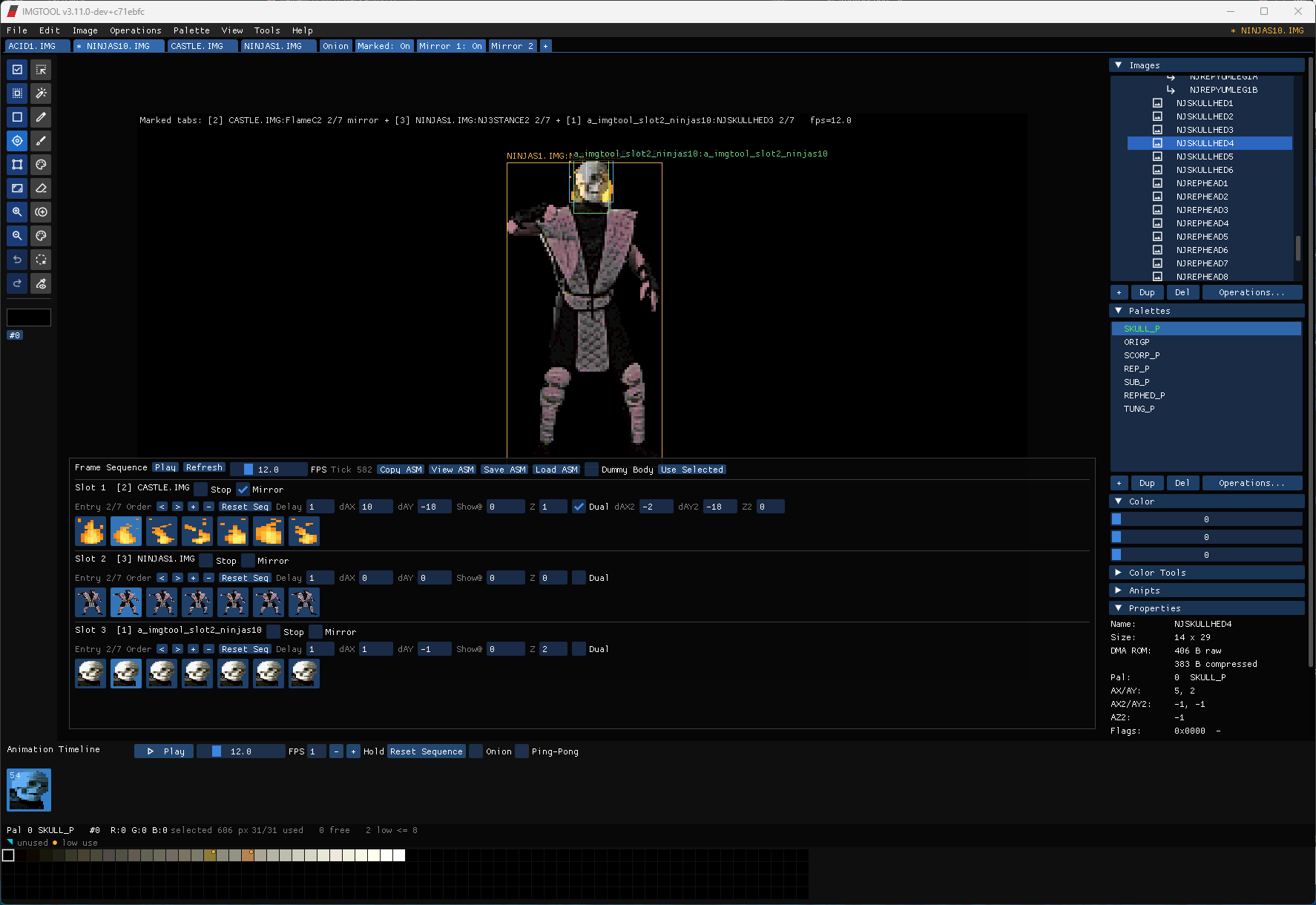
Status: pure C/C++ port. Originally a 1992 DOS tool with ~34,000 lines of x86 assembly — now fully rewritten in C++ with SDL2 + Dear ImGui. No assembler, no DOSBox, no virtualization. Runs on Windows (x64/x86), Linux (x64), and macOS (Intel + Apple Silicon).
Imgtool is a sprite-sheet editor for Midway's IMG format. Open a file, browse hundreds of frames, edit pixels and palettes, then save back out — bit-identical to what the original 1992 tool produced.
- Pixel tools — pencil, eyedropper, flood fill, marquee, lasso, magic wand, clone stamp, smart eraser, smart remap, auto-sprite chopper
- Floating paste with Free Transform — Ctrl+V drops a floating selection that auto-enters scale mode; drag handles to resize (aspect-locked by default, chain icon unlocks), Enter commits
- Adobe-standard shortcuts — Ctrl+A select all, Ctrl+D deselect, Ctrl+Shift+I invert, Ctrl+J duplicate, Ctrl+E merge down, Ctrl+T free transform
- Snap + center guides — drag-to-move snaps to edges of the underlying content (Shift held) and shows live magenta guides when paste centers on the sprite's axis
- 32-level undo / redo for pixel + animation point + hitbox edits
- 256-color palettes with 15-bit RGB editing
- HSL sliders — hue / saturation / lightness with live preview, scoped to selected swatches or whole palette
- Locate-on-canvas highlight — multi-select swatches (Ctrl/Shift-click) and every pixel that isn't one of the selected colors dims on the canvas, so you can see where a color lives at a glance
- Cross-file palette clipboard — copy a palette from one IMG, paste it after opening another
- Tools — merge marked, delete unused colors, histogram, duplicate, rename, palette match for PNG import
- Animation points — primary (X/Y) and secondary (X/Y/Z) anchors per sprite, rendered as DOS-style crosshairs, draggable on the canvas
- Onion-skin registration — when onion mode is on, the previous frame's anipoint shows as a dim gray crosshair underneath the active one, matching the original DOS tool
- Hitbox editor — drag-to-resize collision boxes with overlay rendering
- Timeline strip — Play/Stop, scrubbable thumbnails, drag-to-reorder, FPS slider, ping-pong playback, onion-skin ghosting
- World View — fixed playfield canvas (default 400×254) with sprite anchored at its anipoint, for aligning body parts across frames
- Direct
MKSTK.ASMeditor (Tools → MK2 Hitboxes) — parses the Mortal Kombat 2 source-of-truth strike-table file and edits in place. Nostk.binround-trip required; saves write back through the same.ASMline buffer, preserving comments, indentation, and symbolic literals likesf_squeeze. - 3-pane navigator — character → move → fields. Each strike record exposes
x_offset/y_offset/x_size/y_size,strike_routine(raw token),damage(split into hit / block bytes),score(32-bit), andsound. - Magenta on-canvas overlay — the selected move's collision box renders on the active MK2 sprite with drag-to-resize corner handles; coordinates flow straight back into the
.ASM. The IMG-embedded hitbox overlay suppresses itself while an MK2 move is selected. - Per-record undo + unsaved-changes guard on quit (separate from the IMG dirty flow).
- TGA, LBM, PNG load and save. PNG import quantizes via median-cut in 15-bit RGB space, then maps every pixel by nearest color. Import-into-active-palette mode skips quantization.
- GIF import loads one frame or every frame, with blend mode and opacity controls before quantizing to an IMG palette.
- Palette import/export supports raw Midway
.PALdata and Adobe.ACTRGB palettes. - Build TGA from marked sprites, Export PNG, ANILST (assembly animation lists)
- TBL export — MK3-format with hardware padding (
/P), 16-bit align (/L), dual-bank (/E) - IRW export — raw binary ROM layouts with dynamic BPP (
/B) - LOD parser — read
.lodmanifests, resolve viaIMGDIRor override (/O)
Builds include the normal GUI executable plus imgtool-cli, a console-friendly
headless entry point for scripts and CI. The GUI executable also accepts the
same headless commands, but imgtool-cli gives normal stdout/stderr behavior
on Windows.
imgtool-cli --help
imgtool-cli --verify-load2 MK2MIL.IMG --ppp=6
imgtool-cli --export-tbl MK2MIL.IMG mk2mil.tbl --mk3 --include-pal --base=02000000
imgtool-cli --export-irw MK2MIL.IMG mk2mil.irw --bpp=auto --base=02000000
imgtool-cli --export-anilst MK2MIL.IMG anilst.asm
imgtool-cli --export-png MK2MIL.IMG png-out
imgtool-cli --build-tga MK2MIL.IMG marked.tga
imgtool-cli --build-lod MK2MIL.LOD rebuilt.img --override-dir=./img
Headless commands fail with a non-zero exit status on invalid arguments, missing inputs, failed IMG loads, and LOAD2 breaking issues.
- Drag and drop
.img/.png/.gif/.tga/.lbmfiles onto the window to open or import - Per-category last-dir memory (IMG / PNG / GIF / palette / TGA / LBM each remember their own folder)
- Preview thumbnails for PNG, GIF, and TGA highlighted files
- Sort by name / date / size, asc or desc
- Double-click to open, Recent Files menu
- LOAD2 packing verifier (
Tools → Verify LOAD2 Packing) — cross-checks edits against LOAD2's destbits computation. Catches geometry drift, PPP-fallback palette overflow, per-row zero-shape drift that would misalign sprite addresses (SAGs) when the IMG is repacked into the game's IRW/ROM. Each break shows a per-row drift visualization on the sprite. - Bulk pixel restoration — restore pixel data from a parent sprite across the entire file via regex or explicit selection. Three modes: Replace, Diff, Reconstruct-from-Parent (re-paints censored interior pixels using the master as ground truth).
- Unsaved-changes prompt before opening another file, so palette / hue edits aren't silently discarded
Press h in the app for the full reference — keyboard shortcuts, file formats, the Williams DMA #2 hardware document. See CHANGELOG.md for release-by-release feature history.
Requirements: CMake 3.20+ and SDL2 development libraries. Visual Studio 2022 on Windows, GCC on Linux, Clang on macOS.
build.bat              :: 64-bit (default)
build.bat x86          :: 32-bit
.\build.ps1 # 64-bit (default)
.\build.ps1 -Arch x86 # 32-bitBoth scripts auto-download SDL2 and CMake to %LOCALAPPDATA%\imgtool-build\.
Output includes imgtool.exe and imgtool-cli.exe.
Windows (Visual Studio 2022):
cmake -B build -G "Visual Studio 17 2022" -A x64
cmake --build build --config Release
Linux:
cmake -B build
cmake --build build
macOS (Apple Silicon / Intel):
brew install sdl2
cmake -B build -DCMAKE_PREFIX_PATH="$(brew --prefix)"
cmake --build build
The build copies SDL2.dll (Windows) and the Material Symbols icon font next to the executable.
| Key | Action |
|---|---|
Ctrl+O / Ctrl+S |
Open / Save IMG |
Alt+L / Alt+S / Ctrl+L / Ctrl+B |
Load LBM / Save LBM / Load TGA / Build TGA from marked |
Ctrl+Z / Ctrl+Y |
Undo / Redo (paint, anipoint, hitbox, palette) |
Ctrl+C / Ctrl+X / Ctrl+V |
Copy / Cut / Paste |
Ctrl+Shift+X / Ctrl+Shift+V |
Cut selection to new sprite / Paste as new sprite |
Ctrl+A / Ctrl+D / Ctrl+Shift+I |
Select All / Deselect / Invert |
Ctrl+J / Ctrl+E / Ctrl+T |
Duplicate / Merge Down / Free Transform |
P / R / W / L / I |
Pencil / Marquee / Magic Wand / Lasso / Eyedropper |
[ / ] (Pencil mode) |
Shrink / grow brush radius |
[ / ] (no paint tool) |
Set palette for marked / for current image |
Shift+R / Shift+8 / Del |
Rename / Merge marked into / Delete palette |
Space |
Mark / Unmark current image |
Shift+M / M |
Set all marks (type "M") / Clear all marks (type "m") |
Shift+Del |
Delete image |
Ctrl+R / Ctrl+P |
Rename image / Toggle point table |
Alt+PgUp / Alt+PgDn |
Move image up / down in list |
Tab |
Swap between image lists 1 and 2 |
K |
Toggle timeline play |
Ctrl+Left / Ctrl+Right |
Step prev / next frame |
; |
Least-squares size reduce on marked |
Up / Down / PgUp / PgDn |
Navigate image list (or palette list if last clicked) |
H / F9 |
Help / Debug info |
Esc |
Cancel current action |
| Mouse wheel / Middle drag / Space+drag | Zoom / Pan / Pan |
| Right-click on canvas | Eyedrop |
| Shift + left-click | Flood fill |
Full keyboard reference in the in-app help (h).
| Format | Load | Save | Notes |
|---|---|---|---|
| IMG | Yes | Yes | Primary format. Pre-2.x IMGs auto-converted on open. Up to 2000 sprites/palettes per file. |
| TGA | Yes | Yes | 8-bit color-mapped Truevision Targa. Bottom-up pixel order. |
| LBM | Yes | Yes | IFF/ILBM chunk format. CMAP + BODY with RLE decompression. |
| PNG | Yes | Yes | Median-cut quantization on import, nearest-color mapping. Import (Match to Active Palette) skips quantization. |
| Path | Purpose |
|---|---|
platform/main.cpp |
Entry point, SDL2 window creation, main loop |
platform/imgui_overlay.cpp |
Main UI: menus, toolbar, canvas, panels, palette, modals |
platform/img_format.h |
IMG/PAL data structures, allocators, palette helpers |
platform/img_io.{h,cpp} |
File I/O: IMG load/save, TGA/LBM/PNG import/export |
platform/mk2_hitbox.{h,cpp} |
MK2 strike-table (MKSTK.ASM) parser/writer |
platform/shim_vid.c |
SDL2 renderer init, palette tables |
platform/shim_input.c |
Keyboard input, DOS scan code mapping |
platform/shim_file.c |
File system emulation, path remapping, old-format conversion |
platform/shim_dialog.c |
Native dialogs, directory persistence |
platform/globals.c |
Global state: image/palette lists, selection indices |
imgui/ |
Dear ImGui v1.91.0 (SDL2 renderer backend only, trimmed) |
CMakeLists.txt |
Build config |
| Variable | Purpose |
|---|---|
IMGDIR |
Default directory for .img files |
TGADIR |
Default directory for .tga files |
MODELS |
Default directory for model files |
ITUSR1 / ITUSR2 / ITUSR3 |
User-defined shortcut directories |
SDL-main branch — actively maintained. The original DOSBox build on main and the older sdl-experimental branch have been retired.
What works: Full 2D sprite editing parity with the DOS tool, modern UI, file dialog with previews, all MK1/MK2/MK3/NBA-era IMG files load and save correctly, PNG import with proper quantization, cross-platform Windows/Linux/macOS, pure C/C++ build with no assembler required.
What's missing: 3D model editor (the original it3d.asm was stubbed; this tool is 2D-only).
Portions of this tool are based on agentic AI reverse engineering by Asure007, including work from midway-loadimg.
Issues and PRs welcome at https://github.com/junkwax/midway-imgtool.