
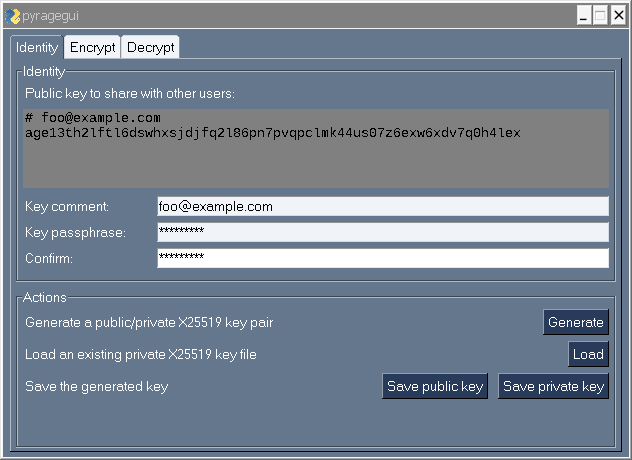
This is a simple attempt for a GUI for the file encryption tool age, built on top of pyrage and currently PySimpleGUI.
- QT (pyqt)
- generate key (if comment is field, show it with the generated public code)
- load existing key (if code has a comment, show it with the generated public code)
- "protect" the key with a passphrase
- save public key (a comment - optional, public key)
- save private key (a comment - optional, 'created', 'public key', the key itself
- encryption modes: passphrase x recipient
- (passphrase) ask for the passphrase and confirm it
- (recipient) populate multiline form with recipients from one or more files, if there is a comment above each public key, show it as well
- show popup how many recipients were loaded from file(s)
- (file) select a file for encryption
- (input) have a multiline form to enter an input text to encrypt
- (outfile) encrypt to an output file
- (armor) encrypt input to the armor format
- decryption modes: passphrase x recipient
- (passphrase) ask for the passphrase for the decryption
- (identity) populate multiline form with identities from one or more files, if there is a comment above each private key, show it as well; obfuscate the visible private key for security reasons
- show popup how many identities were loaded from file(s)
- (file) select a file for decryption
- (input) have a multiline form to enter armor format of encrypted text
- (outfile) save decrypted data to an output file
- (plain) show decrypted plain-text in multiline r/o form
- 'encrypt mode': allow the tool to be called with `-encrypt %f' and show only 'Encrypt' tab
- 'decrypt mode': allow the tool to be called with `-decrypt %f' and show only 'Decrypt' tab
- Windows explorer menu integration
- Czech
- Italian
- French
- ...
- pytest for python code
- GUI tests
- Linux portable 'package'
- Windows exe
- windows installer
- MacOS app