Head and Eye Controlled Cursor Using Electrooculography (EOG) and Inertial Measurement Units (IMU)
A hands-free computer cursor control system using dual-channel EOG for eye event detection and an IMU for head motion tracking. Built as a capstone project demonstrating embedded systems, real-time signal processing, sensor fusion, and machine learning. See docs/data_flow.md for the complete system pipeline.
Team: Jiayu Yang (Jarrod), Andrew Xie, Gordon Lin, Nicole Le, Ani Sarker
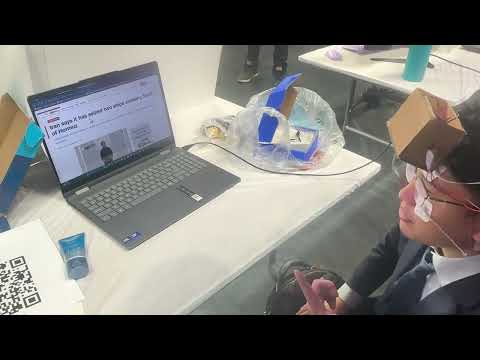
Final demo.
┌─────────────┐     ┌─────────────┐     ┌──────────────────┐
│  AD8232 x2  │     │   STM32     │     │   PC (Python)    │
│ Vertical EOG│────>│  ADC1 (PA0) │     │  Signal Proc.    │
│ Horiz.  EOG │────>│  ADC2 (PA4) │────>│  State-Space     │
└─────────────┘     │  @200Hz     │     │  Sensor Fusion   │
                    │             │     └────────┬─────────┘
┌─────────────┐     │  I2C Read   │              │
│  MPU9250    │────>│  Raw Gyro   │              ▼
│  IMU        │     └─────────────┘       ┌──────────────┐
└─────────────┘                           │ OS Mouse API │
                                          └──────────────┘
How it works: IMU head motion drives cursor movement (direct proportional in threshold mode, state-space model with velocity decay in statespace mode). A Kalman filter tracks gyroscope bias drift in real time, separating true angular velocity from slowly-changing sensor offset without requiring a second sensor. Vertical EOG detects blinks (click/double-click) and up/down gaze (scroll). Horizontal EOG detects left/right gaze (back/forward). Triple blink triggers double click. Looking left/right freezes the cursor; double head nod while frozen centers the cursor on screen. Scroll and navigation require both eye gaze and head motion to agree, preventing false triggers.
| Action | Input | Type |
|---|---|---|
| Cursor Move | IMU Gyro X/Y (proportional or state-space, by mode) | Continuous |
| Left Click | Double Blink (two rapid blinks) | Discrete |
| Right Click | Long Blink (eyes closed >=0.4s) | Discrete |
| Double Click | Triple Blink (three rapid blinks) | Discrete |
| Center Cursor | Look Left/Right + Double Head Nod (eog_h + gyro_x) | Freeze + Gesture |
| Scroll Up/Down | Eye Up/Down (enters scroll-ready) → Head Up/Down (eog_v + gx) | Fusion (2-step) |
| Browser Back/Fwd | Eye Left/Right (enters nav-ready) → Head Left/Right (eog_h + gy) | Fusion (2-step) |
Cursor freeze mechanic: Looking left or right (horizontal EOG) freezes the cursor. While frozen, head nods center the cursor on screen. This prevents accidental triggers during normal head movement and eliminates cursor drift during gestures.
Scroll ready mechanic: Looking up or down (vertical EOG) locks the cursor into a scroll-ready state — the cursor freezes and only head tilt (up/down) can trigger scrolling. Eyes returning to neutral exit the state.
Nav ready mechanic: Looking left or right (horizontal EOG) locks the cursor into a nav-ready state — the cursor freezes and only head turn (left/right) can trigger browser back/forward. Eyes returning to neutral exit the state.
Both scroll and nav use the same two-step design: eye gaze enters the ready state, head motion confirms the action. This prevents missed triggers caused by imperfect eye-head timing synchronization.
Blink detection uses a 4-state machine analyzing full spike waveforms, not simple thresholds. See docs/detection.md for signal zones, state diagrams, and parameters.
Requires a graphical desktop (Windows / macOS / Linux with X11) for cursor control.
pip install -r requirements.txt
python python/scripts/generate_demo_data.py --output data/raw   # ~10s, deterministic (seed=42)
python python/scripts/train_model.py --data data/raw # ~15s, ~98% CV accuracypython python/scripts/collect_data.py --port COM4Label keys during recording: 0=idle 1=blink 2=double_blink 3=triple_blink 4=long_blink 5=look_up 6=look_down 7=look_left 8=look_right, ESC=stop and save.
Procedure: press label key ~1 s before the gesture → perform gesture → wait ~1 s → press 0. The extra buffer ensures the actual gesture falls well within the labeled region; a few hundred ms of timing error is fine because the ML pipeline uses windowed features.
Note: The serial port is exclusive — only one process can open it at a time. Close
collect_databefore runningmain.pyon the same port.
3 modes × 3 data sources — any combination works (run from project root):
--replay CSV (offline) |
--simulate (no hardware) |
--port COM4 (hardware) |
|
|---|---|---|---|
| threshold | python python/main.py --replay data/raw/demo_replay.csv |
python python/main.py --simulate |
python python/main.py --port COM4 |
| statespace | python python/main.py --replay data/raw/demo_replay.csv --mode statespace |
python python/main.py --simulate --mode statespace |
python python/main.py --port COM4 --mode statespace |
| ml | python python/main.py --replay data/raw/demo_replay.csv --mode ml |
python python/main.py --simulate --mode ml |
python python/main.py --port COM4 --mode ml |
Default mode is
threshold. Hardware port: WindowsCOM4, Linux/dev/ttyACM0(Nucleo).
Simulator controls: Arrows=move, Space(x2)=left-click, Space(hold)=right-click, Space(x3)=double-click, L/R+N(x2)=center-cursor (look left/right then nod), U+Up=scroll-up, D+Down=scroll-down, L+Left=back, R+Right=forward, Q=quit.
Keyboard overlay (hardware mode): Add --keyboard-overlay (or --kb) to inject EOG events from keyboard while hardware continues streaming sensor data. Keyboard events are processed through independent detectors and merged with hardware events — they do not modify real EOG values. IMU data still comes from hardware. (Also accepted with --replay for testing, but replay data already contains deterministic events so the overlay is rarely needed.)
Keyboard overlay controls: Space(x2)=left-click, Space(hold)=right-click, Space(x3)=double-click, U=look-up (scroll fusion with hardware IMU), D=look-down (scroll fusion with hardware IMU), L=look-left (freezes cursor, enables nod from hardware IMU), R=look-right (freezes cursor, enables nod from hardware IMU).
python python/main.py --port COM4 --mode threshold   --kb
python python/main.py --port COM4 --mode statespace  --kb
python python/main.py --port COM4 --mode ml          --kb
Note: The simulator generates square-wave EOG signals (instant jumps), which differ from the smooth waveforms used to train the SVM. As a result,
--mode mlwith--simulatecannot classify EOG events reliably. Use--replay CSVor real hardware for ML mode.
├── firmware/                    # STM32 reference firmware (C)
│   ├── firmware.ioc            # CubeMX project (STM32F303RETx Nucleo-64)
│   ├── Core/Inc/
│   │   └── mpu9250.h           # MPU9250 I2C driver header
│   └── Core/Src/
│       ├── main.c              # Main loop: dual ADC + I2C + DMA UART @200Hz (TIM6)
│       └── mpu9250.c           # MPU9250 I2C driver
│
├── python/                      # PC-side application
│   ├── main.py                  # Entry point with CLI
│   ├── eog_cursor/              # Core library
│   │   ├── config.py            # All tunable parameters
│   │   ├── serial_reader.py     # STM32 UART data parser (dual-channel)
│   │   ├── signal_processing.py # Low-pass filter, Kalman filter, sliding window
│   │   ├── event_detector.py    # Blink, gaze, double nod detectors
│   │   ├── feature_extraction.py # 10 features × 2 channels for SVM classifier
│   │   ├── cursor_control.py    # Threshold & state-space controllers
│   │   ├── ml_classifier.py     # SVM training and inference (dual-channel)
│   │   ├── simulator.py         # Keyboard-based hardware simulator
│   │   ├── keyboard_overlay.py  # Keyboard EOG overlay for hardware mode
│   │   └── csv_replay.py        # Offline CSV file replay
│   ├── scripts/
│   │   ├── collect_data.py      # Labeled data collection from hardware
│   │   ├── generate_demo_data.py# Synthetic dual-channel data generator
│   │   ├── train_model.py       # SVM training with cross-validation
│   │   └── visualize.py         # Real-time 3-subplot signal visualization
│   ├── tests/                   # 70 tests (signal, events, ML, state-space, Kalman, keyboard overlay)
│   └── models/                  # Trained SVM model + scaler (.gitignored)
│
├── data/raw/                    # Generated by scripts/generate_demo_data.py
├── docs/                        # Technical deep-dives
│   ├── data_flow.md             # System pipeline (firmware + Python, all 9 run configs)
│   ├── detection.md             # Blink state machine, signal zones, waveform analysis
│   ├── state_space.md           # Matrix derivation, velocity retention analysis, stability proof
│   ├── kalman_filter.md         # Kalman filter derivation, steady-state analysis, parameter tuning
│   ├── performance.md           # Evaluation metrics template (ML + real hardware)
│   └── interview_questions.md   # Technical Q&A for project understanding
└── requirements.txt
- Kalman filter: 2-state filter per gyro axis tracks bias drift in real time — startup calibration seeds the initial estimate, then the filter adapts continuously. See docs/kalman_filter.md for derivation and steady-state analysis.
- State-space cursor: Velocity-retention model gives the cursor physical inertia. See docs/state_space.md for matrix derivation and stability proof.
Scroll and navigation require both eye gaze and head motion to agree:
| Action | Eye Signal | Head Signal |
|---|---|---|
| Scroll Up | eog_v > 2400 (look up) | gx < -300 (tilt up) |
| Scroll Down | eog_v < 1600 (look down) | gx > 300 (tilt down) |
| Browser Back | eog_h < 1600 (look left) | gy < -300 (turn left) |
| Browser Fwd | eog_h > 2400 (look right) | gy > 300 (turn right) |
| Component | Qty | Purpose | Interface |
|---|---|---|---|
| STM32 MCU (F3/F4/U5/etc.) | 1 | Data acquisition | USB (UART) |
| AD8232 | 2 | EOG analog front-end (V + H) | ADC pins |
| MPU9250 (or MPU6050) | 1 | IMU head tracking | I2C |
| Ag/AgCl electrodes | 5 | EOG signal pickup (2 pairs + 1 ref) | AD8232 input |
Electrode placement: Vertical pair (V+/V-) above and below one eye → eog_v. Horizontal pair (L/R) at outer canthi of both eyes → eog_h. Reference on forehead.
Firmware: Reference code in firmware/, developed with STM32CubeMX + STM32CubeIDE. The included firmware.ioc is the CubeMX project for STM32F303RETx (Nucleo-64) — open it to regenerate HAL code, or create a new project for your board. Data packet format: timestamp,eog_v,eog_h,gyro_x,gyro_y,gyro_z\r\n at 115200 baud. See firmware/README.md for AD8232 wiring, serial debug, and CubeMX regeneration instructions. See docs/data_flow.md for the data pipeline.
All parameters in python/eog_cursor/config.py. Key values:
# --- All modes ---
GYRO_DEADZONE = 300             # Below this = noise (cursor deadzone + fusion check)
GYRO_CALIBRATION_SAMPLES = 400  # Startup bias calibration (2s at 200Hz)
KALMAN_Q_OMEGA = 1000.0         # Kalman process noise for angular velocity (fast, trust measurement)
KALMAN_Q_BIAS = 0.001           # Kalman process noise for bias (slow drift, ~6s time constant)
KALMAN_R = 500.0                # Kalman measurement noise (gyro sensor noise variance)

# --- threshold mode only ---
CURSOR_SENSITIVITY = 0.01      # Direct gyro-to-pixel ratio (no inertia)

# --- threshold & statespace modes ---
BLINK_THRESHOLD = 2600         # ADC value for blink detection (ML mode uses SVM instead)

# --- statespace & ml modes ---
SS_VELOCITY_RETAIN = 0.95      # Cursor glide per step (0.8=snappy, 0.99=floaty)
SS_SENSITIVITY = 0.05 # Gyro-to-velocity input gainUse scripts/visualize.py to display live EOG and IMU signals in 3 subplots (vertical EOG, horizontal EOG, gyroscope 3-axis) with threshold lines overlaid. Useful for verifying hardware connections, tuning thresholds, and observing signal patterns.
cd python

python -m scripts.visualize --port /dev/ttyACM0   # Linux
python -m scripts.visualize --port COM4            # Windows
python -m scripts.visualize --port COM4 --window 10 # Show last 10s of data on screen (default: 5s)cd python && python -m pytest tests/ -v70 tests across 4 files:
| File | Key Verifications |
|---|---|
test_event_detector.py — 30 tests |
Double blink detected; triple blink detected; triple blink window expired; single blink ignored; long blink fires on release; long blink max duration rejected; sustained close fires once; cooldown prevents re-trigger; sustained gaze detected; transient gaze rejected; double head nod triggers center cursor (only when cursor frozen); single nod ignored; nod ignored when not frozen; state reset on unfreeze |
test_keyboard_overlay.py — 12 tests |
Double/triple/long blink from Space; look up/down from U/D keys; look left/right from L/R keys; cursor freeze from L/R; idle produces no events; Space does not produce gaze events |
test_signal_processing.py — 21 tests |
Low-pass preserves DC baseline; high frequency attenuated; sliding window keeps most recent samples; Kalman filter tracks constant bias, passes real motion, tracks drift; 3-axis wrapper corrects all axes; feature vector has correct length; state-space velocity decays to ~0 after 200 iterations |
test_ml_pipeline.py — 7 tests |
Training accuracy >80%; model save/load roundtrip succeeds; predictions are valid labels (all 9 classes); streaming classifier produces output; blink features clearly separable from idle |
See docs/performance.md for ML classification accuracy, end-to-end latency, per-action accuracy, and robustness evaluation — all measured with real EOG hardware.
| Decision | Rationale |
|---|---|
| Dual-channel EOG | Enables horizontal gaze for browser back/forward |
| Eye + head fusion | Both must agree — prevents false triggers |
| Processing on PC | Full Python ecosystem, easier debugging |
| Kalman bias tracking | Tracks gyro drift without accelerometer; separates slow bias from fast motion using process noise tuning |
| State-space model | Physical inertia makes cursor feel natural |
| SVM over deep learning | Small dataset, low latency (<5ms), interpretable |
| Lazy pyautogui import | Enables testing in headless CI |
MIT