


A data-quality auditing library for time-series tabular data, with a focus on
financial and sensor domains. tsauditor scans a DataFrame and returns a
structured report of structural problems, anomalies, and data-leakage between
features and the prediction target, its core contribution. It can also repair
the flagged issues on a copy, score data health, export a formal report, and hand
a clean array straight to a forecasting model.
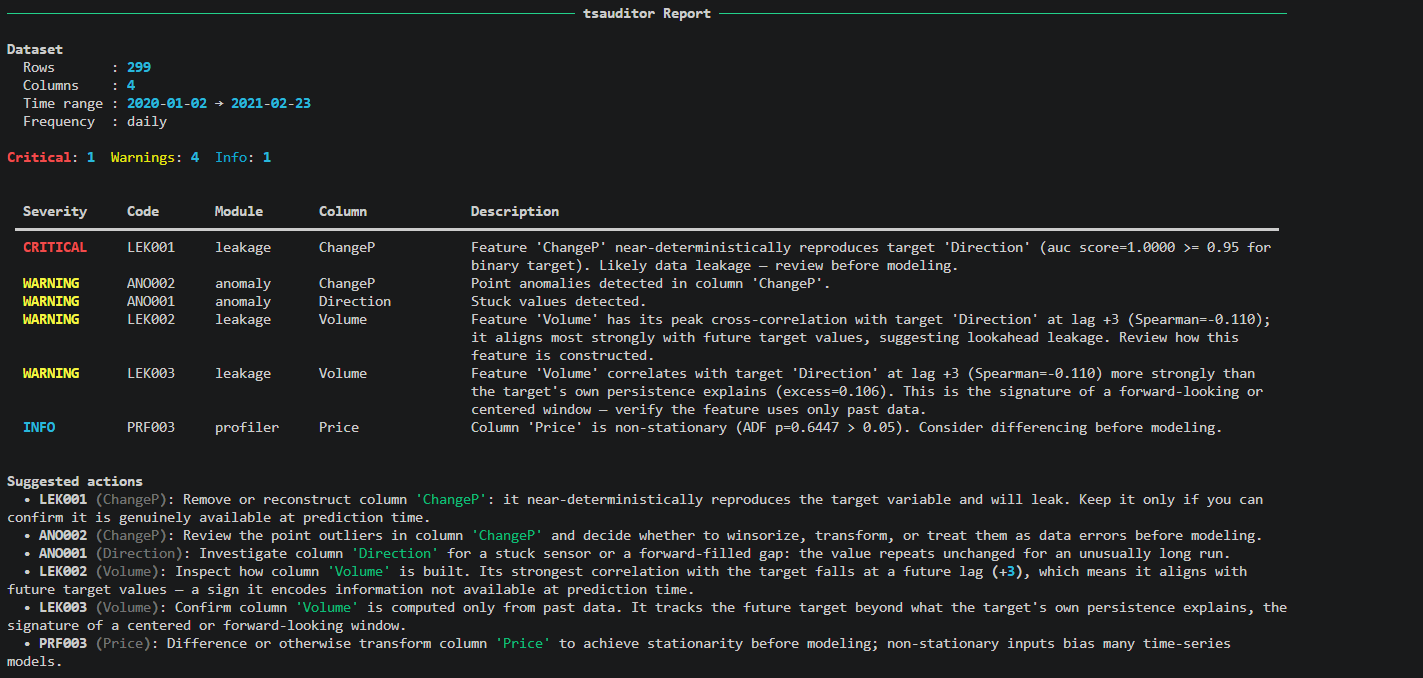
The project grew out of a real bug in a Pakistani equity (OGDC) direction-prediction
model: a same-day percentage-change feature (ChangeP) was mathematically near-identical
to the target it was meant to predict. With ChangeP included, a Random Forest
classifier reached 99.68% accuracy (AUC 0.9987); a Gradient Boosting classifier reached
the same 99.68% accuracy (AUC 0.9967). Removing it, along with same-day Open, High,
and Low, which are equally unavailable at prediction time, dropped accuracy to 69.81%
(RF, AUC 0.7795) and 73.70% (GBM, AUC 0.8072) on a held-out test period
(2025-01-09 to 2026-04-03). Both models still beat a 50% baseline, but the headline
accuracy had been almost entirely an artifact of the leak. tsauditor exists to catch
this class of mistake automatically before it reaches a model.
See examples/ogdc_leakage_case for the full experiment,
script, and measured results.
tsauditor is column-agnostic, it never hard-codes price, Direction, or any
other column. price/Direction are simply the columns in the OGDC example above. The
structural (PRF), anomaly (ANO), and target-relative leakage (LEK001–003) checks apply to
any numeric time-series column. Version 0.2.0 added two declarative mechanisms:
available_at= (point-in-time release correctness) and constraints= (domain validity),
so you can also audit macro, sentiment, order-book, volatility, and other alternative-data
columns correctly. tsauditor never computes these features; you point it at your columns
and, where relevant, declare their semantics.
| Column type | What can go wrong | Check |
|---|---|---|
| Macro indicators (CPI, rates, unemployment) | Published weeks after their reference date → used early | LEK004 as-of (available_at=) |
| Sentiment scores (news / social) | Publish lag; also must sit in a bounded range | LEK004 + VAL001 bounds |
| Order book (bid, ask) | Crossed book (ask < bid) |
VAL002 relation |
| Bid-ask spread | Zero or negative spread | VAL001 strict-positive bound |
| Volume | Negative volume (feed glitch) | VAL001 non-negative bound |
| Bounded indicators (RSI 0–100, probabilities, ratios) | Out-of-range values | VAL001 bounds |
| Realized volatility / drawdown | Impossible negatives | VAL001 non-negative bound |
| OHLC bars | Low > High, Open/Close outside [Low, High] |
VAL002 relations |
| Earnings / fundamentals | Point-in-time restatement / release lag | LEK004 as-of |
| Any numeric series | Gaps, stuck runs, outliers, non-stationarity, target leakage | PRF / ANO / LEK001–003 |
See examples/beyond_price_direction (validity on real
volume/RSI/OHLC columns) and
examples/new_features_walkthrough.ipynb
(as-of leakage, sentiment bounds).
pip install tsauditorRequires Python ≥ 3.9. Core dependencies: pandas, numpy, scipy, statsmodels, rich.
Optional extras (install only what you need):
pip install 'tsauditor[pdf]'      # PDF report export (matplotlib)
pip install 'tsauditor[polars]'   # polars DataFrame input
pip install 'tsauditor[dev]' # test + lint toolchain (contributors)git clone https://github.com/imann128/tsauditor.git
cd tsauditor
pip install -e ".[dev]"Note: For domain-agnostic usage, either omit domain= entirely or pass domain=None
(Python's None, not the string "None": passing the string raises ValueError, since
only "finance", "sensor", and None are accepted). Omitting it is equivalent; None
is already the default.
For usage snippets, scroll down in the readme or check out the examples directory for sample scripts and notebooks.
import tsauditor as tsa

report = tsa.scan(df, target="Direction", domain="finance")

report.summary()                 # rich-formatted CLI table
report.critical                  # list[Issue] that block modeling
report.filter(module="leakage")  # programmatic filtering
report.leaky_columns()           # the shortlist of features to review/remove
report.to_json("report.json")    # structured export

# Repair on a copy and keep the audit trail (original is never modified):
clean, report = tsa.fix(df, target="Direction", domain="finance")
print(report.last_fixes)         # exactly what changed
scan() returns a GuardReport holding Issue dataclasses bucketed by severity
(critical, warnings, info) plus dataset metadata.
New to tsauditor? Start with examples/getting_started,
a from-zero, runnable notebook covering the full scan → read → repair workflow on a
small synthetic dataset, no assumptions made. It also corrects a real, verified case
of an LLM getting the API wrong when asked to explain this library from just a link,
worth a look if you've been getting confidently incorrect code from ChatGPT.
Below is an example using real weather station telemetry data. To showcase how tsauditor behaves during typical field failures, we manually inject three classic hardware faults: a frozen sensor reading, a complete network dropout gap, and a high-voltage electrical spike.
import pandas as pd
import tsauditor as tsa

print(" Fetching real-world weather station sensor dataset...")
url = "https://raw.githubusercontent.com/jbrownlee/Datasets/master/daily-min-temperatures.csv"

try:
    df = pd.read_csv(url, parse_dates=["Date"], index_col="Date")
    df.columns = ["air_temperature"]
    print(" Dataset successfully into memory")
except Exception as e:
    print(f" Error loading dataset: {e}")

print(" Injecting typical hardware field failures for evaluation...")
# 1. Stuck sensor condition: flatlined at 12.2°C for 15 days straight
df.iloc[100:115] = 12.2

# 2. Transmission blackout: 10 days of completely missing telemetry
df.iloc[300:310] = None

# 3. Electrical surge: an impossible 75°C transient spike
df.iloc[500] = 75.0

print("\n Running `tsauditor` validation sweep")

# Execute the audit using the optimized sensor preset
report = tsa.scan(df, domain="sensor")
report.summary()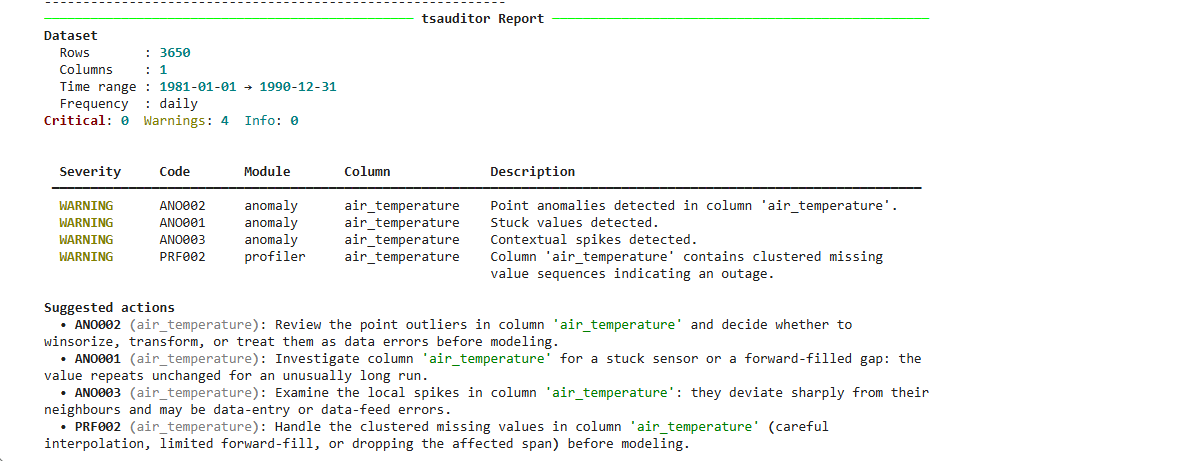
| Module | Code | Severity | Detects |
|---|---|---|---|
| profiler | PRF001 | warning | Irregular timestamp frequency |
| profiler | PRF002 | warning | Clustered missing values |
| profiler | PRF003 | info | Non-stationarity (Augmented Dickey-Fuller) |
| profiler | PRF004 | critical | Duplicate timestamps |
| profiler | PRF005 | warning | Clustered gaps |
| profiler | PRF006 | warning | High overall missing rate |
| profiler | PRF007 | critical | Infinite values (inf / -inf) |
| anomaly | ANO001 | warning | Stuck / repeated constant values |
| anomaly | ANO002 | warning | Point outliers (z-score + IQR) |
| anomaly | ANO003 | warning | Contextual spikes (local rolling z-score) |
| leakage | LEK001 | critical | Target equivalence (feature reproduces the target) |
| leakage | LEK002 | warning | Positive-lag cross-correlation peak (future info) |
| leakage | LEK003 | warning | Rolling-window lookahead (excess over persistence) |
| leakage | LEK004 | critical | As-of leakage (value used before its release time) |
| leakage | LEK005 | critical | Combination leakage (a group of features reconstructs the target) |
| validity | VAL001 | warning | Out-of-range value (declared per-column bounds) |
| validity | VAL002 | critical | Ordering violation (e.g. crossed book, bid > ask) |
| panel | PNL001 | warning | Ragged panel (entities don't share a time index) |
| panel | PNL002 | warning | Cross-sectional lookahead (feature knows future entity ordering) |
| panel | PNL003 | info | Entity too short to audit meaningfully |
| panel | PNL004 | warning | Rows with a null entity id get no checks at all |
Codes marked critical block modeling; warning and info are advisory.
Leakage checks are rank-based, chosen by target type:
- LEK001, equivalence. Continuous targets use
|Spearman ρ|; binary targets use AUC separation (max(AUC, 1−AUC)). This is deliberate: Pearson against a binary 0/1 target is point-biserial correlation, which is capped near√(2/π) ≈ 0.798, so a feature whose sign defines the target scores only ~0.80 and slips under a naive threshold. AUC scores it 1.0. - LEK002, cross-correlation. Flags features whose peak association with the target falls at a positive lag (the feature aligns with the target's future).
- LEK003, temporal lookahead. Flags features that correlate with the future target beyond what the target's own autocorrelation can explain, the signature of a forward-looking or centered window. The persistence baseline is what keeps a legitimate trailing feature from being false-flagged.
- LEK004, as-of / point-in-time. Flags a feature whose value sits at a timestamp earlier than when it was actually published, the classic macro/sentiment trap. See As-of leakage below.
LEK002/LEK003 are WARNING-level suspicions: in pure cross-correlation a genuine strong predictor and a leak are distinguishable only by magnitude. LEK001 and LEK004 are CRITICAL because equivalence and confirmed availability violations are near-deterministic.
Macro releases (CPI, rates, unemployment), earnings, and news/social sentiment describe a reference period but are only published later. A value aligned to its reference date and used on that date leaks the future. This cannot be inferred from values alone, so LEK004 is opt-in: you declare when each value became available.
import pandas as pd

# CPI for a reference month is released ~30 days later:
report = tsa.scan(df, available_at={"cpi": pd.Timedelta(days=30)})

# Or, for a ragged real release calendar, pass per-row publish timestamps:
report = tsa.scan(df, available_at={"cpi": publish_times})   # a pd.Series on df.index
The fix LEK004 suggests is not to drop the column but to shift it to its release schedule so each value is only used on or after publication.
Some values are not merely surprising, they are impossible: a non-positive bid-ask
spread, a sentiment score outside [-1, 1], a crossed order book. tsauditor can't guess
these rules, so you declare them via constraints:
report = tsa.scan(
    df,
    constraints={
        "bounds": {
            "spread":    {"min": 0, "min_exclusive": True},  # strictly positive
            "sentiment": {"min": -1, "max": 1},
        },
        "relations": [("bid", "ask")],   # bid <= ask must hold every row
    },
)
bounds violations raise VAL001 (WARNING); a broken relations ordering (a crossed
book) raises VAL002 (CRITICAL). Validity issues are data errors, so they are not
counted as leakage in leaky_columns().
tsauditor is advisory by default, it reports and suggests, but only edits your data when you ask. Every repair happens on a copy; your original frame is your backup.
# Advisory only:
report.suggestions()             # per-issue suggested action, ordered by severity

# One-shot scan + repair, returning both the clean copy and the report:
clean, report = tsa.fix(df, target="Direction", domain="finance")

# Or repair from an existing report with fine-grained control:
clean = report.apply_fixes(
    df,
    missing="interpolate",   # impute clustered-missing + anything NaN-ed below
    outliers="clip",         # winsorize ANO002 points / ANO003 spikes ("nan" to drop-to-NaN)
    stuck="nan",             # replace stuck runs with NaN, then impute
    leakage=None,            # "drop" to remove leaky columns (off by default)
)
print(report.last_fixes)     # structured change log: column, action, cells changed
Repairs are report-driven (only flagged columns are touched), time-series safe (an outlier is set to NaN and imputed, never deleted, deleting rows would break the index), and the target label is never repaired (interpolating a 0/1 label into fractions is always wrong).
report.health_score(df) # % of numeric cells NOT implicated by a quality issue100 × (1 − affected_cells / total_cells), leakage excluded (a leaky column is a modeling
risk, not corrupt data). It re-scans the frame you pass, so calling it on a fix() output
gives a true "after" score.
report.to_json("report.json", df=df, fixed_df=clean)   # includes health + before/after
report.to_pdf("report.pdf", df=df, fixed_df=clean)     # needs 'tsauditor[pdf]'
to_pdf produces a formal, vector, text-selectable report (Times New Roman, black text,
headings and tables, no charts, no colour coding): a Data Health Scorecard, dataset
overview, before/after comparison, target-leakage callout, executive summary, and a
paginated issues table. For a panel scan, the issues table becomes a prevalence table
(one row per finding, with the fraction of entities it hit) instead of a raw per-issue
dump, matching report.summary()'s CLI output.
Zero-shot forecasters such as Google TimesFM tokenize a clean, contiguous, finite context
window; a raw series with gaps fails tokenization. The adapter audits, repairs, and returns
a plain float32 array, and verifies target_col is numeric and finite before
returning, so neither a non-numeric column nor a NaN reaches the model silently. It adds
no timesfm dependency.
array = tsa.adapters.to_timesfm(df, target_col="close_price", domain="finance")
# array is now safe to pass to model.forecast(inputs=[array], ...)

# keep the audit trail too:
array, report = tsa.adapters.to_timesfm(df, target_col="close_price", return_report=True)
context_len / min_context are your knobs, not TimesFM constants, TimesFM 2.5 accepts a
wide range of context lengths (up to 16k). See
examples/timesfm_adapter for a full walkthrough, the
finiteness guard, context truncation, and the model call.
tsauditor/
├── scanner.py            # scan(), orchestrates all modules into a GuardReport
├── profiler/             # structural checks: frequency, missing, stationarity
├── anomaly/              # point.py, contextual.py
├── leakage/              # equivalence.py, correlation.py, temporal.py, asof.py, combination.py
├── panel.py              # group_col= entity partitioning, prevalence view (PNL001-004)
├── validity.py           # domain-constraint checks (bounds + relations)
├── remediate.py          # apply_fixes / fix engine, health score (repair on a copy)
├── adapters/             # boundary adapters (e.g. timesfm.py)
├── report/
│   ├── summary.py        # GuardReport + Issue dataclasses, rich/JSON output
│   ├── remediation.py    # code -> suggested-action advisory lookup
│   └── pdf.py            # to_pdf export
└── utils/validation.py   # input validation & DataFrame normalization
polars input. A polars DataFrame works anywhere a pandas one does, just name
the datetime column via time_col (polars has no index):
report = tsa.scan(pl_df, target="Direction", time_col="Date", domain="finance")Install with pip install 'tsauditor[polars]'. tsauditor converts to pandas at the
boundary; the audit logic is identical. (See issue #28.)
Panel (long-format) data. If your frame stacks many entities with a repeated
timestamp column, 500 stocks, 200 sensors, 50 stores, pass group_col= and each
entity is audited as its own independent time series:
report = tsa.scan(panel, target="Direction", group_col="ticker", domain="finance")
report.summary()          # prevalence view: which findings are systemic vs isolated
Without it, a panel is treated as one interleaved series and the structural, anomaly
and rolling checks are meaningless, a rolling window would span several entities at
once. report.prevalence() then answers the question that actually matters at scale:
CRITICAL  LEK001  ret    5/5   100.0%   <- systemic: suspect the pipeline
WARNING   ANO002  price  1/5    20.0%   <- isolated: inspect that entity
Repairs are panel-aware too: apply_fixes() partitions by entity, so one entity's
values can never fill another's gaps, and health_score()/to_json()/to_pdf() score
each entity's own cells against its own distribution rather than mixing scales across
entities. fix() accepts group_col= directly, for a one-shot scan + repair without
calling scan() and apply_fixes() separately. See the Panel Data wiki page.
Audit separate frames in parallel. If your entities live in separate DataFrames
rather than one long-format frame, scan() is a pure function and GuardReport is a
plain, picklable dataclass, so it parallelises cleanly with joblib:
from joblib import Parallel, delayed
import tsauditor as tsa

def audit(symbol, df):
    return symbol, tsa.scan(df, target="Direction", domain="finance")

reports = dict(Parallel(n_jobs=-1)(
    delayed(audit)(sym, frames[sym]) for sym in frames
))

# every symbol whose feature set leaks into the target
leaky = {s: r.leaky_columns() for s, r in reports.items() if r.leaky_columns()}
Skip the expensive check. The ADF stationarity test (PRF003) dominates runtime;
scan(run_stationarity=False) skips it for a much faster structural/anomaly/leakage sweep.
Run pip install -e ".[dev,examples]" for running all example notebooks easily.
See examples/ (indexed in examples/README.md):
getting_started/, the from-zero notebook covering the full scan → read → repair workflow (see Quickstart above).ogdc_leakage_case/, the flagship LEK001 case on real OGDC data (script + notebook).beyond_price_direction/, validity (VAL001/VAL002) on real volume, RSI, and OHLC columns: concrete proof tsauditor audits more than price and direction.timesfm_adapter/, the messy-data -> finite float32 array bridge for Google TimesFM (finiteness guard, context truncation).sensor-example/, structural/anomaly checks on a sensor stream, plus a PDF-report demo.new_features_walkthrough.ipynb, LEK004, validity checks,tsa.fix, and the TimesFM adapter, end-to-end.validation_comparison/, time-series validation vs general profiling.whats_new_0_4_0/, everything added in 0.4.0: PRF007, PNL004,fix()'savailable_at=/constraints=, and the LEK002 threshold change.
pytest -q                  # full suite
ruff check .               # lint
ruff format --check .      # formatting
CI runs all three across Python 3.9–3.14 on Linux, Windows and macOS (18 combinations). A pull request cannot merge unless every check is green.
Contributions are welcome. Check open issues
for ideas, or look for the good first issue label.
Comment on an issue to be assigned before opening a pull request. PRs not linked to an assigned issue will be closed. Before opening one, run:
pytest -q
ruff check .
ruff format --check .
All three must pass; CI verifies them across Python 3.9–3.14 on Linux, Windows and macOS. See CONTRIBUTING.md.
Confused about how to use tsauditor, how a particular check applies to your data, want
a tutorial or worked example on a domain not covered in examples/, or ran
into something that doesn't match the docs? Reach out. Open a
GitHub Discussion rather than
emailing or DMing directly. It keeps the answer public and searchable, so the next person
with the same question finds it instead of asking again, and it's the fastest way to get
a reply.
A comprehensive tutorial section, covering more domains and more of the library end to
end, is actively being built. If the examples/ directory doesn't cover your
case yet, ask anyway; it directly shapes what gets written next.
Found an actual bug? Use the Bug Report template instead, see Contributing above.
Featured in PyCoder's Weekly Issue #745
Featured #7 on Data Science Weekly Issue - 657
Featured on Python Hub
Beta (0.5.0). Profiler, anomaly, leakage, validity, panel, remediation, and export
modules are implemented and tested (500 tests passing; CI across Python 3.9–3.14 on
Linux, Windows, macOS).
MIT, see LICENSE.