


Sports analytics product for ML-driven picks, bankroll sizing, and live betting workflows.
This project shows product-oriented ML work rather than notebook-only experimentation:
- prediction workflows tied to a user-facing app
- live odds and betting-oriented UX
- Kelly-based stake sizing and decision support
- production-style frontend architecture with a real deployed surface
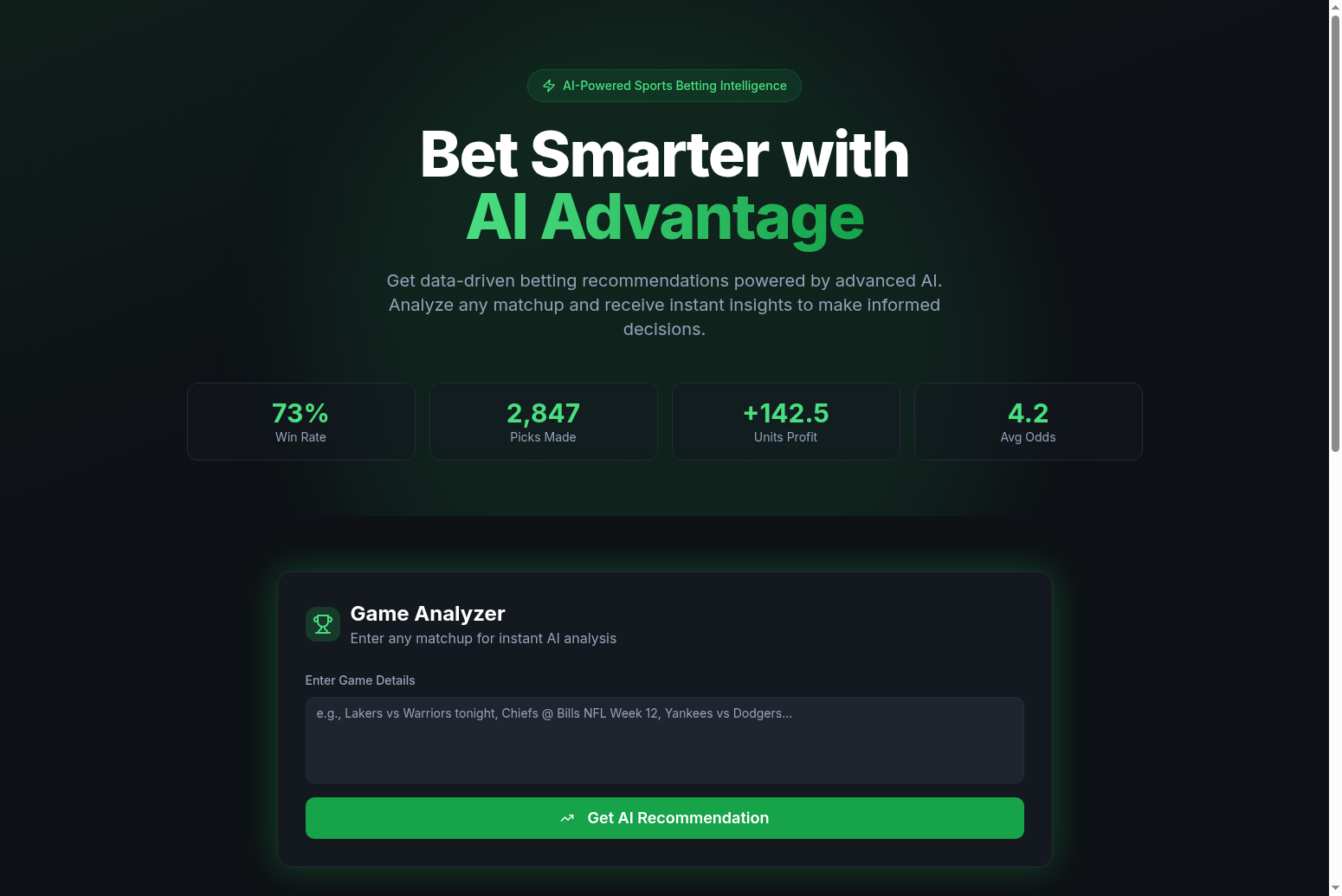
- AI-Powered Analysis - Advanced machine learning models analyze thousands of data points in seconds
- Game Analyzer - Enter any matchup for instant AI analysis and betting recommendations
- Real-Time Odds - Track line movements and find value before the market adjusts
- High Accuracy - Models consistently outperform traditional handicapping methods
- Bankroll Protection - Smart stake sizing recommendations to protect your investment
- Kelly Criterion - Optimal bet sizing based on edge and bankroll management
- Multi-Sport Support - NBA, NFL, and MLB predictions
- Premium Tier - Advanced features with Stripe subscription integration
- Live product experience at aiadvantagesports.com
- Supports NBA, NFL, and MLB workflows
- Includes odds, picks, leaderboard, and premium/paywall paths
- Useful as a portfolio example of turning modeling ideas into an actual product
- Frontend: React, TypeScript, Tailwind CSS
- UI Components: shadcn/ui
- Build Tool: Vite
- Styling: Custom dark theme with green accents
src/
  components/        UI and product features
  lib/               predictions, rosters, Stripe helpers
  pages/             landing page, picks, leaderboard
git clone https://github.com/ianalloway/ai-advantage.git
cd ai-advantage
npm install
npm run dev
Then open http://localhost:5173.
The site is configured for static hosting plus preview-ready serverless payments:
netlify.tomlkeeps the current Netlify SPA deploy working.vercel.jsonadds SPA rewrites so Vercel previews can serve/daily-picksand/leaderboard.api/create-checkout-session.tsandapi/checkout-session.tslet Vercel previews create and verify Stripe Checkout Sessions securely on the server.
For the server-created Stripe flow, set these env vars in your deployment target:
STRIPE_SECRET_KEY=sk_live_or_test_...
STRIPE_PREMIUM_PRICE_ID=price_...
STRIPE_ONE_TIME_PRICE_ID=price_...
PUBLIC_APP_URL=https://your-preview-or-production-domain
If those are missing, the app falls back to the static Stripe Payment Links from VITE_STRIPE_CHECKOUT_URL and VITE_STRIPE_ONE_TIME_CHECKOUT_URL.
The homepage email form now posts to /api/newsletter-subscribe. On each signup it:
- creates a child page in Notion with the subscriber details
- sends you a notification email
- redirects the visitor into the official Substack subscribe page
Set these env vars before turning the form on in production:
NOTION_API_KEY=secret_your_notion_integration_token
NOTION_PARENT_PAGE_ID=your_notion_parent_page_id
RESEND_API_KEY=re_your_resend_api_key
RESEND_FROM_EMAIL="AI Advantage <onboarding@yourdomain.com>"
NOTIFY_EMAIL=ian@allowayllc.com
SUBSTACK_PUBLICATION_URL=https://allowayai.substack.com
NOTION_PARENT_PAGE_ID should be the page where you want each new subscriber page to appear. Share that Notion page with your Notion integration before testing.
- This repository is best read as a shipped product and frontend/application example.
- Modeling details live in adjacent public projects such as
sports-betting-ml,nba-ratings, andnba-clv-dashboard.
Ian Alloway
- Portfolio: ianalloway.xyz
- LinkedIn: linkedin.com/in/ianit
- GitHub: github.com/ianalloway
This project is proprietary. All rights reserved.