forked from ethyca/fides
-
Notifications
You must be signed in to change notification settings - Fork 1
Make changes to Docker Installation, including adding step by step in… #7
New issue
Have a question about this project? Sign up for a free GitHub account to open an issue and contact its maintainers and the community.
By clicking “Sign up for GitHub”, you agree to our terms of service and privacy statement. We’ll occasionally send you account related emails.
Already on GitHub? Sign in to your account
Open
brycebortree
wants to merge
2
commits into
iamkelllly:main
Choose a base branch
from
brycebortree:docker-installation
base: main
Could not load branches
Branch not found: {{ refName }}
Loading
Could not load tags
Nothing to show
Loading
Are you sure you want to change the base?
Some commits from the old base branch may be removed from the timeline,
and old review comments may become outdated.
Open
Changes from all commits
Commits
File filter
Filter by extension
Conversations
Failed to load comments.
Loading
Jump to
Jump to file
Failed to load files.
Loading
Diff view
Diff view
There are no files selected for viewing
This file contains hidden or bidirectional Unicode text that may be interpreted or compiled differently than what appears below. To review, open the file in an editor that reveals hidden Unicode characters.
Learn more about bidirectional Unicode characters
| Original file line number | Diff line number | Diff line change |
|---|---|---|
| @@ -1,9 +1,34 @@ | ||
| # Installation from Docker | ||
|
|
||
| For the ease of deployment in production, the community releases a production-ready reference container image. | ||
| Docker is a platform as a service that bundles software into containers, each of which contains everything the software needs to run, software, libraries, and configuration files. [Docker Hub](https://docs.docker.com/docker-hub/) makes it easy to manage container images. | ||
|
|
||
| The fidesctl community releases Docker Images which are reference images for fidesctl. Every time a new version of fidesctl is released, the images are available in the [ethyca/fidesctl DockerHub](https://hub.docker.com/r/ethyca/fidesctl/tags). There are also mid-release versions (dirty versions) that get uploaded to DockerHub on every commit to the main branch. | ||
| The fidesctl community releases a production-ready reference container image of fidesctl for the ease of deployment in production. | ||
|
|
||
| These reference images contain all of the extras and dependencies for running the Python application. However they do not contain the required Postgres database. | ||
| ## Installation | ||
|
|
||
| Fidesctl requires multiple components to function as it is a multi-part application. You may therefore also be interested in launching fidesctl in the Docker Compose environment, see: [Running Fidesctl in Docker](../quickstart/docker.md). | ||
| 1. Install `docker` locally (see [Docker Desktop](https://www.docker.com/products/docker-desktop) or your preferred installation). The minimum verified Docker version is `20.10.8`. | ||
| 1. Confirm whether you have `docker-compose` using the command `docker-compose -v`. Make sure at least version `1.29.0` is installed. If your installation did not include `docker-compose`, installation instructions can be found in the [Docker Compose documentation](https://docs.docker.com/compose/install/). | ||
| 1. Run `docker pull ethyca/fidesctl` to pull the latest fidesctl container image from Docker Hub. | ||
|
|
||
| Congratulations! Fidesctl is now installed on your machine. | ||
|
|
||
| ## Docker Hub Releases | ||
|
|
||
| The following is an overview of the fidesctl Docker Hub release process, including release cadence and what's included. | ||
|
|
||
| **Release Cadence** | ||
|
|
||
| Every time a new version of fidesctl is released, the images are available in the [ethyca/fidesctl DockerHub](https://hub.docker.com/r/ethyca/fidesctl/tags). | ||
|
|
||
| There are also mid-release versions (dirty versions) that get uploaded to DockerHub on every commit to the main branch. Implementation is not finalized in mid-release versions. | ||
|
|
||
| **What's Included** | ||
|
|
||
| These reference images contain all of the extras and dependencies for running the Python application. However they do not contain the required Postgres database. Continue to [Setting up the database](./database.md). | ||
| ## Next Steps | ||
|
|
||
| You're now ready to start enforcing privacy with Fidesctl! Below are suggestions for continuing your journey. | ||
|
|
||
| - See [Setting up the database](./database.md) to set up the Postgresql for fidesctl. | ||
| - See [Running Fidesctl in Docker](../quickstart/docker.md) for more information on launching fidesctl in Docker Compose. Fidesctl requires multiple components to function as it is a multi-part application. | ||
| - See the [Tutorial](../tutorial/index.md) for a hands-on guide that solves real data privacy problems by setting up a Fidesctl data privacy workflow. | ||
This file contains hidden or bidirectional Unicode text that may be interpreted or compiled differently than what appears below. To review, open the file in an editor that reveals hidden Unicode characters.
Learn more about bidirectional Unicode characters
Add this suggestion to a batch that can be applied as a single commit.
This suggestion is invalid because no changes were made to the code.
Suggestions cannot be applied while the pull request is closed.
Suggestions cannot be applied while viewing a subset of changes.
Only one suggestion per line can be applied in a batch.
Add this suggestion to a batch that can be applied as a single commit.
Applying suggestions on deleted lines is not supported.
You must change the existing code in this line in order to create a valid suggestion.
Outdated suggestions cannot be applied.
This suggestion has been applied or marked resolved.
Suggestions cannot be applied from pending reviews.
Suggestions cannot be applied on multi-line comments.
Suggestions cannot be applied while the pull request is queued to merge.
Suggestion cannot be applied right now. Please check back later.
There was a problem hiding this comment.
Choose a reason for hiding this comment
The reason will be displayed to describe this comment to others. Learn more.
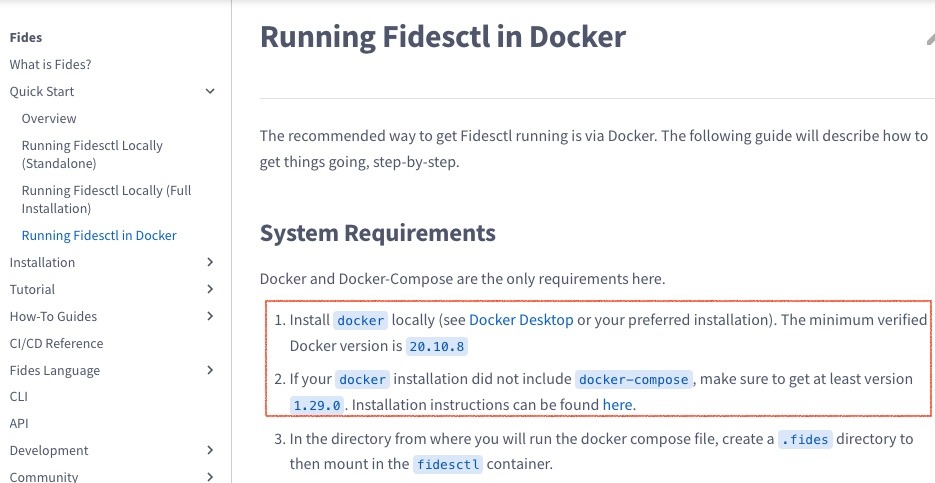
"Running Fidesctl in Docker" contains the same instructions you've included here from the System Requirements section. In your opinion, does it make sense to have it in both places? (this is not a leading question! and you don't have to update the PR if you don't feel it's necessary, I want to understand your opinion on this)
There was a problem hiding this comment.
Choose a reason for hiding this comment
The reason will be displayed to describe this comment to others. Learn more.
This is a great question!
In my last role, we had reusable files that would be able to be shared across page for shared instructions like this.
I think a solution like that, or simply linking to System Requirements would be best here. Having the same instructions in too places will just lead to tech debt in the future.
For now, I'll update with a link to System Requirements.