Fast Google Maps scraper for local business data on Apify. Extract places, addresses, phone numbers, websites, ratings, reviews, images, opening hours, coordinates, Google Place IDs, CIDs, and optional public website contacts from Google Maps search terms, URLs, Place IDs, or map areas.
Base price starts from $1.50 per 1,000 saved places on paid Apify plans. Optional add-ons, such as reviews, images, place details, filters, and website contact enrichment, are charged only when they produce saved output.
Use the hosted actor on Apify: Google Maps Scraper
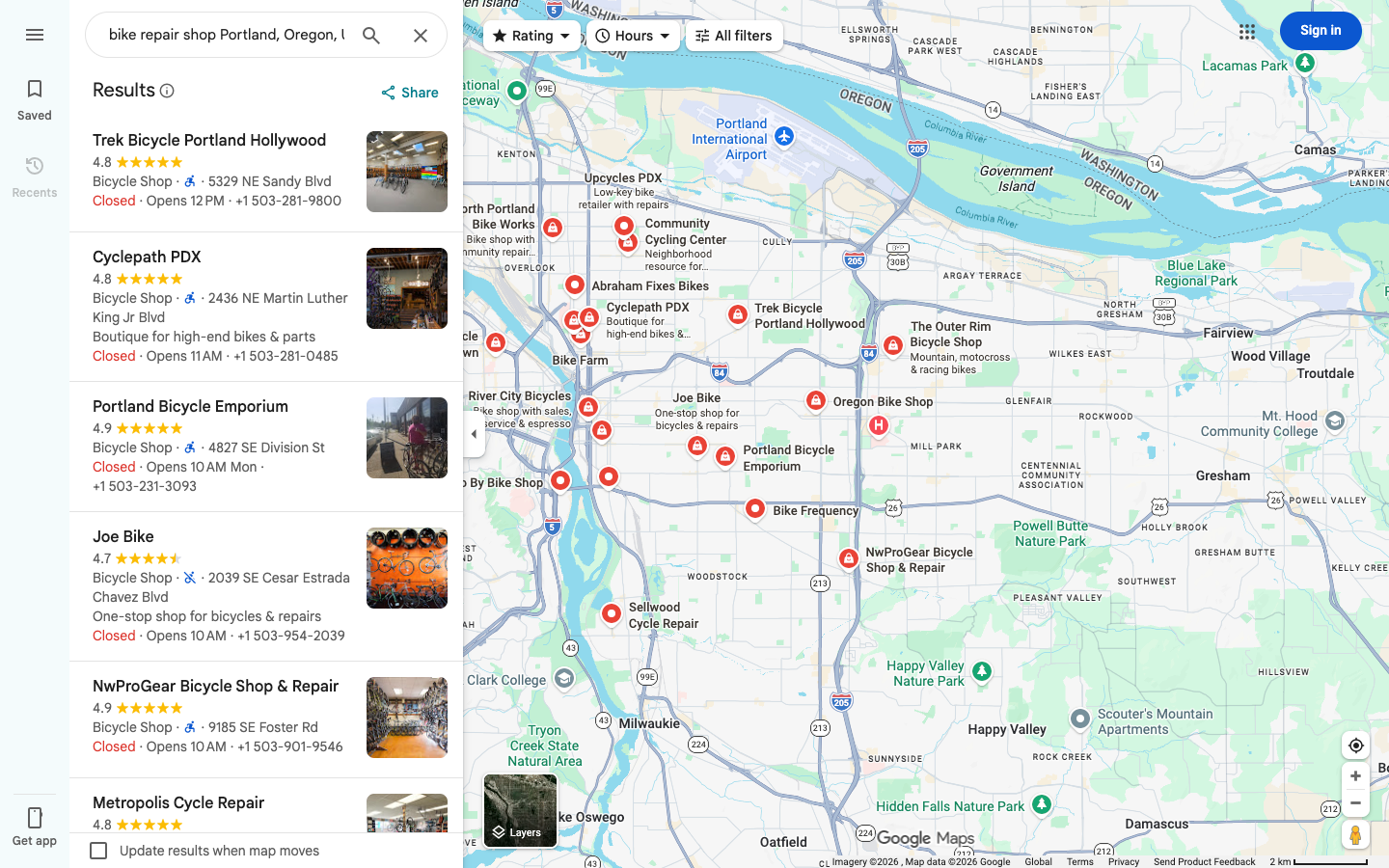
This actor collects structured Google Maps business data for lead generation, local SEO, market research, competitor analysis, CRM enrichment, directory building, and review monitoring.
You can start from:
- Google Maps search terms, such as
dentist,hotel,bike repair shop, orrestaurant - a specific location, such as
Portland, Oregon, USAorBerlin, Germany - direct Google Maps search URLs
- direct Google Maps place URLs
- Google Place IDs
- a selected map area for broad visible-place collection
The actor first collects Google Maps places, then runs optional enrichment add-ons only for the places that were found. This keeps discovery fast and lets you pay only for the extra data you actually need.
| Data group | Example fields |
|---|---|
| Business identity | title, categoryName, categories, description, price, rank |
| Address and geography | address, street, city, state, postalCode, countryCode, location, plusCode |
| Contact data | website, phone, phoneUnformatted, emails, additionalPhones |
| Social links | facebooks, instagrams, linkedIns, twitters, youtubes, tiktoks |
| Ratings and reviews | totalScore, reviewsCount, reviewsDistribution, reviews, reviewsScraped |
| Images | imageUrl, images, imagesCount, imageCategories |
| Opening and details | openingHours, popularTimesHistogram, menu, servicesLink, reserveTableUrl |
| Google identifiers | placeId, cid, fid, kgmid, url, searchPageUrl |
| Enrichment metadata | reviewsFetchStatus, imageFetchStatus, additionalInfo, webResults |
Not every Google Maps listing exposes every field. The actor returns all public data that Google Maps or the business website makes available for each place.
- Build local business lead lists with names, websites, phones, emails, and social links.
- Find restaurants, dentists, hotels, shops, contractors, agencies, clinics, and local service providers in a city or region.
- Create a Google Maps business directory with addresses, coordinates, Place IDs, CIDs, and URLs.
- Monitor reviews, ratings, review counts, and category changes for competitors.
- Enrich CRM rows that already contain Google Maps URLs or Place IDs.
- Collect websites from Google Maps before running email, SEO, or sales workflows.
- Compare businesses by neighborhood, category, rating, review volume, website availability, and open/closed status.
The actor uses Apify pay-per-event pricing. The base event is one saved Google Maps place. Add-ons are charged separately only when they produce enrichment output.
| Event | Free plan | Paid Apify plans |
|---|---|---|
| Scraped place | $3.00 / 1,000 places | $1.50 / 1,000 places |
| Filter applied | $0.80 / 1,000 places | $0.35 / 1,000 places |
| Additional place details | $1.50 / 1,000 places | $0.75 / 1,000 places |
| Website contacts enrichment | $1.50 / 1,000 places | $0.45 / 1,000 places |
| Review scraped | $0.40 / 1,000 reviews | $0.20 / 1,000 reviews |
| Image scraped | $0.40 / 1,000 images | $0.20 / 1,000 images |
Set a maximum run cost in Apify before starting a run. The actor respects the available budget and exits gracefully when no more paid output can be saved.
Use this mode for normal Google Maps scraping.
{
  "searchStringsArray": ["bike repair shop"],
  "locationQuery": "Portland, Oregon, USA",
  "maxCrawledPlacesPerSearch": 250,
  "language": "en"
}Use startUrls when you already have Google Maps search URLs or place URLs.
{
  "startUrls": [
    {
      "url": "https://www.google.com/maps/search/restaurants+near+New+York,+NY"
    }
  ],
  "maxCrawledPlacesPerSearch": 100,
  "language": "en"
}Use placeIds when another system already stores Google Place IDs.
{
  "placeIds": ["ChIJN1t_tDeuEmsRUsoyG83frY4"],
  "maxCrawledPlacesPerSearch": 1,
  "scrapePlaceDetailPage": true
}Use allPlacesNoSearchAction when you want visible map coverage without a business keyword.
{
  "locationQuery": "SoHo, New York, USA",
  "allPlacesNoSearchAction": "all_visible",
  "allPlacesZoom": 16,
  "maxCrawledPlacesPerSearch": 500
}
This mode works best with concrete local areas. Country-only or vague areas are too broad.
| Field | Purpose |
|---|---|
searchStringsArray |
One or more Google Maps search terms. |
locationQuery |
Free-text location for all search terms. |
maxCrawledPlacesPerSearch |
Target number of places per search term or URL. |
language |
Google Maps language code for localized result text. |
startUrls |
Google Maps search URLs or direct place URLs. |
placeIds |
Google Place IDs or compatible Place ID values. |
countryCode, city, state, county, postalCode |
Structured search area fields. |
customGeolocation |
Custom area geometry for bounded scraping. |
strictLocationBounds |
Keeps results inside the resolved or custom search area when coordinates are available. |
allPlacesNoSearchAction |
Enables visible-map scraping without a search term. |
allPlacesZoom |
Optional map zoom for visible-place mode. |
Enable scrapePlaceDetailPage to collect richer data such as opening hours, plus code, menu links, reservation links, order links, related web results, inside places, refined phone/address/category data, and other fields Google Maps exposes for that place.
Related fields:
scrapePlaceDetailPagescrapeTableReservationProviderDatascrapeOrderOnlineWidgetDataincludeWebResultsscrapeInsidePlaces
Enable scrapeCompanyContacts to visit public business websites and extract available emails, phone numbers, and social profile links from the homepage plus contact/about/team/impressum-style pages.
This is useful for Google Maps lead generation because many businesses publish emails on their own websites, not directly on Google Maps.
Enable review extraction with maxReviews.
{
  "searchStringsArray": ["dentist"],
  "locationQuery": "Austin, Texas, USA",
  "maxCrawledPlacesPerSearch": 50,
  "maxReviews": 20,
  "reviewsSort": "newest",
  "reviewsOrigin": "all",
  "scrapeReviewsPersonalData": false
}
Review options:
maxReviews: number of reviews to extract per placereviewsStartDate: optionalYYYY-MM-DDfilterreviewsSort:newest,mostRelevant,highestRanking, orlowestRankingreviewsFilterString: optional keyword filterreviewsOrigin: review source selectionscrapeReviewsPersonalData: include reviewer profile data when allowed by your use case and local law
Enable maxImages to extract additional Google Maps image URLs per place.
{
  "searchStringsArray": ["hotel"],
  "locationQuery": "Miami, Florida, USA",
  "maxCrawledPlacesPerSearch": 100,
  "maxImages": 10
}The actor can filter places after discovery:
placeCategories: predefined Google Business Profile category filterscustomPlaceCategories: custom category text filterssearchMatching: keep all places, search-term matches, or exact name matchesminStars: minimum Google ratingwebsite: all places, only places with a website, or only places without a websiteskipClosedPlaces: remove temporarily or permanently closed places when Google exposes the status
Filters can improve relevance, but they can also remove valid businesses if Google categorized them differently.
{
  "title": "Example Bike Repair",
  "categoryName": "Bicycle repair shop",
  "address": "123 Main St, Portland, OR 97205",
  "city": "Portland",
  "countryCode": "US",
  "website": "https://example.com",
  "phone": "+1 503-555-0100",
  "totalScore": 4.8,
  "reviewsCount": 142,
  "placeId": "ChIJ...",
  "cid": "1234567890",
  "url": "https://www.google.com/maps/place/...",
  "location": {
    "lat": 45.5152,
    "lng": -122.6784
  }
}Run the actor with the Apify API:
curl -X POST "https://api.apify.com/v2/acts/x_guru~google-maps-scraper/runs?token=$APIFY_TOKEN" \
  -H "Content-Type: application/json" \
  -d '{
    "searchStringsArray": ["plumber"],
    "locationQuery": "Phoenix, Arizona, USA",
    "maxCrawledPlacesPerSearch": 100,
    "language": "en",
    "scrapeCompanyContacts": true
  }'
For synchronous small runs:
curl -X POST "https://api.apify.com/v2/acts/x_guru~google-maps-scraper/run-sync-get-dataset-items?token=$APIFY_TOKEN&clean=true" \
  -H "Content-Type: application/json" \
  -d '{
    "searchStringsArray": ["coffee shop"],
    "locationQuery": "Seattle, Washington, USA",
    "maxCrawledPlacesPerSearch": 25
}'- Use one clear business category per search term for better relevance.
- Use a concrete city, neighborhood, postal code, or custom area instead of very broad locations.
- Start with small limits to validate quality, then scale.
- Enable only the add-ons you need for the workflow.
- Use
maxTotalChargeUsdin Apify run options when controlling spend matters. - Turn off reviewer personal data if you only need review text, rating, and date.
- For website contact enrichment, filter to places with websites first when the target list is large.
It is a Google Maps scraper running on Apify. It is useful when you need data visible on Google Maps pages and want dataset exports, add-ons, or automation workflows. Use official APIs when your use case requires Google's API terms and official quota model.
Google Maps rarely exposes emails directly. The website contacts add-on visits each business website and extracts public emails, phones, and social links when available.
Yes. Set maxReviews above 0 and choose the review sort/date options you need.
Yes. Use direct Google Maps place URLs in startUrls or Google Place IDs in placeIds.
Yes, with allPlacesNoSearchAction, but this should be used with a concrete local area. Very large areas should be split into smaller runs.
No. Google Maps and business websites expose different data for different places. Missing fields usually mean the data was not publicly available for that listing or website.
Google Maps scraper, Google Maps leads, Google Maps API alternative, Google Places scraper, local business scraper, Google reviews scraper, Google Maps emails, business contacts scraper, local SEO scraper, lead generation scraper, Apify Google Maps actor, scrape Google Maps places.
This repository contains documentation for the hosted Apify actor. Use of the actor is governed by the Apify Store listing and Apify platform terms.