

Warning

- Candle-lighting offset: default is 15 minutes. In Israel most people use 30–40 minutes before sunset, so change this in Options.
- Havdalah offset: default is 72 minutes. Adjust if your minhag differs.
A custom Home Assistant integration that provides a full Yiddish/Hebrew Jewish calendar experience, including holiday spans, zmanim, fast timers, special Shabbos indicators, and automation-friendly binary sensors.
All date calculations are standalone (no external Jewish-calendar integration) and use your Home Assistant latitude, longitude & timezone.
Setup — Requirements · Installation · Configuration Options · Language · Location Resolution · Early Shabbos & Yom Tov
Calendars — Calendar entities · What each calendar publishes · Zmanim calendars
Sensors — Devices / Services layout · Core binary sensors · Holiday attributes · Key daily sensors · Special Sensors · Upcoming sensors · Display device extras · Yurtzeit sensors
Zmanim — Overview & algorithm · Alos HaShachar opinions · Zman Erev / candle lighting · Night 2 / Night 3 · Zman Motzi / havdalah · Upcoming Shabbos · Upcoming Yom Tov · Zmanim Lookup · Time format
Timing notes — Erev / Motzi · Day Type
More — Generate Luach (PDF) · Yurtzeit Customization · Lovelace countdown example · Releases · Report an issue
Entities are grouped into these Devices/Services for clarity in Home Assistant’s “by device/service” views:
- YidCal — regular daily/weekly sensors
- YidCal — Display — sensors mainly used for dashboards
- YidCal — Holiday Attribute Sensors — sensors created from Holiday sensor attributes (only if enabled)
- YidCal — Special Sensors — special sensors such as Slichos, Eruv Tavshilin, Kiddush Levunah, etc.
- YidCal — Zmanim — all zmanim sensors
- YidCal — Calendars — all calendar entities (only if enabled; see Calendar entities)
(Existing entity IDs stay the same; grouping is for organization.)
- No Melucha (
binary_sensor.yidcal_no_melucha) (e.g., on Shabbos and Yom Tov) - No Melucha – Regular Shabbos (
binary_sensor.yidcal_no_melucha_regular_shabbos) ON every regular Shabbos from Friday candle lighting to Saturday havdalah — not when Shabbos is Yom Tov (but on for Shabbos Chol HaMoed). Attributes:Now,Window_Start,Window_End - No Melucha – Yom Tov (
binary_sensor.yidcal_no_melucha_yomtov) ON for any contiguous Yom Tov span from candle before first day (sunset of day−1 − candle offset) through havdalah after last day (sunset + havdalah offset) — regardless of weekday. Attributes:Now,Window_Start,Window_End - Bishul Allowed (
binary_sensor.yidcal_bishul_allowed) Usually ON; OFF on Shabbos and Yom Kippur. Perfect for percolators with auto-fill valves. Attributes:Now,Next_Off_Window_Start,Next_Off_Window_End - 3 Days Yom Tov (
binary_sensor.yidcal_three_day_yomtov) ON from candle-lighting through Alos the morning after a continuous Shabbos + Yom Tov block (3+ days of no melacha). Only fires when the block contains both a pure Shabbos (not also YT) and at least one Yom Tov day. Attributes:שבת ואח"כ יום טוב(Shabbos first),יום טוב ואח"כ שבת(YT first)
-
Holiday Sensor (
sensor.yidcal_holiday) with boolean attributes for every holiday, including (all defaultfalse):- א׳ סליחות (ON at Tzeis (Motzei Shabbos), OFF at candle-lighting)
- ערב ראש השנה (ON at Tzeis (night before), OFF at candle-lighting)
- ראש השנה א׳ (ON at candle-lighting, OFF at Tzeis)
- ראש השנה ב׳ (ON at Tzeis (end of day 1), OFF at Tzeis (end of day 2))
- ראש השנה א׳ וב׳ (ON at candle-lighting, OFF at Tzeis (end of day 2))
- מוצאי ראש השנה (ON at Tzeis, OFF at Alos)
- עשרת ימי תשובה (ON at Tzeis (end of Rosh Hashana), OFF at candle-lighting (Erev Yom Kippur))
- צום גדליה (ON at Alos, OFF at Tzeis)
- שלוש עשרה מדות (ON at Alos, OFF at candle-lighting)
- ערב יום כיפור (ON at candle-lighting (night before), OFF at candle-lighting)
- יום הכיפורים (ON at candle-lighting, OFF at Tzeis)
- מוצאי יום הכיפורים (ON at Tzeis, OFF at Alos)
- ערב סוכות (ON at Tzeis (night before), OFF at candle-lighting)
- סוכות (כל חג) (ON at candle-lighting (day 1), OFF at candle-lighting (end of הושענא רבה))
- סוכות א׳ (ON at candle-lighting, OFF at Tzeis)
- סוכות ב׳ (ON at Tzeis (end of day 1), OFF at Tzeis (end of day 2))
- סוכות א׳ וב׳ (ON at candle-lighting, OFF at Tzeis (end of day 2))
- א׳ דחול המועד סוכות (ON at Tzeis (prior), OFF at Tzeis)
- ב׳ דחול המועד סוכות (ON at Tzeis (prior), OFF at Tzeis)
- ג׳ דחול המועד סוכות (ON at Tzeis (prior), OFF at Tzeis)
- ד׳ דחול המועד סוכות (ON at Tzeis (prior), OFF at Tzeis)
- חול המועד סוכות (ON at Tzeis (end of day 2 YT), OFF at Tzeis (end of day 4 CH"M))
- שבת חול המועד סוכות (ON at candle-lighting (Friday), OFF at Tzeis (Motzei Shabbos))
- הושענא רבה (ON at Tzeis (prior), OFF at candle-lighting (entering שמיני עצרת))
- שמיני עצרת (ON at candle-lighting, OFF at Tzeis)
- שמחת תורה (ON at Tzeis (end of שמיני עצרת), OFF at Tzeis)
- שמיני עצרת/שמחת תורה (ON at candle-lighting (entering שמיני עצרת), OFF at Tzeis (end of שמחת תורה))
- מוצאי סוכות (ON at Tzeis, OFF at Alos)
- אסרו חג סוכות (ON at Tzeis (end of שמחת תורה), OFF at Tzeis)
- ערב חנוכה (ON at Alos, OFF at Tzeis)
- חנוכה (ON at Tzeis (entering 25 Kislev), OFF at Tzeis (end of זאת חנוכה))
- ערב שבת חנוכה (ON at Alos, OFF at candle-lighting)
- שבת חנוכה (ON at candle-lighting (Friday), OFF at Tzeis (Motzei Shabbos))
- שבת חנוכה ראש חודש (ON at candle-lighting (Friday), OFF at Tzeis (Motzei Shabbos))
- א׳ דחנוכה (ON at Tzeis (entering 25 Kislev), OFF at Tzeis)
- ב׳ דחנוכה (ON at Tzeis (prior), OFF at Tzeis)
- ג׳ דחנוכה (ON at Tzeis (prior), OFF at Tzeis)
- ד׳ דחנוכה (ON at Tzeis (prior), OFF at Tzeis)
- ה׳ דחנוכה (ON at Tzeis (prior), OFF at Tzeis)
- ו׳ דחנוכה (ON at Tzeis (prior), OFF at Tzeis)
- ז׳ דחנוכה (ON at Tzeis (prior), OFF at Tzeis)
- זאת חנוכה (ON at Tzeis (prior), OFF at Tzeis (end of day 8))
- מוצאי חנוכה (ON at Tzeis, OFF at Alos)
- שובבים (ON at Tzeis (Motzei Shabbos entering a Shovavim parsha week), OFF at Tzeis (Motzei Shabbos ending the last Shovavim week))
- שובבים ת"ת (ON at Tzeis (Motzei Shabbos entering a Shovavim TaT parsha week), OFF at Tzeis (Motzei Shabbos ending the last week))
- צום עשרה בטבת (ON at Alos, OFF at Tzeis)
- חמשה עשר בשבט (ON at Tzeis (prior), OFF at Tzeis)
- פורים קטן (leap years only — 14 Adar I. ON at Tzeis (prior), OFF at Tzeis — OR when 14 Adar I is Friday: OFF at candle-lighting (entering Shabbos))
- שושן פורים קטן (leap years only — 15 Adar I. ON at Tzeis (prior), OFF at Tzeis — OR when 15 Adar I is Shabbos: ON at candle-lighting (Friday), OFF at Tzeis (Motzei Shabbos). Attribute only — unlike פורים קטן, it never becomes the sensor state)
- תענית אסתר מוקדם (ON at Alos (Thursday 11 Adar when 13 Adar is Shabbos), OFF at Tzeis)
- שבת ערב פורים (ON at Alos (Shabbos 13 Adar), OFF at Tzeis (Motzei Shabbos, when Megillah reading begins))
- תענית אסתר (ON at Alos, OFF at Tzeis)
- פורים (ON at Tzeis (entering 14 Adar), OFF at Tzeis — OR when Purim is on Friday: OFF at candle-lighting (entering Shabbos))
- שושן פורים (ON at Tzeis (entering 15 Adar), OFF at Tzeis — OR when 15 Adar is Shabbos (Purim Meshulash): ON at Tzeis (Motzei Shabbos), OFF at Tzeis (Motzei Sunday))
- מוצאי שושן פורים (ON at Tzeis, OFF at Alos)
- ערב בדיקת חמץ (ON at Alos, OFF at Tzeis)
- ליל בדיקת חמץ (ON at Tzeis, OFF at Alos)
- ערב פסח מוקדם (ON at Tzeis (night before), OFF at candle-lighting)
- שבת ערב פסח (ON at candle-lighting (Friday), OFF at candle-lighting (Motzei Shabbos/Tzeis))
- ערב פסח (ON at Tzeis (night before), OFF at candle-lighting)
- פסח (כל חג) (ON at candle-lighting (day 1), OFF at Tzeis (end of אחרון של פסח in diaspora / end of שביעי in Israel))
- פסח א׳ (ON at candle-lighting, OFF at Tzeis — OR when Erev Pesach is on Shabbos: ON at Tzeis (Motzei Shabbos), OFF at Tzeis)
- פסח ב׳ (ON at Tzeis (end of day 1), OFF at Tzeis (end of day 2))
- פסח א׳ וב׳ (ON at candle-lighting, OFF at Tzeis (end of day 2) — OR when Erev Pesach is on Shabbos: ON at Tzeis (Motzei Shabbos), OFF at Tzeis (end of day 2))
- א׳ דחול המועד פסח (ON at Tzeis (prior), OFF at Tzeis)
- ב׳ דחול המועד פסח (ON at Tzeis (prior), OFF at Tzeis)
- ג׳ דחול המועד פסח (ON at Tzeis (prior), OFF at Tzeis)
- ד׳ דחול המועד פסח (ON at Tzeis (prior), OFF at Tzeis)
- חול המועד פסח (ON at Tzeis (end of day 2 YT), OFF at candle-lighting (entering שביעי של פסח))
- שבת חול המועד פסח (ON at candle-lighting (Friday), OFF at Tzeis (Motzei Shabbos))
- שביעי של פסח (ON at candle-lighting, OFF at Tzeis)
- אחרון של פסח (ON at Tzeis (end of שביעי), OFF at Tzeis)
- שביעי/אחרון של פסח (ON at candle-lighting (entering שביעי), OFF at Tzeis (end of אחרון))
- מוצאי פסח (ON at Tzeis, OFF at Alos)
- אסרו חג פסח (ON at Tzeis (prior), OFF at Tzeis)
- פסח שני (ON at Tzeis (prior), OFF at Tzeis)
- ל"ג בעומר (ON at Tzeis (prior), OFF at Tzeis)
- מוצאי ל"ג בעומר (ON at Tzeis, OFF at Alos)
- ערב שבועות (ON at Tzeis (night before), OFF at candle-lighting)
- שבועות א׳ (ON at candle-lighting, OFF at Tzeis — OR when Erev Shavuos is on Shabbos: ON at Tzeis (Motzei Shabbos), OFF at Tzeis)
- שבועות ב׳ (ON at Tzeis (end of day 1), OFF at Tzeis)
- שבועות א׳ וב׳ (ON at candle-lighting, OFF at Tzeis (end of day 2) — OR when Erev Shavuos is on Shabbos: ON at Tzeis (Motzei Shabbos), OFF at Tzeis)
- מוצאי שבועות (ON at Tzeis, OFF at Alos)
- אסרו חג שבועות (ON at Tzeis (prior), OFF at Tzeis)
- צום שבעה עשר בתמוז (ON at Alos, OFF at Tzeis)
- מוצאי צום שבעה עשר בתמוז (ON at Tzeis, OFF at Alos)
- ערב תשעה באב (ON at Alos, OFF at sunset (fast begins))
- ערב תשעה באב שחל בשבת (ON at Chatzos (Shabbos 9 Av in a Nidche year), OFF at sunset/shkiah)
- תשעה באב (ON at sunset (entering 9 Av), OFF at Tzeis (end of 9 Av) — OR in a Nidche year: ON at Shabbos sunset (entering 10 Av), OFF at Sunday Tzeis)
- תשעה באב נדחה (ON at sunset (Motzei Shabbos of 9 Av, fast begins), OFF at Tzeis (Sunday 10 Av))
- מוצאי תשעה באב (ON at Tzeis, OFF at Alos)
- ט"ו באב (ON at Tzeis (entering 15 Av), OFF at Tzeis)
- יום כיפור קטן (ON at Alos (29 Av, or Thursday 28/27 Av if RC Elul starts Shabbos/Sunday), OFF at Tzeis)
- ראש חודש (ON at Tzeis (entering day 30 or day 1), OFF at Tzeis)
- שבת ראש חודש (ON at candle-lighting (Friday), OFF at Tzeis (Motzei Shabbos))
- ערב שבת (ON at Alos, OFF at candle-lighting)
- ערב יום טוב (ON at Alos, OFF at candle-lighting)
- מוצאי שבת (ON at Tzeis, OFF at 02:00)
- מוצאי יום טוב (ON at Tzeis, OFF at 02:00)
- א׳ דיום טוב (Diaspora only) — ON during the first day of any two-day Yom Tov. Each member turns ON at candle-lighting and OFF at havdalah (Tzeis + your havdalah offset). Exception: when the first day begins Motzaei Shabbos (Pesach or Shavuos, when their Erev is Shabbos), it turns ON at that havdalah instead of candle-lighting. An OR of these first-day flags:
- ראש השנה א׳
- סוכות א׳
- שמיני עצרת
- פסח א׳
- שביעי של פסח
- שבועות א׳
- ב׳ דיום טוב (Diaspora only) — ON during the second day of any two-day Yom Tov. Each member turns ON at havdalah of the first day (Tzeis + your havdalah offset) and OFF at havdalah of the second day. An OR of these second-day flags:
- ראש השנה ב׳
- סוכות ב׳
- שמחת תורה
- פסח ב׳
- אחרון של פסח
- שבועות ב׳
- ערב שבת שחל ביום טוב (ON at Alos, OFF at candle-lighting)
- ערב יום טוב שחל בשבת (ON at Alos, OFF at candle-lighting (Tzeis))
- מוצאי שבת שחל ביום טוב (ON at Tzeis, OFF at 02:00)
- מוצאי יום טוב שחל בשבת (ON at Tzeis, OFF at 02:00)
If enabled in config flow options, many of these attributes can also be exposed as separate binary sensors under YidCal — Holiday Attribute Sensors.
-
Erev (
binary_sensor.yidcal_erev) Turns on at Alos on qualifying Erev days (Erev-Shabbos or weekday Erev-Yom-Tov) and turns off at candle-lighting.Holiday Erev binary sensors (attribute-derived): these specific Erev holiday binaries now start at Tzeis the night before (instead of Alos):
- ערב ראש השנה
- ערב סוכות
- ערב פסח מוקדם
- ערב פסח
- ערב שבועות
Note: The Day Type “Erev” behavior remains Alos → candle-lighting.
-
Motzi (
binary_sensor.yidcal_motzi) Turns on after Havdalah, and stays ON until Alos. Attribute:יקנה"ז(added on this Motzi binary sensor — not on the Zman Motzi sensor).Motzi holiday sensors (attribute-derived) — Shabbos overlap rule: If a holiday’s “motzi moment” is swallowed by Shabbos (example: the holiday ends Friday night after sunset), then its Motzi-holiday sensor is skipped entirely (you just continue with regular Shabbos → Motzi Shabbos). Exception — major Yom Tov deferral: For מוצאי ראש השנה, מוצאי סוכות, מוצאי פסח, מוצאי שבועות, and מוצאי יום הכיפורים, if YT ends Friday going into a 3-day block, the motzei sensor defers to Motzaei Shabbos (Saturday havdalah → Sunday Alos) instead of being skipped. Exception: In a Purim Meshulash year,
מוצאי שושן פוריםturns on Sunday Tzeis → Monday Alos.
-
Molad (
sensor.yidcal_molad→friendlyattribute) Full human-friendly Molad string in Yiddish -
Full Display Sensor (
sensor.yidcal_full_display) displays it all in one (e.g פרייטאג פרשת קרח ~ ב׳ ד׳ראש חודש תמוז)Attributes: every piece that goes into the state is also published on its own, so a dashboard can reorder or restyle the pieces individually instead of parsing one concatenated string. Each attribute carries the sensor's own decision about whether that piece is showing right now — a template never has to re-derive a timing gate. Every key is always present (empty string when that piece isn't showing), so
state_attr()never returnsNone.Attribute Contents day_labelThe day label, in whichever language the option selects parshaWeekly parsha — empty during the regalim, where it is suppressed holidayThe sensor.yidcal_holidaystate — empty while anערב…is still hidden before Alos, and empty for the many flags that are attribute-only (ראש חודש,שבת ראש חודש, …)shabbos_erev_pesachערב פסחon a Shabbos that is Erev Pesach — empty when the holiday state already says itspecial_shabbosSpecial Shabbos name, only inside its display window (Friday from midday or candle-lighting, through Motzei Shabbos) rosh_chodeshRosh Chodesh — empty when שבת ראש חודשalready covers itsefirah_shortShort Omer count, e.g. ח׳ בעומרhebrew_dateHebrew date, matching sensor.yidcal_datecivil_dateCivil date, e.g. Saturday, April 18, 2026sefirah_shortandhebrew_dateare populated whenever their source has a value. The two config options that mention them govern only whether they are appended to the state, so the attributes stay available to compose with either way.civil_dateis attribute-only and never joins the state, so nothing an existing dashboard shows shifts. It rolls at civil midnight — unlikehebrew_date, which rolls at havdalah — so the two are meant to disagree on an evening after havdalah. Its weekday and month names follow the host's locale (English on a stock install), which is why it is not namedenglish_date.{% set fd = 'sensor.yidcal_full_display' %} <center><b><font size="3.5"> {{ state_attr(fd,'day_label') }} {{ state_attr(fd,'parsha') }} </font></b></center> <center><b><font size="2" color="grey"> {{ state_attr(fd,'hebrew_date') }} ~ {{ state_attr(fd,'civil_date') }} </font></b></center>
-
Parsha (
sensor.yidcal_parsha) weekly Torah portion. During weeks where Yom Tov falls on Shabbos (no regular parsha), the sensor shows the next upcoming parsha with an א׳ suffix (e.g. "פרשת שמיני א׳") if there's a regular Mon/Thu kriah that week before Yom Tov. The following week when the parsha is actually leined shows a ב׳ suffix. During the actual Yom Tov / Chol HaMoed days, the parsha is intentionally empty. Sukkos weeks are always empty. Works correctly for both Israel and Diaspora. -
Rosh Chodesh Today (
sensor.yidcal_rosh_chodesh_today) i.e.:א' ד'ראש חודש שבטif today (after nightfall) is Rosh Chodesh -
Perek Avos: current Perek rendered in אבות פרק ה׳
-
Morid Geshem/Tal Sensor (
sensor.yidcal_morid_geshem_or_tal) Indicates when to change the prayer between “Morid HaGeshem”/“Morid HaTal” -
Tal U'Matar (
sensor.yidcal_tal_umatar) Indicates when to change the prayer betweenותן טל ומטרandותן ברכה. In Diaspora, switches at Ma'ariv of Dec 4 (or Dec 5 in the year before a Gregorian leap year, e.g. 2019, 2023, 2027, 2031) and stays onותן ברכהfrom first night of Pesach through the summer. -
No Music (
binary_sensor.yidcal_no_music) Indicates when music is prohibited (e.g., in Sefirah, Three Weeks) -
Upcoming Shabbos Mevorchim (
binary_sensor.yidcal_upcoming_shabbos_mevorchim)onif the upcoming Shabbos is Mevorchim -
Shabbos Mevorchim (
binary_sensor.yidcal_shabbos_mevorchim)onif today is Shabbos Mevorchim -
Special Prayer Sensor (
sensor.yidcal_special_prayer)- Aggregates liturgical insertions (מוריד הגשם/הטל, ותן טל ומטר/ותן ברכה, יעלה ויבוא, על הניסים, עננו, נחם, etc.)
- Attribute
הושענות– daily Hoshana during Sukkot - Adds פרשת המן on ג׳ בשלח
- Adds אין אומרים ויהי נועם / ואתה קדוש on Motzaei Shabbos when the coming week has no ששת ימי המעשה — a Yom Tov (incl. Yom Kippur) falling Sun–Thu, or Chol HaMoed anywhere Sun–Fri (suppressed when Motzaei Shabbos is itself Erev Yom Tov)
-
Special Shabbos Sensor (
sensor.yidcal_special_shabbos) Special Shabbat names (שבת זכור, שבת נחמו, etc.) Attributes include: individual boolean attributes for each special Shabbos, שבת מברכים / חודש_מברכים, and שבת הפסקה (true when the upcoming Shabbos falls between the ד׳ פרשיות without having one of its own). -
Sefirah Counter (
sensor.yidcal_sefirah_counter) Day-count of Sefiras HaOmer -
Sefirah Counter Short (
sensor.yidcal_sefirah_counter_short) Short-form Omer count using Hebrew gematria (e.g.,ח׳ בעומר,ט״ו בעומר,ל״ג בעומר) -
Sefirah Middos (
sensor.yidcal_sefirah_counter_middos) Middos (qualities) of the day in the Omer count -
Tehilim Daily (
sensor.yidcal_tehilim_daily) Five-chapter rotation of Tehilim (e.g. א–ה, ו–ט) -
Tehilim Daily - Pupa (
sensor.yidcal_tehilim_daily_pupa) -
Date (
sensor.yidcal_date) Current Hebrew date in Yiddish (e.g., כ"ה חשון תשפ"ה) -
Day Label Yiddish (
sensor.yidcal_day_label_yiddish) (e.g. זונטאג, מאנטאג, ערש"ק, מוצש"ק) -
Day Label Hebrew (
sensor.yidcal_day_label_hebrew) (e.g. יום א' יום ב) -
Nine Days (
binary_sensor.yidcal_nine_days) turns on Rosh Chodesh Av & turns off 10 Av at Chatzos. -
Day Type (
binary_sensor.yidcal_day_type) Indicates the type of the current day (Any Other Day, Shabbos, Yom Tov, Shabbos & Yom Tov, Erev, Motzi, Fast Day, Chol Hamoed, Shabbos & Chol Hamoed) -
Longer Shachris (
binary_sensor.yidcal_longer_shachris) – ON 4 AM–2 PM local on Rosh Chodesh, Chanukah, Chol Hamoed (Pesach/Sukkos), Purim, and Tisha B’Av (incl. nidcheh). Always OFF on Shabbos/Yom Tov.
- Chodesh (
sensor.yidcal_chodesh) — current Hebrew month - Yom L’Chodesh (
sensor.yidcal_yom_lchodesh) — current Hebrew day-of-month - Day Label Hebrew Full (
sensor.yidcal_day_label_hebrew_full) — the weekday written out in full:יום ראשון,יום שני…יום שישי, switching toערב שבתFriday midday,שבת קודשfrom candle-lighting, andמוצאי שבתafter havdalah. The flip times are identical tosensor.yidcal_day_label_hebrew— only the wording differs — so the two are interchangeable in Full Display. Attributes:Hebrew_Date,Weekday,Full(label + Hebrew date joined, e.g.יום ראשון י״ג אב תשפ״ו),possible_states
-
Slichos (
binary_sensor.yidcal_slichos)- Continuous Selichos window: turns on at Alef Slichos Motzaei-Shabbos (havdalah) and stays on until Erev Yom Kippur candle-lighting; auto-off on any intervening Shabbos or Rosh Hashanah (1–2 Tishrei).
- Attribute
Selichos_Label– Hebrew label for the current Selichos day (e.g., סליחות ליום א׳, סליחות לערב ר״ה, סליחות ליום חמישי מעשי״ת)
-
Eruv Tavshilin (
binary_sensor.eruv_tavshilin) On only from Alos to Tzeis on Erev-Yom-Tov for a Yom Tov thats going into a Shabbos. -
DST (
binary_sensor.yidcal_dst) ON when the configured timezone is currently observing Daylight Saving Time, OFF otherwise. Updates every 60 seconds. Attributes:Now,UTC_Offset,DST_Offset,Timezone -
Erev After Chatzos (
binary_sensor.yidcal_erev_after_chatzos) ON when all of the following are true: today is Erev Shabbos or Erev Yom Tov (and not itself Shabbos/YT), current time is after Chatzos HaYom (midday), and current time is before the erev window end (candle-lighting / early start). Attributes:Now,Is_Erev_Day,Chatzos,Erev_Window_End,Activation_Logic -
Erev Tisha B’Av After Chatzos (
binary_sensor.yidcal_erev_tisha_bav_after_chatzos) ON when all of the following are true: today is Erev Tisha B’Av (the daytime of 8 Av), current time is after Chatzos HaYom (midday), and current time is before shkia (the moment the fast / תשעה באב begins). Always OFF when the erev-of-fast falls on Shabbos — a nidcheh year (9 Av on Shabbos, the fast deferred to Sunday) or when 8 Av itself is Shabbos — since there is no after-chatzos window on Shabbos. Attributes:Now,Is_Erev_Tisha_Bav_Day,Chatzos,Tisha_Bav_Onset,Erev_Falls_On_Shabbos,Activation_Logic -
Tisha B’Av Night (
binary_sensor.yidcal_tisha_bav_night) ON from the floored shkia that begins the fast (on the erev-of-fast) until alos HaShachar the next morning — the night portion of Tisha B’Av only. Because the fast spans two sunsets, this stays OFF through the fast's daytime and its second (closing) shkia, so an automation can trigger on this sensor turning on for the first shkia without ambiguity. Follows the observed fast: in a nidcheh year (9 Av on Shabbos) it shifts to 10 Av — shkia on Motzei Shabbos → alos Sunday; when 9 Av is Sunday it begins at Motzei-Shabbos shkia. Attributes:Now,Fast_Day,Is_Nidche,Night_Start,Alos,Activation_Logic -
Season (
sensor.yidcal_season) State: "בין פסח לסוכות" or "בין סוכות לפסח" — easy to use in automation triggers/conditions. Boolean attributes:Pesach_to_Sukkos,Sukkos_to_Pesach,Pesach_till_Shvuos,Shvuos_till_Rosh_Hashanah,After_Shvuos_till_DST_OFF,DST_OFF_till_Pesach,DST_ON_till_Pesach,DST_OFF_till_Chanukah -
Longer Shabbos Shachris (
binary_sensor.yidcal_longer_shabbos_shachris) ON for the entire Shabbos (candle-lighting → havdalah) when the davening is longer due to: שבת שקלים/זכור/פרה/החודש, שבת הגדול, שבת ראש חודש, פורים משולש, שבת מברכים, שבת חנוכה, שבת חנוכה ראש חודש, שבת חול המועד סוכות/פסח. Always OFF on weekdays (use the existing Longer Shachris sensor for weekday scenarios). Attributes:Now,Window_Start,Window_End,Reason,Activation_Logic -
Yom Tov Tomorrow (
binary_sensor.yidcal_yomtov_tomorrow) ON when tomorrow (the next civil calendar date) is a Yom Tov day, OFF otherwise. Flips at 12:00 AM, so it's a simple all-day flag — perfect for morning prep automations (“is tomorrow Yom Tov?”) without any window logic. The halachic windows themselves are covered by Erev, No Melucha, and Upcoming Yom Tov. On day 1 of a two-day Yom Tov it stays ON (tomorrow is day 2); use theToday_Is_Yom_Tovattribute to tell a prep day apart from a day already inside Yom Tov. Attributes:Today_Is_Yom_Tov,Tomorrow_Date,Activation_Logic -
Bein Hazmanim (
binary_sensor.yidcal_bein_hazmanim) ON during yeshiva vacation periods. Two spans: Nissan — from 12 AM on Rosh Chodesh Nissan until 12 AM on the 2nd day of Rosh Chodesh Iyar; Elul/Tishrei — from 12 AM on Friday before Alef Slichos until 12 AM on the 2nd day of Rosh Chodesh Cheshvan. Attributes:Now,Next_Window_Start,Next_Window_End,Nissan_Span_Start,Nissan_Span_End,Tishrei_Span_Start,Tishrei_Span_End,בין_הזמנים_פסח,בין_הזמנים_סוכות,Activation_Logic -
Leap Year (
binary_sensor.yidcal_leap_year) ON for the entire Hebrew year when the current year is a leap year (שנה מעוברת — 13 months), OFF in a regular year. Flips at nightfall of Erev Rosh Hashanah, in lock-step with the Date sensor. Attributes:Hebrew_Year,Year_In_Cycle(position 1–19 in the machzor),Months_In_Year,Next_Leap_Year -
Leap Year Next Year (
binary_sensor.yidcal_leap_year_next_year) ON when the coming Hebrew year is a leap year — know a full year ahead (e.g., for planning around Adar I/II). Attributes:Hebrew_Year,Next_Hebrew_Year,Next_Year_In_Cycle,Months_In_Next_Year -
Shmita (
binary_sensor.yidcal_shmita) ON during a Shmita year (e.g., 5782, 5789), OFF otherwise. Attributes:Hebrew_Year,Shmita_Cycle_Year(1–7 — the ד׳ לשמיטה-style count shown in the kvius line),Years_Until_Shmita,Next_Shmita_Year -
Years Until Shmita (
sensor.yidcal_years_until_shmita) Whole years remaining until the next Shmita — counts down 6 → 0, showing 0 during the Shmita year itself. Attributes:Hebrew_Year,Shmita_Cycle_Year,Next_Shmita_Year,Is_Shmita("true"/"false") -
Pruzbol (
binary_sensor.yidcal_pruzbol) ON from Alos until candle-lighting on an Erev Rosh Hashanah that brackets a Shmita year (29 Elul) — the window in which the פרוזבול still has to be made. OFF the rest of the time. Same Alos → candle-lighting window convention as the Erev sensor. There are two such days per cycle, in consecutive years, and the printed sheets carry a different note for each — entering shmita and leaving it are not the same halacha:- Entering the Shmita year (29 Elul of cycle year 6) —
Pruzbol_Kind: chumra—בער״ה תשפ״ט יש מחמירים לעשות פרוזבול (לכתחלה) - Leaving the Shmita year (29 Elul of the Shmita year itself, cycle year 7) —
Pruzbol_Kind: required—בער״ה תש״צ צריכין לעשות פרוזבול
Attributes:
Now,Pruzbol_Date,Pruzbol_Kind(chumra/required),Entering_Shmita("true"/"false"),Shmita_Year(the year bracketed — the same for both days),Hebrew_Year(the incoming year — the one named in the line),Hebrew_Year_Letters,Line,Days_Until,Next_Window_Start,Next_Window_End,Activation_Logic - Entering the Shmita year (29 Elul of cycle year 6) —
-
Pruzbol Display (
sensor.yidcal_pruzbol_display) Always populated with the next pruzbol day as its printed-luach Hebrew line — both the year and the wording come from the calendar, never hard-coded. At candle-lighting it rolls forward to the next occurrence, in lock-step with the binary sensor going OFF: achumraday rolls to therequiredday one year later, and arequiredday rolls to the nextchumraday six years on. (Next up: Wednesday, September 20, 2028 — ערב ראש השנה תשפ״ט, thechumranote; then Sunday, September 9, 2029 — ערב ראש השנה תש״צ, therequiredone. Both bracket Shmita 5789.) Attributes:Pruzbol_Date,Pruzbol_Kind,Entering_Shmita,Shmita_Year,Hebrew_Year,Hebrew_Year_Letters,Days_Until,Window_Start,Window_End,Is_Today,In_Window("true"/"false"),Nusach(the full נוסח הפרוזבול) -
Kiddush Levunah (
binary_sensor.yidcal_kiddush_levana) ON continuously from the configured start — ג' שלימים (3 complete days after the molad) or ז' שלימים (7 complete days, the default) — until סוף זמן קידוש לבנה (half the molad interval after the molad, שיטת הרמ״א). Pick the start in Options; both opinions are always exposed as attributes regardless of which one drives the state. Boolean attributes:Gimmel_Shleimim,Zayin_Shleimim("true"/"false"— each turns true at its own start and false at the same sof zman) -
Sof Zman Kiddush Levunah (
sensor.yidcal_sof_zman_kiddush_levana) Timestamp of סוף זמן קידוש לבנה for the current lunar month, at full precision (seconds incl. chalakim). Once the deadline passes, it rolls to the next month's cycle at the following Alos — so it always shows the next relevant deadline. Attributes:Month_Name,Molad,Gimmel_Shleimim,Zayin_Shleimim(ISO timestamps of this cycle's molad and both start opinions) -
Sof Kiddush Levunah Display (
sensor.yidcal_sof_kiddush_levana_display) The deadline as a printed-luach Hebrew line, e.g.ס״ז קידוש לבנה: ליל ב׳ 2:07orס״ז קידוש לבנה: ליל ג׳ כל הלילה— (a deadline that falls during the day rolls back to the preceding night as "כל הלילה"; Yom-Tov nights get their YT name, e.g. ליל א׳ דפסח). Rolls to the next month together with the timestamp sensor. When the deadline is more than a week out, the week's parsha is added after the night so you can tell which ליל ד׳ it means — e.g.ס״ז קידוש לבנה: ליל ד׳ עקב כל הלילה. Once you're in that same parsha week (or on a Yom-Tov night, which already names itself), the parsha drops and it reads exactly like the printed luach —ס״ז קידוש לבנה: ליל ד׳ כל הלילה. Honors the מצורע/טהרה naming option. Attributes:Gimmel_ShleimimandZayin_Shleimim— the ג׳ שלמים and ז׳ שלמים lines in the same style, with the same parsha rule (e.g.ז׳ שלמים: יום ב׳ 1:10, orז׳ שלמים: ליל ג׳ ואתחנן 8:30when it's a different week). Both are always published, whichever start opinion theג' אדער ז' שלימיםsetting selects — that setting governs the binary sensor's ON window and the calendar event, not this display. -
Shehecheyanu Display (
sensor.yidcal_shehecheyanu_display) Whether שהחיינו is said at the next candle lighting — Shabbos or Yom Tov, whichever comes first. Always populated, with one of exactly two states:שהחיינוorאין אומרים שהחיינו. Rolls forward to the next lighting on the same minute Zman Erev publishes (ceil-to-minute for after-tzeis lightings, half-up for before-shkia). It is said at every Yom Tov lighting — including Erev Yom Kippur, the ליל ב׳ lightings (ר״ה, סוכות, פסח, שבועות) and שמחת תורה — except שביעי and אחרון של פסח. Those are the same two days on which the printed luach stamps א״א שהחיינו on the Erev row, and they read from the same predicate, so the sensor and the sheet cannot disagree. A plain Shabbos lighting always showsאין אומרים שהחיינו. Israel falls out for free: אחרון של פסח is not a Yom Tov there, so it produces no lighting at all — while ראש השנה ב׳ is still kept (יומא אריכתא). Night-2/3 lightings are always seen, whether or not the optional Night 2 / Night 3 candle sensors are enabled — that option is a display preference, not a halachic one. Attributes:Shehecheyanu("true"/"false"),Candle_Lighting(ISO timestamp),Lighting_Date,Lighting_Kind(erev_before_sunset/between_yt_after_tzeis/motzaei_shabbos_after_tzeis),Lighting_Label(e.g.Yom Tov – Night 2,Motzi Shabbos → Yom Tov),Incoming_Date,Incoming_Day(the Hebrew Yom Tov name, or שבת קודש),Is_Yom_Tov,Days_Until,Is_Today,Activation_Logic
-
Day Type (
binary_sensor.yidcal_day_type) Notes:- Motzi (Day Type) still turns off at 2:00 AM.
- Minor fast days show Fast Day starting at 2:00 AM (instead of waiting until Alos).
Astronomical algorithm: YidCal computes sunrise, sunset, and all derived zmanim using Rabbi Yissocher Dov Grossmann's algorithm from קונטרס קו לקו (the booklet documenting the computational basis of his "Zmanim Grossman" software). This matches the printed Kiryas Joel luach at minute precision across the full year for sunrise, sunset, candle lighting, and motzei. The algorithm is mathematically equivalent to the standard NOAA/Meeus algorithm but with two intentional simplifications that make it closely track the published Chassidic luachs in use across the United States, Europe, and Israel.
Community location snapping: YidCal includes a curated database of known communities (Kiryas Joel, Monsey, Williamsburg, Boro Park, Flatbush, Lakewood, and many others) with coordinates aligned to the published luach for that community. If your configured Home Assistant location is within about 5 km of one of these communities, zmanim are computed from that community's luach-aligned centroid so they match the printed local luach. If you are not near a listed community, the same algorithm is applied directly to your own Home Assistant latitude, longitude, and timezone (with no snapping). Because neighboring communities each have their own centroid, two nearby communities (e.g. Williamsburg vs. Boro Park) can correctly show slightly different times from each other.
By default sensor.yidcal_alos is 72 fixed minutes before sunrise, which is what
every existing install has always used and what stays unless you change it.
Settings → Devices & Services → YidCal → gear icon → עלות השחר און טלית ותפילין lets you pick a different opinion, in three families:
| Family | What it means | Options |
|---|---|---|
| Fixed minutes | A flat number of clock minutes before sunrise. | 60, 72 (default), 90, 96, 120 |
| Zmanis minutes | The same numbers as proportional minutes — one zmanis minute is 1/60 of a GRA שעה זמנית, so the interval stretches in summer and shrinks in winter. | 72, 90, 96, 120 |
| Degrees | The sun a given number of degrees below the horizon. 16.1° is the classic equivalent of 72 minutes at the Jerusalem equinox; 19.8° corresponds to 120. | 16.1°, 18°, 19°, 19.8°, 26° |
This dropdown cannot shift your luach. It changes the Alos sensor only — and Talis & Tefilin, if that is set to follow it. Every other MGA zman (סוף זמן ק"ש, תפילה, מנחה גדולה/קטנה, פלג) stays anchored to sunrise minus 72 regardless.
Every opinion is always available as an attribute on sensor.yidcal_alos, whichever
one you select: Alos_60_Minutes, Alos_72_Minutes, Alos_90_Minutes, Alos_96_Minutes,
Alos_120_Minutes, Alos_72_Zmanis, Alos_90_Zmanis, Alos_96_Zmanis, Alos_120_Zmanis,
Alos_16_1_Degrees, Alos_18_Degrees, Alos_19_Degrees, Alos_19_8_Degrees,
Alos_26_Degrees.
Optional extra Alos sensors. On the same page, צולייגען עקסטערע עלות סענסארס lets
you tick any of the opinions to get its own standalone timestamp sensor — handy if you
want to graph or compare two of them side by side:
sensor.yidcal_alos_60_minutes
sensor.yidcal_alos_72_minutes
sensor.yidcal_alos_90_minutes
sensor.yidcal_alos_96_minutes
sensor.yidcal_alos_120_minutes
sensor.yidcal_alos_72_zmanis
sensor.yidcal_alos_90_zmanis
sensor.yidcal_alos_96_zmanis
sensor.yidcal_alos_120_zmanis
sensor.yidcal_alos_16_1_degrees
sensor.yidcal_alos_18_degrees
sensor.yidcal_alos_19_degrees
sensor.yidcal_alos_19_8_degrees
sensor.yidcal_alos_26_degrees
Each one carries the same Alos_Simple / Tomorrows_Simple / Yesterdays_Simple
attributes as the main sensor.
Which Alos Talis & Tefilin counts from. פון וועלכן עלות זאל גערעכנט ווערן טלית ותפילין
defaults to פאלג דעם הויפט עלות — follow whatever the primary Alos is set to, so
changing the opinion above carries the Talis time with it. Pick any specific opinion
instead to pin it independently of the primary.
⚠️ Unticking an extra Alos sensor later does not auto-delete the entity. Remove it manually via Settings → Entities.
sensor.yidcal_tzies_hakochavim keeps its state as sunset + havdalah_offset —
nothing here changes it, and there is no dropdown to pick a different one. What is new
is that every printed צאת opinion is published alongside it as an attribute, so a
dashboard can show a second shita, or you can compare a few before deciding what to set
havdalah_offset to.
| Family | Attributes |
|---|---|
| Fixed minutes after sunset | Tzies_40_Minutes, Tzies_50_Minutes, Tzies_56_Minutes, Tzies_60_Minutes, Tzies_72_Minutes, Tzies_90_Minutes, Tzies_120_Minutes |
| Degrees below the horizon | Tzies_3_65_Degrees, Tzies_3_7_Degrees, Tzies_3_8_Degrees, Tzies_4_37_Degrees, Tzies_4_61_Degrees, Tzies_4_8_Degrees, Tzies_5_95_Degrees, Tzies_6_Degrees, Tzies_6_45_Degrees, Tzies_7_083_Degrees, Tzies_7_1_Degrees, Tzies_7_67_Degrees, Tzies_8_Degrees, Tzies_8_5_Degrees, Tzies_9_3_Degrees, Tzies_9_75_Degrees, Tzies_16_1_Degrees, Tzies_18_Degrees, Tzies_19_8_Degrees, Tzies_26_Degrees |
Values are ISO timestamps, rounded up to the minute like the sensor's own state. They describe the same night the state does, so they follow the same Alos rollover.
⚠️ A degree attribute is absent on a date the sun never reaches that depression. This is not an error — at mid-northern latitudes the sun bottoms out around 25° below the horizon in late June, soTzies_26_Degreesdisappears for a few weeks around the solstice and comes back on its own. Publishing a substitute under that name would be worse than publishing nothing. Guard templates withis defined:{% set t = state_attr('sensor.yidcal_tzies_hakochavim','Tzies_26_Degrees') %} {{ t if t is defined and t else 'n/a tonight' }}
-
Zman Erev (Candle Lighting) (
sensor.yidcal_zman_erev) — Next candle-lighting timestamp-
What it shows: The current day’s candle-lighting for Shabbos or Yom Tov.
- Erev Shabbos / Erev Yom Tov (weekday):
sunset − candlelighting_offset - Between Yom Tov days (Night 2) and Motzi Shabbos → Yom Tov:
sunset + havdalah_offset
- Erev Shabbos / Erev Yom Tov (weekday):
-
When it updates:
- At local 12:00 AM, it flips to the lighting for that civil day when applicable.
- If today has no lighting, it holds the most recent lighting and only jumps forward at the first midnight after Motzi (the day right after Shabbos or the final Yom-Tov day).
- During Shabbos/Yom-Tov day, it keeps showing yesterday’s lighting until midnight (prevents jumping mid-day).
-
Static mode (when “Multi-day Candle Lighting Sensors” is enabled in config):
- Zman Erev shows only Night 1 candle lighting (always
erev_before_sunset). It never advances to Night 2/3 times during a multi-day Yom Tov. - It advances to the next Night 1 at 12:00 AM on Motzi night.
- Zman Erev shows only Night 1 candle lighting (always
-
Attributes:
-
Zman_Erev_With_Seconds– ISO local time (unrounded) -
Zman_Erev_Simple– HH:MM (local) -
City,Latitude,Longitude -
Static “Day” rows for Shabbos↔Yom-Tov clusters (always present; empty when not applicable):
Day_1_Label,Day_1_SimpleDay_2_Label,Day_2_SimpleDay_3_Label,Day_3_Simple
-
Other candle-lighting opinions for the same evening the state is showing, ordered earliest first:
Zman_Erev_Viznitz_30_Minutes,Zman_Erev_18_Minutes,Zman_Erev_15_Minutes
Present only when the state is a before-sunset lighting. On a Night 2 Yom Tov or a Motzi Shabbos → Yom Tov the zman is tzeis-based, so a "minutes before shkia" figure is not a variant of it and the keys are absent rather than wrong.
-
-
Requires enabling “Create separate candle lighting sensors for Night 2/Night 3” in General settings.
-
Night 2 Candle Lighting (
sensor.yidcal_night_2_candle_lighting) — Next Night 2 candle-lighting timestamp -
Night 3 Candle Lighting (
sensor.yidcal_night_3_candle_lighting) — Next Night 3 candle-lighting timestamp-
What they show: The upcoming candle-lighting time for the 2nd or 3rd night of a multi-day Yom Tov cluster. These always point to the next occurrence, even if it’s months away.
-
When they update: Hold their current value through the entire Yom Tov and advance at 12:00 AM on Motzi night (same as Zman Erev in static mode).
-
Attributes:
Zman_With_Seconds,Zman_Simple,City,Latitude,Longitude
-
-
Zman Motzi (Havdalah) (
sensor.yidcal_zman_motzi) — Next havdalah timestamp-
What it shows: The earliest of:
- End of the next Yom-Tov span:
sunset(last day) + havdalah_offset - Next Motzi Shabbos:
sunset(Saturday) + havdalah_offset
- End of the next Yom-Tov span:
-
When it updates:
- Holds tonight’s havdalah through the night and advances at Alos (dawn) the next morning.
-
Attributes:
-
Zman_Motzi_With_Seconds– ISO local time (unrounded) -
Zman_Motzi_Simple– HH:MM (local) -
City,Latitude,Longitude -
Other Motzi opinions for the same night the state is showing, ordered earliest first:
Zman_Motzi_8_5_Degrees,Zman_Motzi_50_Minutes,Zman_Motzi_Viznitz_54_Minutes,Zman_Motzi_60_Minutes,Zman_Motzi_72_MinutesThe order is worked out from the times themselves, not fixed in advance — a degree opinion has no fixed minute equivalent, so 8.5° runs roughly 42 minutes after shkia in spring and past 50 in midsummer, and it moves position accordingly. As on the Tzies sensor, a degree attribute is simply absent on a date the sun never reaches it.
-
-
- Zman Talis & Tefilin (
sensor.yidcal_zman_tallis_tefilin) – Misheyakir: Alos HaShachar + configured offset - Sof Zman Krias Shma (MGA) (
sensor.yidcal_sof_zman_krias_shma_mga) – end-of-Shema, Magen Avraham - Sof Zman Krias Shma (GRA) (
sensor.yidcal_sof_zman_krias_shma_gra) – end-of-Shema, Vilna Ga’on - Sof Zman Tefilah (MGA) (
sensor.yidcal_sof_zman_tefilah_mga) – end-of-prayer, Magen Avraham - Sof Zman Tefilah (GRA) (
sensor.yidcal_sof_zman_tefilah_gra) – end-of-prayer, Vilna Ga’on - Zman Netz HaChamah (
sensor.yidcal_netz) – sunrise - Zman Alos HaShachar (
sensor.yidcal_alos) – dawn - Zman Chatzos (
sensor.yidcal_chatzos_hayom) – halakhic midday - Zman Shkiat HaChamah (
sensor.yidcal_shkia) – sunset. Rolls over to the next day at Alos HaShachar (not civil midnight), so nighttime automations keep reporting the current night's shkia through the night. - Zman Maariv +60m (
sensor.yidcal_zman_maariv_60) – 60 min after sunset. Rolls over to the next day at Alos HaShachar (not civil midnight), so nighttime automations keep reporting the current night's value through the night. - Zman Maariv R"T (
sensor.yidcal_zman_maariv_rt) – 72 min after sunset. Rolls over to the next day at Alos HaShachar (not civil midnight), so nighttime automations keep reporting the current night's value through the night. - Zman Tzies Hakochavim (
sensor.yidcal_tzies_hakochavim) – stars emergence (sunset + havdalah_offset). Rolls over to the next day at Alos HaShachar (not civil midnight), so nighttime automations (e.g. "6 hours after Tzies Hakochavim") keep working through the night. Every other צאת opinion rides along as an attribute — see Tzies Hakochavim opinions. - Zman Mincha Gedola (
sensor.yidcal_mincha_gedola) – earliest Mincha - Zman Mincha Ketana (
sensor.yidcal_mincha_ketana) – preferred Mincha - Zman Chatzos HaLaila (
sensor.yidcal_chatzos_haleila) – halachic midnight (6 שעות זמניות from nightfall). Anchored to the halachic night: between civil midnight and עלות the sensor still shows the current night's חצות; transitions to the next night at עלות. - Plag HaMincha (MGA) (
sensor.yidcal_plag_hamincha) (friendly name changed only) - Plag HaMincha (GRA) (
sensor.yidcal_plag_hamincha_gra) - Sof Zman Achilas Chumetz (
sensor.yidcal_sof_zman_achilas_chumetz) – last time to eat chametz (4 שעות זמניות MGA), always computed on 14 Nisan. Rounded down (machmir for a deadline to stop eating). Attributes:Sof_Zman_Chumetz_With_Seconds,Sof_Zman_Achilas_Chumetz_Simple - Sof Zman Sriefes Chumetz (
sensor.yidcal_sof_zman_sriefes_chumetz) – last time to burn chametz (5 שעות זמניות MGA). Rounded to nearest minute (like Zman Erev). In a deferred year (14 Nisan on Shabbos), state and_Simpleshow the Friday (13 Nisan) zman for the physical sriefa; additionalSof_Zman_Biur_SimpleandSof_Zman_Biur_With_Secondsattributes show the Shabbos (14 Nisan) biur deadline. Attributes:Sof_Zman_Chumetz_With_Seconds,Sof_Zman_Sriefes_Chumetz_Simple,Sof_Zman_Biur_With_Seconds(deferred only),Sof_Zman_Biur_Simple(deferred only)
Note: You may see some sensors with “Simple” attributes (Today/Tomorrow/Yesterday). Those are affected by the Simple Zmanim time format option below.
-
Upcoming Shabbos Zmanim (
sensor.yidcal_upcoming_shabbos_zmanim) — daily zmanim for the upcoming Shabbos at a glance.- State: Hebrew label for the upcoming Shabbos. Examples:
לשב״ק פרשת אחרי-קדושים— a regular Shabbosלשב״ק פרשת נצבים - שבת שובה— Shabbos with a special name (שבת הגדול, שבת שובה, מברכים חודש…)לשבת חול המועד פסח/לשבת חול המועד סוכות— Shabbos Chol HaMoed
- Rollover: freezes on Saturday itself and advances to the next week's Shabbos at 12:00 AM Sunday.
- Attributes for that Saturday, in this order:
Shabbos_Date— the Saturday's date, as"Sat, 2026-04-25".הדלקת נרות— Friday candle lighting (sunset − the candle-lighting offset configured in the integration).מוצאי שבת(orמוצאי יום טובwhen the Shabbos is itself a Yom Tov day, e.g. שמיני עצרת on Shabbos) — havdalah at the end of the no-melucha block. For multi-day spans (e.g. Shavuos Day 2 on Shabbos = Fri YT + Sat YT/Shabbos), this is the final day's havdalah.- Daily zmanim, chronologically: עלות השחר → זמן טלית ותפילין → הנץ החמה → סוף זמן קריאת שמע מג״א → סוף זמן קריאת שמע גר״א → סוף זמן תפילה מג״א → סוף זמן תפילה גר״א → חצות היום → מנחה גדולה → מנחה קטנה → פלג המנחה גר״א → פלג המנחה מג״א → שקיעת החמה → צאת הכוכבים → זמן מעריב 60 → זמן מעריב ר״ת → חצות הלילה.
- State: Hebrew label for the upcoming Shabbos. Examples:
-
Upcoming Yom Tov Zmanim (
sensor.yidcal_upcoming_yomtov_zmanim) — daily zmanim for the next Yom Tov block, split per day.- State (diaspora / Israel aware):
לימים ראשונים של פסח/ליום ראשון של פסחלשביעי ואחרון של פסח/לשביעי של פסחלשבועותלראש השנהליום כיפורלסוכותלשמיני עצרת ושמחת תורה
- Rollover: stays on the current block through its final Motzei Yom Tov and advances to the next block at 12:00 AM the next civil day.
- Attributes for the upcoming YT block, in this order:
Block_Start_Date— the first day's date, as"Thu, 2026-04-02".Block_Days— the number of YT days in the block (1 or 2).הדלקת נרות— candle lighting on the day before the no-melucha block starts (Erev YT, or Erev Shabbos when the block extends backward through Shabbos).מוצאי שבתorמוצאי יום טוב— havdalah at the end of the no-melucha block. The label follows the block's last day; YT wins over Shabbos when both apply (matching the Zman-app convention).- Empty-value headers
יו״ט א׳andיו״ט ב׳divide the block's days. Each day has its own set of daily zmanim (same chronological order as the Shabbos sensor), prefixed by the header for uniqueness. Israel single-day blocks produce Day 1 only.
- State (diaspora / Israel aware):
Requires enabling "Create the Zmanim Lookup sensor and yidcal.check_zmanim service" in the integration's General options.
-
Zmanim Lookup (
sensor.yidcal_zmanim_lookup) — on-demand zmanim for up to 10 dates in a single service call.-
State (after a lookup) — a Hebrew label describing the primary date (the first one passed to the service). Examples:
ליום ד׳ פרשת אחרי-קדושים— regular weekday (weekday name + upcoming parsha)לשבת פרשת פנחס— regular Shabbosלשבת פרשת נצבים - שבת שובה— Shabbos with a special nameלשבת חול המועד פסח/לשבת חול המועד סוכות— Shabbos Chol HaMoedלפסח א׳,לראש השנה ב׳,ליום כיפור,לשמיני עצרת,לשמחת תורהלא׳ דחול המועד פסח,לב׳ דחול המועד סוכותלשביעי של פסח,לאחרון של פסח,להושענא רבהלערב פסח,לערב שבועות,לערב ראש השנה,לערב יום כיפור,לערב סוכות— the day before a major Yom Tovלפורים,לשושן פורים,לחנוכה א׳,לתענית אסתרלי״ז בתמוז,לט׳ באב,לי׳ בטבת,לצום גדליהלל״ג בעומר,לט״ו בשבטלראש חודש סיון(etc.)
-
Attributes (primary date — no suffix):
Lookup_Date— the date looked up, formatted as"Wed, 2026-05-20"(day-of-week + ISO).Location— only present when the service was called with alocationoverride. Shows the resolved place name (e.g."Lakewood, Ocean County, NJ, USA") so you can confirm the geocoder found the right place.הדלקת נרות— only present when the date has a before-sunset candle-lighting: Erev Shabbos, Erev Yom Tov (weekday), or a Yom Tov day when the next day is Shabbos (the "Shabbos as 2nd/3rd day" case in a multi-day span).מוצאי שבתorמוצאי יום טוב— only present when the date is inside or the Erev of a no-melucha block. For multi-day spans (2-day or 3-day), this is always the final day's havdalah. Label follows the block's last day: YT wins over Shabbos when both apply (matches the Zman-app convention of "מוציו״ט").סוף זמן אכילת חמץandסוף זמן שריפת חמץ— only present when the date is 14 Nisan (Erev Pesach). Uses the same MGA formula assensor.yidcal_sof_zman_achilas_chumetz/sensor.yidcal_sof_zman_sriefes_chumetz.- All daily zmanim for the looked-up date, in chronological order (same ordering as the Shabbos/Yom Tov Zmanim sensors).
-
Attributes for dates 2–10 (multi-date lookups only) — each subsequent date appends its own set of attributes, suffixed by its position:
Lookup_Date_2,Lookup_Date_3, … — the date, same"Wed, 2026-05-20"format.Label_2,Label_3, … — the Hebrew day label (since the sensor's state only shows the primary date's label).הדלקת נרות_2,מוצאי יום טוב_2,סוף זמן אכילת חמץ_2,עלות השחר_2,הנץ החמה_2, …,חצות הלילה_2— all the same conditional + daily zmanim attributes as above, suffixed.- The
Locationoverride (when supplied) applies to all dates in the call but is only emitted as one un-suffixedLocationattribute on the primary date.
-
Service —
yidcal.check_zmanim:Single-date lookup:
service: yidcal.check_zmanim
data:
  date: "2026-07-18"
Multi-date lookup — e.g., Shavuos plus the following Shabbos:
service: yidcal.check_zmanim
data:
  date:   "2026-05-21"   # Erev Shavuos (state will show "לערב שבועות")
  date_2: "2026-05-22"   # Shavuos Day 1
  date_3: "2026-05-23"   # Shavuos Day 2 / Shabbos
  date_4: "2026-05-30"   # following Shabbos (parshas Nasso)
  # date_5 through date_10 are also available — handy for grabbing
  # an entire week's zmanim in a single call
Lookup at a different location — e.g., zmanim for a trip:
service: yidcal.check_zmanim
data:
  date: "2026-07-18"
  location: "Jerusalem"     # ZIP, city, neighborhood, landmark — any free-form string
The
locationparameter accepts any free-form string that Nominatim can geocode (e.g."Lakewood, NJ","11211","Jerusalem","London SW1A 1AA"). Resolved coordinates and timezone are used for all dates in the call. Lookups are biased toward your HA-configured country and location, so an ambiguous postal code like"12733"resolves to your country's match (not, say, a Ukrainian postal code that shares the same digits) — but international queries like"Jerusalem"still resolve correctly. Resolved locations are cached per-process to avoid re-hitting the geocoder.All dates must be within ±100 years of today. Out-of-range dates or invalid input raise a validation error.
-
Offsets: Candle-lighting offset, havdalah offset, and the Talis & Tefilin offset are read from your existing integration configuration — even when a
locationoverride is supplied. These are personal-minhag preferences, not location-dependent, so a lookup at a different location uses your local sun/sunset calculations but keeps your own offsets. -
Use cases: plan a multi-day Yom Tov at a glance, check zmanim for a simcha months away, verify a historical date, or build an automation that looks up a rolling future date. The sensor starts empty — call the service once to populate it.
-
You can choose a time format in config flow options: 12-hour (AM/PM) or 24-hour.
This affects only the Simple attributes (e.g., Alos Simple, Tomorrows Simple, Yesterdays Simple).
ISO/With-Seconds timestamps remain controlled by Home Assistant’s global date/time display settings.
YidCal's sensors answer "what is true right now." A calendar answers a different
question — "when" — which is the language the Home Assistant calendar panel, the
calendar.get_events service, and any automation that schedules against an upcoming
event all speak.
Calendars are off by default. Turn them on at Settings → Devices & Services → YidCal → gear icon → קאלענדערס, then tick the ones you want. Everything you pick lands on one device, YidCal — Calendars, which only exists while the master toggle is on — switch it off and there is a single device to delete rather than entries scattered across five others.
Nothing here computes a new zman, parsha or holiday rule. Each calendar is a thin front end over the same functions the matching sensor already uses, so a correction to a rule reaches the calendar without being copied.
| Pick | Entity | What the events are |
|---|---|---|
| דעיט | calendar.yidcal_date |
The Hebrew date, plus the Yom Tov when there is one. All-day. |
| יום טוב | calendar.yidcal_holiday |
One event per holiday attribute, spanning exactly the window it is active — from 9:35 until whenever — rather than an all-day block. |
| דעי טייפ | calendar.yidcal_day_type |
The Day Type label for each day. |
| שבת מברכים | calendar.yidcal_shabbos_mevorchim |
Shabbos Mevorchim, with the full Molad announcement in the event description. |
| עמוד היומי | calendar.yidcal_amud_hayomi |
The day's Amud. |
| דף היומי | calendar.yidcal_daf_hayomi |
The day's Daf. |
| ספירת העומר (קורץ) | calendar.yidcal_sefirah_short |
The short Omer count. |
| ספעציעלע שבת | calendar.yidcal_special_shabbos |
שקלים, זכור, פרה, החודש, הגדול, שובה, חזון, נחמו … |
| סוף זמן קידוש לבנה | calendar.yidcal_sof_kiddush_levana |
The Kiddush Levunah deadline. |
| לענגערע שחרית | calendar.yidcal_longer_shachris |
The same window as the binary sensor. |
| לענגערע שבת שחרית | calendar.yidcal_longer_shabbos_shachris |
The same window as the binary sensor. |
Two extras for the Date calendar. צולייגען צו די דעיט קאלענדאר decorates the Date
calendar's event titles:
- פרשה —
י"ג אב תשפ"ו - פרשת צו - וואכנטאג —
י"ג אב תשפ"ו - ג' צו
Tick both and you get the weekday and the parsha together.
וועלכע זמנים זאלן באקומען א באזונדערן קאלענדאר gives any zman you tick its own
calendar entity, with one timed event per day at that zman:
| Pick | Entity | Notes |
|---|---|---|
| עלות השחר | calendar.yidcal_zman_alos |
|
| זמן טלית ותפילין | calendar.yidcal_zman_talis_tefilin |
|
| הנץ החמה | calendar.yidcal_zman_netz |
|
| סוף זמן קריאת שמע מג״א | calendar.yidcal_zman_krias_shma_mga |
|
| סוף זמן קריאת שמע גר״א | calendar.yidcal_zman_krias_shma_gra |
|
| סוף זמן תפילה מג״א | calendar.yidcal_zman_tefilah_mga |
|
| סוף זמן תפילה גר״א | calendar.yidcal_zman_tefilah_gra |
|
| חצות היום | calendar.yidcal_zman_chatzos_hayom |
|
| מנחה גדולה | calendar.yidcal_zman_mincha_gedola |
|
| מנחה קטנה | calendar.yidcal_zman_mincha_ketana |
|
| פלג המנחה גר״א | calendar.yidcal_zman_plag_gra |
|
| פלג המנחה מג״א | calendar.yidcal_zman_plag_mga |
|
| שקיעת החמה | calendar.yidcal_zman_shkia |
|
| צאת הכוכבים | calendar.yidcal_zman_tzeis |
|
| זמן מעריב 60 | calendar.yidcal_zman_maariv_60 |
|
| זמן מעריב ר״ת | calendar.yidcal_zman_maariv_rt |
|
| חצות הלילה | calendar.yidcal_zman_chatzos_haleila |
|
| הדלקת הנרות | calendar.yidcal_zman_candle_lighting |
only on the days it applies |
| מוצאי שבת/יום טוב | calendar.yidcal_zman_havdalah |
only on the days it applies |
| זמני חמץ | calendar.yidcal_zman_chometz |
only on Erev Pesach |
Event titles carry a זמן prefix. The Pick column above is what you tick in
the options screen; the events themselves are titled זמן עלות השחר, זמן שקיעת החמה,
זמן הדלקת הנרות, זמן מוצאי שבת, and so on. That is deliberate: with the Holiday
calendar on as well, the same Motzei Shabbos appears twice — once as a period
(מוצאי שבת, 9:11 PM – 12:00 AM) and once as the moment itself
(זמן מוצאי שבת, 9:11 PM) — and without the prefix the pair reads like a duplicate.
Titles that already say זמן (סוף זמן קריאת שמע מג״א, זמן מעריב ר״ת, the chometz
deadlines) are left alone rather than doubled up.
Cost note: the calendar component polls about once a minute. Each entity keeps a window of events around "now" and rebuilds it every few hours, so a poll is a list scan rather than a month of recomputation. Scrolling the panel computes on demand for the range you're looking at.
⚠️ Unticking a calendar later does not auto-delete the entity. Remove it manually via Settings → Entities.
-
Upcoming Yom Tov Sensor (
binary_sensor.yidcal_upcoming_yomtov)- Attributes:
Next_Holiday,Date,Next_On - ON: 12:00 AM after the latest Motzi (Shabbos or Yom Tov), leading into the next target
- OFF: at candle-lighting of the target’s erev (sunset − offset)
- Attributes:
-
Upcoming Holiday Sensor (
sensor.yidcal_upcoming_holiday)- Exposes: all holiday flags as booleans (True/False)
- State: readable list of active upcoming labels
- Behavior: pre-activates up to your lookahead days; updates nightly at 12:02 AM; honors offsets
- Krias HaTorah (
sensor.yidcal_krias_hatorah) — summarizes today’s (or the next) קריאת התורה: how many ס"ת, which parsha(s) and reasons (Shabbos, Yom Tov, fast day, חנוכה, ראש חודש, נשיאים בניסן, etc.), with separate attributes for שחרית / מנחה / ערבית. - Minhag toggles (config flow):
?ליינט מען קרבנות אום שלוש עשרה מדות— optionally add קרבנות at מנחה on שלוש עשרה מדות days.?ליינט מען משנה תורה הושענא רבה ביינאכט— optionally add משנה תורה reading for הושענא רבה by night.- Both default to false, so you can enable them only if it matches your shul’s minhag.
- Haftorah (
sensor.yidcal_haftorah) — Haftarah reading for the relevant Shabbos (including special Haftaros when applicable). - Minhag selection: controlled by the config-flow option
הפטרה סענסאר מנהג:- אשכנזי (default)
- ספרדי
- Both minhagim are always published. The option only picks which one becomes the sensor's state; the
אשכנזיandספרדיattributes carry both readings on every Shabbos and weekday, so a dashboard can show the other minhag without changing the setting.
- Fast Starts In (
sensor.yidcal_fast_starts_in) Countdown timer for when a fast begins. Note: This sensor starts showing a value 6 hours before a fast starts. - Fast Ends In (
sensor.yidcal_fast_ends_in) Countdown timer for when a fast ends.
(Both are under the YidCal — Display device.)
Shows the reminder: “שניידן די נעגל, האר היינט לכבוד שבת” when applicable:
- If upcoming Rosh Chodesh is Fri (1 day) or Fri/Sat (2 days) → shows on Thursday
- If upcoming Rosh Chodesh is Thu/Fri (2 days) → shows on Wednesday
- Daf HaYomi (
sensor.yidcal_daf_hayomi) — Today's Daf Yomi page, computed from the standard 2,711-day cycle (14th cycle started Jan 5, 2020). Enabled by default — can be toggled via config flow. State:"ברכות דף ב׳"(masechta + daf in Hebrew numerals). Attributes:Masechta,Masechta_English,Daf,Daf_Hebrew,Cycle_Number,Day_In_Cycle
- Amud HaYomi (
sensor.yidcal_amud_hayomi) — Today's Amud HaYomi (Dirshu cycle), one amud per day, 7 days/week. Cycle 1 started October 15, 2023 (1 Cheshvan 5784) with Berachos 2a. Always enabled (no config toggle). State:"פסחים דף ק״ג עמוד ב"(masechta + daf + amud side). Attributes:Masechta,Masechta_English,Daf,Daf_Hebrew,Amud(א/ב),Amud_English(a/b),Cycle_Number,Day_In_Cycle
- Yurtzeit Sensor (
sensor.yidcal_yurtzeit) - Displays today's yurtzeits (flipping at sunset + havdalah_offset), with attributes for each yurtzeit name. - Yurtzeit Weekly Sensor (
sensor.yidcal_yurtzeits_weekly) - Displays weekly yurtzeits (flipping at Saturday sunset + havdalah_offset), with attributes for each day's yurtzeits.
During setup, you can choose to add:
- Daily, Weekly, Both, or None
If you enable any Yurtzeit sensor, you must select a database. You can run daily+weekly using either database, or both.
YidCal's setup and Options screens can be shown in אידיש, עברית, or English — and you pick the language inside YidCal, not in Home Assistant.
- The first card of setup is a one-tap language picker.
- To change it later: Settings → Devices & Services → YidCal → gear icon → שפראך / שפה / Language.
Because the choice lives in YidCal, it's independent of your Home Assistant profile language. You don't have to switch your whole HA to Hebrew just to read YidCal's settings in Hebrew, and two people sharing one HA instance don't have to agree.
Which language you start in. YidCal guesses once from your Home Assistant language, then remembers whatever you pick:
| Your Home Assistant language | YidCal starts in |
|---|---|
| Hebrew | עברית |
| English (UK) | English |
| anything else | אידיש |
Existing installs keep exactly what they were already showing — nothing changes until you pick something.
Note: Choosing a language saves and closes the Options dialog. Reopen it to see the new language.
Not covered yet: service descriptions and entity names still follow your Home Assistant language rather than this setting.
To ensure you calculate sunrise/sunset on the correct center of your municipality for the Zmanim Sensors (and fix boroughs like Brooklyn in NYC):
- Reverse lookup your HA’s latitude/longitude via Nominatim (OSM) to pull the OSM “city” or—if in New York City—the
city_district(Brooklyn, Queens, etc.). - Forward geocode only
"City, State"(no ZIP, no bias) via Nominatim’sgeocode(exactly_one=True)to snap to the official polygon centroid. - Use TimezoneFinder to resolve your timezone from the final lat/lon.
After adding the integration via UI, go to Settings → Devices & Services → YidCal → Options:
The labels below are the אידיש ones. If you chose עברית or English in the Language picker (see above), you'll see those instead — the options, defaults, and behavior are identical either way. The Description column explains each one in English regardless.
| Option | Default | Description |
|---|---|---|
אויב איר זענט אין ארץ ישראל, צייכנט דאס |
false |
Enable Israel rules (experimental / not fully tested). |
וויפיל מינוט פארן שקיעה איז הדלקת הנרות |
15 |
Minutes before sunset for Erev Shabbos / Yom-Tov candle-lighting (Israel users usually set 30–40). |
וויפיל מינוט נאכן שקיעה איז מוצאי |
72 |
Minutes after sunset for Motzaei Shabbos / Yom-Tov havdalah (adjust for local minhag). |
וויפיל מינוט נאכן עלות איז טלית ותפילין |
22 |
Minutes after Alos HaShachar for Talis & Tefilin (Misheyakir). |
נעם אראפ די נְקֻודּוֹת |
false |
Remove Hebrew vowel-points (nikud) from Omer text. |
צולייגען באזונדערע סענסאָרס פאר די ימים טובים |
true |
Add/remove individual binary sensors for each holiday (holidays always remain as attributes). |
Full Display Sensor צולייגען די קורצע ספירת העומר - ח' בעומר צום |
false |
Append the short Sefiras HaOmer count (e.g. ח׳ בעומר) to Full Display during Sefirah. Auto-hidden on ל״ג בעומר to avoid duplicating the holiday sensor. |
צולייגען באזונדערע הדלקת הנרות סענסאָרס פאר 2טע/3טע נאכט |
false |
Add Night 2 / Night 3 candle lighting sensors. When enabled, Zman Erev becomes Night 1 only. See above. |
Full Display Sensor וויזוי דו ווילסט זעהן דעם טאג ביי די |
yiddish |
Which day label Full Display uses: זונטאג, מאנטאג (Yiddish), יום א', יום ב (Hebrew short), or יום ראשון, יום שני (Hebrew full). |
אין וועלכע שפראך זאל דער מולד סענסאר ווייזן |
אידיש |
Language for the Molad sensor's state: Yiddish, Hebrew, or English. Only picks the state — all three renderings are always published as the English / Hebrew attributes. |
צייט־פארמאט (נאר פאר Simple Zmanim) |
12-hour |
Format for Simple Zmanim attributes only: 12-hour (AM/PM) or 24-hour. |
ווען זאל זיך די סליחות טאג טוישן |
זמן הבדלה |
When the Selichos label advances: havdalah (after sunset + offset) or midnight (12 AM). |
ווען הייבט זיך אן קידוש לבנה - ג' אדער ז' שלימים |
ז' שלימים |
Which start drives the Kiddush Levunah binary sensor: ג' שלימים (molad + 3 days) or ז' שלימים (molad + 7 days). Both opinions stay available as attributes either way. |
Upcoming Holiday Sensor וויפיל טעג פאראויס זאל קוקן די |
2 |
How many halachic days ahead Upcoming Holiday pre-activates (range 1–14). Updates nightly at 12:02 AM and respects offsets. |
הפטרה סענסאר מנהג |
אשכנזי |
Choose the minhag used for the Haftorah sensor: אשכנזי or ספרדי. |
פרשת מצורע אדער פרשת טהרה |
מצורע |
How parshas מצורע is displayed in the Parsha sensor: מצורע (default) or טהרה. Applies both standalone and in תזריע-מצורע. אחרי מות is always shortened to אחרי. |
?ליינט מען קרבנות אום שלוש עשרה מדות |
false |
Include קרבנות in the Krias HaTorah sensor at מנחה on שלוש עשרה מדות days if your shul leins it from the בימה. |
?ליינט מען משנה תורה הושענא רבה ביינאכט |
false |
Include משנה תורה in the Krias HaTorah sensor for הושענא רבה ביינאכט if your minhag is to lein it (not just say it privately). |
צולייגען די זמנים Lookup & service call sensors |
false |
Create sensor.yidcal_zmanim_lookup and the yidcal.check_zmanim service. The service accepts up to 10 dates in a single call (primary + 9 optional), so you can look up a full week or a Yom Tov plus surrounding Shabbosos at once. Off by default. See the Zmanim Lookup section above. |
עקטיוועט די קאלענדערס |
false |
Master switch for the Calendars page. When on, creates the YidCal — Calendars device holding every calendar you tick; when off, no calendar entities and no device are created. See Calendar entities. |
לויט וועלכע שיטה זאל גערעכנט ווערן עלות השחר |
72 מינוט פאר נץ |
Which opinion sensor.yidcal_alos follows — fixed minutes, zmanis minutes, or degrees below the horizon. Affects the Alos sensor only. See Alos HaShachar opinions. |
צולייגען עקסטערע עלות סענסארס |
(none) | Give any additional Alos opinion its own sensor, e.g. sensor.yidcal_alos_16_1_degrees. |
פון וועלכן עלות זאל גערעכנט ווערן טלית ותפילין |
פאלג דעם הויפט עלות |
Which Alos the Talis & Tefilin offset counts from. Defaults to following the primary Alos setting; pick a specific opinion to pin it independently. |
צולייגען די לוח PDF סערוויס |
true |
Create the yidcal.generate_luach service, which writes a printable luach (PDF) under /config/www/yidcal-data/. On by default — uncheck it here if you don't need it. See the Generate Luach (PDF) section below. (beta) |
⚠️ Important: If you previously enabled separate holiday binary sensors and later disable them in Options, those entities will not auto-delete. Remove them manually via Settings → Entities, or delete and re-add the integration with the option turned off.
Wasn't fully tested. If anything needs corrections, please report a GitHub issue.
YidCal can calculate an earlier “start time” for entering Shabbos or certain Yomim Tovim, based on either Plag HaMincha or a fixed clock time.
Setup note: Early Shabbos / Early Yom Tov cannot be configured during the initial integration setup. After YidCal is installed, go to Settings → Devices & Services → Integrations → YidCal, then click the Settings (gear) icon to configure it under Options.
When enabled, YidCal adds:
- Select: Early Shabbos Override (
select.yidcal_early_shabbos_override) - Select: Early Yom Tov Override (
select.yidcal_early_yomtov_override) - Select: Early Shabbos Method (
select.yidcal_early_shabbos_method) - Select: Early Yom Tov Method (
select.yidcal_early_yomtov_method) - Time: Early Shabbos Fixed Time (
time.yidcal_early_shabbos_fixed_time) - Time: Early Yom Tov Fixed Time (
time.yidcal_early_yomtov_fixed_time) - Sensor: Early Shabbos/Yom Tov Start Time (
sensor.yidcal_early_shabbos_yt_start_time)
The sensor state is a timestamp representing the next effective start time, and includes rich attributes explaining why that time was chosen.
These live controls let you change early-entry behavior right from your dashboard, without reopening Options. They only appear when the matching feature (Early Shabbos / Early Yom Tov) is enabled.
Override selects — control whether early entry applies:
- Early Shabbos Override / Early Yom Tov Override:
Auto— apply early entry automatically when it's applicable (per your configured rule) and earlier than regular candle-lightingForce early— always use the early timeForce regular— never use the early time
Method selects — control which early time to use:
- Early Shabbos Method / Early Yom Tov Method:
Auto— use the mode set in Options (Plag / Fixed / Disabled)Force Plag— use Plag HaMincha, regardless of the configured modeForce Fixed— use the fixed clock time, regardless of the configured mode
Fixed-time pickers — the clock time used whenever the effective method is Fixed:
- Early Shabbos Fixed Time / Early Yom Tov Fixed Time — a time picker, seeded from your configured fixed time and remembered across restarts.
The two axes combine. For example, Force early + Force Fixed with the picker set to 6:30 PM gives early Shabbos at 6:30 PM every week. Left at their defaults (Auto on both selects, picker seeded from Options), they behave exactly like your configured settings.
sensor.yidcal_early_shabbos_yt_start_time includes:
effective_shabbos_start_by_date/effective_yomtov_start_by_dateearly_shabbos_override,early_yomtov_overrideearly_shabbos_method,early_yomtov_methodearly_shabbos_fixed_time,early_yomtov_fixed_timenext_effective_start_kindnext_effective_start_descriptionandsummary
When enabled, the effective start time becomes the source of truth for:
- when Erev turns off
- when Day Type flips to Shabbos / Yom Tov
- when No Melucha begins
The Yurtzeit sensor pulls names from a GitHub-hosted JSON file by default. You can add custom names or mute existing ones using text files in your Home Assistant config directory.
Upon installation or restart, the integration automatically creates a /config/www/yidcal-data/ folder with two sample files:
custom_yahrtzeits.txt: For adding your own Yurtzeit names.muted_yahrtzeits.txt: For hiding specific names from the sensor.
-
Locate the Files: Use HA's File Editor add-on, SSH, or a file transfer tool (e.g., FileZilla) to access:
/config/www/yidcal-data/custom_yahrtzeits.txt/config/www/yidcal-data/muted_yahrtzeits.txt
-
Custom Yurtzeits (Add Names):
-
Format:
Hebrew Date: Full Name(one per line). -
Example:
ט"ו תמוז: רבי פלוני בן רבי אלמוני זי"ע [מחבר ספר דוגמא] תש"א י"ז תמוז: רבי דוגמא בן רבי משל זי"ע תרצ"ב -
Custom names are added to the existing GitHub names for that date.
-
Comment out lines with
#to ignore them.
-
-
Muted Yurtzeits (Hide Names):
-
Format: Full exact name (one per line, no date needed).
-
Example:
רבי פלוני בן רבי אלמוני זי"ע [מחבר ספר דוגמא] תש"א רבי דוגמא בן רבי משל זי"ע תרצ"ב -
Muted names are hidden globally (from both GitHub and custom lists).
-
Comment out lines with
#to ignore them.
-
-
Save and Restart: After editing, save the files and restart Home Assistant. Changes load only on restart.
-
Tips:
- Files support Hebrew/UTF-8; use a text editor that handles it well.
- Invalid lines are silently skipped.
- If files don't exist, restart HA to regenerate samples.
Note
This feature is in beta. If a time, date, or layout looks off, please open a GitHub issue — include the style, location, Hebrew year, and what you expected vs. got.
Generate a printable luach PDF straight from Home Assistant. It runs on the same zmanim engine as the sensors, so it matches your printed local luach at minute precision.
Samples — click any image to enlarge:
| Weekly YidCal (default) | Yearly — Single Sheet |
|---|---|
 |
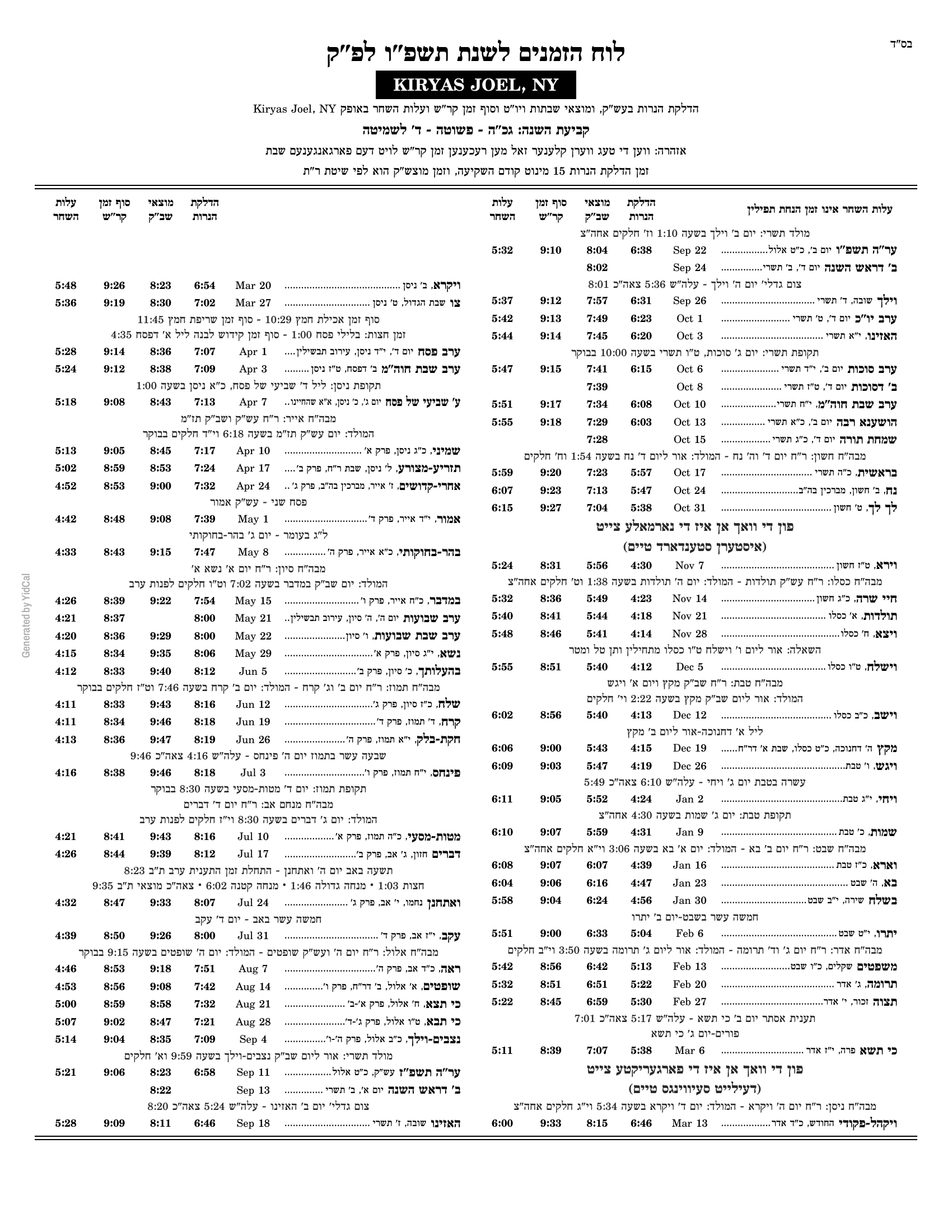 |
Yearly — Multi Sheet — the full year as a multi-page booklet:
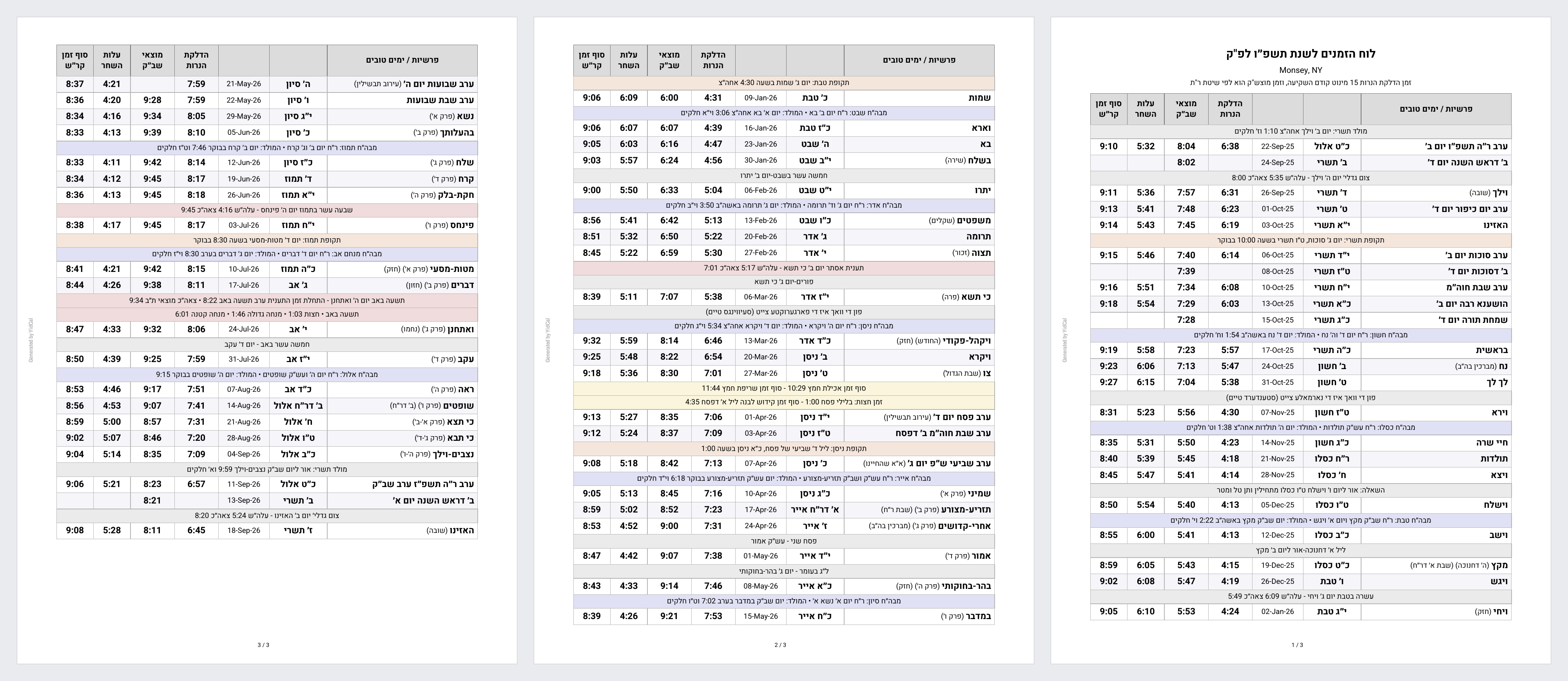
-
Service:
yidcal.generate_luach— enabled by default (toggle it under Options → Create the Generate Luach (PDF) service). -
Output: written to
/config/www/yidcal-data/and served at/local/yidcal-data/…. A persistent notification pops up with a clickable download link. YidCal keeps only the 4 most-recent files and prunes older ones, so the folder never fills up. (Download/save any PDF you want to keep.) -
output_path— write somewhere else instead of the default folder. -
no_notification: true— generate silently. The file is still written and the service still returns its path; use this when something else is showing the result, such as a dashboard card. -
Returns a response. Call it with
response_variable:and you get backpdf_url,pdf_pathandjson_url, plus the resolved date range, location and Hebrew year — so an automation can link to the file it just made:- action: yidcal.generate_luach data: style: weekly_yidcal no_notification: true response_variable: luach - action: notify.mobile_app_phone data: message: "Luach ready: {{ luach.pdf_url }}"
Call it with no data to get this week's YidCal card for your configured location:
service: yidcal.generate_luachOr set any of the options:
service: yidcal.generate_luach
data:
  style: yearly_multi_page   # weekly_yidcal (default) | yearly_multi_page | yearly_sheet
  hebrew_year: "תשפ״ז"       # 5787 or תשפ״ז — defaults to the current year
  time_format: "12"          # "12" or "24"
  location: "Monsey, NY"     # ZIP, place name, or "lat,lon" — defaults to your HA location
  is_in_israel: false        # override Diaspora/Israel just for this call
  candle_offset: 15          # minutes before sunset — defaults to your config
  havdalah_offset: 72        # minutes after sunset — defaults to your config
  emit_json: true            # also drop a JSON data file next to the PDF
Styles:
yearly_multi_page— full year as a multi-page table.yearly_sheet— full year on a single two-column sheet (התאחדות-style).weekly_yidcal(default) — one YidCal card per week. Usestart_date/end_dateto pick the range;shehecheyanuandadd_secondsare weekly-only extras.
Every field defaults to your integration settings, so overrides are only needed when you want something different (a different year, another city, an Israel luach from a Diaspora setup, etc.).
YidCal always keeps one JSON for the current year. Turn on
האלטן די לוח JSON פאר עטליכע יארן under Options → General and it also keeps a
separate file per year — one year back, plus however many years ahead you choose
under וויפיל יארן פאראויס צו האלטן (1–10, default 5).
- Files are named
luach_erev_rosh_hashanah_<year>.json, with an index atluach_years.json. - Each Erev Rosh Hashanah the new far year is added and the oldest is dropped, so there is always exactly one past year on disk.
- They are built one at a time, a few minutes apart, so a fresh install doesn't generate all of them at once.
- Each file is roughly 1MB — the default of 5 years ahead means about 7 files (one back + this year + five ahead).
Only runs while the Generate Luach (PDF) service above is enabled. If your configured location changes, the affected files are rebuilt.
-
HA 2023.7+
-
Python 3.10+
-
HACS recommended
-
Dependencies installed via manifest:
hdate[astral]==1.1.2pyluach==2.2.0zmanim==0.3.1timezonefinder==5.2.0geopy==2.4.1
- Open HACS in Home Assistant.
- Search for "YidCal" in the Integrations section.
- Install YidCal.
- Restart Home Assistant.
- Settings → Devices & Services → Add Integration → YidCal
- Pick your language on the first card — אידיש, עברית, or English — then work through the setup screens.
type: conditional
conditions:
  - condition: or
    conditions:
      - condition: state
        entity: sensor.yidcal_fast_starts_in
        state_not: ""
      - condition: state
        entity: sensor.yidcal_fast_ends_in
        state_not: ""
card:
  type: horizontal-stack
  cards:
    - type: markdown
      content: >
        {% set start = states('sensor.yidcal_fast_starts_in') %}
        {% set end = states('sensor.yidcal_fast_ends_in') %}

        {% if start %}
        <center>
          <b><font size="2">מען פאַסט אַן און</font></b><br><br>
          <ha-icon icon="mdi:clock-start" style="width:24px;height:24px;"></ha-icon><br><br>
          <b><font size="5">{{ start }}</font></b>
        </center>
        {% elif end %}
        <center>
          <b><font size="2">מען פאַסט אויס און</font></b><br><br>
          <ha-icon icon="mdi:clock-end" style="width:24px;height:24px;"></ha-icon><br><br>
          <b><font size="5">{{ end }}</font></b>
        </center>
        {% endif %}
      text_only: true
By Yoel Goldstein / Vaayer LLC