Wanderer is an #1 EVE Online mapper tool, light and fast alternative to Pathfinder. You can self-host Wanderer Community Edition or have us manage Wanderer for you in the cloud. Made and hosted in the EU 🇪🇺
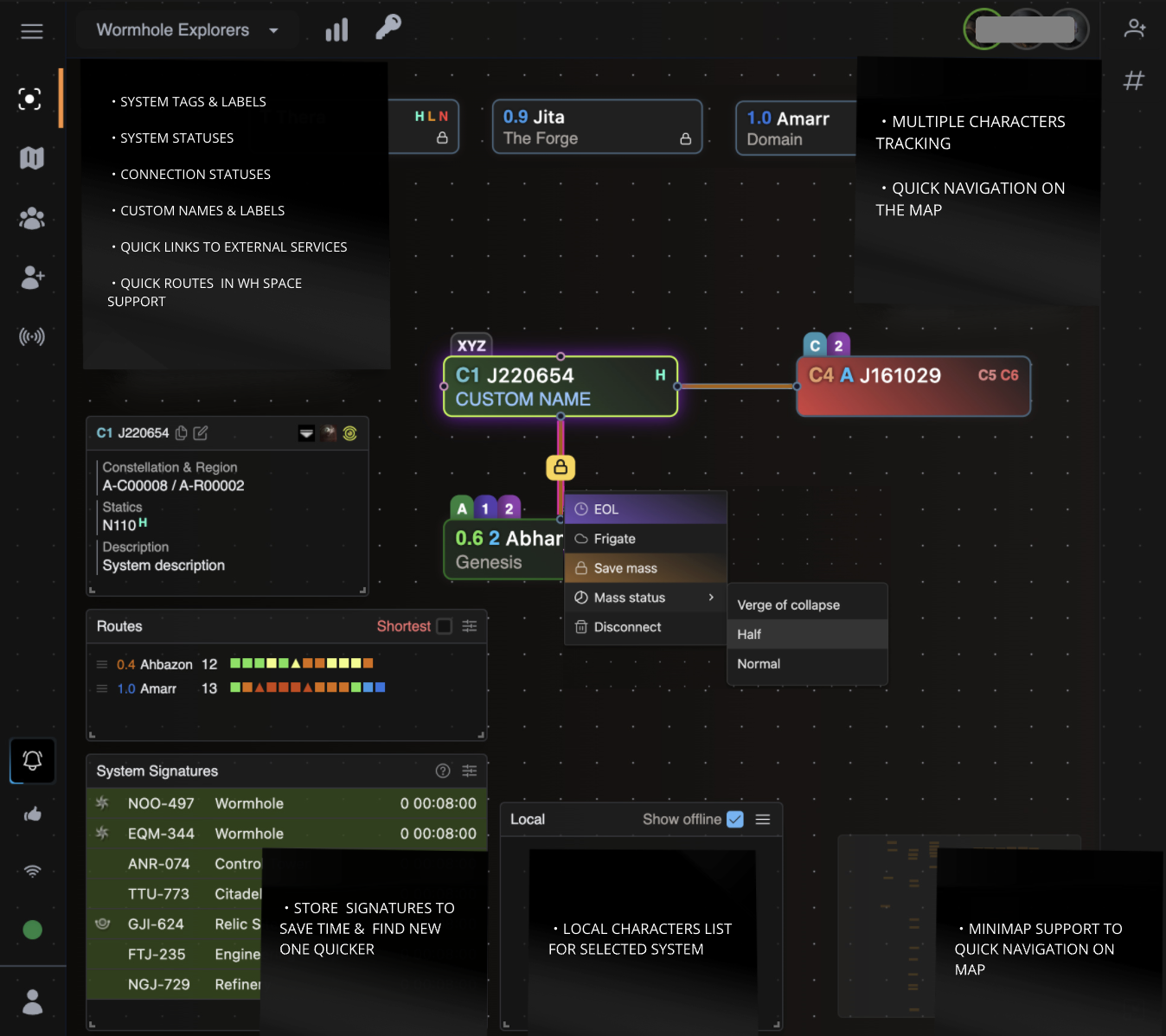
Here's what makes Wanderer a great Pathfinder alternative:
- Clutter Free: Wanderer provides simple interface and it cuts through the noise. No training necessary.
- Lightweight, fast and secure: Wanderer is lightweight and fast. It uses a self-hosted database and a self-hosted server.
- See all your characaters on a single page: Wanderer provides a simple interface to see all your characters on a single page.
- SPA support: Wanderer is built with modern web frameworks in core.
- Active development: Wanderer is actively developed and improved with new features and updates every week based on user feedback.
Interested to learn more? Check more on our website.
Wanderer is open source project and we have a free as in beer and self-hosted solution called Wanderer Community Edition (CE). Here are the differences between Wanderer and Wanderer CE:
| Wanderer Cloud | Wanderer Community Edition | |
|---|---|---|
| Infrastructure management | Easy and convenient. It takes 2 minutes to register your character and create a map. We manage everything so you don’t have to worry about anything and can focus on gameplay. | You do it all yourself. You need to get a server and you need to manage your infrastructure. You are responsible for installation, maintenance, upgrades, server capacity, uptime, backup, security, stability, consistency, loading time and so on. |
| Release schedule | Continuously developed and improved with new features and updates multiple times per week. | Latest features and improvements won't be immediately available. |
| Server location | All visitor data is exclusively processed on EU-owned cloud infrastructure. We keep your site data on a secure, encrypted and green energy powered server in Germany. This ensures that your site data is protected by the strict European Union data privacy laws and ensures compliance with GDPR. Your website data never leaves the EU. | You have full control and can host your instance on any server in any country that you wish. Host it on a server in your basement or host it with any cloud provider wherever you want, even those that are not GDPR compliant. |
Interested in self-hosting Wanderer CE on your server? Take a look at our Wanderer CE installation instructions.
Wanderer CE is a community supported project and there are no guarantees that you will get support from the creators of Wanderer to troubleshoot your self-hosting issues. There is a community supported forum where you can ask for help.
Our only source of funding is your donations.
Wanderer is a standard Elixir/Phoenix application backed by a PostgreSQL database for general data. On the frontend we use TailwindCSS for styling and React to make the map interactive.
Map owners and admins can configure Discord webhooks under Map settings → Notifications to receive kill notifications for systems on that map, optionally filtered to wormhole space and excluding chosen systems. The filter is server-side and per-map — it is separate from the per-user filters of the in-app kills widget.
There are two destinations per map, each with its own webhook, enabled flag and health state. The system destination receives kills in the map's systems. The optional character destination receives kills involving the map's tracked characters, so they can be routed to a separate channel. If a destination is disabled the kills for that role are dropped — they are never rerouted to the other channel.
Requires WANDERER_WEBHOOKS_ENABLED=true. When it is false the delivery workers
are not running and "Send test message" reports that notifications are disabled
on this server. WANDERER_DISCORD_POOL_SIZE (default 10) sizes the isolated
Finch connection pool used for Discord delivery.
WANDERER_DISCORD_MAX_KILLMAIL_AGE_SECONDS (default 3600) drops killmails
older than the given age, so an upstream replay does not post stale kills.
The dedup marks that stop a killmail being posted twice are held in memory, so a
restart loses them and the upstream service then replays recent kills. For
WANDERER_DISCORD_STARTUP_GRACE_SECONDS (default 600) after the marks are
lost, WANDERER_DISCORD_STARTUP_MAX_KILLMAIL_AGE_SECONDS (default 120)
applies instead of the hour above, so the replayed history is dropped for being
old while a kill that genuinely happens during the window still posts. Set the
grace to 0 to disable the window.
WANDERER_NOTABLE_ITEMS_ENABLED (default false) adds a "Notable Items"
section to each kill embed, listing the most valuable loot that dropped
(destroyed modules are excluded). It is off by default because building it costs
one extra ESI killmail fetch per kill plus a market price lookup, on the
dispatcher's critical path. WANDERER_NOTABLE_ITEMS_THRESHOLD_ISK (default
50000000) sets the minimum value an item must exceed to be listed,
WANDERER_NOTABLE_ITEMS_LIMIT (default 5) caps how many are listed per kill,
and WANDERER_NOTABLE_ITEMS_TIMEOUT_MS (default 1500) bounds how long
enrichment may hold up a batch — raising it delays kill notifications for every
map on the instance. Prices are Jita 4-4 quotes; abyssal modules are listed
without a price, since market quotes for them are not meaningful. Any failure —
timeout, ESI error, unavailable pricing — simply omits the section; the kill is
still posted.
Corporation tickers are filled in from ESI when a killmail reaches the
dispatcher without them, so the (TICKER) after each pilot name is not lost to
an upstream payload that arrived unenriched. This is on by default: it is one
lookup per corporation, cached for an hour, and only for the kills actually
being posted. WANDERER_CORP_TICKERS_TIMEOUT_MS (default 1500) bounds how
long those lookups may hold up a batch, and WANDERER_CORP_TICKERS_ENABLED
(default true) is an incident switch for stopping the lookups without a
deploy — turning it off means embeds lose the ticker again. A failure omits the
ticker; the kill is still posted.
Mentions are a per-map, per-webhook opt-in, so an instance with nothing
configured pings nobody. WANDERER_DISCORD_MENTIONS_ENABLED (default true)
is the instance-wide incident switch for them: turning it off silences every
role and user ping — on kill and route notifications alike — without touching
per-map configuration or waiting for a deploy.
The webhook URL is stored encrypted and is never displayed in full after it is saved — the settings tab shows only a masked hint. Pointing a destination at a different channel means entering the full URL again.
-
Copy
.env.exampleto.envand fill in the values -
Run
mix setupto install and setup dependencies -
(optional step) run
make yarnto install client dependencies
- Start server with
make serverormake s
Now you can visit localhost:8000 from your browser.
- Copy
.env.exampleto.envand fill in the values - Open the repository in the dev container ("Reopen in Container")
The image ships Erlang/Elixir pinned to .tool-versions, Node.js 18, yarn and
the usual CLI tooling, and runs as the non-root developer user. On first
create, .devcontainer/setup.sh fetches and compiles deps, creates and migrates
the database, seeds the EVE SDE reference data if it is missing, and installs
and builds the client assets — so there is nothing to install by hand.
-
If your host user id is not
1000, exportUSER_UID/USER_GIDbefore building so files written through the bind mount stay host-owned. See.devcontainer/docker-compose.override.yml.examplefor this and other host-specific settings. -
See how to run server in #Run section
- Run
nix develop - Run local postgres server:
pg-setup&pg-start - See how to start server in #setup section
mix ecto.reset
mix run priv/repo/seeds.exs
mix ash.codegen <name_of_migration>mix ash.migrate
iex> 32 |> :crypto.strong_rand_bytes() |> Base.encode64()