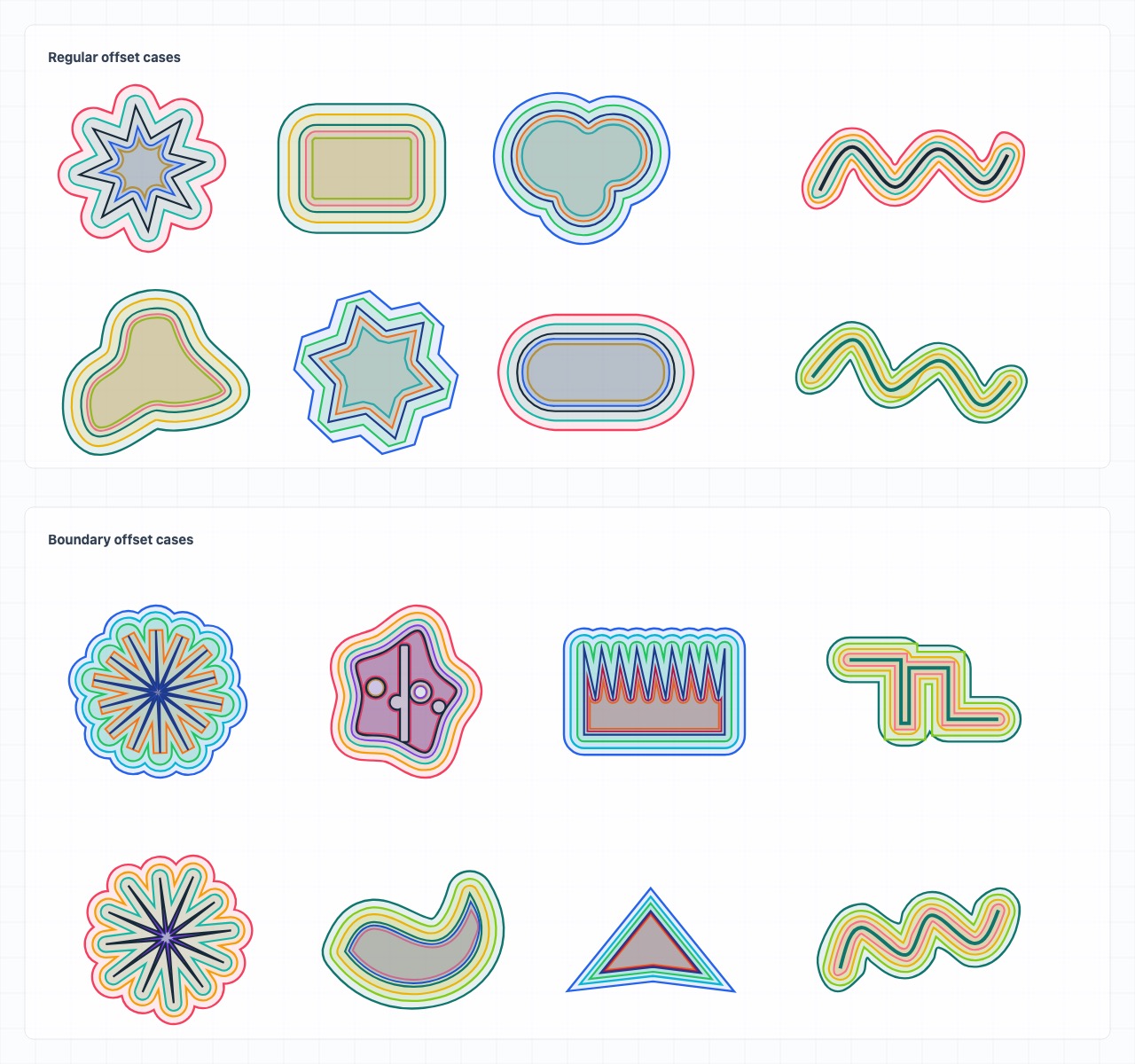
paperjs-offset 是 Paper.js 的路径偏移辅助库,用于生成闭合路径偏移、描边轮廓,以及分析偏移结果质量。
本地运行预览:
npm run demo:serve本地服务会输出并监听:
http://localhost:4173/新代码推荐直接使用命名函数:
import paper from 'paper';
import { analyze, offset, offsetStroke } from 'paperjs-offset';

paper.setup(new paper.Size(400, 300));function offset(
path: paper.Path | paper.CompoundPath,
distance: number,
options?: OffsetOptions
): paper.Path | paper.CompoundPath;
function offsetStroke(
path: paper.Path | paper.CompoundPath,
distance: number,
options?: OffsetOptions
): paper.Path | paper.CompoundPath;
function analyze(
source: paper.Path | paper.CompoundPath,
result: paper.Path | paper.CompoundPath,
distance: number,
options?: { stroke?: boolean }
): OffsetQuality;offset(path, distance, options)用于扩张或收缩路径。offsetStroke(path, distance, options)将描边中心线转换成可填充的闭合轮廓。distance是轮廓到中心线的距离,因此效果类似描边宽度的一半。analyze(source, result, distance, options)对生成结果做质量评分,并为困难几何场景输出警告。
这三个函数都接受 paper.Path 和 paper.CompoundPath。默认情况下,结果会插入当前 Paper.js project;如果希望自行管理返回对象,请传入 insert: false。
npm install paper paperjs-offset使用这个附加库的应用需要自行安装 paper。paperjs-offset 不声明运行时依赖;包内提供 CommonJS、ESM、TypeScript 类型声明和浏览器 bundle。
import paper from 'paper';
import { offset, offsetStroke } from 'paperjs-offset';

paper.setup(new paper.Size(400, 300));

const source = new paper.Path.Star({
  center: [160, 120],
  points: 8,
  radius1: 70,
  radius2: 36,
  insert: false
});

const expanded = offset(source, 14, {
  join: 'round',
  insert: false
});

const outline = offsetStroke(source, 8, {
  join: 'round',
  cap: 'round',
  insert: false
});正数距离会扩张闭合图形,负数距离会向内收缩。
const expanded = offset(source, 18, {
  join: 'round',
  insert: false
});

const contracted = offset(source, -18, {
  join: 'round',
  insert: false
});当你需要一个可填充的轮廓,而不是仅由渲染层绘制的 stroke 时,可以对开放或闭合路径使用 offsetStroke。
const openPath = new paper.Path({
  segments: [[20, 80], [90, 30], [160, 80]],
  insert: false
});

const outline = offsetStroke(openPath, 10, {
  join: 'round',
  cap: 'round',
  insert: false
});对于开放路径,cap 控制端点样式;对于闭合路径,结果仍然是闭合的可填充轮廓。
Bezier 几何的偏移是近似问题。当图形包含紧凑曲线、凹角、自交,或使用较激进的负向偏移时,可以使用 analyze 检查结果质量。
const result = offset(source, -12, {
  join: 'round',
  algorithm: 'auto',
  insert: false
});

const quality = analyze(source, result, -12);

console.log(quality.score, quality.warnings);
检查 offsetStroke 结果时,请传入 stroke: true:
const outline = offsetStroke(openPath, 10, {
  join: 'round',
  cap: 'round',
  insert: false
});

const quality = analyze(openPath, outline, 10, { stroke: true });interface OffsetOptions {
join?: 'miter' | 'bevel' | 'round';
cap?: 'butt' | 'round';
limit?: number;
insert?: boolean;
algorithm?: 'auto' | 'adaptive' | 'robust' | 'split' | 'legacy';
}| 选项 | 默认值 | 适用于 | 说明 |
|---|---|---|---|
join |
'miter' |
offset, offsetStroke |
角点重建样式。 |
cap |
'butt' |
offsetStroke |
开放路径端点样式。 |
limit |
10 |
offset, offsetStroke |
尖角的 miter 限制。 |
insert |
true |
offset, offsetStroke |
将结果插入源对象父级或当前 active layer。 |
algorithm |
'auto' |
offset, offsetStroke |
策略选择模式。 |
algorithm: 'auto' 是推荐默认值。它会尝试可用策略,使用与 analyze 相同的质量函数对候选结果评分,并返回评分最低的结果。
adaptive 有意保持保守。当严格结果看起来像 miter 尖刺,或负向偏移过度侵蚀时,它可能选择更安全的连接方式或更小的向内 fallback 距离。如果必须严格使用请求的距离,请使用 robust、split 或 legacy。
| 模式 | 使用场景 |
|---|---|
auto |
推荐的应用默认值,会选择评分最佳的结果。 |
adaptive |
先尝试严格 robust 结果,再为 miter 尖刺和激进内缩提供更安全的 fallback。 |
robust |
对凹角和自交描边轮廓做额外清理。 |
split |
拆分自交曲线,清理程度低于 robust。 |
legacy |
尽量接近旧版本行为,适合需要保持历史输出的场景。 |
OffsetQuality 包含:
interface OffsetQuality {
  algorithm?: 'auto' | 'adaptive' | 'robust' | 'split' | 'legacy';
  score: number;
  warnings: string[];
  selfIntersections: number;
  containmentErrors: number;
  distanceErrors: number;
  segmentCount: number;
  area: number;
}
警告可能包括空结果、非有限 bounds、自交、非预期面积变化、包含关系错误、中心偏移、负向偏移坍缩和距离坍缩。
在浏览器页面中,先加载 Paper.js,再加载浏览器版本的 paperjs-offset:
<script src="https://cdn.jsdelivr.net/npm/paper@0.12.18/dist/paper-full.min.js"></script>
<script src="https://cdn.jsdelivr.net/npm/paperjs-offset@2/dist/index.umd.min.js"></script>
这里使用 @2 跟随 v2 的最新兼容版本。如果需要完全可复现的构建,可以 pin 到具体版本,例如 paperjs-offset@2.1.0。
使用 paperjsOffset 全局对象访问当前 API:
const expanded = paperjsOffset.offset(path, 12, {
  join: 'round'
});

const outline = paperjsOffset.offsetStroke(path, 8, {
  join: 'round',
  cap: 'round'
});打开在线 Demo 可以查看偏移方向、连接样式、描边轮廓、复合路径、策略选择和质量评分。Gallery 已拆成 basic、advanced、boundary 和 edge-case 页面,以减少单页需要渲染的确定性 case 数量。
本地运行 demo:
npm run demo:serve根目录 index.html 会重定向到 demo/index.html。npm run build 会将浏览器 bundle 写入 dist/,并同步生成文件到 demo/,因此本地 demo 和发布产物使用的是同一套构建结果。
线上 demo 由 GitHub Pages 部署。仓库需要在 GitHub 的 Settings -> Pages 中把 Source 设为 GitHub Actions;之后 .github/workflows/pages.yml 会在 master 分支推送或手动触发时运行:
npm ci
npm run pages:build
pages:build 会重新构建包,把 index.html、demo/ 和 public/ 复制到 .pages/,并把锁定版本的 Paper.js 复制到 .pages/demo/vendor/。GitHub Pages workflow 只部署 demo 站点,不负责 npm 发布。
旧入口仍然可用,但新代码应优先使用上面的命名函数。
import { PaperOffset } from 'paperjs-offset';

const expanded = PaperOffset.offset(path, 12, { join: 'round' });
const outline = PaperOffset.offsetStroke(path, 8, { cap: 'round' });
const quality = PaperOffset.analyze(path, expanded, 12);
浏览器 bundle 也会暴露 window.PaperOffset,作为旧脚本的兼容别名。
import paper from 'paper';
import extendPaperJs from 'paperjs-offset';

extendPaperJs(paper);

const expanded = path.offset(12, { join: 'round' });
const outline = path.offsetStroke(8, { cap: 'round' });
这会修改 paper.Path.prototype 和 paper.CompoundPath.prototype。它仍然保留用于兼容,但命名函数更容易类型标注、测试和迁移。
路径偏移本质上是几何近似问题,尤其是在 Bezier 连接、自交、复合路径和大幅负向偏移附近。复杂图形仍然可能暴露边界情况。
反馈问题时,最好包含:
pathData- 距离
- 选项
- 使用的是
offset还是offsetStroke - 预期图形或截图
- 如果方便,附上
analyze(...)输出
请在 https://github.com/glenzli/paperjs-offset/issues 反馈问题。
npm ci
npm run lint
npm test
npm run test:stress
npm run test:stress:quick
npm run test:stress:boundary
常用构建命令:
npm run build
npm run build:ts
npm run build:bundles
npm test 会重新构建包、运行 smoke tests,然后运行完整生成式 stress corpus。普通 gallery 分组可使用 test:stress:quick,更激进的 boundary 分组可使用 test:stress:boundary。
发布流程刻意保持在本地触发;当前没有 GitHub Action 自动发布到 npm。准备发大版本时,先提交普通代码改动,然后运行:
npm run release:major也可以用 npm run release:minor 或 npm run release:patch。release:prepare 要求 git 工作区干净,会更新 package.json 和 package-lock.json、运行 release:check、提交 chore: release vX.Y.Z,并创建 vX.Y.Z tag。
确认版本提交和 tag 无误后,再执行真正的发布:
npm run release:shiprelease:ship 要求当前提交带有匹配当前版本号的 tag,会先检查 npm whoami 和 gh auth status,再重新运行 release:check,然后显式推送当前分支和版本 tag、用官方 npm registry 执行 npm publish,最后通过 GitHub CLI 执行 gh release create --generate-notes。如果 npm 发布需要 2FA,可以运行 npm run release:ship -- --otp=123456。
release:check 会运行 typecheck、测试、npm audit 和 npm pack --dry-run --ignore-scripts。npm test 已经先完成构建,因此 pack 校验不依赖 npm lifecycle。直接执行 npm publish 时,prepublishOnly 也会运行同一套 release check。
MIT。详见 LICENSE。
paperjs-offset provides offset geometry helpers for Paper.js. It generates closed path offsets, filled stroke outlines, and quality reports for generated offset geometry.
Open the live demo · Report an issue
Run the live preview locally:
npm run demo:serveThe local server prints and serves:
http://localhost:4173/Use the named functions for new code:
import paper from 'paper';
import { analyze, offset, offsetStroke } from 'paperjs-offset';

paper.setup(new paper.Size(400, 300));function offset(
path: paper.Path | paper.CompoundPath,
distance: number,
options?: OffsetOptions
): paper.Path | paper.CompoundPath;
function offsetStroke(
path: paper.Path | paper.CompoundPath,
distance: number,
options?: OffsetOptions
): paper.Path | paper.CompoundPath;
function analyze(
source: paper.Path | paper.CompoundPath,
result: paper.Path | paper.CompoundPath,
distance: number,
options?: { stroke?: boolean }
): OffsetQuality;offset(path, distance, options)expands or contracts a path.offsetStroke(path, distance, options)converts a stroked centerline into a closed filled outline. The distance is the outline distance from the centerline, so it behaves like half of a stroke width.analyze(source, result, distance, options)scores generated geometry and reports warnings for hard cases.
All three functions accept paper.Path and paper.CompoundPath. Results are inserted into the active Paper.js project by default; pass insert: false when you want to manage the returned item yourself.
npm install paper paperjs-offsetInstall paper in applications that use this addon. paperjs-offset does not declare runtime dependencies; the package ships CommonJS, ESM, TypeScript declarations, and browser bundles.
import paper from 'paper';
import { offset, offsetStroke } from 'paperjs-offset';

paper.setup(new paper.Size(400, 300));

const source = new paper.Path.Star({
  center: [160, 120],
  points: 8,
  radius1: 70,
  radius2: 36,
  insert: false
});

const expanded = offset(source, 14, {
  join: 'round',
  insert: false
});

const outline = offsetStroke(source, 8, {
  join: 'round',
  cap: 'round',
  insert: false
});Positive distances expand closed shapes. Negative distances contract them.
const expanded = offset(source, 18, {
  join: 'round',
  insert: false
});

const contracted = offset(source, -18, {
  join: 'round',
  insert: false
});Use offsetStroke for open or closed paths when you need a fillable outline instead of a rendered stroke.
const openPath = new paper.Path({
  segments: [[20, 80], [90, 30], [160, 80]],
  insert: false
});

const outline = offsetStroke(openPath, 10, {
  join: 'round',
  cap: 'round',
  insert: false
});
For open paths, cap controls the terminals. For closed paths, the result is still a closed filled outline.
Offsetting Bezier geometry is approximate. Use analyze when a shape may contain tight curves, concave joins, self-intersections, or aggressive negative offsets.
const result = offset(source, -12, {
  join: 'round',
  algorithm: 'auto',
  insert: false
});

const quality = analyze(source, result, -12);

console.log(quality.score, quality.warnings);
When inspecting offsetStroke output, pass stroke: true:
const outline = offsetStroke(openPath, 10, {
  join: 'round',
  cap: 'round',
  insert: false
});

const quality = analyze(openPath, outline, 10, { stroke: true });interface OffsetOptions {
join?: 'miter' | 'bevel' | 'round';
cap?: 'butt' | 'round';
limit?: number;
insert?: boolean;
algorithm?: 'auto' | 'adaptive' | 'robust' | 'split' | 'legacy';
}| Option | Default | Applies to | Notes |
|---|---|---|---|
join |
'miter' |
offset, offsetStroke |
Corner reconstruction style. |
cap |
'butt' |
offsetStroke |
Terminal style for open paths. |
limit |
10 |
offset, offsetStroke |
Miter limit for sharp joins. |
insert |
true |
offset, offsetStroke |
Insert the result into the source parent or active layer. |
algorithm |
'auto' |
offset, offsetStroke |
Strategy selection mode. |
algorithm: 'auto' is the recommended default. It tries the available strategies, scores each candidate with the same quality function exposed by analyze, and returns the lowest-scoring result.
adaptive is intentionally conservative. When a strict result looks like a miter spike or an over-eroded inward offset, it may choose a safer join or a smaller inward fallback distance. Use robust, split, or legacy when the requested distance must be treated strictly.
| Mode | Use case |
|---|---|
auto |
Recommended application default. Chooses the best-scored result. |
adaptive |
Tries strict robust output first, then safer fallbacks for miter spikes and aggressive inward collapse. |
robust |
Extra cleanup for concave joins and self-intersecting stroke outlines. |
split |
Splits self-intersecting curves with less cleanup than robust. |
legacy |
Closest behavior to older releases when preserving historical output matters. |
OffsetQuality includes:
interface OffsetQuality {
  algorithm?: 'auto' | 'adaptive' | 'robust' | 'split' | 'legacy';
  score: number;
  warnings: string[];
  selfIntersections: number;
  containmentErrors: number;
  distanceErrors: number;
  segmentCount: number;
  area: number;
}
Warnings can include empty results, non-finite bounds, self-intersections, unexpected area changes, containment errors, center shift, negative offset collapse, and distance collapse.
For browser pages, load Paper.js first and then the browser build:
<script src="https://cdn.jsdelivr.net/npm/paper@0.12.18/dist/paper-full.min.js"></script>
<script src="https://cdn.jsdelivr.net/npm/paperjs-offset@2/dist/index.umd.min.js"></script>
This uses @2 to follow the latest compatible v2 release. Pin an exact version such as paperjs-offset@2.1.0 when you need fully reproducible builds.
Use the paperjsOffset global for the current API:
const expanded = paperjsOffset.offset(path, 12, {
  join: 'round'
});

const outline = paperjsOffset.offsetStroke(path, 8, {
  join: 'round',
  cap: 'round'
});Open the live demo to inspect offset direction, join styles, stroke outlines, compound paths, strategy selection, and quality scoring. The gallery is split into basic, advanced, boundary, and edge-case pages so each page renders a smaller deterministic case set.
Run the demos locally:
npm run demo:serveThe root index.html redirects to demo/index.html. npm run build writes browser bundles to dist/ and syncs the generated files into demo/, so local demos and published artifacts exercise the same build.
The live demo is deployed with GitHub Pages. Set the repository Pages source to GitHub Actions in GitHub Settings -> Pages; after that, .github/workflows/pages.yml runs on pushes to master and on manual dispatch:
npm ci
npm run pages:build
pages:build rebuilds the package, copies index.html, demo/, and public/ into .pages/, and copies the locked Paper.js build into .pages/demo/vendor/. The Pages workflow only deploys the demo site; it does not publish to npm.
Older entry points still exist, but new code should prefer the named functions above.
import { PaperOffset } from 'paperjs-offset';

const expanded = PaperOffset.offset(path, 12, { join: 'round' });
const outline = PaperOffset.offsetStroke(path, 8, { cap: 'round' });
const quality = PaperOffset.analyze(path, expanded, 12);
The browser bundle also exposes window.PaperOffset as an alias for older scripts.
import paper from 'paper';
import extendPaperJs from 'paperjs-offset';

extendPaperJs(paper);

const expanded = path.offset(12, { join: 'round' });
const outline = path.offsetStroke(8, { cap: 'round' });
This mutates paper.Path.prototype and paper.CompoundPath.prototype. It remains available for compatibility, but named functions are easier to type, test, and migrate.
Path offsetting is a geometric approximation problem, especially around Bezier joins, self-intersections, compound paths, and large negative offsets. Difficult shapes can still expose edge cases.
Bug reports are most useful when they include:
pathData- distance
- options
- whether the operation is
offsetoroffsetStroke - expected shape or screenshot
analyze(...)output when available
Report issues at https://github.com/glenzli/paperjs-offset/issues.
npm ci
npm run lint
npm test
npm run test:stress
npm run test:stress:quick
npm run test:stress:boundary
Useful build commands:
npm run build
npm run build:ts
npm run build:bundles
npm test rebuilds the package, runs smoke tests, and then runs the full generated stress corpus. Use test:stress:quick for the normal gallery groups, and test:stress:boundary for the aggressive boundary groups.
Publishing is intentionally triggered locally. There is no GitHub Action that publishes to npm. For a major release, commit normal code changes first, then run:
npm run release:majorUse npm run release:minor or npm run release:patch for smaller releases. release:prepare requires a clean git worktree, updates package.json and package-lock.json, runs release:check, commits chore: release vX.Y.Z, and creates the vX.Y.Z tag.
After verifying the version commit and tag, ship the release:
npm run release:shiprelease:ship requires the current commit to have the tag matching the current package version. It checks npm whoami and gh auth status, reruns release:check, explicitly pushes the current branch and version tag, publishes to the official npm registry, and runs gh release create --generate-notes through the GitHub CLI. If npm publish requires 2FA, run npm run release:ship -- --otp=123456.
release:check runs typecheck, tests, npm audit, and npm pack --dry-run --ignore-scripts. npm test builds first, so the pack check does not depend on npm lifecycle scripts. Direct npm publish also runs the same release check through prepublishOnly.
MIT. See LICENSE.