This is an independent, community-maintained fork — not the original "SFTP" extension by Natizyskunk / liximomo. It has its own name, icon and repository. Use it if the original stopped working on recent VS Code.
A maintained, up-to-date fork of the popular VS Code SFTP extension — and it works on VS Code 1.123+ / Node 24, where the older versions crash.
Sync files between a local folder and a remote server over SFTP/SSH or FTP/FTPS: upload on save, download, two-way sync, a remote file explorer, multiple profiles and more.
Maintained by @fibanez7. Fork lineage: liximomo → Natizyskunk → this fork. MIT licensed — thanks to both for the original work.
This is a separate listing with its own name, icon, repository and maintainer. It exists to keep the tool alive on modern VS Code:
Original SFTP (Natizyskunk / liximomo) |
SFTP Sync Plus (this fork) | |
|---|---|---|
| VS Code 1.123+ / Node 24 | ❌ crashes (isDate is not a function) |
✅ fixed |
| Maintenance | stalled (last release behind) | actively maintained |
| Icon & branding | blue file glyph | own green ⇅ icon |
| Repository | Natizyskunk/vscode-sftp |
fibanez7/vscode-sftp |
Your sftp.json |
— | drop-in, no config changes |
If the original still works for you, great — keep using it. This fork is for everyone it left stranded on a crash.
The widely-installed SFTP extensions stopped working on recent VS Code: on VS Code 1.123+ (which ships Node 24 via Electron) opening or saving a file over SFTP crashed with TypeError: isDate is not a function. Upstream is slow to update. This fork keeps it alive.
Fixed in v1.17.0
| Fix | Detail |
|---|---|
✅ isDate is not a function on Node 24 |
Bumped ssh2 to ^1.17.0 (uses util.types.isDate). |
✅ Crash on connect ("listener" argument must be of type function) |
Disconnect handlers were registered incorrectly. |
| ✅ Source wouldn't recompile | Fixed missing command-constant imports and a path-handling type bug. |
It's a drop-in replacement — your existing .vscode/sftp.json keeps working unchanged.
- Features
- Install
- Quick start
- Commands
- Configuration reference
- Profiles
- Multiple contexts
- Connection hopping (jump host)
- Config from User Settings (remote-fs)
- VS Code settings
- Remote Explorer
- Debugging
- FAQ
- Credits & license
- 📤 Upload files/folders/whole project — manually or automatically on save.
- 📥 Download files/folders/project from the server.
- 🔁 Sync Local→Remote, Remote→Local, or both directions.
- 🔍 Diff a local file against its remote version.
- 🗂️ Remote Explorer — browse, open, create and delete remote files from a sidebar.
- 👀 File watcher — react to external file changes.
- 👥 Multiple profiles (e.g. dev/prod) with one-click switching.
- 🪝 Connection hopping through one or more jump hosts.
- 🔑 Password, private key, SSH agent, and keyboard-interactive (2FA) auth.
- 🧩 Multiple contexts — map different local folders to different servers.
- 📄 Atomic / temp-file uploads to avoid serving half-written files.
- Open Extensions (
Ctrl/Cmd + Shift + X). - Uninstall any other SFTP extension to avoid duplicate commands.
- Install SFTP Sync Plus from the Marketplace, or grab the
.vsixfrom Releases and use ··· → Install from VSIX…. - Reload VS Code.
-
Open the local folder you want to sync.
-
Ctrl/Cmd + Shift + P→SFTP: Config. This creates.vscode/sftp.json. -
Edit it with your server details:
-
Save it. To pull an existing project down first, run
SFTP: Download Project. -
Edit locally — with
uploadOnSave: true, every save syncs to the server.
Tip: leave
passwordout and you'll be prompted securely instead of storing it in plain text. For keys, useprivateKeyPath(see below).
Open the Command Palette (Ctrl/Cmd + Shift + P) and type SFTP, or right-click files/folders in the Explorer. Keybinding: Ctrl + Alt + U = Upload Changed Files.
Transfer
| Command | What it does |
|---|---|
SFTP: Upload File / Upload Folder |
Upload the selected file/folder. |
SFTP: Upload Active File / Active Folder |
Upload the file/folder open in the editor. |
SFTP: Upload Project |
Upload the whole project to remotePath. |
SFTP: Upload Changed Files |
Upload files changed in Git (working tree / index). |
SFTP: Force Upload |
Upload ignoring timestamp checks. |
SFTP: Download File / Folder / Project |
Download from the server. |
SFTP: Download Active File / Active Folder |
Download what's open in the editor. |
SFTP: Force Download |
Download ignoring timestamp checks. |
… To All Profiles variants |
Run the upload against every profile at once. |
SFTP: Cancel All Transfers |
Abort in-flight transfers. |
Sync
| Command | What it does |
|---|---|
SFTP: Sync Local -> Remote |
Make remote match local. |
SFTP: Sync Remote -> Local |
Make local match remote. |
SFTP: Sync Both Directions |
Two-way sync. |
Browse & compare
| Command | What it does |
|---|---|
SFTP: Diff with Remote |
Diff a local file against its remote copy. |
SFTP: List / List Active Folder / List All |
List remote files. |
SFTP: Reveal in Remote Explorer |
Jump to a file in the Remote Explorer. |
SFTP: Edit in Local |
Open a remote-explorer file for local editing. |
SFTP: View Content |
Open a remote file read-only. |
SFTP: Refresh / Refresh Active Remote File |
Refresh the Remote Explorer. |
Remote management
| Command | What it does |
|---|---|
SFTP: Create Folder / Create File |
Create on the server. |
SFTP: Delete |
Delete a remote file/folder. |
SFTP: Open SSH in Terminal |
Open an SSH session to the server. |
SFTP: Set Profile |
Switch the active profile. |
SFTP: Config |
Create/open sftp.json. |
All settings live in .vscode/sftp.json. Below is every available option.
| Option | Type | Default | Description |
|---|---|---|---|
name |
string | — | A label for this config (required for multi-context). |
host |
string | localhost |
Server hostname or IP. |
port |
number | 22 (SFTP) / 21 (FTP) |
Server port. |
protocol |
"sftp" | "ftp" |
sftp |
Transfer protocol. |
username |
string | — | User for authentication. |
password |
string | — | Password. Omit to be prompted (avoids plaintext). |
remotePath |
string | / |
Absolute base path on the server. |
context |
string | workspace root | Local path (relative to workspace) this config maps to. |
connectTimeout |
number (ms) | 10000 |
How long to wait for the connection. |
| Option | Type | Default | Description |
|---|---|---|---|
privateKeyPath |
string | — | Absolute path to your private key. |
passphrase |
string | true |
— | Key passphrase. Set true to be prompted (no plaintext). |
agent |
string | — | Path to ssh-agent socket. Windows: pageant or a cygwin socket path. |
interactiveAuth |
boolean | string[] | false |
Keyboard-interactive auth (e.g. 2FA / Google Authenticator). Pass an array to auto-answer prompts. |
sshConfigPath |
string | — | Absolute path to an SSH config file (e.g. ~/.ssh/config). |
algorithms |
object | — | Override transport algorithms: kex, cipher, serverHostKey, hmac (arrays). |
concurrency |
number | — | Number of concurrent operations. |
sshCustomParams |
string | cd "${remotePath}"; exec $SHELL -l |
Extra params for Open SSH in Terminal. |
| Option | Type | Default | Description |
|---|---|---|---|
secure |
boolean | "control" | "implicit" |
false |
true = encrypt control+data; "control" = control only; "implicit" = implicit TLS (usually port 990). |
secureOptions |
object | — | Options passed to Node's tls.connect() (certs, CAs, ciphers, rejectUnauthorized, etc.). |
| Option | Type | Default | Description |
|---|---|---|---|
uploadOnSave |
boolean | false |
Upload automatically on every save. |
downloadOnOpen |
"confirm" | boolean |
"confirm" |
Download a file when opened. "confirm" asks first. |
useTempFile |
boolean | false |
Upload to a temp file first, so visitors never hit a half-written file. |
openSsh |
boolean | false |
Atomic uploads (OpenSSH servers only). Requires useTempFile: true. |
Configure the Sync commands via syncOption:
| Option | Type | Default | Description |
|---|---|---|---|
syncOption.delete |
boolean | true |
Delete files at the destination that don't exist at the source. |
syncOption.skipCreate |
boolean | true |
Don't create new files at the destination. |
syncOption.ignoreExisting |
boolean | true |
Don't update files that already exist at the destination. |
syncOption.update |
boolean | true |
Only overwrite when the source file is newer. |
| Option | Type | Default | Description |
|---|---|---|---|
ignore |
string[] | [".vscode", ".git", ".DS_Store"] |
Glob patterns to skip (gitignore syntax). |
ignoreFile |
string | .gitignore |
Path to an ignore file (absolute or relative to workspace). |
| Option | Type | Default | Description |
|---|---|---|---|
remoteExplorer.filesExclude |
string[] | [] |
Patterns to hide in the Remote Explorer. |
remoteExplorer.order |
number | 0 |
Sort order (ascending; ties broken by name). |
| Option | Type | Default | Description |
|---|---|---|---|
watcher.files |
string (glob) | **/* |
Files to watch for external changes. |
watcher.autoUpload |
boolean | true |
Upload when a watched file changes. |
watcher.autoDelete |
boolean | false |
Delete remote when a watched file is deleted. |
remoteTimeOffsetInHours |
number | — | Hour difference between local and server (remote − local). |
limitOpenFilesOnRemote |
number | true |
true |
Cap concurrent remote file descriptors (true = 222). Don't set unless you must. |
remote |
string | — | Pull config from a remotefs.remote entry in User Settings. |
defaultProfile |
string | — | Profile to activate by default. |
contextandwatcherare only valid at the root level.
Define environments and switch between them with SFTP: Set Profile:
{
"username": "user",
"password": "secret",
"remotePath": "/remote/workspace/a",
"watcher": {
"files": "dist/*.{js,css}",
"autoUpload": false,
"autoDelete": false
},
"profiles": {
"dev": { "host": "dev-host", "remotePath": "/dev", "uploadOnSave": true },
"prod": { "host": "prod-host", "remotePath": "/prod" }
},
"defaultProfile": "dev"
}Map different local folders to different servers. Each context must be unique, and name is required:
[
{
"name": "build",
"context": "project/build",
"host": "host", "username": "user", "password": "secret",
"remotePath": "/remote/project/build"
},
{
"name": "src",
"context": "project/src",
"host": "host", "username": "user", "password": "secret",
"remotePath": "/remote/project/src"
}
]Reach a target server through one or more SSH proxies. (Variable substitution is not supported inside a hop config.)
Single hop — local → hop → target:
{
"name": "target",
"remotePath": "/path/in/target",
"host": "hopHost",
"username": "hopUser",
"privateKeyPath": "/Users/me/.ssh/id_rsa", // key lives on the local machine
"hop": {
"host": "targetHost",
"username": "targetUser",
"privateKeyPath": "/Users/hopUser/.ssh/id_rsa" // key lives on the hop
}
}Multiple hops — local → hopA → hopB → target: pass hop as an array, each entry's key living on the previous host.
Reuse a connection defined for remote-fs via the remote key.
User Settings:
"remotefs.remote": {
"dev": { "scheme": "sftp", "host": "host", "username": "user", "rootPath": "/path/to/somewhere" }
}sftp.json:
{
"remote": "dev",
"remotePath": "/home/xx/",
"uploadOnSave": false
}Set these in your User/Workspace Settings (not sftp.json):
| Setting | Default | Description |
|---|---|---|
sftp.printDebugLog |
false |
Print debug logs to the SFTP output channel (reload after changing). |
sftp.debug |
false |
Enable debug logging (reload after changing). |
sftp.downloadWhenOpenInRemoteExplorer |
false |
Use Download instead of View Content when opening a file in the Remote Explorer. |
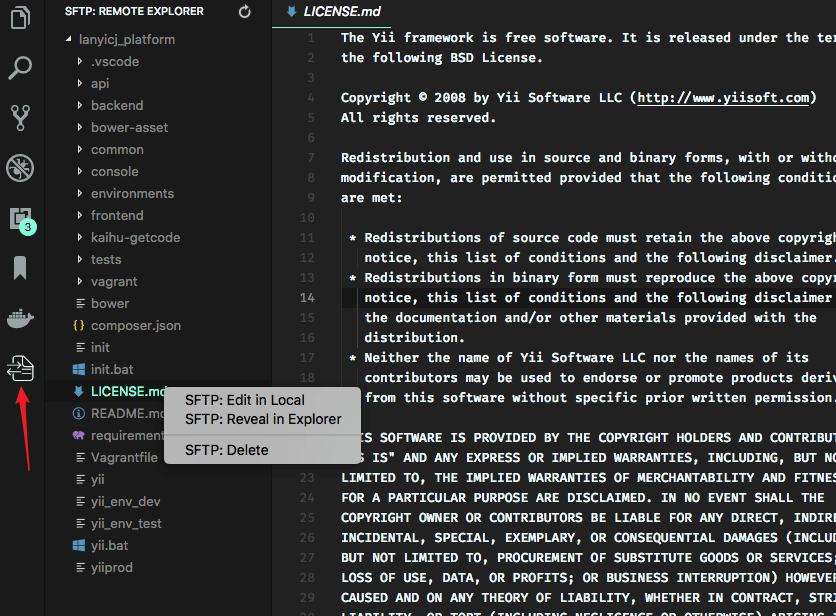
Browse the server from a dedicated sidebar:
- Run
View: Show SFTP, or click the SFTP icon in the Activity Bar. - Files open read-only by default — run
SFTP: Edit in Localto edit one locally. - Multi-select with
Ctrl/Shiftto download/upload several items at once.
After deleting a file, manually refresh the parent folder if the view doesn't update.
- Open Settings → set
sftp.debugtotrue→ reload VS Code. - View logs in View → Output → sftp.
When reporting an issue, this log (with secrets removed) is the most useful thing to include.
See FAQ.md.
Released under the MIT License. This is a maintained fork — full credit to the original authors:
- liximomo — original extension.
- Natizyskunk — long-running maintained fork this one continues.
Issues and pull requests welcome: https://github.com/fibanez7/vscode-sftp/issues
{
  "name": "My Server",
  "host": "192.168.0.10",
  "protocol": "sftp",          // "sftp" (default) or "ftp"
  "port": 22,
  "username": "user",
  "password": "secret",        // optional — omit to be prompted
  "remotePath": "/var/www/project",
  "uploadOnSave": true          // auto-upload every time you save
}