LoRA Image Curator is a local-first Windows desktop application for turning large image collections into reviewed, documented, training-ready LoRA datasets. It combines cataloging, local AI-assisted analysis, visual curation, quality review, and non-destructive export in one workflow.
The application prepares image datasets; it does not train a LoRA itself.
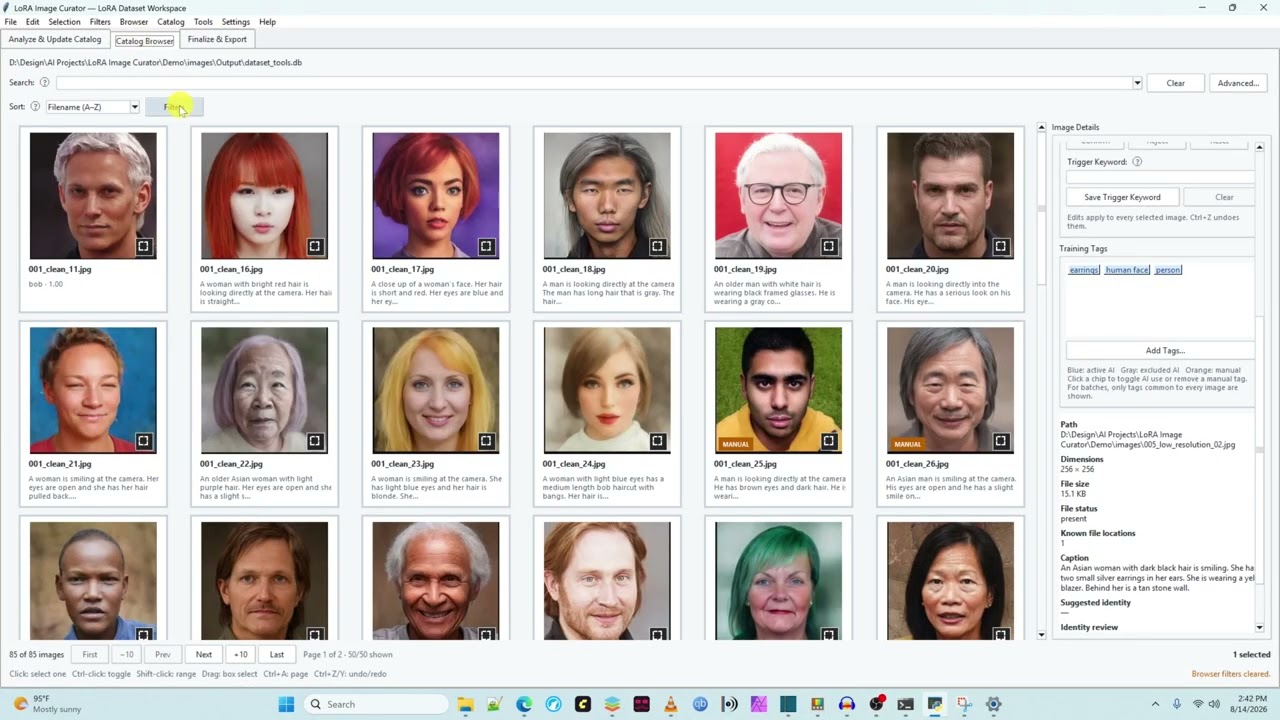
Watch the LoRA Image Curator demonstration on YouTube
See the workflow from a deliberately messy 100-image synthetic portrait collection through AI-assisted analysis, human-guided curation, validation, and export of training-ready data.
| Project at a glance | |
|---|---|
| Current release | v0.28.4 Git/source release; v0.28.2 Portable Source |
| Primary platform | Windows 11, Python 3.11+ |
| Data model | Versioned SQLite catalog with SHA-256 content identity |
| Local analysis | Florence-2, optional InsightFace and MediaPipe |
| Tested scale | Approximately 14,000–17,000 local images |
| License | MIT for project source; third-party components retain their licenses |
Status: Active pre-1.0 stabilization. v0.27.17 passed the complete live-Windows golden-build gate. v0.27.18 established the professionally reviewed public repository; v0.27.19 added a portable, checklist-driven source setup and launcher. v0.27.20 makes Recycle Bin safety standard, moves public QA files under
tests/, and prepares a non-mutating new-computer check. v0.27.21 moved Florence to pinned native Transformers code. v0.27.22 corrects the checkpoint to Hugging Face's native-compatible Florence conversion, adds a fail-fast caption/triage preflight, and safely resumes exact successful 4.49.0 or v0.27.21 results instead of regenerating completed large-catalog work. v0.27.23 fixes setup ordering that could silently install CPU-only PyTorch throughtimm, and adds a verified CUDA 13 repair for modern NVIDIA GPUs while keeping optional ONNX Runtime aligned. v0.28.0 adds the machine-readable provider registry, versioned/hash-verified MediaPipe model, source-scoped SPDX SBOM, first-launch third-party notice, and smart runtime launcher that form the security boundary for later end-user packaging. v0.28.1 adds explicit model-download confirmations and reuses the established Setup & Launch assistant from the Tools menu; checks never download anything. v0.28.2 turns the tested slim-inventory policy into a deterministicLoRA_Image_Curator_Portable_Source_vX.Y.Z.zip: it retains the complete guided setup/application payload while excluding repository-only files and every user/runtime-data category. The full source archive and future self-contained Windows package remain separate artifacts. v0.28.3 separates InsightFace detection from optional identity matching: an absent, invalid, or unusable reference no longer blocks the catalog scan, while trigger-word suggestions are created only when a valid reference profile exists. The Portable Source artifact remains at v0.28.2 until the source fix passes its Windows/Git smoke test and is deliberately propagated. v0.28.4 makes the first-use workflow explicit: catalog update, optional default-on Quality Analysis, then providers. It also adds editable local filter settings, Prominent Overlay readiness, duplicate grouping from the readiness checkbox, Finalize target selection, OCR search, and native File menu catalog/export commands. Prominent Overlay measures the visible area of Florence OCR text and conservative bar/banner candidates against the whole image, face, body, either, or both; the setting is shared everywhere. Schema 14 adds cached bar/banner rectangles to schema 13's OCR geometry. Existing catalogs need one Quality Analysis rerun for bar candidates and one Florence rerun if OCR rectangles are absent. Portable Source remains at v0.28.2 pending a deliberate portable update. Initial large-catalog validation is complete at the project's current 14,000–17,000-image scale; deeper interruption, memory, and sustained-provider testing can be reopened if community feedback indicates a need. The first complete exported-dataset training trial remains on the roadmap.
Preparing a character LoRA dataset is not just a folder-sorting problem. Useful curation requires durable image identity, provenance, review decisions, repeatable analysis, transparent quality checks, and a safe way to export only the chosen training material.
LoRA Image Curator treats the SQLite catalog as the source of truth while keeping provider output, user decisions, and original files separate. Source images remain outside destructive application control during analysis and export.
- Create a catalog from one or more image folders.
- Update the catalog, run local Quality Analysis, then run caption, face, and optional body/pose providers.
- Search, filter, compare, and review images in a paged thumbnail browser.
- Prune a named image set with duplicate, quality, identity, and readiness evidence.
- Quarantine questionable files reversibly or send confirmed deletions to the operating-system Recycle Bin.
- Validate the final selection and export images, sidecars, provenance, and a training handoff without moving or modifying the sources.
- Content-addressed catalog: SHA-256 identity keeps duplicate file paths separate from unique image content and supports compatible analysis reuse.
- Transactional persistence: schema migrations, catalog replacement, edits, undo/redo, quarantine metadata, and export history have explicit SQLite ownership.
- Provider boundaries: Florence-2, InsightFace/ONNX Runtime, MediaPipe, and FFmpeg remain attributable optional components rather than being hidden behind generic “AI” behavior.
- Responsive desktop lifecycle: long analysis, thumbnail, quality, export, and video tasks run outside Tk's event thread; GUI objects and callbacks are created and finalized on the GUI thread.
- Non-destructive defaults: analysis and export read or copy source images; file-moving actions require confirmation and recovery-aware handling.
- Large-catalog controls: paged thumbnails, bounded caches, indexed duplicate grouping, result-wide selection, and persisted image sets avoid catalog-wide widget growth and ordinary all-pairs work.
- Reproducible releases: a signed member manifest, static privacy/security audit, historical regression chain, deterministic ZIP builds, clean extraction, overwrite-preservation checks, and live GUI checkpoints define the release boundary.
See docs/ARCHITECTURE.md for module ownership, invariants, and concurrency rules.
- Local Florence-2 captioning, object detection, OCR text/regions, and triage evidence.
- Optional InsightFace detection and identity suggestions.
- Optional MediaPipe pose/body analysis with vetted model compatibility checks.
- Independent inclusive-by-default subfolder scopes for catalog import, captioning, face scanning, and face-reference folders.
- Boolean search, named searches, image sets, transactional undo, and combined face/body/catalog/readiness filters.
- Cached paged thumbnails, enlarged review with zoom/pan, and source-scene context for extracted video frames.
- Explicit duplicate review and preview-first “Remove Unnecessary Images” curation; the user retains final control.
- Readiness profiles for Flux, SDXL, SD 1.5, and general LoRA targets.
- FFmpeg frame extraction with fixed-interval estimates, scene-change support, provenance timestamps, and collision handling.
- Reversible quarantine, native Recycle Bin deletion, validation, and non-destructive export with manifests and handoff documentation.
The comprehensive user reference is README.txt.
The GitHub download is a source release, not yet a self-contained Windows
executable. Windows 11, 64-bit Python 3.11 or newer with Tk support, PyTorch,
and the base packages in requirements.txt are therefore required to start
the app. The guided setup creates and manages venv inside the project folder;
users do not activate or administer it manually.
Face analysis, body/pose analysis, and FFmpeg video extraction are optional. Native Recycle Bin support is installed with the base dependencies because it is the application's safety path for file deletion; the app still refuses any permanent-delete fallback. A later executable/installer milestone is intended to hide Python and environment setup from ordinary non-source users.
Florence-2, InsightFace, and MediaPipe model weights are not bundled. Review
MODEL_LICENSES.txt before downloading or using models.
Florence requires the exact transformers==4.56.2 dependency installed by the
base setup so the app can enforce its reviewed native-code boundary.
-
Clone the repository or extract a release into a clean folder.
-
Install 64-bit Python for Windows if Python 3.11 or newer is not already installed. Keep the Python launcher enabled during installation.
-
Double-click
Setup and Launch LoRA Image Curator.bat. -
Choose 1. First-time setup (recommended).
-
Follow the numbered checklist. The assistant creates
venv, installs base packages, guides the PyTorch choice, and offers each optional component separately. -
Run the app from menu option 10 or use:
.\Run LoRA Image Curator.bat
The ordinary launcher validates required packages and the real CUDA tensor path before starting. It opens guided setup when its local environment is missing or incompatible, and it refuses to silently use CPU PyTorch on a computer where NVIDIA hardware is visible. The diagnostic launcher remains a direct troubleshooting path. For an advanced manual setup, the equivalent commands are:
py -3 -m venv venv
venv\Scripts\python.exe -m pip install --upgrade pip setuptools wheel
Install PyTorch from its
official installation selector,
using venv\Scripts\python.exe -m pip in place of the selector's pip3. Then
run venv\Scripts\python.exe -m pip install -r requirements.txt and launch
with venv\Scripts\python.exe app.py. The guided assistant selects
PyTorch before installing packages whose dependency chains include Torch. It
can automatically install and verify the reviewed PyTorch 2.13.0 / Torchvision
0.28.0 CUDA 13.0 pair on a compatible modern NVIDIA system, safely run a
command copied from the official selector inside the local venv, or install the
official CPU-only build. The automatic NVIDIA path requires Windows driver
580.88 or newer and performs a real CUDA tensor operation before reporting
success.
An external virtual environment is also supported. The golden-build test reports the project-source folder and Python runtime separately and rejects project imports that escape the checkout under test.
| Capability | Setup |
|---|---|
| Face analysis | Menu option 5, or Install Face Analysis Dependencies.bat |
| Body/pose analysis | Menu option 7, or Install Body Analysis Dependencies.bat |
| Recycle Bin safety | Installed automatically with the required base packages |
| Video extraction | Install FFmpeg separately or select its executable in the video dialog |
Face analysis uses InsightFace with ONNX Runtime. The included installer first
reads the CUDA generation bundled with the installed PyTorch build, removes
conflicting CPU/GPU ONNX Runtime packages, and then installs the compatible
line. In particular, CUDA 12 uses onnxruntime-gpu>=1.21,<1.27, while CUDA 13
uses onnxruntime-gpu>=1.27,<1.30; CPU-only PyTorch receives CPU ONNX Runtime.
This follows the official ONNX Runtime CUDA compatibility table.
Do not independently install both onnxruntime and onnxruntime-gpu, and do
not assume the newest GPU package is compatible with an older CUDA generation.
Close the application and extract the release over the existing application
folder, allowing release files to be replaced. Preserve the virtual
environment, output, models, settings, catalogs, image sources, and caches.
The release preflight reports exact retired top-level Python filenames. v0.27.20
moves every maintained test_*.py file into tests/ and retires
Install Body and File Action Dependencies.bat. When upgrading by ZIP overlay,
move or delete those old root test copies and that one old batch file; do not
remove application modules, catalogs, images, models, outputs, settings, or the
virtual environment. Git users should use git rm so Git records the moves.
After overlaying v0.27.23 or later, run Install Base Dependencies.bat when
the release notes request a dependency repair. If an
NVIDIA GPU is present but the established venv contains CPU-only PyTorch, the
installer now exposes that mismatch and offers the tested CUDA 13 repair. The
repair records the current package list, changes only the project-local venv,
verifies a real GPU tensor operation, and realigns an already-installed
InsightFace/ONNX Runtime stack to CUDA 13. It does not modify catalogs, models,
settings, outputs, image sources, caches, or another application's environment.
The corrected Florence checkpoint downloads only on the first run that still
needs inference. With stored-result reuse enabled, exact successful results
from the former Microsoft checkpoint under Transformers 4.49.0 or 4.56.2 are
retained; only unfinished images use the corrected
florence-community/Florence-2-large-ft checkpoint.
- The application does not upload images, captions, embeddings, identity names, or catalogs.
- LoRA Image Curator does not collect telemetry data. Some third-party tools may collect their own telemetry; their defaults are set to telemetry off.
- Model and dependency downloads are separate, explicit third-party actions.
- Source images are read-only during analysis and export.
- Catalog replacement is staged and validated before publication.
- Catalog deletion is limited to a validated SQLite file and its exact sidecars.
- FFmpeg is invoked with an argument list and
shell=False. - Model weights, FFmpeg, catalogs, caches, logs, private datasets, and virtual environments are excluded from release archives.
The source and future portable artifacts are intentionally different. The
source archive is named LoRA_Image_Curator_Source_vX.Y.Z.zip and includes
tests, developer documentation, and release tooling. The future end-user
portable archive will be named
LoRA_Image_Curator_Portable_Windows_x64_vX.Y.Z.zip and will exclude tests,
release tools, GitHub metadata, contributor/developer material, source setup
scripts, and every user/runtime-data location. Its exact boundary is recorded
in portable_payload_policy.json; it will never be assembled by copying an
existing user or developer venv.
Third-party packages, models, executables, websites, terms, and privacy
practices remain outside the application's trust boundary. See
SECURITY.md and
THIRD_PARTY_NOTICE.md. Machine-readable identities
and the source/provider software bill of materials are in
provider_registry.json and SBOM.spdx.json.
The authoritative Windows release gate uses temporary synthetic data and never opens or edits a real catalog:
python -X dev -m tests.test_golden_buildA passing default run establishes the maintained regressions, source compilation, bounded privacy/security audit, two byte-identical builds, signed member verification, clean extraction, overwrite preservation, and cumulative live Tk checkpoints.
For a quick dependency-free repository check:
python -m tools.compile_project
python tools\audit_project.py
python -X dev -m tests.test_v0280_regression
python -X dev -m tests.test_golden_build --no-gui is useful in a headless
environment, but it does not qualify a release as golden. See
docs/GOLDEN_TEST.md for exact coverage and limitations.
The repository also runs the dependency-free checks on supported Python versions through GitHub Actions. Model execution, GPU compatibility, and live Tk behavior intentionally remain workstation tests.
| Area | Responsibility |
|---|---|
app.py, dialogs, ui_* |
Desktop composition, user intent, progress, and Tk lifecycle |
catalog*.py, image_sets.py |
Schema, migrations, durable catalog state, and saved sets |
florence_analyzer.py, face_analyzer.py, body_analysis*.py |
Local provider adapters and normalized results |
catalog_browser.py, browser_workflow.py, dataset_readiness.py |
Visual review, filtering, selection, and readiness evidence |
file_actions.py, dataset_export.py, video_extraction*.py |
Recovery-aware file actions, export, and video handoff |
tests/, tools/ |
Historical regressions, clean-install QA, audit, fixtures, and deterministic packaging |
docs/ |
Architecture, development, and golden-gate documentation |
BUGS.md, ROADMAP.md, WISHLIST.md, and CHANGELOG.md keep confirmed
defects, planned work, deferred ideas, and completed history distinct.
- Windows 11 is the primary tested platform; Linux/macOS portability is not yet a supported release claim.
- Provider evidence is probabilistic and requires human review.
- Large-catalog timing observations are workstation baselines, not performance guarantees.
- FFmpeg and model weights must be installed separately.
- Provider cancellation is cooperative at safe item/task boundaries.
- Readiness scoring evaluates preparation evidence; it does not predict final LoRA quality.
- The first complete exported-dataset training trial remains pre-1.0 work.
See BUGS.md, ROADMAP.md, and WISHLIST.md for the detailed current state.
The project is in focused stabilization, so reproducible bug reports and narrow fixes are preferred over broad feature expansion. Read CONTRIBUTING.md before proposing a change and do not include private images, catalogs, model files, credentials, or sensitive local paths in public reports.
Product direction, workflow design, acceptance criteria, hands-on Windows QA, and release decisions are led by David Scott Guffey. Implementation has been developed iteratively with AI assistance and validated through explicit regressions, catalog-integrity checks, security-boundary reviews, deterministic packaging, and extracted-archive verification.
Project source is licensed under the MIT License. Third-party packages, models, and separately installed tools retain their own licenses; see MODEL_LICENSES.txt and THIRD_PARTY_NOTICE.md.