


A small Rust CLI tool that renames files and directories to clean, ASCII-safe slugs.
Warning
Breaking change since 0.4.0. The directory-scan mode and the
-a/--all and -r/--recursive options have been removed.
rename-simple now operates only on the paths you give it, like
rename(1). Use your shell's globbing to select entries:
rename-simple * instead of rename-simple -a, and
rename-simple **/*.pdf instead of -r.
- Transliterates accented and extended Latin characters to ASCII (
é → e,ç → c,œ → oe,ß → ss…) - Expands typographic ligatures and compatibility forms (
fi → fi, fullwidthFile → file, superscripts² → 2,™ → tm,№ → no) - Romanises Greek and Cyrillic letters (
Ελληνικά → ellinika,Москва → moskva) - Lowercases everything
- Replaces spaces and special characters with
-; collapses consecutive separators - Preserves
_; cleans up_-and-_sequences to_ - Strips leading and trailing
-/_before the extension - Preserves known compound extensions (
.tar.gz,.tar.bz2,.tar.xz,.tar.zst) - Keeps extensions separate only when they are ASCII alphanumeric and ≤10 characters
(e.g.
.tét→ absorbed as-tet;.abcdefghijkl(12 chars) → absorbed as-abcdefghijkl) - Skips hidden files (
.gitignore,.DS_Store…) and flags naming conflicts - Optionally (
-D) deletes a source file that is a byte-for-byte duplicate of an already existing target - Optional cleanup fixes: repairs mojibake (
-U), strips HTML tags and entities (-H), or both (-A)
Requires Rust 1.85+.
# From crates.io
cargo install rename-simple

# Or from source
cargo install --path .The repository is a flake, so no Rust toolchain is needed:
# Run without installing
nix run github:darkone-linux/rename-simple

# Or install into your profile
nix profile install github:darkone-linux/rename-simplerename-simple [OPTIONS] <files>...
Each argument is an entry renamed itself, like the traditional rename
command — globbing is left to the shell (rename-simple *.jpg, or
rename-simple dir/**/*.pdf with zsh / bash globstar). Files and directories
are both renamed by default; -f / -d act as a type filter. With no
arguments, rename-simple prints this help.
| Option | Description |
|---|---|
<files>... |
Entries to rename (files and/or directories) |
-f, --files-only |
Rename files only |
-d, --dirs-only |
Rename directories only |
-U, --fix-unicode |
Repair mojibake (UTF-8 misread as Latin-1/CP1252) before renaming |
-H, --fix-html |
Strip HTML tags and decode HTML entities before renaming |
-A, --fix-all |
Apply every cleanup fix (currently -U + -H) |
-D, --delete-duplicates |
Delete a source that is a byte-for-byte duplicate of an existing target |
-n, --dry-run |
Preview renames without touching any file |
-q, --quiet |
Print nothing at all |
-v, --verbose |
Show details of each rename |
-h, --help |
Print help |
-V, --version |
Print version |
$ rename-simple --dry-run ~/Downloads/*[R] .: 01_ Introduction au Projet.PDF -> 01_introduction-au-projet.pdf
[R] .: Réunion d'équipe (2024).docx -> reunion-d-equipe-2024.docx
[R] .: backup.TAR.GZ -> backup.tar.gz
[R] .: Café Montréal.jpg -> cafe-montreal.jpg
[R] .: à faire .tét -> a-faire-tet
[R] .: notes.cuicuicuicui -> notes-cuicuicuicui
6 entries matched, 6 entries renamed, 0 error.
$ rename-simple -f ~/Downloads/*Directories among the arguments are left untouched; only files are renamed.
$ rename-simple -d ~/Projects/*Files among the arguments are left untouched; only directories are renamed.
$ rename-simple ~/Downloads/*With a shell that supports recursive globs you can select entries at any depth:
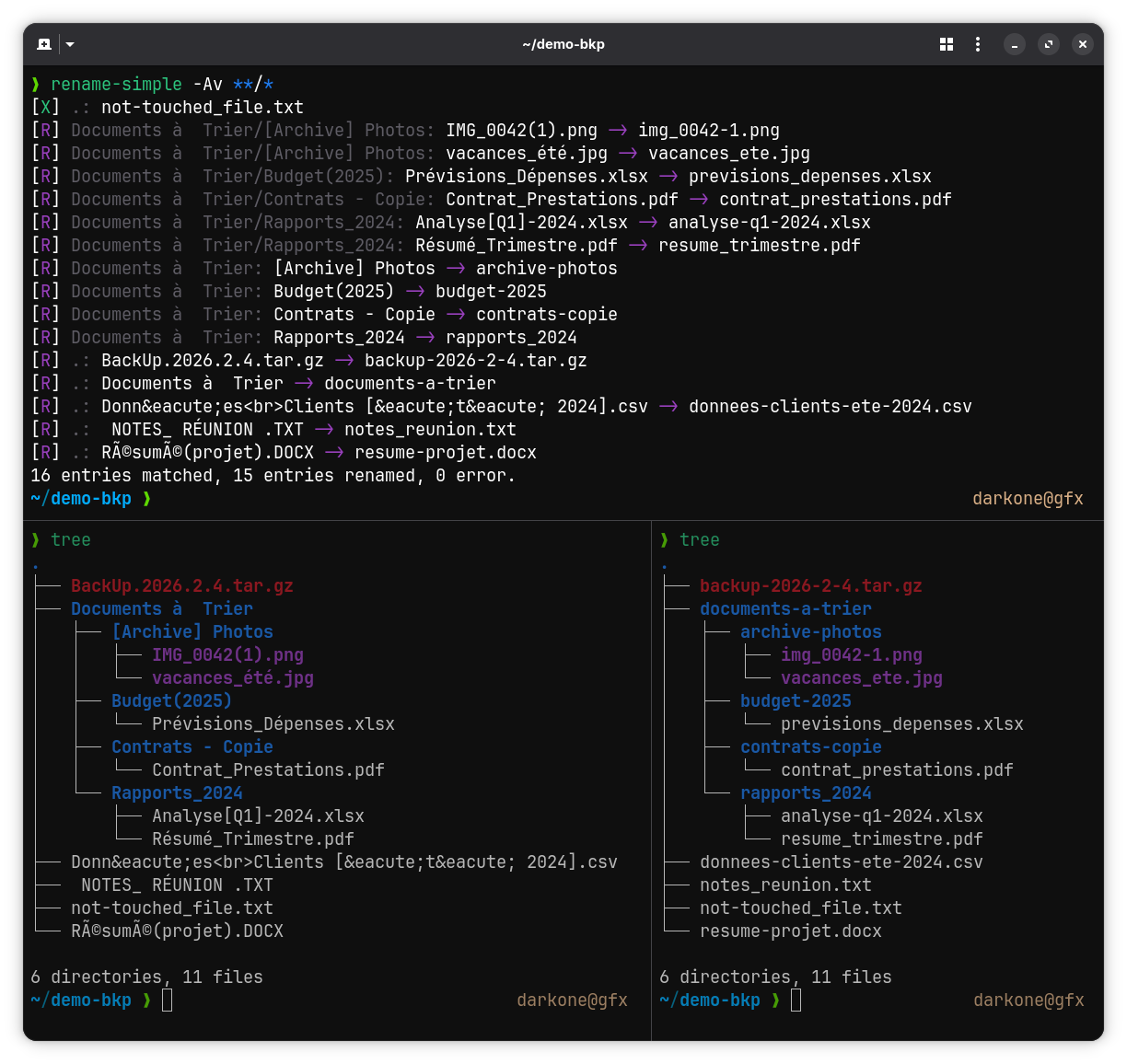
$ rename-simple ~/Documents/**/*.pdfNames coming from broken downloads or web scrapers often carry mojibake (UTF-8 read as Latin-1/CP1252) or HTML markup. The cleanup fixes repair the name before the slug pipeline runs:
$ rename-simple -A ~/Downloads/*[R] .: Café Montréal.jpg -> cafe-montreal.jpg
[R] .: Tom & Jerry.mp4 -> tom-jerry.mp4
[R] .: <b>Été 2024.pdf -> ete-2024.pdf
3 entries matched, 3 entries renamed, 0 error.
-U/--fix-unicode is all-or-nothing per name: a file that is already
correctly named (café.jpg) is never re-decoded, so the fix is safe to apply
everywhere. Double mojibake (Café) is repaired too. -H/--fix-html
strips tags and decodes named (é), decimal (é) and hex
(é) entities. Block-level tags (<br>, <p>, <div>, <li>,
<h1>–<h6>, …) are replaced by a space so the surrounding words stay
separated (data<br>client → data-client), while inline tags (<b>, <i>,
<span>, …) vanish with no gap (client<b>s → clients). -A/--fix-all
applies every cleanup fix.
When the cleaned name is already taken, the source is never overwritten and the clash is reported. The message tells you whether the two entries hold the same bytes:
$ rename-simple *[E] .: IMG 9572.mov -> File name already exists (identical duplicate, use -D to delete the source)
[E] .: VID 20260819.mp4 -> File name already exists (2 different files)
-D/--delete-duplicates acts on the first case: when source and target are
two regular files with strictly identical content (compared byte for byte,
not by name or size), the rename would only produce a copy of what is already
there, so the redundant source is deleted:
$ rename-simple -D *[W] .: IMG 9572.mov -> Identical duplicate, source deleted
[E] .: VID 20260819.mp4 -> File name already exists (2 different files)
4 entries matched, 0 entry renamed, 1 duplicate removed, 1 error.
Nothing is ever deleted without -D, and -A/--fix-all does not imply
it: -A only repairs names. -D combined with --dry-run announces the
deletion without performing it. Everything else stays an error and is left
untouched: differing content, a directory, or two names for the same entry
(hard link, case-insensitive filesystem).
Symlinks are left out of the comparison entirely — neither side may be one. A link is not a redundant copy of the bytes it points at, and content reached through a symlinked target lives outside the directory being cleaned up: deleting the source there would drop the last real copy.
Verbose mode prints each rename and a summary:
$ rename-simple -v ~/Downloads/*[R] .: 01_ Introduction au Projet.PDF -> 01_introduction-au-projet.pdf
[R] .: Réunion d'équipe (2024).docx -> reunion-d-equipe-2024.docx
[R] .: backup.TAR.GZ -> backup.tar.gz
[R] .: Café Montréal.jpg -> cafe-montreal.jpg
[R] .: à faire .tét -> a-faire-tet
[R] .: notes.cuicuicuicui -> notes-cuicuicuicui
6 entries matched, 6 entries renamed, 0 error.
Since the directory-scan mode is gone, "rename everything in the current
directory" is now just rename-simple *. A shell alias makes it a habit:
alias rsa='rename-simple *'Add this line to your ~/.bashrc or ~/.zshrc, then:
rsa                      # rename everything in the current directory
rename-simple -n *       # dry-run preview
rename-simple **/*.pdf # rename every PDF in the tree (zsh / bash globstar)cargo testMIT