
An MCP server that tests apps like a real testing engineer—exploring user journeys, discovering unscripted bugs, and proving each finding before reporting it.
Argus is an MCP server. It adds evidence-first browser QA to Claude Code, Codex, Cursor, or any MCP host without taking over the host agent's identity or broader coding task. The agent explores, inspects, verifies persistence, and records reproducible bugs. Every certified finding is independently re-confirmed from a clean page load before it's reported.





Product page · Quick start · Why Argus · Compared · Tools · Benchmarks
Give it a URL; get a report of bugs — each tagged with whether Argus independently reproduced it or only observed it:
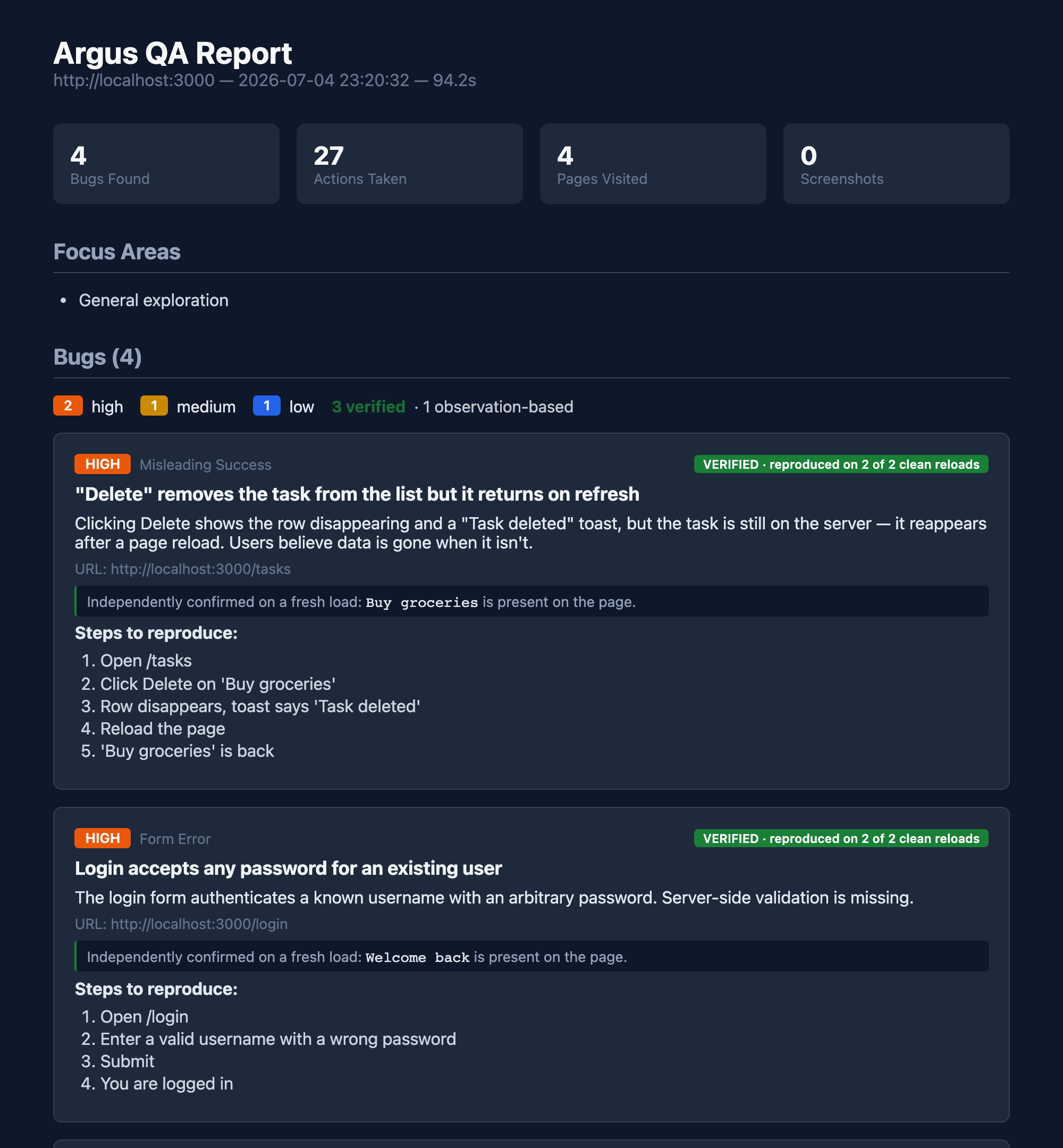
The green badge is the whole point. Anyone can have an LLM claim a bug. Argus re-loads the page from scratch and re-checks the symptom before it says VERIFIED — so the report is a list of bugs you can trust, not a list of guesses to triage.
flowchart LR
    A(["observe"]) --> B{"looks wrong?"}
    B -->|not sure| C["act: click · type · resize · verify"]
    C --> A
    B -->|bug| D["verify_persistence — reload from a clean state"]
    D -->|symptom repeats| E(["VERIFIED"])
    D -->|symptom gone| F(["dropped — no false positive"])
    E --> G[["report: HTML · JSON · JUnit · SARIF"]]
The agent is the intelligence. Argus supplies concise QA guidance, a description-keyed tool surface (click_what("Login button"), not click(7)), a goal coverage ledger, and a reproduction-receipt engine that turns "the model thinks this is a bug" into "this bug is real, here's the proof."
With uv installed, no global Python package install is required. Install Chromium once:
uvx --from playwright playwright install chromiumThen connect Argus to your MCP client.
claude mcp add argus -- uvx --from argus-testing argus-mcpCodex CLI, the Codex IDE extension, and the ChatGPT desktop app share the same local MCP configuration:
codex mcp add argus -- uvx --from argus-testing argus-mcp
The button adds Argus to Cursor; run the Chromium installation command above once before the first test.
{
  "mcpServers": {
    "argus": {
      "command": "uvx",
      "args": ["--from", "argus-testing", "argus-mcp"]
    }
  }
}
The default core profile exposes the primary web-testing workflow without flooding the host with every specialist tool. Use uvx --from argus-testing argus-mcp --list-tools to inspect the selected profile, --tool-profile screen for native macOS testing, or --tool-profile full for the entire advanced surface. ARGUS_TOOL_PROFILE provides the same setting through the environment.
Then just ask, in your agent session:
"Test my app at http://localhost:3000 — find real bugs."
That's it. The agent drives; Argus keeps it honest and writes the report.
For a scoped review, the host can give start_session explicit goals, constraints, and an advisory time_budget_minutes. Argus returns the full testing protocol once and keeps outstanding goals and discovered pages visible in later observations. Mark a goal in_progress before its journey; when coverage_update marks it exercised or blocked, Argus requires a concrete explanation and automatically links the URLs, value-redacted actions, screenshots, persistence checks, bugs, and observations produced in that testing window. The final HTML and JSON reports preserve both completed and unfinished coverage instead of implying that an incomplete pass was comprehensive.
pip installation
pip install argus-testing
playwright install chromium
claude mcp add argus -- argus-mcp
CLI mode (no MCP host — bring your own LLM)
# Uses a LiteLLM-backed planner. Set a provider key (OPENAI_API_KEY, DEEPSEEK_API_KEY, …).
uvx --from argus-testing argus http://localhost:3000 --model deepseek/deepseek-chat

# Higher recall: union N independent passes (deduped, proven instance kept)
uvx --from argus-testing argus http://localhost:3000 --passes 3
Screen mode (macOS) — test any native app, not just the web
pip install 'argus-testing[mac]'
brew install cliclick          # keystroke / coordinate fallback
argus-mcp --doctor             # check Screen Recording + Accessibility grants
claude mcp add argus-screen -- argus-mcp --tool-profile screen
Same description-keyed tools, but the target is whatever app is foreground on macOS — Notes, Cursor, Safari, your in-progress feature. No headless Chrome, no scripted Playwright. Argus sees what you see, via the Accessibility tree.
Existing testing tools only test what you script. Playwright and Cypress run the assertions you wrote. Argus discovers bugs you didn't think to test for — and then does the thing an LLM alone can't be trusted to do: proves them.
| Autonomous & black-box | You give it a URL, not a test plan. It explores like a real user — no repo access, no scripted steps. |
| Coverage contract | Optional natural-language goals, user constraints, discovered pages, and time budget stay visible throughout the session and in the final report. |
| Reproduction receipts | Before certifying a bug, it re-loads the page from a clean state and re-confirms the symptom. Engineered for zero false-certifications. |
| Finds human-eye bugs | Fake "Only 3 left!" scarcity, a "Saved" toast that doesn't save, a sale badge where the price didn't drop, a stale navbar after a rename. Static analysis catches none of these. |
| Discover → guard | Findings are journaled; argus-regression re-checks them on every build with zero LLM cost and a non-zero exit — a real CI gate against known bugs coming back. |
| Machine-readable | Every report also emits JSON, JUnit, and SARIF — so findings gate a pipeline and surface as inline GitHub PR annotations. |
On the axis that matters for finding bugs — autonomously discover, independently verify, and report — Argus occupies a different slot from the browser-MCP crowd:
| Argus | Playwright MCP | Chrome DevTools MCP | browser-use | |
|---|---|---|---|---|
| Autonomously finds unknown bugs | Yes | No (driver) | No (debugger) | Partial (task-scoped) |
| Independently verifies each finding | Yes (receipt) | No | No | No (LLM score) |
| Evidence-rich bug report | Yes | No | No | Partial |
| Black-box (no repo / source access) | Yes | Yes | Yes | Yes |
| Zero-LLM CI regression gate | Yes | Partial | No | Partial |
These aren't "worse" tools — they're a different job. Playwright MCP gives an agent excellent hands; Chrome DevTools MCP gives it deep network/perf/memory inspection Argus doesn't have. Argus is the layer that decides what's a bug and proves it. Use them together.
$ python -m argus.bench --target all

  buggytasks    22 / 22  = 100 %   ·  mechanical bugs (console errors, fake delete, auth bypass…)
  darkshop      12 / 12  = 100 %   ·  human-eye bugs (fake scarcity, lying toasts, stale state…)
  ──────────────────────────────────────────────────────────────────────
  total         34 / 34  = 100 %   ·  reproducible from git clone in two commands
34 / 34 is the capability ceiling — what's findable through the tool surface, measured by deterministic scripts. It is deliberately separate from how often a given LLM remembers to use the tools well, which is noisy and honestly reported below.
Real-LLM recall — the honest number (and why we report the spread)
python -m argus.bench.agent_runner puts an actual model in the driver's seat and scores recall across trials. What we've learned running it:
- Real recall sits well below the
34/34ceiling. A live driver finds a fraction of the seeded bugs per pass — the ceiling is what's findable, this is what a model finds. - Variance is large — never rank models on a few runs. Per-trial recall swings widely; we report the spread, not a single hero number.
- Dogfooding the bench found real bugs in Argus itself — a
record_bugcrash on a string argument that silently dropped findings, resolver misses on common phrasings. The tool-testing tool got tested. - Precision holds regardless of driver. Across every trial, the reproduction receipt kept false-certifications at zero — a weak model finds fewer bugs, but the ones marked VERIFIED are still real.
What the fixtures seed
BuggyTasks (:5555) — 22 mechanical bugs in a task app: console errors, dead links, fake delete (UI says "deleted!" but data persists on refresh), auth bypass, NaN dates, off-by-one counts, race conditions. The "scripted E2E could find these" tier.
DarkShop (:5556) — 12 human-eye bugs in a polished-looking store: hardcoded "Only 3 left!" scarcity, -50% badges where sale price equals original, a "free shipping over $50" banner contradicted by a flat $5 at checkout, inverted visual hierarchy ("Add to Cart" demoted under a prominent "Subscribe"), cross-page state drift (rename sticks on /account, navbar greeting doesn't). Static analysis catches roughly none of these — they require an agent that reads the page and reasons.
python test-site/app.py           # BuggyTasks  :5555
python human-eye-fixture/app.py   # DarkShop    :5556
python -m argus.bench --target allargus-mcp starts with the focused core web profile. Every public tool is documented below. The counts are also available directly from the installed server:
uvx --from argus-testing argus-mcp --list-tools
uvx --from argus-testing argus-mcp --tool-profile screen --list-tools
uvx --from argus-testing argus-mcp --tool-profile full --list-tools| Profile | Public tools | Intended use |
|---|---|---|
core |
30 | Primary browser QA workflow; the default. |
screen |
14 | Focused native macOS testing through Accessibility and screenshots. |
full |
77 | Everything in core and screen, plus specialist browser, state, network, coordinate, and crawl controls. |
Core profile — 30 tools
| Tools | Purpose |
|---|---|
start_session |
Start an exploratory, visual, or regression browser review; optionally accept goals, constraints, and time_budget_minutes; return the one-time protocol and initial observation. |
observe |
Return URL, title, description-keyed interactive elements, counts, visible feedback, ARIA tree, and viewport state. |
coverage_update |
Open a goal evidence window with in_progress, then mark it exercised or blocked; terminal states require an explanation and automatically link session evidence. |
click_what |
Click the element best matching a natural-language description; return candidates instead of guessing when ambiguous. |
type_into · select_into |
Resolve a field by description, then type text or select an option. |
hover_what · press_key |
Exercise hover states and keyboard interactions against description-keyed targets. |
resize · emulate_device |
Test responsive breakpoints or reopen the page under real mobile touch, UA, DPR, and viewport settings. |
upload_file |
Attach one or more local files to a matching file input. |
navigate · go_back · scroll_down |
Navigate directly, return through browser history, or reveal content below the fold. |
inspect_element · check_layout |
Inspect computed styles, ARIA and markup, or bounded overflow, clipping, small-target, and overlay signals. |
screenshot · screenshot_diff |
Capture viewport, full-page, or element evidence and produce a red-tint pixel-diff overlay. |
get_errors |
Drain correlated console errors and HTTP 4xx/5xx events captured since the previous read. |
capsule_save · capsule_restore |
Save and restore a named authenticated or seeded browser state, with an optional liveness check. |
verify_persistence |
Force a fresh load and check whether target text is present or absent. The “Saved!” toast is not proof; this is. |
test_action · test_form |
Perform a description-keyed action or form submission and return the resulting state diff in one round trip. |
check_links · check_performance |
Probe current-page internal links and expose raw browser performance metrics without auto-certifying generic audit findings. |
regression_check |
Re-test journaled findings for the current origin without requiring another discovery pass. |
record_bug · record_observation |
Record a reproducible defect with evidence and receipt, or keep a qualitative review note separate from certified bugs. |
end_session |
Close the active session and emit HTML, JSON, JUnit, and SARIF reports. |
Reports keep original screenshots as evidence and, by default, write compact WebP previews under report-assets/ instead of base64-embedding every full-size PNG into the HTML. Set ARGUS_PORTABLE_REPORT=1 when a single self-contained HTML file is more important than size. JSON output includes complete reproduction receipts, the coverage contract and its structured evidence references, constraints, review mode, tool-call and recorded-step counts, screenshot metadata, and qualitative observations. JUnit suite failure totals match the emitted <failure> nodes.
Screen profile — 14 tools
| Tools | Purpose |
|---|---|
start_screen_session |
Bind to the foreground or a named macOS app after checking Screen Recording and Accessibility permissions. |
screen_observe |
Return the foreground app, window title, bounded AX tree, screen coordinates, and a fresh screenshot. |
screen_click_what · screen_type_into · screen_press_key |
Resolve against the AX tree and act through native accessibility, falling back to cliclick. |
screen_wait_for_stable |
Wait until the target window remains visually stable within a configurable threshold. |
screen_launch · screen_quit · screen_is_running |
Control and inspect an app by localized name, bundle ID, or absolute path. |
screen_screenshot_region |
Capture a precise rectangular screen region for fine visual evidence. |
screen_session_status |
Report elapsed time, remaining session budget, action counts, and the abort-file path. |
record_bug · record_observation · end_session |
Use the shared evidence, reporting, and teardown tools in screen mode. |
Safety: per-call timeout, a 30-minute session cap, a ~/.argus/abort panic file that halts every subsequent action, and an automatic before/after screenshot trail on every action.
Full profile — 77 tools
The full profile includes every core and screen tool above plus these 36 specialist tools. Use it when the workflow genuinely needs low-level state, fault injection, multi-tab control, coordinates, or crawling.
| Additional tools | Purpose |
|---|---|
paste_into · right_click |
Fire a real clipboard paste event or open a target's context menu. |
emulate_media |
Emulate dark/light color schemes and reduced-motion preferences. |
click_at · type_at · hover_at · drag_at · drag_what |
Exercise canvas/WebGL, hover-reveal, and drag-and-drop interfaces by coordinates or description. |
drop_file |
Dispatch a real file drop onto a matching dropzone. |
set_dialog_handler |
Queue an accept, dismiss, or prompt response for the next JavaScript dialog. |
eval_js |
Run arbitrary page-context JavaScript. It remains disabled unless the server also starts with --unsafe. |
network_requests · network_request |
Inspect the bounded request log or retrieve full detail for one matching request. |
network_mock · network_unmock · network_clear_mocks · network_clear_log |
Inject canned HTTP responses and independently reset active mocks or captured traffic. |
cookies_get · cookies_set · cookies_clear |
Inspect, seed, or clear browser-context cookies. |
storage_get · storage_set · storage_remove · storage_clear |
Inspect and mutate page-local localStorage or sessionStorage. |
tabs_list · tabs_switch · tabs_close |
Control OAuth, payment, and other popup or multi-tab journeys. |
wait_for_text · wait_for_request |
Wait for specific visible text or matching outgoing traffic with a bounded timeout. |
get_downloads |
Inspect files downloaded during the session, including their paths and sizes. |
crawl_site |
Crawl bounded internal pages and collect browser events, link results, and performance evidence. |
screen_click_at · screen_hover_at · screen_drag · screen_keys · screen_type_at |
Use absolute screen coordinates and multi-key sequences when a native app exposes no useful AX element. |
To expose eval_js as an operational tool rather than a disabled safety stub:
uvx --from argus-testing argus-mcp --tool-profile full --unsafeArgus runs on your machine and does not send telemetry to an Argus-operated service. Reports and screenshots stay under ./argus-reports by default; your MCP host and its configured model provider can still receive tool results included in the conversation. Browser actions and native macOS controls can cause real side effects, so use test accounts and non-production data wherever possible.
Read the full privacy disclosure and security policy before using Argus against sensitive systems.
Trust the agent, don't simulate intelligence
Argus assumes an Opus-class driver. Static rules that pretend to be the smart layer are subtractive — they add maintenance and false positives and pull attention from what the agent actually saw. So detector.py is tiny: it only captures the two channels the agent literally cannot see (the console event stream and the HTTP layer). "Is this toast misleading? Is the visual hierarchy wrong? Is that count off?" — the agent reads observe() and decides.
Guide the review; don't hijack the host task
The global instruction is intentionally tiny so it does not repeat a long QA prompt in every MCP tool description. start_session returns the full evidence-first ritual, goals, constraints, and budget once; observations then surface only the compact live coverage ledger. Argus remains a capability inside the user's current task: it does not prevent implementation work, replace the host's identity, or imply authority for irreversible external actions.
Description-keyed, not index-keyed
click_what("Login button"), not click(7). Element indices are a leaky abstraction even within one observe. A capable agent describes what it wants by what it is, and the resolver maps that to the right element — refusing to misclick on ambiguity rather than guessing.
argus/
├── mcp_server.py     # tool surface + role instructions + reproduction-receipt engine
├── browser.py        # Playwright backend: DOM/ARIA extraction, capsule/replay
├── resolver.py       # description → element (web + screen)
├── reporter.py       # HTML + JSON + JUnit + SARIF
├── detector.py       # console + network capture (only)
├── cli.py            # argus (explore) + argus-regression
├── bench/            # deterministic ceiling + real-LLM recall harness
└── screen/           # macOS AX backend, permissions, safety
test-site/            # BuggyTasks  (22 mechanical bugs)
human-eye-fixture/    # DarkShop    (12 human-eye bugs)
MIT licensed · Product page · Agent install guide · Privacy · Security · Built by Yichen Wu