A command-line tool for compressing and optimising PDF files using configurable rasterization, colour mode, sharpening and contrast settings.


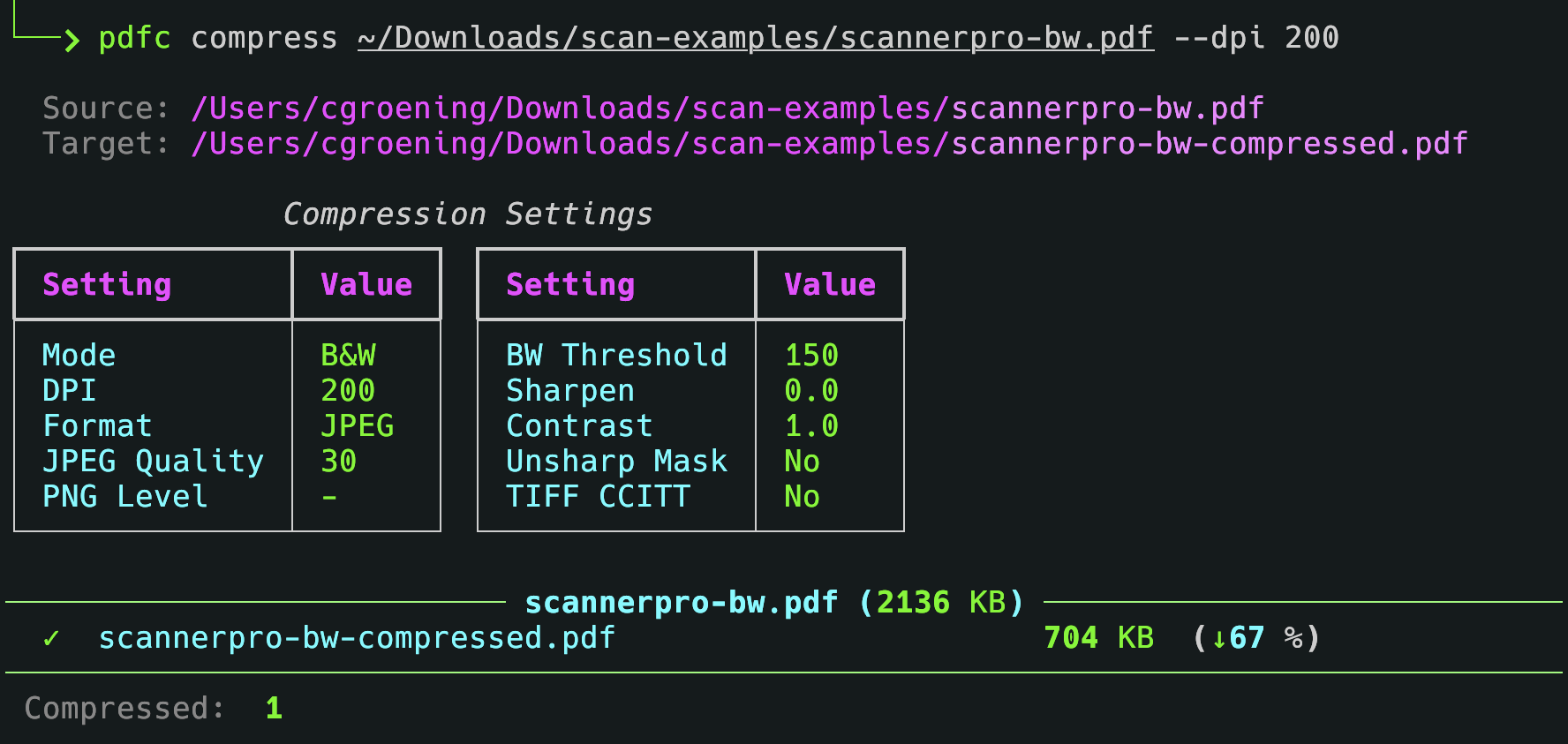
Compressing a PDF file:
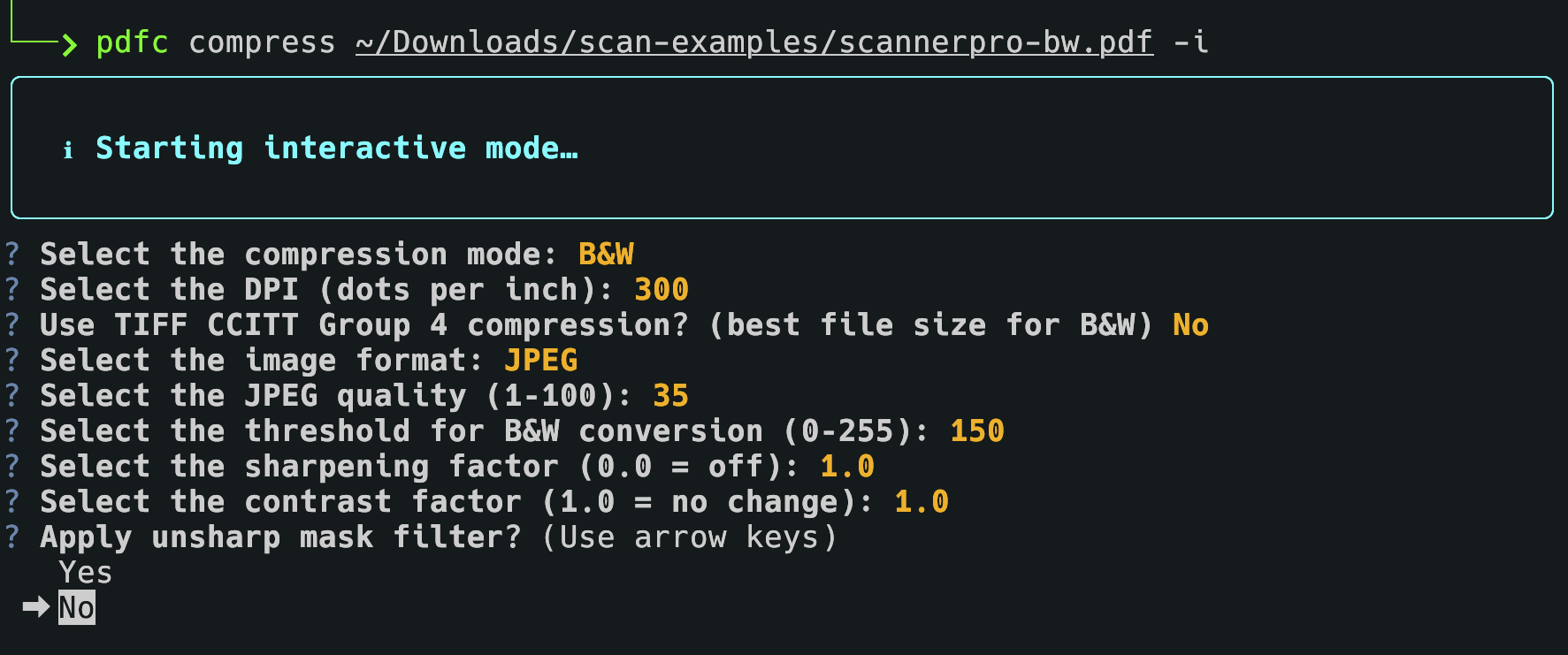
Interactive mode:
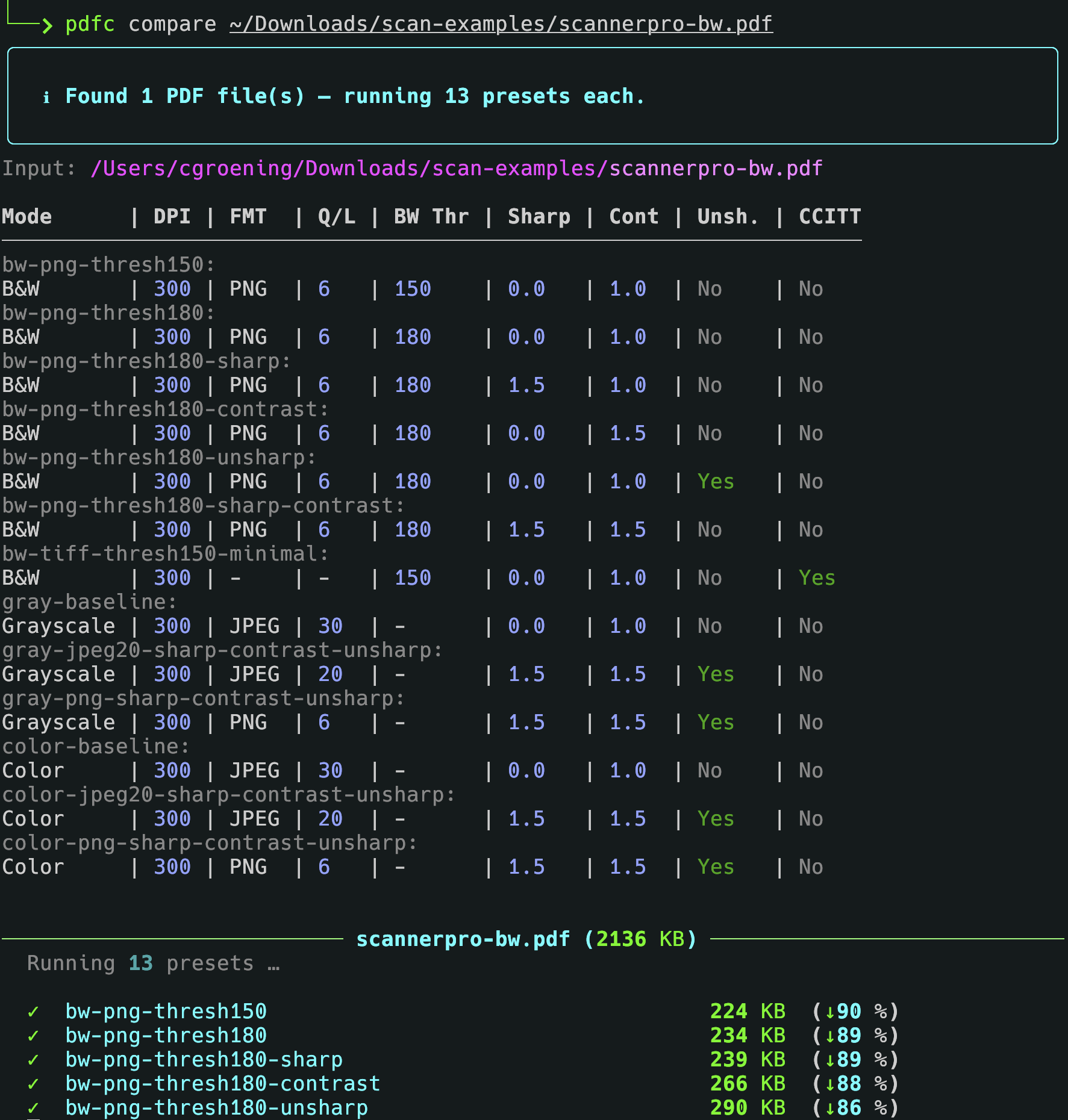
Comparing compression presets:
- Python 3.11+
- Poppler (for
pdf2image)- macOS:
brew install poppler - Ubuntu/Debian:
sudo apt install poppler-utils
- macOS:
pip install pypdfc-
Clone this repository:
git clone https://github.com/cgroening/py-pdfc.git cd py-pdfc -
Install the package if you want the
pdfccommand available globally:
uv pip install .Alternatively, pdfc can be run without installation, see Section Without Installation.
pdfc compress [OPTIONS] INPUT_PATH [OUTPUT_PATH]
| Argument / Option | Short | Description |
|---|---|---|
--interactive |
-i |
Collect all settings interactively via prompts |
--verbose |
-v |
Verbose output |
--mode |
-m |
Colour mode: color, gray or bw |
--dpi |
-d |
Resolution for rasterization in dots per inch (default: 300) |
--jpeg-quality |
-q |
JPEG quality 1–100 (default: 30). Mutually exclusive with --png-compression-level |
--png-compression-level |
-p |
PNG compression level 0–9 (default: 6). Mutually exclusive with --jpeg-quality |
--threshold |
-t |
B&W threshold 0–255 (default: 150). Only used in bw mode |
--sharpen |
-s |
Sharpening factor 0.0–3.0 (default: 0.0 = off) |
--contrast |
-c |
Contrast factor 0.0–3.0 (default: 1.0 = no change) |
--unsharp-mask |
-u |
Apply PIL UnsharpMask filter |
--tiff-ccitt |
-T |
Use TIFF CCITT Group 4 as intermediate format (bw mode only) |
--no-skip |
Process all files, including files ending with -compressed.pdf (which are skipped by default when input is a directory) |
|
INPUT_PATH |
PDF file or directory of PDF files to compress | |
OUTPUT_PATH |
Output file (single-file mode only). Defaults to <input>-compressed.pdf |
Examples:
# Compress a single file to B&W at 300 DPI
pdfc compress input.pdf -m bw -d 300

# Compress with a custom output path
pdfc compress input.pdf output.pdf -m gray -d 200 -q 50

# Compress all PDFs in a folder using defaults (skips *-compressed.pdf files)
pdfc compress /path/to/folder

# Compress all PDFs in a folder, including already compressed files
pdfc compress /path/to/folder --no-skip

# Choose settings interactively
pdfc compress input.pdf -iRuns all presets defined in ~/.config/pdfc/presets.yaml against one or more
PDF files and writes the results into a subdirectory named after each input file.
Fields:
| Field name | Type | Range | Default | Description |
|---|---|---|---|---|
name |
string |
[a-zA-Z0-9_-]+ |
- |
Required. Used as the output file name. |
mode |
string |
color, gray or bw |
bw |
Color space of the output: Black & white (1-bit after threshold conversion), Grayscale (8-bit) or Color (RGB, 24-bit) |
dpi |
int |
> 0 |
300 |
Resolution for rasterization. Strongly affects both quality and file size. |
threshold |
int |
0-255 |
150 |
Threshold for B&W conversion. Pixels above the value → white, below → black. Higher value = more white = smaller file. |
jpeg_quality |
int |
1-100 |
30 |
JPEG quality. Lower values = smaller file, lower image quality. Enables JPEG mode. Cannot be combined with png_compression. |
png_compression |
int |
0-9 |
7 |
PNG compression level. PNG compression level. Higher values lead to smaller files and longer processing times. Enables PNG mode. Cannot be combined with jpeg_quality. |
sharpen |
float |
0.0-3.0 |
1.0 |
Sharpening filter (PIL ImageEnhance.Sharpness). 0.0 → off, 1.0 → no change, >1.0 → sharper. |
contrast |
float |
0.0-3.0 |
1.0 |
Contrast filter (PIL ImageEnhance.Contrast). 1.0 → no change, >1.0 → more contrast. |
unsharp_mask |
bool |
true/false |
false |
PIL UnsharpMask filter (radius=2, percent=150, threshold=3). Sharpens edges before conversion. |
tiff_ccitt |
bool |
true/false |
false |
Use TIFF CCITT Group 4 intermediate format |
pdfc compare [OPTIONS] INPUT_PATH
| Option | Short | Description |
|---|---|---|
--dpi |
-d |
Resolution for rasterization (default: 300) |
--verbose |
-v |
Verbose output |
Examples:
# Compare all presets for a single file
pdfc compare input.pdf

# Compare all presets for all PDFs in a folder at 200 DPI
pdfc compare /path/to/folder --dpi 200
Output is written to a subdirectory next to the input file:
input.pdf
input/
  preset-name-1.pdf
  preset-name-2.pdf
  ...
The package can also be run without installation from the project root:
python -m pdfcThe compare command reads presets from ~/.config/pdfc/presets.yaml.
Each preset defines a named compression configuration.
Example:
presets:
  - name: bw-300
    mode: bw
    dpi: 300
    threshold: 150
    sharpen: 1.5
    contrast: 1.5

  - name: gray-150
    mode: gray
    dpi: 150
    jpeg_quality: 40

  - name: color-200
    mode: color
    dpi: 200
    jpeg_quality: 60
    sharpen: 1.3
    contrast: 1.3
See example-presets.yaml for more presets to try.
Available preset fields:
| Field | Type | Description |
|---|---|---|
name |
string | Required. Used as the output file name |
mode |
string | color, gray or bw |
dpi |
int | Resolution for rasterization |
threshold |
int | B&W threshold 0–255 |
jpeg_quality |
int | JPEG quality 1–100 |
png_compression |
int | PNG compression level 0–9 |
sharpen |
float | Sharpening factor 0.0–3.0 |
contrast |
float | Contrast factor 0.0–3.0 |
unsharp_mask |
bool | Apply PIL UnsharpMask filter |
tiff_ccitt |
bool | Use TIFF CCITT Group 4 intermediate format |
| Mode | Description |
|---|---|
color |
Keeps full colour. Best for photos and colour diagrams |
gray |
Converts to greyscale. Good balance of size and readability |
bw |
Converts to black & white. Smallest file size, best for text-only scans |
Range: 0.0 to 3.0 (float)
| Value | Effect | Use case |
|---|---|---|
| 0.0 | No sharpening (off) | Default |
| 0.5 | Slight blur | Noise reduction |
| 1.0 | Original (no change) | Baseline |
| 1.2–1.5 | Light sharpening | Recommended for clean documents |
| 1.5–2.0 | Medium sharpening | Good for text |
| 2.0–2.5 | Strong sharpening | For blurry scans |
| 2.5–3.0 | Very strong sharpening | Risk of artefacts |
| >3.0 | Extreme (not allowed) | Too much; artefacts likely |
Visual effect:
sharpen = 0.5:  T e x t   (blurry)
sharpen = 1.0:  Text      (original)
sharpen = 1.5:  Text      (crisper)
sharpen = 2.0:  Text      (very sharp)
sharpen = 3.0:  Text      (over-sharpened, halo artefacts)
Too much sharpening (> 3.0):
- Halos around letters (white/black fringes)
- Noise amplification (grainy look)
- Edge artefacts
- Unnatural appearance
Range: 0.0 to 3.0 (float)
| Value | Effect | Use case |
|---|---|---|
| 0.0 | Flat grey (no contrast) | Not useful |
| 0.5 | Reduced contrast | Softer images |
| 1.0 | Original (no change) | Baseline |
| 1.2–1.5 | Slightly increased contrast | Recommended for clean documents |
| 1.5–2.0 | Medium contrast | Good for text, clear separation |
| 2.0–2.5 | Strong contrast | For faded documents |
| 2.5–3.0 | Very strong contrast | Risk of detail loss |
| >3.0 | Extreme (not allowed) | Near binary; details lost |
Visual effect:
contrast = 0.5:  Text  (washed out, grey)
contrast = 1.0:  Text  (original)
contrast = 1.5:  Text  (crisper, more defined)
contrast = 2.0:  Text  (very clear, strong separation)
contrast = 3.0:  Text  (near binary)
Too much contrast (> 3.0):
- Detail loss (everything becomes black or white)
- No more grey tones
- Hard edges without transitions
- Information loss
Contrast is applied before the B&W threshold. A higher contrast value effectively makes the threshold more aggressive, since pixel values are pushed further apart before the cut-off is applied.
| Scenario | contrast | threshold | Pixel at 140 | Pixel at 160 |
|---|---|---|---|---|
| Low contrast | 1.0 | 150 | stays ~140 → black | stays ~160 → white |
| High contrast | 2.0 | 150 | pushed to ~100 → black | pushed to ~200 → white |
Rule of thumb: increase contrast only as much as needed; combine with the threshold to control where the black/white boundary falls.
| Document type | sharpen | contrast | Notes |
|---|---|---|---|
| Clean, digital documents | 1.3 | 1.3 | Subtle improvement, no risk |
| Standard scans | 1.5 | 1.5 | Best balance |
| Blurry or faded scans | 2.0 | 2.0 | Strong improvement, low artefact risk |
| Very poor scans | 2.5 | 2.5 | Maximum recommended |
| Last resort | 3.0 | 3.0 | Artefacts likely |
| Parameter | Minimum | Recommended | Safe maximum | Risky maximum |
|---|---|---|---|---|
| Sharpen | 0.0 (off) | 1.3–2.0 | 2.5 | 3.0 |
| Contrast | 0.0 (grey) | 1.3–2.0 | 2.5 | 3.0 |
- Skip files with the suffix
-compressed.pdfto avoid re-processing already compressed files, unless flag--no-skipis set - Skip presets for color mode if input file is B&W or grayscale
- Improve/clean output messages when processing files and presets
-
presets.yaml: Field to set one preset as default forcompresscommand, warn if missing or multiple defaults - Add
--presetoption tocompresscommand to specify a preset from the presets file, e.g.pdfc compress input.pdf --preset bw-300 - Add command
list-presetswhich lets the user interactively view, add, edit and delete presets in the presets file - Add command
presetwhich lets the user select a preset from the presets file and applies it to one or more PDF files