






The most capable Calibre MCP server in existence — connect Claude (or any MCP client) to your Calibre ebook library and search it by meaning, not just keywords.
Ask your AI assistant “which of my books explain consumer-group rebalancing?” and get the exact chapter — across 800+ books or inside one. Curate metadata, dedupe, and safely edit your library, all through natural language.
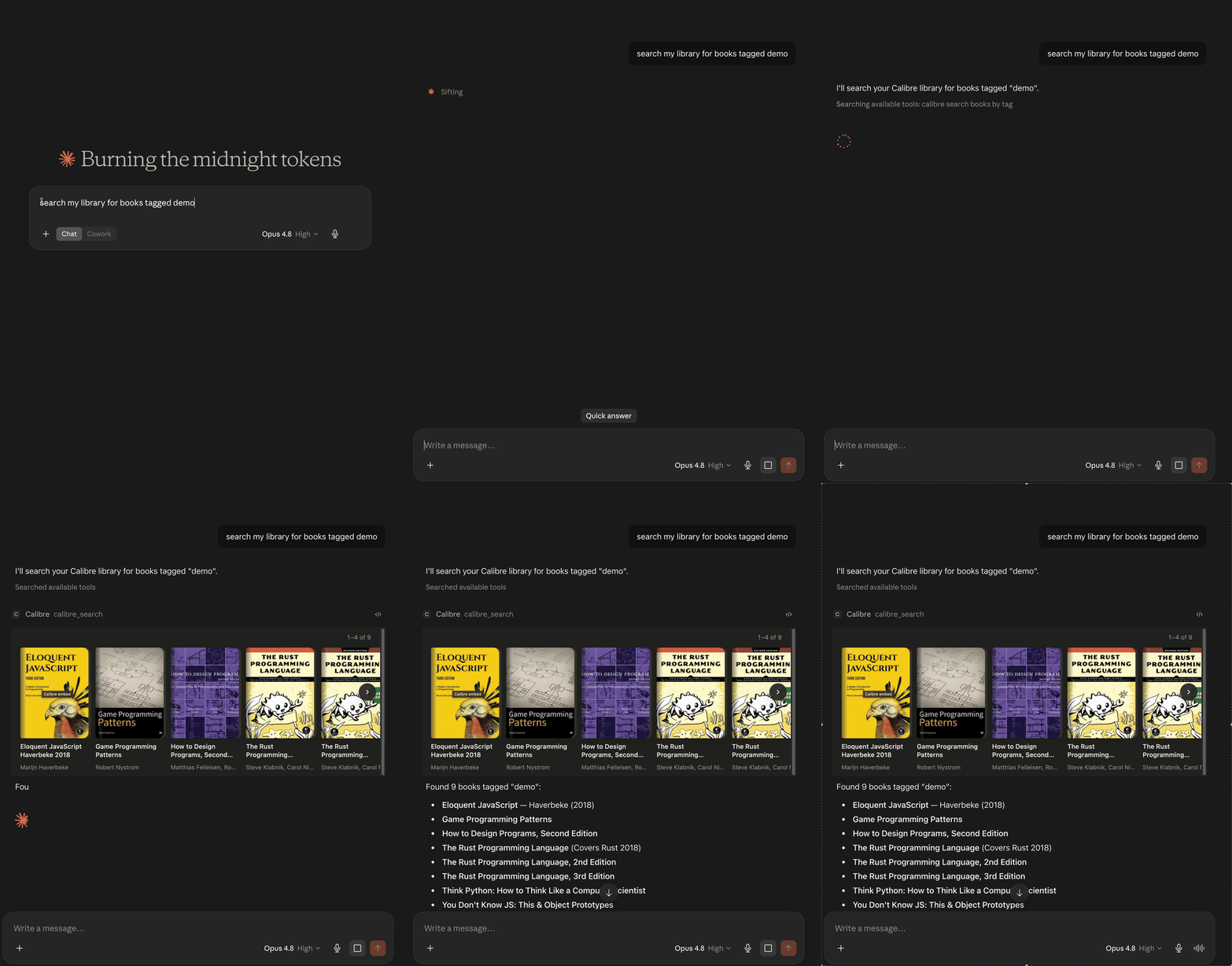
Claude Desktop rendering a library search as an interactive cover board (MCP Apps)
- 19 tools covering the full surface: search, read content, browse categories, curate, and (opt-in) write — update metadata, bulk-edit, merge duplicates, import, delete, and manage bundles (named topical filters).
- Semantic search — meaning-based, hybrid vector + keyword retrieval over your whole library or inside a single book. Multilingual (English + Russian verified, cross-lingual queries work). No other Calibre MCP server has this.
- In-chat UI (MCP Apps) — in hosts that support MCP Apps (Claude Desktop), library
searches render an interactive cover carousel,
calibre_get_booka book detail card with cover, rating, and read/similar actions, andcalibre_get_figuresa figure viewer that shows you the same diagrams the assistant fetched. Text-only hosts are unaffected. - Curation tools — find duplicates with merge-safety scoring, audit metadata quality,
and recover real metadata for books with raw filenames (
795731065.pdf→ Fundamentals of Software Engineering) via Open Library / Google Books. - Safe by default — read-only unless you explicitly enable writes; destructive operations preview first and require confirmation; all writes route through the Content Server so they never race the Calibre GUI.
- Calibre with the Content Server running (in Calibre: Connect/share → Start Content server). Tested against Calibre 9.x; any recent version should work.
- Node.js ≥ 22.5 for the npm/npx install (not needed for the Claude Desktop one-click bundle — Desktop ships its own runtime).
- Optional, for best PDF text extraction: poppler's
pdftotext(brew install poppler) or Python 3 with PyMuPDF (pip install pymupdf). Without them the server falls back to Calibre'sebook-convert.
Grab the guided-installer skill and hand the whole job to your agent:
npx skills@latest add caelum29/calibre-mcp # pick calibre-mcp-setupThen tell your agent: "set up calibre-mcp". The calibre-mcp-setup skill drives
everything below — preflight (Node, calibredb, Content Server), the Calibre-side
config, the right install for your client (macOS/Windows/Linux), and a calibre_ping
verification — asking you only the questions that are yours to answer (which client,
writes on/off). Works in any Agent-Skills-compatible harness (Claude Code, Copilot,
Amp, …). Prefer doing it by hand? Pick your client below.
MCP server only:
claude mcp add calibre -- npx -y calibre-mcpOr install the plugin — server and the companion skills in one step, with a settings dialog (server URL, library, write gate) at install time:
/plugin marketplace add caelum29/calibre-mcp
/plugin install calibre-mcp@caelum29
Download the .mcpb bundle from the
latest release and open it —
Claude Desktop installs it and prompts for settings (server URL, library, writes on/off).
No terminal needed.
About the install warning. Claude Desktop shows “Installing will grant this extension access to everything on your computer… developer information has not been verified by Anthropic” for every extension installed from a file rather than the built-in directory — it’s not specific to this one. The server runs as a local Node process under your user account, exactly like the
npxinstall below; the bundle is built and published by CI from this repository, so you can audit what you’re running. Click Install to proceed.
The bundle ships without the optional embeddings dependency to stay small, so the two semantic-search tools report themselves unavailable. Metadata and full-text search work fully. For semantic search, use the npx install below instead.
Add to claude_desktop_config.json:
{
  "mcpServers": {
    "calibre": {
      "command": "npx",
      "args": ["-y", "calibre-mcp"]
    }
  }
}Configure the server in Claude Desktop (either method above) — Desktop bridges local MCP servers into Cowork automatically. No extra setup.
The repo's Agent Skills — a guided installer (calibre-mcp-setup), the calibre-mcp usage
guide, and the two distill skills — install into any Agent-Skills-compatible harness with
the skills.sh installer:
npx skills@latest add caelum29/calibre-mcpPick the skills and target agents interactively. Two philosophies, same as
mattpocock/skills: skills.sh copies the files
into your setup so you can hack on them; the Claude Code plugin (above) keeps them as a
managed, auto-updating bundle. Either way the skills drive this MCP server's tools, so
install the server too — or let the calibre-mcp-setup skill do it: it walks any agent
through preflight, per-client install (macOS/Windows/Linux), and verification.
The server auto-detects your default library; if the Content Server isn’t reachable it logs an actionable hint to stderr. Then try, in order:
- “list my calibre libraries” — connectivity sanity check.
- “find books about Rust” — metadata search; in Claude Desktop the results render as the cover carousel above.
- “show me The Rust Programming Language” — full metadata; renders as a book card with cover, rating, and per-format read buttons.
- “show me figure 2.3 from the JWT Handbook” — the figure arrives as an image for the assistant and, in Claude Desktop, in a figure viewer you can zoom and pan.
- “build the semantic index for my Kafka books” — one-time prep for meaning-based search (see below).
- “which of my books explain consumer-group rebalancing?” — semantic search; answers with ranked books, or exact passages when scoped to one book.
Bonus: “what’s wrong with my library?” runs the quality audit (missing metadata, raw-filename titles, invalid ISBNs).
Write tools (calibre_update_book, calibre_bulk_update, calibre_add_book,
calibre_remove_book, calibre_merge_books, calibre_manage_bundles) are hidden by
default — including calibre_manage_bundles' read-only list action, since the gate works
per tool, not per action. Two independent switches must be on:
-
The MCP-side gate — set
CALIBRE_MCP_ENABLE_WRITE=1(or tick Enable writes in the Desktop bundle settings). Without it the write tools aren’t even registered. -
The Calibre-side gate — the Content Server must allow local writes. By default the server embedded in the Calibre GUI is read-only, so either enable the GUI option below or run a standalone server with
--enable-local-write:# quit the Calibre GUI first (it holds the library lock), then: calibre-server --enable-local-write --port 8080 "/path/to/Calibre Library"
Or enable it on the GUI-embedded server without quitting the app: open Calibre → Preferences → Sharing over the net → Advanced and tick “Allow un-authenticated local connections to make changes to the library” (i.e. permit local write access), then restart the Content Server from the GUI. This is the
--enable-local-writeequivalent for the embedded server.
With only the first switch on, write tools appear but Calibre refuses the write — the error message tells you exactly that. Reads work fine against the GUI-embedded server.
Safety behavior: calibre_bulk_update requires an explicit book selection (ids or
query — there is no “all books” default) and previews changes until you pass
preview: false. calibre_remove_book is a dry-run until you pass confirm: true;
deletion removes records and files, permanently. calibre_merge_books shows its full
merge plan until you pass confirm: true, and trashed sources stay recoverable from
Calibre's trash (mode safe keeps them entirely). calibre_add_book only imports files
from whitelisted folders (CALIBRE_MCP_ADD_ROOTS).
Deep dive:
docs/SEMANTIC-SEARCH.md— how indexing, hybrid retrieval, and reranking work.
Meaning-based search is opt-in and needs two things:
- The embeddings dependency —
@huggingface/transformersis anoptionalDependenciesentry, so a normalnpx calibre-mcp/npm installgets it automatically. (Only the MCPB bundle excludes it.) - An index — ask Claude to run
calibre_build_indexfor the books you care about (by ids or a Calibre query). The first build downloads the embedding model (multilingual-e5-small, ~118 MB, one-time) into the index directory; after that everything runs offline. Indexing runs at roughly 100 chunks/sec on Apple Silicon.
Important
Search results are sharpened by a cross-encoder reranker whose model is a separate
~576 MB one-time download. calibre_build_index pre-downloads it during the build —
the step you already expect to be slow. If you skip straight to searching on a machine
without the cached model, your first hybrid/vector search triggers that download
instead. Reranking also adds seconds of CPU per semantic search; set
CALIBRE_MCP_RERANK=off to disable it (faster, noticeably less precise ranking).
Then calibre_semantic_search answers queries like “which of my books explain consumer
group rebalancing?” — across the library (scope: library, ranks books) or within one
book (scope: book, returns located passages). Retrieval is hybrid by default:
vector cosine + stemmed keyword FTS, fused with reciprocal rank fusion, then reranked by
the cross-encoder (top 30 candidates) when its model is available. Queries in one
language find passages in another (EN⇄RU verified).
No embeddings? Keyword search still works. mode: keyword uses no model at query
time, but it needs an index. If the embedding model isn’t installed (the default MCPB
bundle ships without it), build a keyword-only index — calibre_build_index with
keywordOnly: true, or it happens automatically when the model is absent — and search with
mode: keyword. That path has zero ML dependencies. mode: vector then errors actionably
and mode: hybrid degrades to keyword (with a note); rebuild with the model installed
(force: true) to add semantic ranking.
Full reference with parameters and examples:
docs/TOOLS.md.
| Tool | Access | What it does |
|---|---|---|
calibre_search |
read | Find books by title/author/ISBN/tag or Calibre query syntax (mode: meta), or full text (mode: fts); scope: book searches inside one book; filter scopes to a bundle |
calibre_get_book |
read | Full metadata, formats, and cover link for one book (id or uuid); include_cover: true embeds the cover image in the result |
calibre_get_content |
read | Read a book’s text as capped excerpts; walk the whole book via cursor. structure: true returns a chapter map (headings, offsets, per-chapter cursors) — EN + RU/UK |
calibre_get_figures |
read | List a book’s figures/illustrations with captions and page locations; fetched ones render in an in-chat figure viewer |
calibre_list_categories |
read | Browse tags, authors, series, publishers, custom columns with counts |
calibre_list_libraries |
read | List the libraries the Content Server exposes (+ which is default) |
calibre_semantic_search |
read | Meaning-based search; mode: hybrid|vector|keyword, library- or book-scoped; filter scopes to a bundle |
calibre_build_index |
read* | Build/refresh the local semantic index for selected books (writes only a local index file); keywordOnly: true builds a model-free keyword index |
calibre_find_duplicates |
read | Duplicate groups with merge-safety scores; mode: compare diffs two books |
calibre_quality_report |
read | Audit: missing metadata, raw-filename titles, invalid ISBNs, author-sort issues, series gaps |
calibre_recover_metadata |
read | Propose real metadata via Open Library → Google Books; preview-only, apply with calibre_update_book |
calibre_extract_isbn |
write | Scan a book’s own text for a valid ISBN and set its isbn identifier; preview-first, apply with apply: true |
calibre_update_book |
write | Set metadata fields on one book (incl. #custom columns); returns the applied diff |
calibre_bulk_update |
write | Same change across a set of books; selection required, preview-first |
calibre_add_book |
write | Import a local ebook file (path-whitelisted) |
calibre_remove_book |
write, destructive | Permanently delete books (records + files); dry-run unless confirmed |
calibre_merge_books |
write, destructive | Merge duplicate records: move formats into a target, merge metadata per Calibre's rules, trash sources; dry-run plan unless confirmed |
calibre_manage_bundles |
write | List/create/update/delete Bundles — named topical filters backed by Calibre saved searches; --named bundles auto-hide their books from discovery searches; preview-first |
calibre_ping |
read | Health check: is Calibre reachable end-to-end? |
In MCP Apps hosts, calibre_search and calibre_semantic_search (library scope) render
their results as a cover-board carousel, calibre_get_book as a book card, and
calibre_get_figures as a figure viewer (reading pane + margin rail, click to zoom to 100%)
so you see the diagrams the assistant is reading — covers load from your local Content
Server. Everywhere else the same tools return their usual text results; no configuration
needed either way.
An Agent Skill that distills a book from your library into a reusable, structured skill
(frameworks, mental models, glossary, cheatsheet) by driving the tools above — the chapter
map (calibre_get_content structure=true) plus in-book keyword + semantic search. Works on
EN and RU/UK books, no temp files, and can optionally stamp what you learned back into the
catalog (tags + a distill note) through the gated write tools.
It ships in this repo at skills/calibre-distill/. Install it
via npx skills@latest add caelum29/calibre-mcp or the Claude Code plugin (see
Quick start), or manually by symlinking:
ln -s "$PWD/skills/calibre-distill" ~/.claude/skills/calibre-distillThen ask, e.g., “distill book 187 into a skill called kafka-ops”. Note: the MCPB bundle can’t ship skills — install the skills separately from the MCP server on Claude Desktop.
A sibling skill that synthesizes one topic across several books (≥3) into a single
concept-keyed skill — a decision framework, per-concept sections, a cross-source config
table, an explicit “where the sources disagree or complement” section, and an ISBN
bibliography that doubles as a live-source binding. Use it when you want a topic study aid
built from a shelf of books rather than a single-book distill (single-book requests belong
to calibre-distill). Ships at skills/calibre-distill-topic/;
installed by the same skills.sh / plugin / symlink paths as above.
Then ask, e.g., “synthesize kafka reliability from books 187 182 571 186 into a skill.”
Generated skills can be checked with the bundled verifier — verbatim-overlap (8-gram shingles vs the source books), quote budget, compression floor, heading mirroring, cursor leaks, and attribution:
pnpm build && node scripts/legal-gate.mjs <skill-dir> --book <id> [--book <id>…]Everything is optional — with a running Content Server on the default port, zero config works. Environment variables (the Desktop bundle exposes the same settings as UI fields):
| Variable | Default | Purpose |
|---|---|---|
CALIBRE_MCP_SERVER_URL |
http://localhost:8080 |
Calibre Content Server base URL |
CALIBRE_MCP_LIBRARY |
auto-detect | Library name; empty = the server’s default library |
CALIBRE_MCP_ENABLE_WRITE |
off | Master write gate (1/true/yes) |
CALIBRE_MCP_CALIBREDB_PATH |
auto-discover | calibredb binary; found via standard install paths, then PATH |
CALIBRE_MCP_INDEX_DIR |
platform data dir¹ | Semantic index + embedding-model cache |
CALIBRE_MCP_SEMANTIC_FLOOR |
0.78 |
Cosine score below which semantic results are flagged low-confidence |
CALIBRE_MCP_RERANK |
on | Cross-encoder rerank stage on semantic search (~576 MB model, seconds of CPU per query); set off/false/0 to disable |
CALIBRE_MCP_MAX_BOOK_BYTES |
268435456 (256 MB) |
Largest book download calibre_build_index / calibre_get_content will extract; bigger books are skipped² |
CALIBRE_MCP_ADD_ROOTS |
~/Documents, ~/Downloads |
Folders calibre_add_book may import from (path-delimiter separated) |
CALIBRE_MCP_BOARD_STYLE |
shelf |
Search-results widget style in MCP Apps hosts: shelf (scrolling cover shelf) or coverflow (3D cover flow; the Desktop bundle exposes this as a Coverflow search results toggle) |
¹ macOS ~/Library/Application Support/calibre-mcp/index, Windows
%APPDATA%\calibre-mcp\index, Linux $XDG_DATA_HOME/calibre-mcp/index.
² Size the cap against what the Content Server serves, not the file on disk — it can hand back a much heavier copy (an 8 MB PDF served as 70 MB), so a disk-sized cap silently skips books.
More symptoms and fixes:
docs/TROUBLESHOOTING.md.
- “Calibre unreachable” / connection refused — the Content Server isn’t running.
In Calibre: Connect/share → Start Content server, or point
CALIBRE_MCP_SERVER_URLat the right host/port. - Write refused / “Forbidden” — the Content Server doesn’t allow local writes.
See Enabling writes above: run a standalone server with
--enable-local-write, or tick the GUI’s Sharing over the net → Advanced option and restart the Content Server. - Full-text search returns nothing / errors — Calibre’s FTS index isn’t enabled for the library. In Calibre: Preferences → Searching → Full text search, enable it, and let indexing finish (it can take a while on large libraries).
- “embedding model unavailable” — the optional
@huggingface/transformerspackage isn’t installed (expected with the MCPB bundle). Use the npx install, ornpm install @huggingface/transformersnext to the server. To search without it, build a keyword-only index (calibre_build_index keywordOnly=true) and usemode: keyword. calibredbnot found — install Calibre, or setCALIBRE_MCP_CALIBREDB_PATHto the binary (macOS:/Applications/calibre.app/Contents/MacOS/calibredb).- A PDF extracts to empty text — it’s a scanned/image PDF; Calibre has no OCR, and neither do we.
- Library not found (404) — pass the library’s display name or ID as shown by
calibre_list_libraries; when in doubt, leave the library unset and let the server pick its default.
pnpm install
pnpm build        # tsc → dist/
pnpm test         # vitest (unit; no network, no model download)
pnpm test:model   # gated embedding-model integration tests (~118 MB download)
pnpm inspect      # MCP Inspector against the built server
pnpm pack:mcpb    # build the Claude Desktop .mcpb bundle
The codebase is Clean Architecture: tool handlers, Calibre clients, and the semantic
core are SDK-free; only src/server.ts touches the MCP SDK. User docs — the tool
reference and the semantic-search guide — live in docs/.
Questions, ideas, and setups welcome in Discussions; bug reports and PRs in Issues.
MIT © 2026 Artem Sorochynskyi
An independent project, not affiliated with Calibre.
Calibre itself is
Kovid Goyal's open-source project (GPLv3) —
this server drives it as a separate program via calibredb and the Content Server.