Add sortable list view with filters to the dashboard#562
Open
bborn wants to merge 1 commit into
Open
Conversation


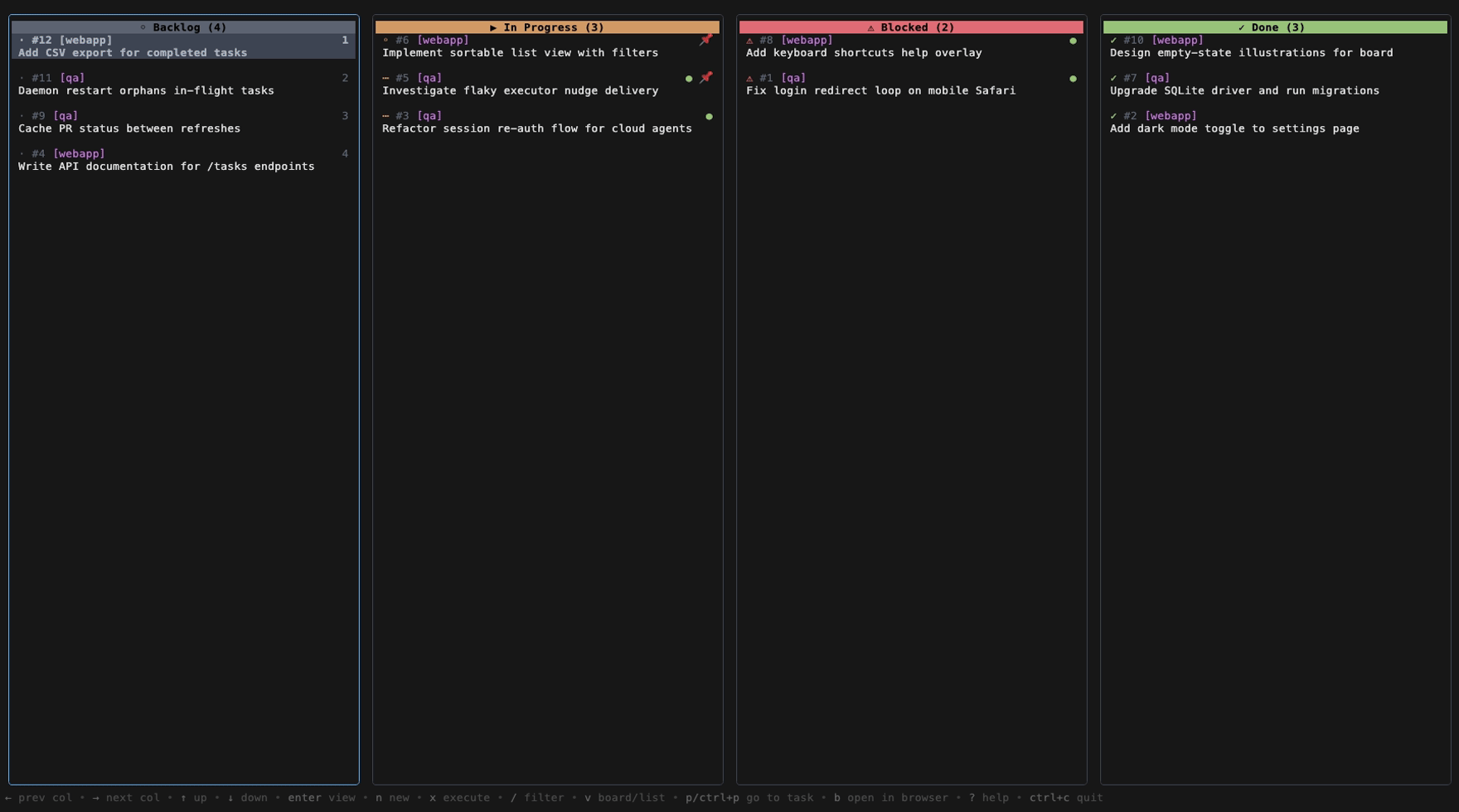
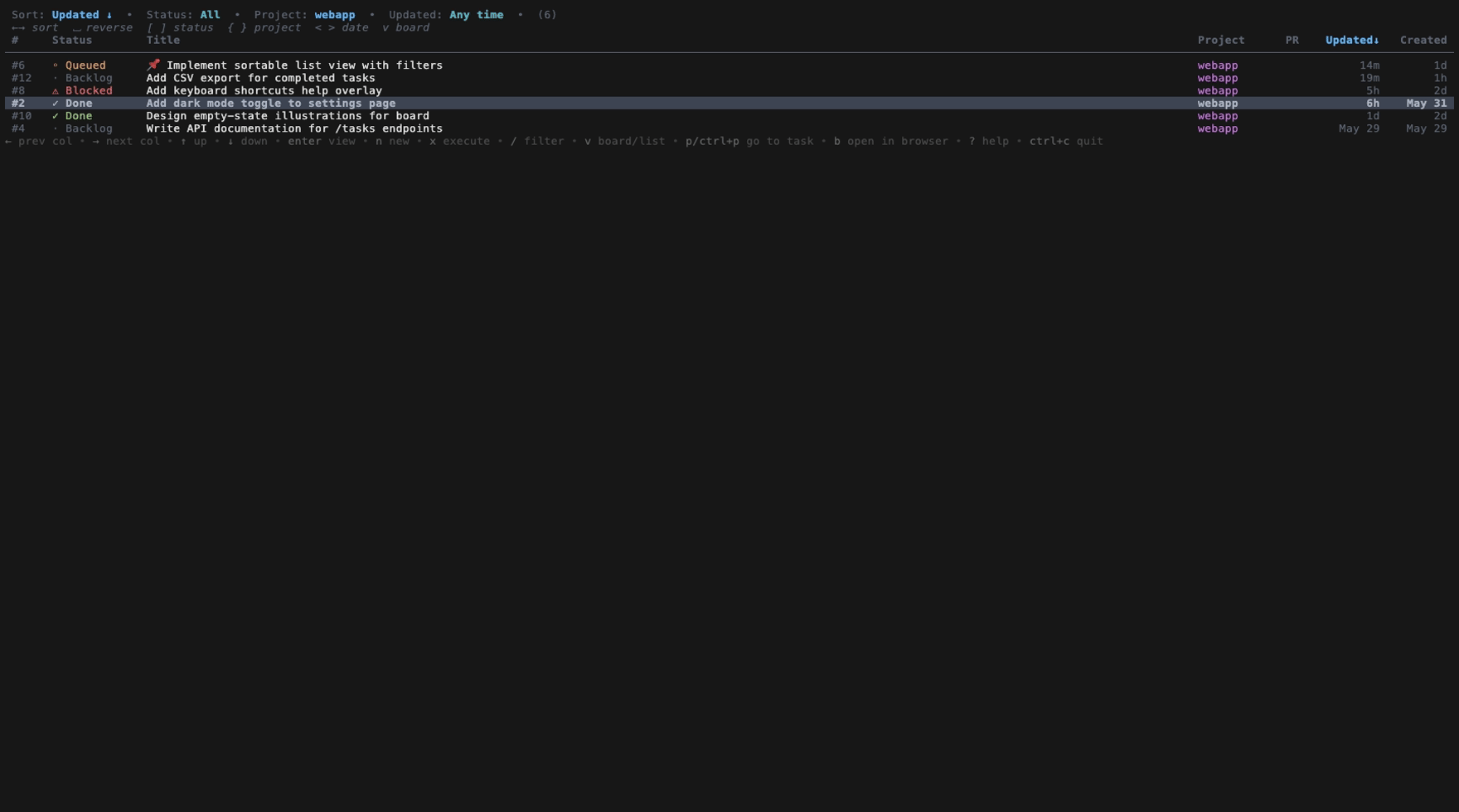
Adds a flat, sortable, filterable table view as an alternative to the
kanban board. Press `v` to toggle between Board and List.

List view:
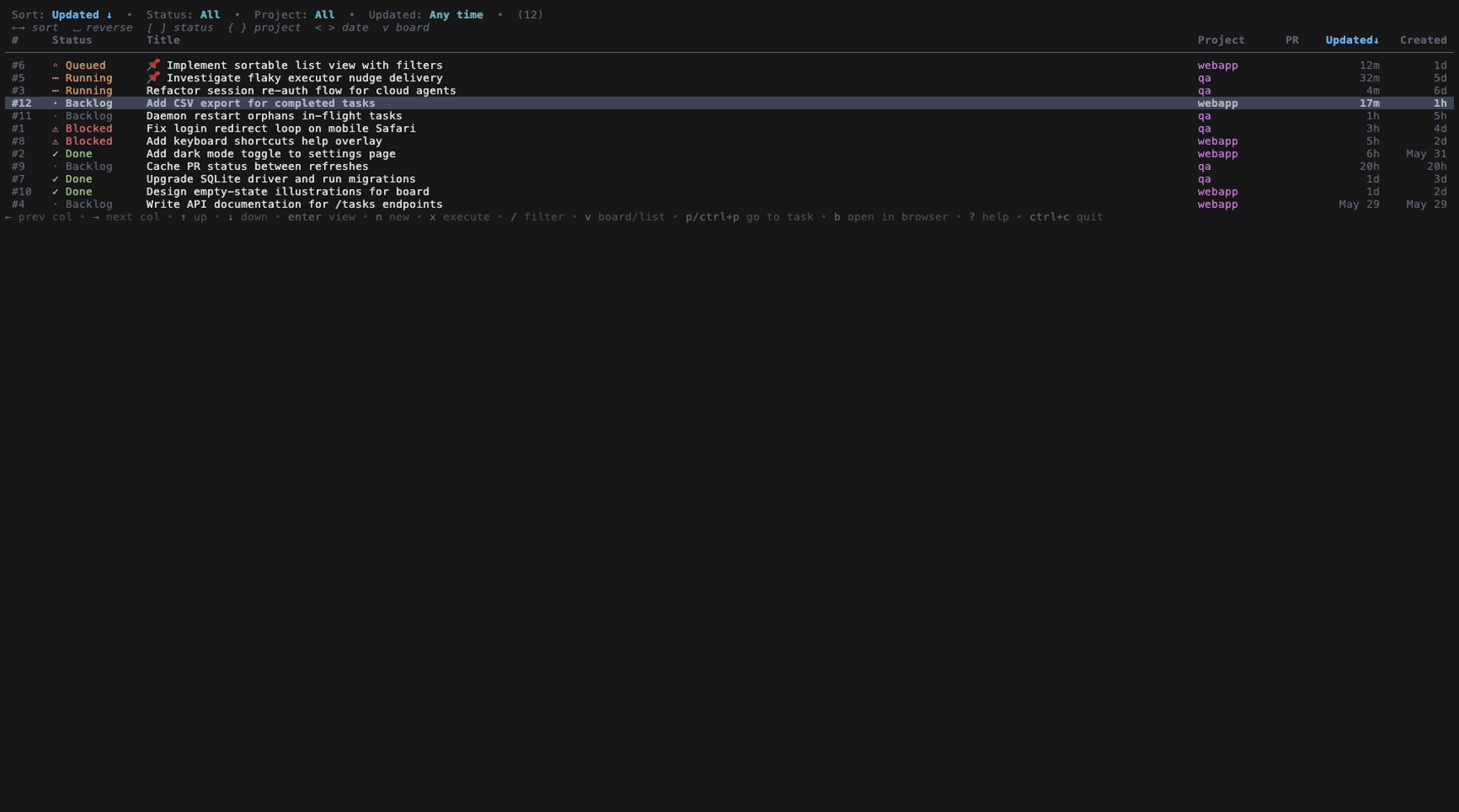
- Columns: #, Status, Title, Project, PR, Updated, Created
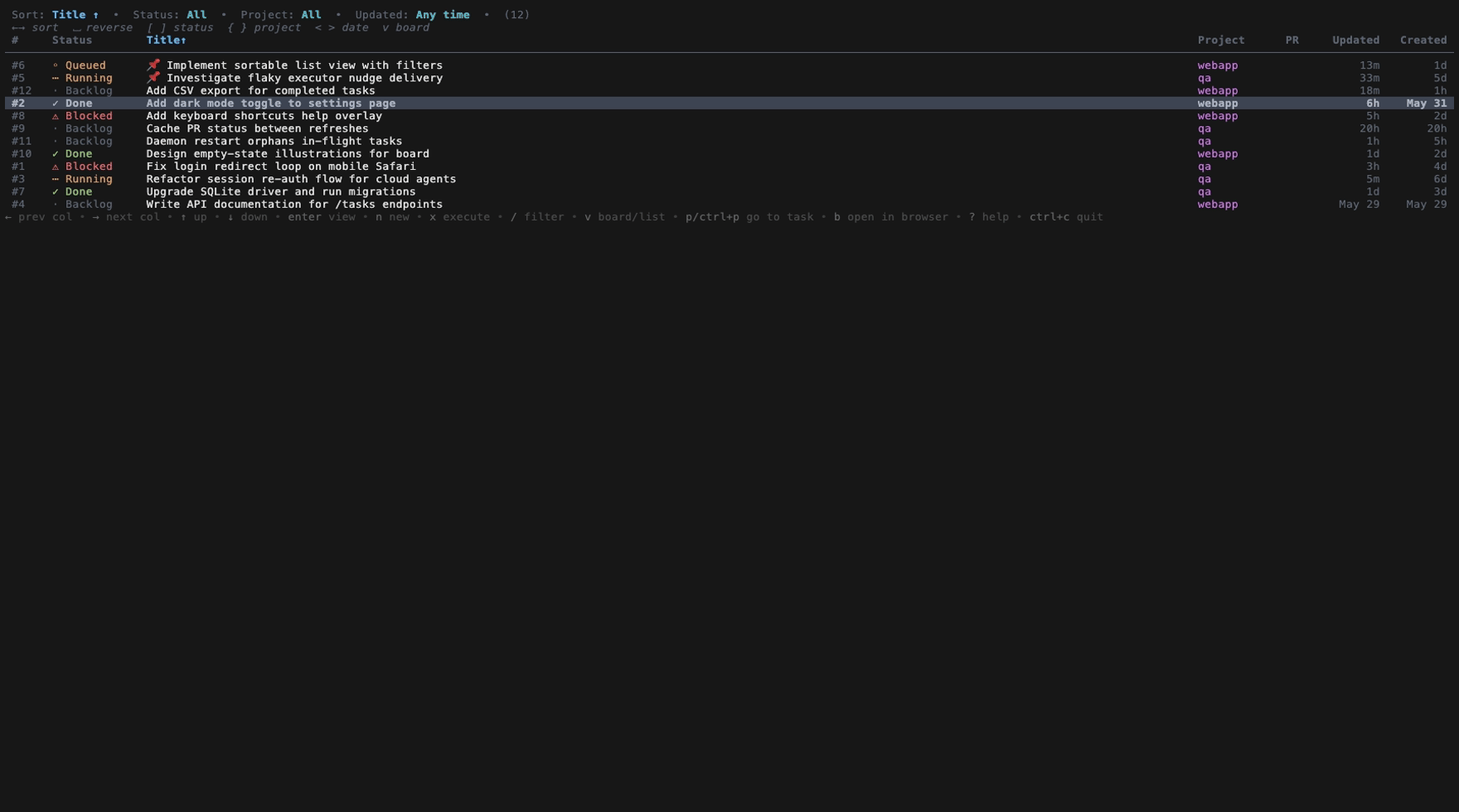
- Sort by any column with ←/→; reverse with space. Pinned tasks always
  float to the top, mirroring the board.
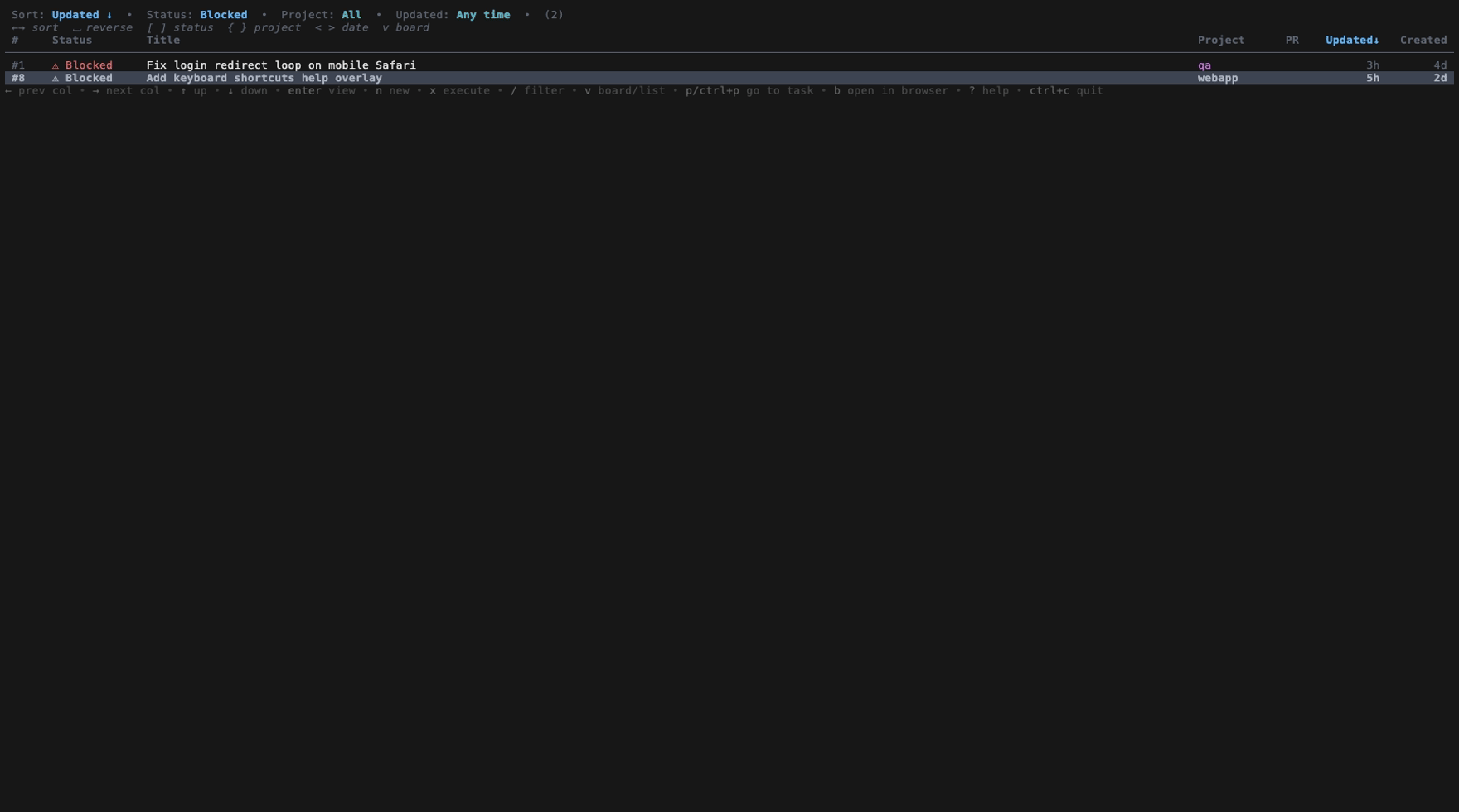
- Filter chips at the top: Status ([/]), Project ({/}), and "updated
  within" date (</>). Text/project filtering via the existing `/` filter
  still applies.
- Enter / click / 1-9 open a task's detail view; up/down in detail
  navigate rows in list order.

Both views share the same task data and selection, so toggling keeps the
same task focused. Debug state (--debug-state-file) now reports the active
view_mode plus the list's sort/filter state for the QA harness.

Co-Authored-By: Claude Opus 4.8 <noreply@anthropic.com>

Owner
Author
QA evidence — real TUI screenshotsDriven against an isolated, seeded instance (12 tasks across 2 projects Board view (for comparison) — note the new
|
This file contains hidden or bidirectional Unicode text that may be interpreted or compiled differently than what appears below. To review, open the file in an editor that reveals hidden Unicode characters.
Learn more about bidirectional Unicode characters
Sign up for free
to join this conversation on GitHub.
Already have an account?
Sign in to comment
1 participant

Add this suggestion to a batch that can be applied as a single commit.This suggestion is invalid because no changes were made to the code.Suggestions cannot be applied while the pull request is closed.Suggestions cannot be applied while viewing a subset of changes.Only one suggestion per line can be applied in a batch.Add this suggestion to a batch that can be applied as a single commit.Applying suggestions on deleted lines is not supported.You must change the existing code in this line in order to create a valid suggestion.Outdated suggestions cannot be applied.This suggestion has been applied or marked resolved.Suggestions cannot be applied from pending reviews.Suggestions cannot be applied on multi-line comments.Suggestions cannot be applied while the pull request is queued to merge.Suggestion cannot be applied right now. Please check back later.
What
Adds a flat, sortable, filterable list view as an alternative to the kanban board. Press
vto toggle between Board and List at any time — the same task stays focused across the switch.This answers the question in the task ("could the board just be a list, sorted by whatever you want?") with a real table: one row per task, sortable columns, and filter chips at the top.
List view
Columns:
#· Status · Title · Project · PR · Updated · Created[/](All · Backlog · In Progress · Blocked · Done){/}(All · each project)</>(Any time · Today · 7 days · 30 days)/fuzzy filter (text,#id,[project]) still applies on top.Enter, a mouse click, or number keys1–9. Up/Down inside the detail view walk rows in list order.Status colours, project colours, PR badges, running (
●) and needs-input (!) indicators all carry over from the board, so the list stays scannable.Implementation notes
internal/ui/list_view.go(ListView) owns its own selection, sort, and filter state but renders the same task data the board does.app.gofeeds both renderers and routes navigation/selection through small mode-aware helpers.--debug-state-filenow reportsdashboard.view_modeplus the list's sort/filter state and visible rows, so the QA harness can assert against it.internal/ui/list_view_test.gocover sorting (each column + reverse), status/project filtering, pinned-float, selection preservation across refreshes, nav wrap, and responsive rendering at multiple widths.QA
Verified by driving the real TUI against an isolated, seeded instance (12 tasks across 2 projects and every status) using the
scripts/qaharness, rendered with VHS. Screenshots in the QA comment below.go build ./...,go vet ./internal/ui/,gofmtcleango test ./...passesCloses the "sortable list view with filters" task.
🤖 Generated with Claude Code