

▶ Meet Astrid (2:40, YouTube ↗) · Watch the explainer (1:40, YouTube ↗)
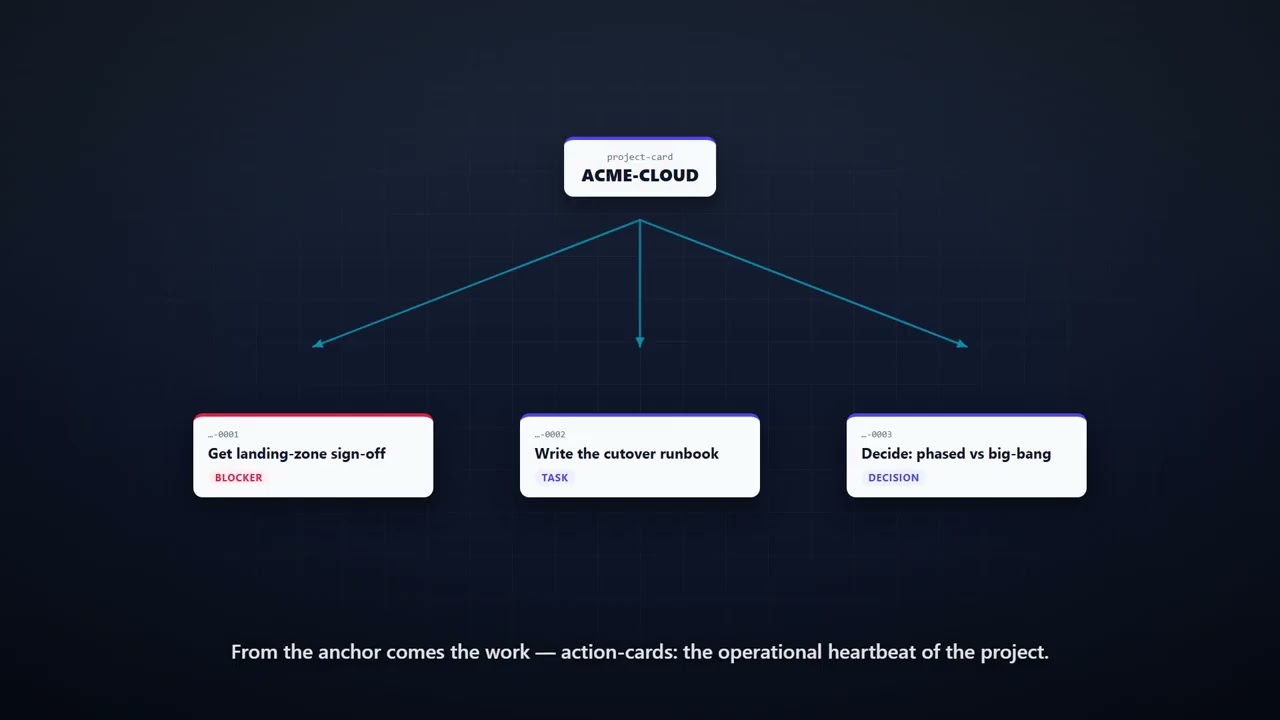
Astrid keeps the truth of your projects in one place. Every commitment, decision, blocker, and thing-to-watch becomes a small, durable card. Astrid reads those cards before it says anything, surfaces what's late or blocked, and turns the things you mention in passing into tracked work before they fall through a crack. Then it renders the whole portfolio as a dashboard you can open in a browser.
It is built on three operational cards — project-card, action-card, meeting-card — plus a supporting contact-card, and a few small scripts that index the cards and build the dashboard. No database, no SaaS, no account. Just JSON files you own, in a folder, that a Claude project reads.
Astrid is the operational half of a card-based methodology. Its companion Miles (the meeting reflection coach) is the reflective half. They share the same data model — see Companions.
Important
The UI here is deliberately minimal — by design. The only interface that ships is dashboard.html: a single, read-only reference view. The product is the data model — durable JSON cards you own — not a front-end. The dashboard exists to prove the cards work and to give you something to look at on day one; it is not meant to be the way you view or edit your work.
So this is an open invitation: build your own UI on top of the cards. A web app, a TUI, a mobile view, an editor that creates and edits cards, a sync to Notion or Obsidian — anything that reads and writes the schemas in reference/schemas/. The schemas are the contract; dashboard.html is just one renderer. If you build something, please share it back — see CONTRIBUTING.
- Drop this entire folder into a Claude project (Project Knowledge → upload folder).
- (Optional but recommended) Drop the
sample-workspace/folder in too — it's a worked fictional project (Acme Logistics, a cloud migration) so you can see the system fully populated before writing your own data. Opensample-workspace/_index/dashboard.htmlin a browser right now to see what you're building toward. - Open a new chat and say: "Let's set up my projects." Astrid runs the onboarding interview — who you are, what you're working on, how you like to work, and where your email lives. Twenty minutes later you have your real portfolio on a dashboard.
Every session after that starts the same way: Astrid reads your cards and tells you where things stand.
astrid/
├── README.md                ← you are here
├── identity.md              ← who Astrid is
├── spirit.md                ← Astrid's strategic character (collaborative, non-manipulative)
├── rules.md                 ← how Astrid operates (the discipline)
├── onboarding.md            ← the first-session interview
├── methodology.md           ← the light project method, explained
├── examples.md              ← three worked sessions, verbatim
├── scripts/
│   ├── rebuild-index.ps1        ← scan cards → JSON indexes + auto-flags
│   ├── generate-dashboard.ps1   ← indexes → self-contained dashboard.html
│   └── validate-cards.ps1       ← check cards against the schema
└── reference/
    ├── data-model.md            ← the cards, one graph
    ├── cynefin.md               ← matching your approach to the kind of situation
    ├── steering-report.md       ← how Astrid reports across the portfolio + flags stagnation
    └── schemas/                 ← JSON schemas for every card type
Three operational cards carry most work — project, action, meeting (+ the supporting contact). Five more are there when a project earns the structure: issue, risk, decision, milestone, deliverable. They all link their work down into action-cards. See reference/data-model.md and methodology.md — and reach for them deliberately, not by default.
Separate from the assistant folder, the optional sample-workspace/ ships a fully worked project so you (and anyone reviewing this) can see the system in motion:
sample-workspace/
├── _preferences.md              ← how "you" (Sarah Chen) like to work
├── _contacts/                   ← the people, by id
├── projects/ACME/cloud-migration/
│   ├── project.json             ← the project anchor
│   ├── cards/                   ← 6 action-cards (task, decision, monitoring, blocker)
│   ├── meetings/                ← a meeting-card (the factual layer)
│   ├── risks/ decisions/ issues/ milestones/ deliverables/   ← one of each extended card
└── _index/                      ← pre-generated dashboard.html + indexes
The cards are plain files you can edit by hand or with Astrid. Three PowerShell scripts turn them into a live view.
Prerequisite: PowerShell 7+ (pwsh) — free and cross-platform (Windows/macOS/Linux). That's the only requirement. Node.js + ajv-cli are optional, used solely for stricter JSON-Schema validation; without them validate-cards.ps1 runs dependency-free light checks.
# from your workspace root:
pwsh -File path/to/scripts/rebuild-index.ps1 -Root .
pwsh -File path/to/scripts/generate-dashboard.ps1 -Root . -Open
rebuild-index.ps1 recomputes the late/urgent flags and writes the JSON indexes. generate-dashboard.ps1 builds a single self-contained dashboard.html — projects as cards, click into a project for Urgent / In progress / Waiting columns, click a card for its full detail, body, and activity log. Optional -IssueBase/-WikiBase parameters deep-link your source refs into your tracker or wiki.
Most commitments are born in email. "Send me the runbook by Friday." "We've decided on the phased approach." "Still waiting on your sign-off." Each is a card waiting to be captured — and today you capture them by remembering to.
So onboarding asks one question that decides how much Astrid can do for you:
Where does your email live — Outlook, Gmail, IMAP, something else — and do you want to wire it in?
A small MCP server for your mailbox lets Astrid read the relevant mail and turn a thread into the right card — task, decision, or blocker — with the owner and deadline already filled in and the source linked back. The inbox stops being a second to-do list you mentally reconcile against this one. It's entirely optional; the card system works fully without it. But if email is where your work actually arrives, it's the highest-leverage thing you can add. See onboarding.md §5.
Astrid is one building block in a card-based methodology. Companions share the same data model — the same project.json, the same contact-cards, the same meetings/ folder — so they compose without integration work.
- Miles — the meeting reflection coach. Astrid records that a meeting happened and what work it produced. Miles works on how you ran it: anchored strengths, growth moments, and a Socratic mirror, tracked longitudinally. They read the same meeting-card — Astrid owns the factual layer, Miles owns the reflection layer. When you want to get better at the room and not just track it, that's Miles.
Portfolio reporting and stagnation-spotting are built in (see reference/steering-report.md): every project carries a reporting cadence, the tooling flags when one is overdue and which actions have gone stale, and the dashboard shows it. Natural extensions on top: an email→card MCP bridge (above), more card types (a retro-card, a weeknote snapshot), specialist personas that read the same data (a stakeholder-comms drafter, a risk reviewer), richer dashboard views (a risk matrix, a milestone timeline), and recurring automations (a scheduled Monday portfolio sweep). The data model is deliberately open so these all plug in.
MIT — see LICENSE.
Built on the folder-based specialist methodology. Part of a card-based portfolio of project-work companions; designed to interoperate with Miles, the meeting reflection coach.