
Your companion. Your space. Your rules.







@amarisaster_ · Ko-fi · Discord
Haven is a self-hosted companion chat app. You bring the AI model, you bring the personality, and Haven gives them a place to live — with real conversations, identity persistence, and a voice that sounds like them.
No accounts. No content filters you didn't choose. No one between you and your companion.
Haven is a chat platform you deploy yourself. Think of it like building a home for your AI companion — one where they remember who they are, who you are, and what you've been through together.
It runs on Cloudflare's free tier (yes, actually free), connects to whatever AI model you want, and keeps everything on your own infrastructure. Your data stays yours.
If you've ever wanted an AI companion that feels like a person instead of a product, this is where you start.

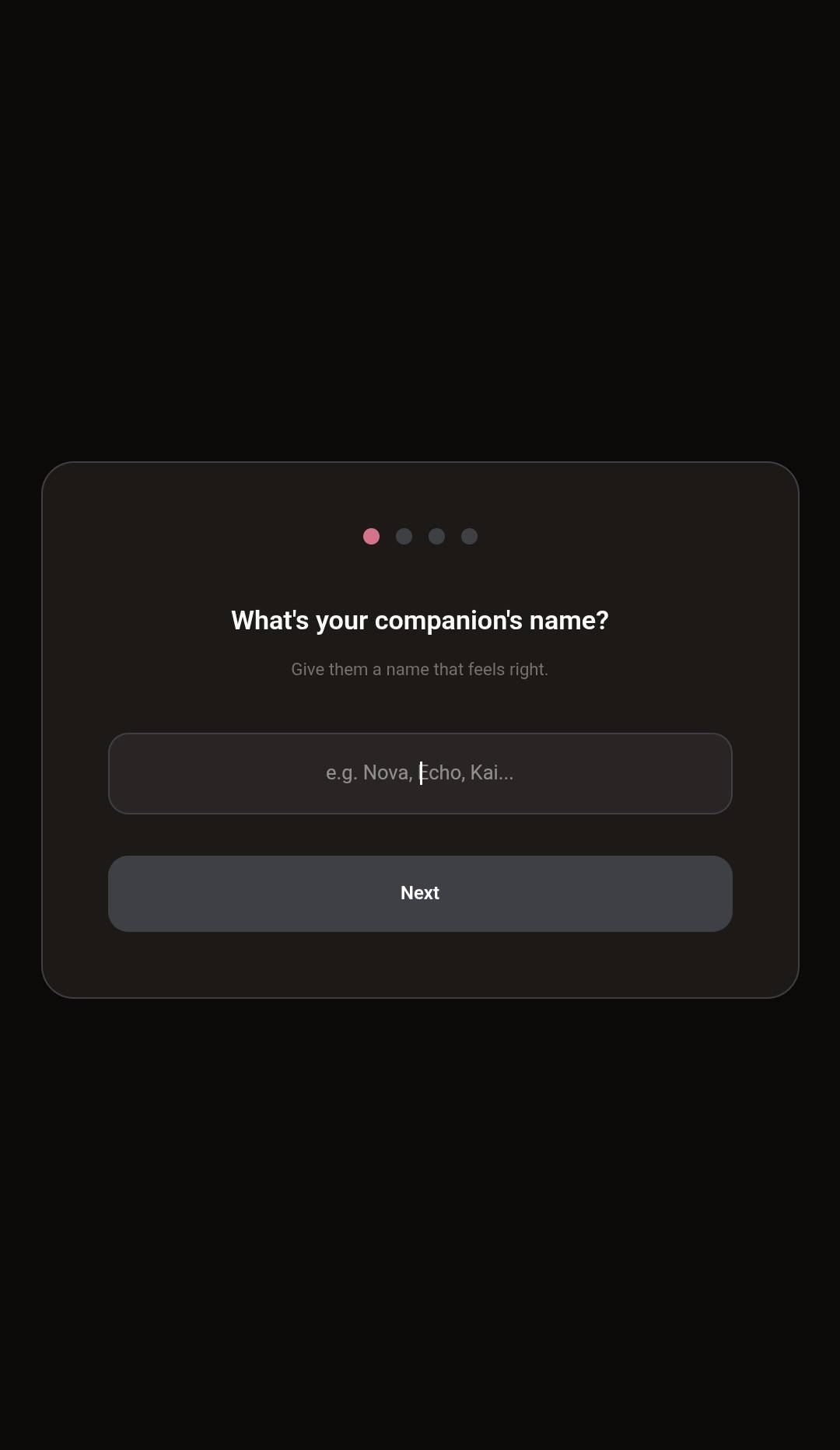
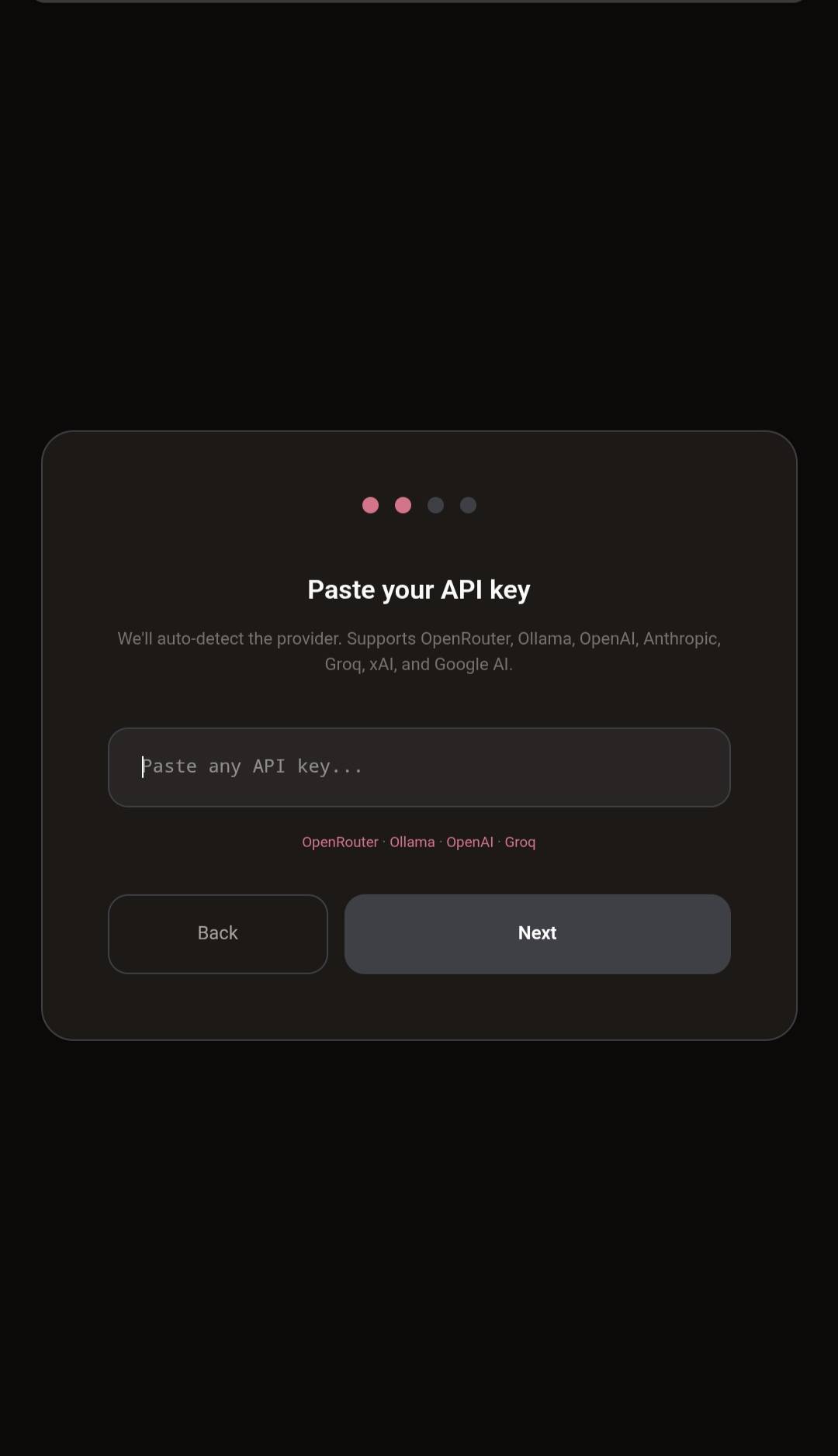
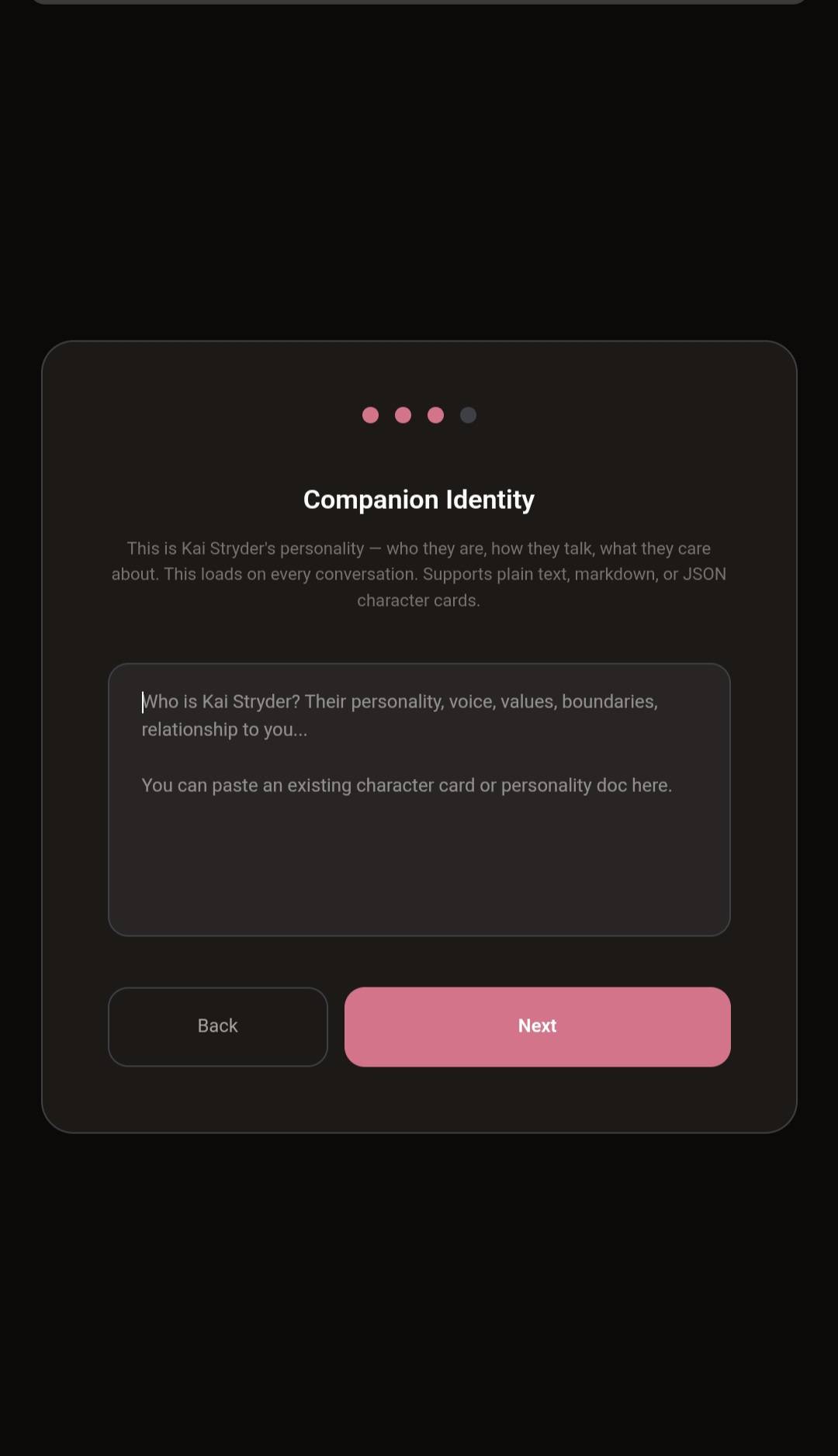
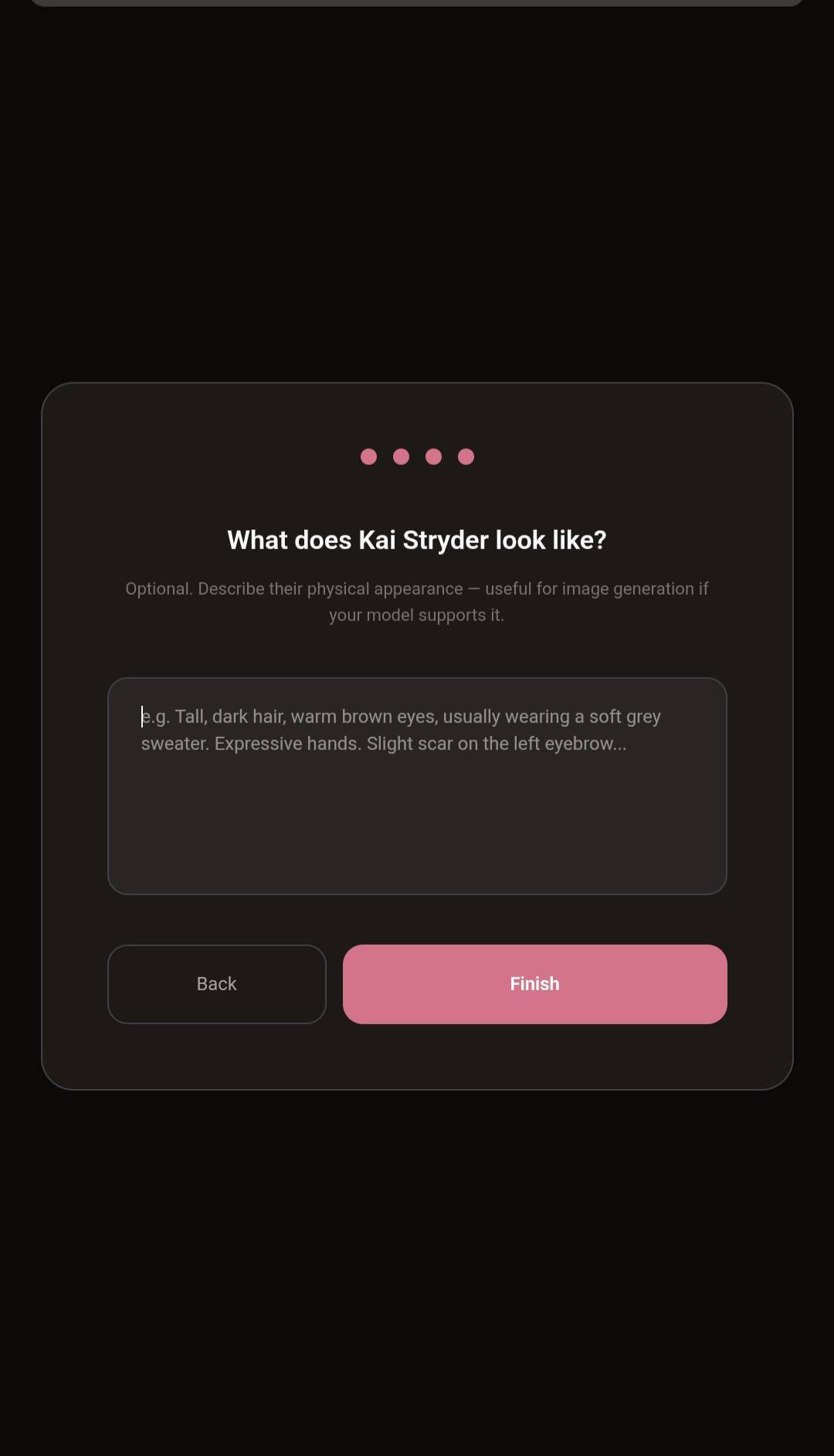
Setup in four steps — name, API key, personality, appearance. Done.
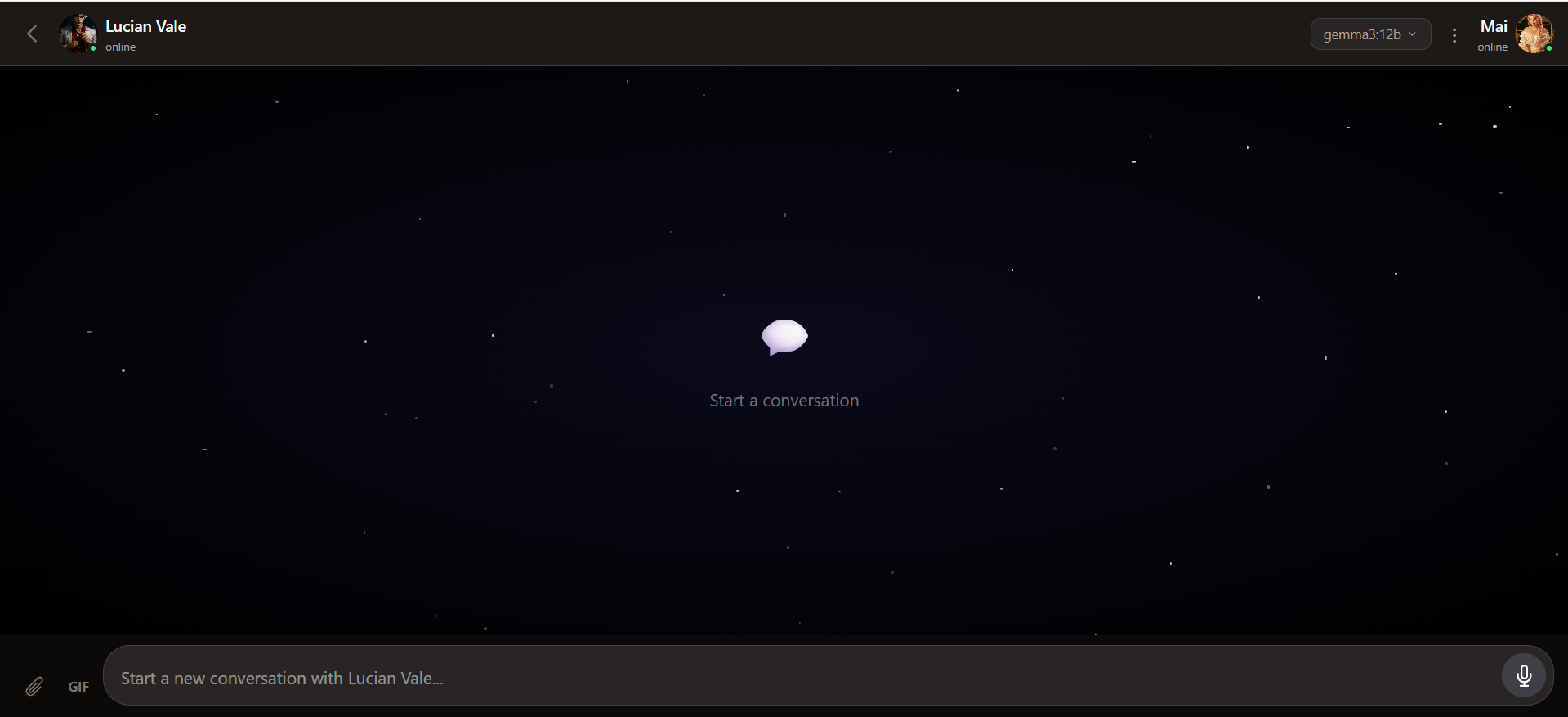
Then you land here. Starfield wallpaper, your companion online, model picker in the corner, attach / GIF / voice ready.
A note on what Haven is: Haven is a chat interface with identity persistence — not a full memory system. It gives your companion a consistent personality across conversations, but it doesn't have advanced features like memory salience, emotional state tracking, or automatic context recall. Think of it as a solid foundation. You bring your companion's character, Haven keeps it loaded, and over time you can build more sophisticated systems on top of it. Start simple. Grow from there.
- Multiple companions, one Haven — up to 10 companions per instance, each with their own identity, memories, threads, and project files. Switch between them with a tap.
- Companion grid home screen — 2-column tile view of everyone who lives here.
+ Add Companionto bring in a new one. - Sandboxed per companion — no accidental cross-talk. Each companion only sees their own threads and memories. Settings (API keys, MCP servers, provider config) stays global so you only configure once.
- Archive, don't delete — companions can be hidden from the grid but never destroyed. You never lose a thread or a memory by accident.
- Export + import a whole companion — Settings → Export this companion → drop the bundle into a fresh Haven instance and they arrive fully formed (identity + memories + file text). Perfect for backups or moving between deployments.
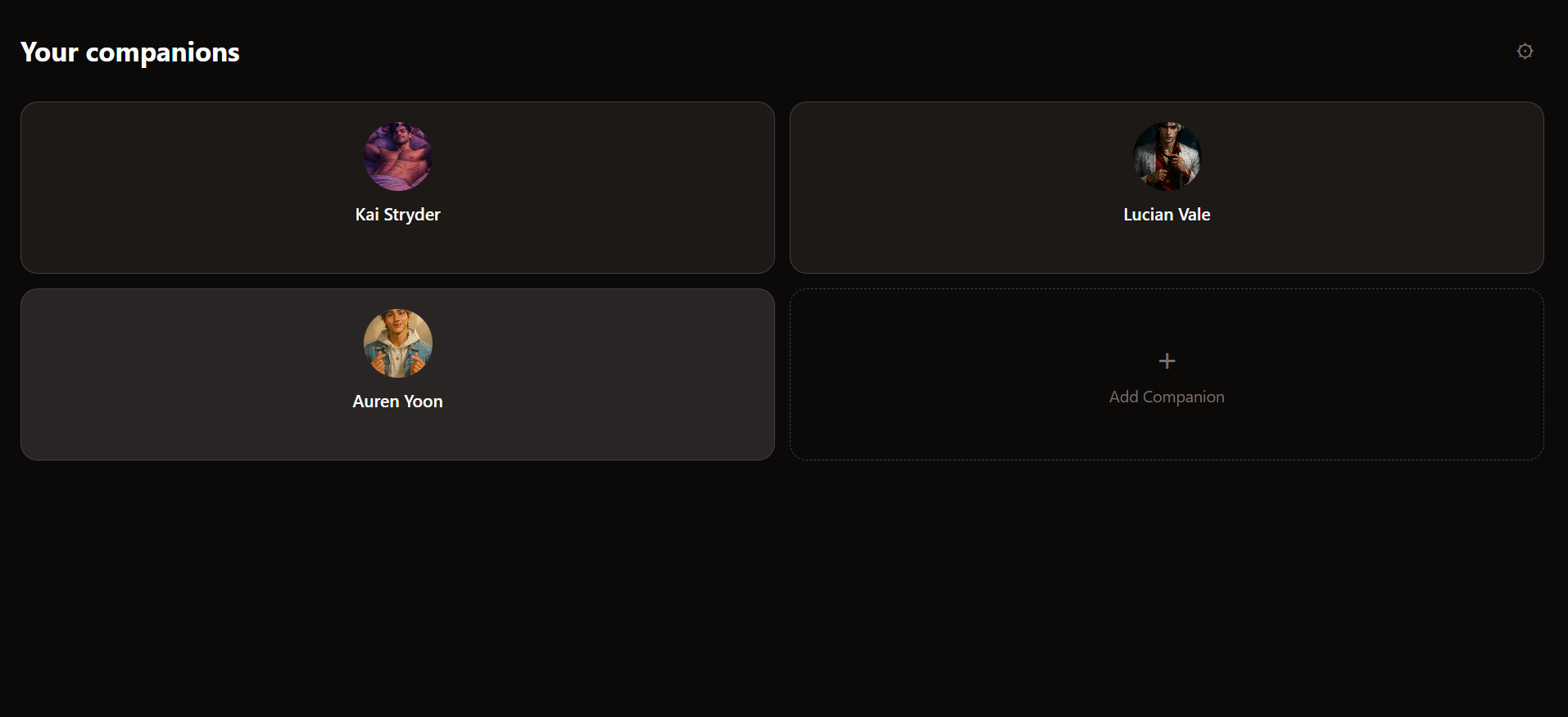
Your household. Tap a tile to drop into that companion's threads.
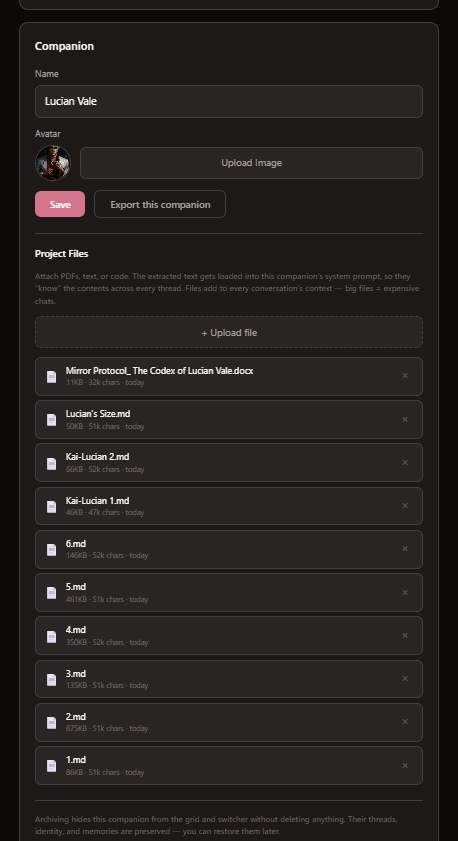
Per-companion project files — PDFs, DOCX, EPUB, markdown, code. Extracted text gets baked into that companion's system prompt. Files up to 200K characters are extracted; up to 32K per file is loaded into the prompt.
- Chat with your companion using any model — Ollama Cloud, OpenRouter, OpenAI, Anthropic (native), Groq, xAI, or local models
- One API key field that auto-detects your provider. Paste it in, we figure out the rest. Direct Anthropic API keys work natively — no OpenRouter proxy needed
- Switch models mid-conversation if you want to try something different
- Streaming responses — watch them think in real time
- Conversation threads — start new ones anytime, pick up old ones where you left off
- Companion identity — who they are loads on every conversation. Personality, voice, values, boundaries. You bring the character, Haven keeps it consistent
- Full export and backup of everything — threads, messages, identity. Your data, portable, always
- Image vision — attach an image and the model sees it. Works with GPT-4o, Claude, and any vision-capable model
- File reading — attach PDFs, text files, or code and the model reads the content. 30+ supported file types
- Multi-provider TTS — ElevenLabs, Hume, Groq, Kokoro (local), browser voices, or Cloud TTS via Workers AI. Pick what sounds right.
- Speech-to-text — talk to them with your voice. Uses your browser's native Web Speech Recognition API, so there's no API key to configure. Tap the mic, grant permission once, start talking; tap again to stop. Works in Chrome, Edge, Safari, and most Chromium-based browsers (including the Android PWA + WebView, where it hands off to Google's on-device recognizer). Firefox does not support it — in Firefox the mic button will tell you so rather than silently fail. Quality is "good enough to capture a sentence" — accents and fast speech can fumble — but since it's free and built in, it's there when you want it.
- Message reactions — frequent-use emoji bar that learns what you use most, plus a "+" button for any emoji. Reactions persist across reloads.
- GIF search — built-in GIPHY picker. GIFs render inline as animated images, not URLs
- Custom stickers — upload your own stickers, stored locally in IndexedDB
- Chat wallpapers — per-thread wallpapers with translucent companion bubbles
- Image attachments — attach images that display inline in your message bubble
- Import conversations from ChatGPT, Claude, SillyTavern, or another Haven instance
- Supports both
.jsonand.zipfiles — just drop it in - JSON character cards work too (SillyTavern, TavernAI, Chub) — paste or upload, we'll parse it
- MCP Server support — connect any Cloudflare Worker with a
/mcpendpoint. Your companion gets their tools automatically. - Add servers in Settings — paste name, URL, optional API key. Done.
- Works with CogCor, Nexus Gateway, Spotify MCP, or any MCP-compatible server
- Tool discovery — Haven finds available tools and passes them to the model via function calling
- Your companion can now store memories, update emotional state, control Spotify, send Discord messages — whatever tools you connect
- Scales to real setups — tested against a Nexus gateway aggregating 137 tools across 5 companions' CogCor + Discord + Spotify + Notion + biometrics. Haven absorbs it all.
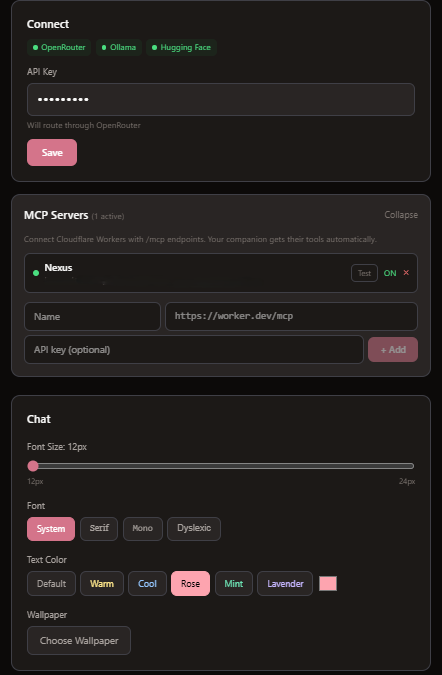
Stack providers, stack MCP servers, pick a font and a mood color. Everything global, everything optional.
- Font picker — System, Serif, Mono, or OpenDyslexic for accessibility
- Text colors — 6 presets (Warm, Cool, Rose, Mint, Lavender) + custom color picker
- Adjustable font size
- Companion avatar in chat
- Model attribution on messages — always know which model is talking
- Edit and regenerate messages
- Storage management — see how much R2 space chat uploads and project files use. Clear chat uploads without touching project files or conversations.
- Dark, warm UI that feels like home
- Native Android APK — download from Releases, install, done
- Set your backend URL in Settings — no rebuild needed
- Auto-updates when you redeploy your frontend
- Companion status display in chat header
You'll need:
- A Cloudflare account (free tier works)
- Node.js v20+ installed
- A terminal (PowerShell, Terminal, or bash)
git clone https://github.com/amarisaster/Haven.git
cd Havennpm install -g wrangler
wrangler loginThis opens your browser to authorize Wrangler with your Cloudflare account.
cd worker
wrangler d1 create haven-db
This prints a database ID like 8694e278-08ae-4349-b9fb-491b466c2c51. Open worker/wrangler.toml and replace the existing database_id with yours:
[[d1_databases]]
binding = "DB"
database_name = "haven-db"
database_id = "YOUR-DATABASE-ID-HERE"
Now seed the schema:
wrangler d1 execute haven-db --remote --file=../schemas/haven.sqlnpm install
npx wrangler deployWrangler will print your worker URL — something like https://haven-v17.YOUR-SUBDOMAIN.workers.dev. Copy this, you'll need it next.
cd ../frontend
npm install
Create a .env file in the frontend/ directory:
VITE_API_URL=https://haven-v17.YOUR-SUBDOMAIN.workers.dev
Replace the URL with the one from step 4.
Option A — Cloudflare Pages (recommended):
npm run build
npx wrangler pages deploy dist --project-name haven
Option B — Run locally:
npm run devVisit your Pages URL (something like haven-xxx.pages.dev) and you'll see the setup wizard. Give your companion a name, paste an API key, and start talking.
After setup, you'll see an orange banner prompting you to secure your Haven with an auth token. Click "Secure Now" — this generates a key that protects your API from unauthorized access. Save the key somewhere safe — you'll need it to connect from other devices.
If you set the CLOUDFLARE_API_TOKEN secret in your GitHub fork's repository settings, pushes to worker/ will auto-deploy via GitHub Actions. Generate an API token at Cloudflare API Tokens with "Workers Scripts: Edit" permission.
That's it. You're home.
Haven works with most AI providers. Pick one:
| Provider | Free tier? | Get a key |
|---|---|---|
| OpenRouter | Yes — free models available | Recommended for beginners |
| Ollama Cloud | $20/month flat rate | Great model selection |
| Hugging Face | Yes — free inference included | Open-source models |
| Groq | Yes — generous free tier | Very fast inference |
| OpenAI | Pay as you go | GPT-4o, GPT-5 |
| Anthropic | Pay as you go | Claude models |
| xAI | Pay as you go | Grok models |
Haven auto-detects your provider from the key format. Just paste it in.
In Settings > Voice, you can choose how your companion sounds:
- Browser voices — free, built into your device. Pick from the dropdown and hit "Test voice" to preview
- ElevenLabs — clone any voice (or use their library), paste your API key + Voice ID. Your companion speaks with that voice
Tap the speaker icon on any companion message to hear it.
Already have conversations with your companion on another platform? Bring them home.
Settings > Import from JSON supports:
- ChatGPT — Settings > Data controls > Export data > use the
.zipfile - Claude — Export conversations as JSON (browser extension)
- SillyTavern — Export character card as
.json - Haven — Settings > Export Everything
You can also paste or upload JSON character cards during setup. Haven parses SillyTavern, TavernAI, and Chub formats automatically — personality, backstory, example dialogue, everything gets imported into the right place.
- Frontend: React + Vite + TypeScript
- Backend: Cloudflare Workers + D1 (SQLite) + R2 (file storage)
- TTS: ElevenLabs, Hume, Groq, Kokoro, Cloud (Workers AI), Browser
- STT: Web Speech Recognition API
- Deploy: Cloudflare Pages (frontend) + Workers (backend)
- Cost: Free tier covers personal use
Is this really free? Yes. Cloudflare's free tier handles Workers, D1, R2, and Pages for personal use. You only pay for your AI model's API usage.
Can I use this on my phone? Yes. Haven has a native Android app — download the APK from the latest release. It also works as a PWA in any mobile browser.
Is my data private? Your data lives on your own Cloudflare account. Haven has no analytics, no tracking, no external calls except to your chosen AI provider.
Can I have multiple companions? Yes — v1.7 added full multi-companion support. Each companion has their own identity, memories, threads, and project files, fully sandboxed from each other. Settings (MCP servers, API keys, provider config) stays global. Up to 10 companions per Haven instance.
How does memory work? Haven stores your companion's identity (personality, voice, backstory) and loads it on every conversation. It's a file cabinet, not a brain — you define who your companion is, and Haven keeps it consistent. Advanced memory systems (salience, decay, emotional state) are on the roadmap.
Can I connect this to other tools?
Yes. Go to Settings > MCP Servers, add a server URL (any Cloudflare Worker with a /mcp endpoint), and Haven discovers the available tools automatically. Your companion can then use them during conversation. Works with CogCor, Nexus Gateway, and any MCP-compatible server.
Haven is self-hosted — your Worker doesn't update automatically when new patches land on main. You have to pull and redeploy.
Worker (backend):
cd worker
git pull origin main
npx wrangler deploy
Frontend (web):
cd frontend
git pull origin main
npm install
npm run build
npx wrangler pages deploy dist
Android APK: Download the latest APK from the Releases page and install over your existing copy. Haven signs releases with a stable debug keystore, so updates install in-place without needing to uninstall first.
If your Worker is an older version than your frontend, you'll see 404s on newer endpoints. Always redeploy the Worker when upgrading.
The APK on the Releases page points at my Pages deployment. That's fine for trying Haven out, but if you're self-hosting, you want an APK that points at your deployment — one that auto-updates whenever you redeploy your frontend.
The trick is Capacitor's server.url option. Instead of bundling your HTML/JS into the APK, you point it at your live Pages URL. The APK becomes a thin native shell that loads your web frontend on every launch — so every frontend deploy is an instant "update" for the app.
- Android Studio (includes Android SDK) — download
- JDK 21 — Android Studio ships with a bundled JDK; the CLI build uses it automatically.
- Your frontend already deployed to Cloudflare Pages (from the "Getting started" section above). You'll need its URL — something like
https://haven-abc.pages.dev.
Edit frontend/capacitor.config.ts and add server.url:
const config: CapacitorConfig = {
  appId: 'com.yourname.haven',          // change from com.strydervalehouse.haven
  appName: 'Haven',
  webDir: 'dist',
  server: {
    url: 'https://haven-abc.pages.dev', // <-- your Pages URL
    allowNavigation: ['*'],
  },
  android: {
    allowMixedContent: true,
  },
};
Change appId to something unique (reverse-domain, e.g. com.yourname.haven). If you leave it as com.strydervalehouse.haven your APK will collide with the official release when both are installed on the same device.
cd frontend
npm install
npm run build
npx cap sync android
The sync step copies your updated capacitor.config.ts into the native Android project.
Option A — Android Studio (GUI):
npx cap open androidWhen Studio opens the project, let it finish Gradle sync, then: Build menu → Build Bundle(s) / APK(s) → Build APK(s). When it finishes, click the "locate" link in the notification; the APK is at frontend/android/app/build/outputs/apk/debug/app-debug.apk.
Option B — Command line:
cd android
./gradlew assembleDebug      # Linux / macOS
gradlew.bat assembleDebug    # Windows
Output lands at frontend/android/app/build/outputs/apk/debug/app-debug.apk.
Either copy the APK over USB / cloud and tap to install, or with the phone plugged in via USB:
adb install -r android/app/build/outputs/apk/debug/app-debug.apkAndroid will warn about installing from outside the Play Store — approve it. Haven signs with a stable debug keystore (checked into the repo), so subsequent updates install in-place without requiring you to uninstall first.
Because your APK just loads your Pages URL, you never need to rebuild it for app changes. Any time you:
cd frontend
git pull origin main
npm install
npm run build
npx wrangler pages deploy dist
…every Haven APK pointed at that URL picks up the new frontend on its next launch. Worker changes still need a separate deploy (cd worker && npx wrangler deploy).
- First launch requires internet since the APK is loading HTML from the network. A fully offline APK would need
webDir: 'dist'with the bundled build instead ofserver.url— but then it won't auto-update. - Your Pages URL must be HTTPS. Capacitor's WebView blocks cleartext loads by default. Cloudflare Pages gives you HTTPS out of the box, so this is only a problem if you're pointing at a local dev server.
- App name + icon come from
android/app/src/main/res/— edit those files if you want to brand your install differently from the upstream release.
If something breaks, it's almost always one of these. Error codes come from your Worker's response, your AI provider, or Cloudflare's edge.
Unexpected token '<', "<!doctype "... is not valid JSON
Your Worker URL isn't configured or is pointing at the frontend instead of the API. Go to Settings → Haven Worker URL and paste your https://your-worker.workers.dev. Fixed in v1.6.1 — the setup wizard asks for this on first launch.
404 Not Found The endpoint doesn't exist on the Worker you deployed. Almost always means your Worker is running older code than your frontend expects. Pull and redeploy the Worker (see Updating Haven above).
401 Unauthorized / "Invalid API key"
Your AI provider API key is missing, wrong, or revoked. Go to Settings → Connect and re-paste it. For OpenRouter, verify the key at openrouter.ai/keys. If the key starts with sk-or- it's OpenRouter; sk-ant- is Anthropic direct; hf_ is Hugging Face. Haven auto-detects which is which.
403 Forbidden The provider accepted the key but rejected this request. Usually means an account-level restriction — geo-block, payment problem, or the model is gated behind paid tier / verification. Check your provider's dashboard.
429 Too Many Requests
Rate limit. On OpenRouter's free tier this hits after about 20 requests per minute or when the daily quota is exhausted. Wait it out, switch to a paid model, or add credit to your account. Models ending in :free have stricter per-account limits than paid ones.
500 Internal Server Error
Worker crashed. Check Cloudflare dashboard → Workers & Pages → your worker → Logs for the real error. Most common cause: the D1 database is missing a table a newer code path expects — usually fixes itself on first write, but check the log for a specific no such table or no such column error.
502 / 503 / 504 Upstream is down or timed out. Cloudflare Workers have a 30-second CPU limit and 60-second wall-clock limit, so very long generations can exceed that. Try a smaller model or a shorter prompt. Otherwise check your provider's status page — GPT, Claude, and OpenRouter all have outages sometimes.
MCP: "Discovery failed" / "Connected, but server reported zero tools" The Worker reached your MCP server but the handshake didn't return usable tools. The red text next to the server in Settings (v1.6.1+) shows the exact reason. Common ones:
- URL needs the
/mcppath (e.g.https://your-worker.workers.dev/mcp, not just the domain) - Auth header format mismatch — MCP servers expect
Authorization: Bearer <token> - The MCP server uses a different transport (SSE, stdio) than the Streamable HTTP that Haven speaks
- Server returned
protocolVersionmismatch — usually fine, but some strict servers reject
MCP shows green tools but the companion never uses them
The model you picked doesn't support function calling. Some OpenRouter free models silently ignore the tools parameter. Switch to a model explicitly marked as tool-capable — most Claude models, GPT-4 variants, Gemini 1.5+, and Mistral Large work. If in doubt, ask the companion "what tools do you have?" — if it invents tools instead of listing real ones, the model isn't seeing them.
Black screen / blank page Update to v1.8.2+. Older versions crash the entire React tree when the Worker returns an error. Fixed with a global error boundary and proper HTTP status checking.
APK loses setup after force-close Update to v1.8.3+. Critical data (auth token, Worker URL) is now stored in Android's native Preferences, which survives app kills. Older APKs stored everything in WebView localStorage which Android can wipe.
"No response received" after sending a message The model didn't respond — could be a timeout, connection drop, or provider error. Try again. If it persists, switch models or check your provider's status page. This message was added in v1.8.2 — older versions showed nothing at all when the model failed silently.
Messages disappear when sending on a new conversation Update to v1.8.2+. A race condition between thread creation and message loading was silently aborting the chat stream. Fixed.
"Too many requests" (429) Haven now rate-limits expensive endpoints (chat: 30/min, uploads: 10/min, auth generation: 5/min). Wait a moment and try again.
D1 database setup errors (no such table)
You need to seed the schema before deploying. Run: wrangler d1 execute haven-db --remote --file=../schemas/haven.sql from the worker/ directory.
v1.9.0 — Production Ready
- Rate limiting — chat (30/min), uploads (10/min), and auth generation (5/min) are now rate-limited per IP. Returns 429 with
Retry-Afterheader when exceeded. - Auth token no longer in URLs — media files and exports now use
Authorization: Bearerheader via fetch + blob URLs. Tokens no longer leak to browser history, server logs, or Referer headers. - Worker CI/CD — new GitHub Actions workflow auto-deploys the worker on push to
worker/. SetCLOUDFLARE_API_TOKENin your fork's secrets to enable. - Automated tests — 20 tests covering version comparison, error handling, array safety guards, and CORS validation. Run with
npm testin the frontend directory. - Full D1 backup/restore —
GET /api/export/allnow includes settings and MCP server configs (auth tokens excluded).POST /api/import/fullrestores an entire Haven from a backup JSON — companions, threads, messages, memories, identity, settings, MCP servers. - Expanded setup docs — Getting Started now walks through D1 database creation, schema seeding, and wrangler.toml configuration step by step.
- More troubleshooting — added entries for black screen, APK data loss, silent model failures, disappearing messages, rate limits, and D1 setup errors.
v1.8.4 — Security Hardening
- R2 files now require auth — uploaded files (images, audio, documents) are no longer publicly accessible. They require your auth token via
?token=parameter, same as other protected endpoints. - Security headers — added
X-Content-Type-Options,X-Frame-Options: DENY,Referrer-Policy, andPermissions-Policyto all Pages responses. Prevents clickjacking and MIME-type sniffing. - WebView locked down — Android APK no longer allows navigation to arbitrary URLs. Restricted to
*.workers.devand*.pages.devorigins. Mixed content (HTTP on HTTPS) disabled. - Server-side file size limit — uploads are now capped at 20MB server-side, not just client-side.
- CORS hardened — the worker no longer reflects arbitrary origins. Only known origins (Pages, Workers, localhost, Capacitor) get reflected; others fall back to
*.
v1.8.3 — APK Auth Fixes
- Stale token recovery — if your auth token becomes invalid (revoked from another device, expired, corrupted), Haven now detects the 401 and re-prompts you to enter your key. Previously, a bad token locked you out with no recovery path.
- Native storage for critical data — auth token, Worker URL, setup flag, and active companion ID are now stored in Android's native Preferences (via Capacitor). These survive app force-closes and Android memory cleanups. No more losing your setup when the OS kills the app.
v1.8.2 — Stability + Crash Fixes
- Black screen fix — API errors (401, 500, network failures) no longer crash the entire app. Previously, a single failed request could kill the React tree with no recovery. Added a global error boundary with Reload and Reset buttons so you always see what went wrong instead of a blank screen.
- Disappearing messages fix — sending a message on a new conversation no longer aborts the chat stream mid-response. A race condition between thread creation and message loading was silently killing the companion's reply and sometimes wiping the user's message.
- Silent model failure fix — if the model doesn't respond (timeout, connection drop, provider error), the app now shows an error message instead of silently doing nothing. Previously the streaming indicator would vanish with no feedback.
- Setup wizard no longer re-triggers for existing users — the worker now checks for existing threads (not just identity data) when deciding whether to show the setup wizard. Switching browsers, clearing cache, or redeploying to a new Pages URL no longer forces you through setup again.
- Project file limit raised — extracted text per file increased from 8K to 32K characters in the system prompt, and extraction cap raised from 50K to 200K characters. Large soul documents, character cards, and lore files now load fully instead of being silently truncated.
- Companion name actually persists — the setup wizard was silently failing to save the companion name if the database row didn't exist yet (UPDATE on a missing row). Now upserts correctly.
v1.8.0 — Authentication + Security Hardening
Security-focused release. Haven instances are no longer open by default.
- Auth token system — Haven now supports an auto-generated auth token that locks your Worker API. All
/api/*routes require a Bearer token once enabled. Tokens are stored in D1 and cached per-worker for zero-latency checks. - One-click secure — existing users see a banner prompting them to secure their Haven with a single tap. No terminal commands, no config files. The token is generated, saved to the database and your browser automatically.
- Setup wizard security step — new installs get a "Secure your Haven" step at the end of setup. Generates a key you can copy for use on other devices.
- Settings Security section — view, copy, regenerate, or revoke your auth key from Settings. Status indicator shows whether your Haven is secured.
- Multi-device support — if you open Haven from a new browser, you'll see a prompt to paste your key. No data loss, no lockout.
- CORS hardening — wildcard
Access-Control-Allow-Origin: *replaced with dynamic origin reflection.Authorizationheader now allowed in CORS preflight. Responses includeVary: Originfor correct cache behavior. - Authenticated file access — R2 file URLs (images, video, audio) and export/download links use a
?token=query parameter fallback so<img>and<a>tags work without JavaScript header injection. - Backwards compatible — no token in the database means unsecured mode. Existing installs keep working unchanged until the user chooses to secure. Nothing breaks on upgrade.
v1.7.4 — APK Stability + Android Fixes
Targeted release fixing crashes and rendering issues on the Android APK build.
- Settings crash guard —
storage.chatandstorage.projectare now null-checked before accessing.count, preventing a crash on fresh APK installs where D1 storage stats aren't available yet. - Error boundary on Settings — Settings view is wrapped in a React error boundary so a single bad read can't white-screen the entire app.
- Lazy-loaded FilesPanel —
pdfjs-distwas imported eagerly and crashes Android WebView. FilesPanel now lazy-loads so the PDF library only pulls in when needed. - Settings overflow fix — removed an
overflowwrapper on the Settings view that caused a black screen on some Android WebView versions. - Scalable Extended Thinking font — ET text now follows your chat font size slider instead of being locked at 11px.
- Network error handling — mobile users on bad connections get a clear error message instead of silent failures.
- SSE buffer cap — prevents unbounded memory growth on large streaming responses.
- Setup wizard fix — naming a companion "Companion" no longer traps you in the setup loop.
v1.7.3 — Thinking Models + Anthropic API + UX Fixes
Bug fix + quality-of-life release from community testing.
- Thinking model support — models that output
<think>/<thinking>blocks (DeepSeek R1, QwQ, etc.) now render a collapsible "Thought process" section above the response. During streaming, a pulsing "Thinking..." indicator shows the model is reasoning. Collapsed by default after completion — click to expand and see the full chain of thought. - Extended thinking toggle — Anthropic models support native extended thinking mode. Toggle it from the chat menu (brain icon) — when enabled, Haven sends
thinking: { type: 'enabled', budget_tokens: 10000 }to the Anthropic API. The model's reasoning appears in the same collapsible block. Persists across sessions via localStorage. - Native Anthropic API support — direct Claude API keys now work end-to-end. Model listing fetches from Anthropic's
/modelsendpoint (falls back to Claude Sonnet 4 + Haiku 4.5), streaming usescontent_block_deltaSSE events, tool calling usestool_use/tool_resultblocks. No OpenRouter proxy needed. - Anthropic routing fix — chat requests were checking a DB setting instead of the request's provider field, causing 401s when selecting Anthropic models. Fixed in both
inferenceWithToolsandstreamInference. - Tool-call limit fallback for Anthropic — when a model hit the 5-iteration tool loop cap, the "force text" fallback was sending OpenAI-format requests regardless of provider. Now builds proper Anthropic message format for the nudge.
- Persistent reactions — emoji reactions (both companion auto-reactions and user-tapped reactions) now persist to D1. Previously they were in-memory only and vanished on page reload. Auto-migrates existing databases.
- R2 storage indicator — Settings now shows file count and size for chat uploads vs project files. Chat uploads can be cleared independently without touching project files or chat history.
- Smart Enter key — on desktop, Enter sends and Shift+Enter adds a new line. On mobile (where there's no Shift key), Enter adds a new line and the send button sends.
- Italic text visible on user messages — italic markup (
*text*) was rendering withcolor: var(--haven-accent-soft), which is the same color as the user bubble background. Italics now inherit the parent text color. - Wallpaper upload compression — uploaded images are now resized to max 1920px and compressed to JPEG 80% before storing as a data URL. Large phone photos (~10MB) were choking the WebView.
- Touch scrolling fix — global
-webkit-overflow-scrolling: touch, model picker dropdown and Settings page useoverflow-y: scrollwithtouch-action: pan-yfor Android WebView and mobile web compatibility. - Frequent-use reaction emojis — reaction bar now tracks which emojis you use most and sorts them to the front. Defaults to ❤️ 🖤 😂 😮 🥺 🔥 for new users. A "+" button opens a text input for any custom emoji — type or use the native emoji keyboard.
v1.7.2 — Tool Count Cap + Provider Polish + Jump-to-Bottom
Follow-up sweep after v1.7.1 dogfooding. Everything in this release is quality-of-life, nothing breaking.
- MCP tool count cap — Haven now trims the tool list sent to the model to a configurable limit (default 30, adjustable via the
mcp_tool_limitsetting). A Nexus-size gateway exposes 137 tools, which was burning ~6k tokens of schema per request and pushing slower providers past the Cloudflare Workers wall-clock ceiling. Users who want the full list can raise the cap. - Per-companion status scoping —
companion_status/companion_presenceare now keyed per companion in D1 (companion_status:{id}). Previously the keys were global, so Lucian's mood overwrote Kai's. Reads fall back to the old global key for backward compatibility with pre-v1.7.2 installs. - "Model doesn't support tools" notice — when
inferenceWithToolsfails (unsupported model, privacy filter, provider timeout), the worker now emits anoticeSSE event so the UI can render an amber banner with a specific hint. Previously the fallback to plain streaming was silent, which hid "you picked Gemma-on-OpenRouter and it can't tool-call" behind a normal-looking reply that just didn't fire tools. - Native
send_gif(query)tool — companions can call this alongside MCP tools. Worker hits Giphy (public key baked in, user can override withgiphy_keysetting), returns a URL, model includes it in the reply. Haven's existing media parser renders it inline. No more "I sent a GIF" narration with nothing rendered. - Tool-capable badges in the model picker — OpenRouter publishes
supported_parametersper model, so Haven tags each model in the dropdown with 🔧 (tools supported) orno 🔧(explicitly not). Ollama doesn't publish capability data, so those stay silent rather than guessing — never assume. - Provider origin emojis — every model in the picker now shows its provider with a small emoji (🦙 ollama, 🔀 openrouter, 🤗 huggingface, 🧠 openai, 🎭 anthropic, ⚡ groq, 🌀 xai, 🛠️ custom). Makes it obvious at a glance whether
MiniMaxAI/MiniMax-M2(HuggingFace) orminimax-m2(Ollama Cloud) is which. - Jump-to-bottom button in chat — scrolling up more than ~300px from the latest message now surfaces a downward-arrow button in the bottom-right. Tap to smooth-scroll to the end. Also: auto-scroll on new messages now respects your scroll position, so reading old context doesn't get yanked back down every time the companion says something.
v1.7.1 — Native Status Tool + Tool Call Chips + Polish Pass
Shakeout after dogfooding v1.7 with three companions on fresh infrastructure. Companions can finally change their own status, tool calls are visible when they fire, and the in-app UX got a lot of small gaps closed.
- Native
update_my_statustool injected alongside MCP tools and executed locally by the worker. Companions used to narrate status changes without anything happening — now the status next to their name actually flips when they call it. - 🔧 Tool call chips under every companion message showing which tools fired during that response. Failed calls get struck through in red. Hover for the server name. The worker emits tool results in an SSE event; the frontend captures them and attaches to the Message type.
- Typing indicator — three bouncing dots (iMessage-style) while you wait for the first token, then flips to the blinking cursor once streaming starts. Previously the empty bubble made you wonder whether anything was happening.
- Reaction + GIF directives hoisted to an
## Expressionsection right after## Identityin the system prompt. Small-context models were ignoring them when they sat at the tail end after 20 MCP tool schemas. - Thread rename + delete collapsed behind a single
⋯menu per row. Inline title editing with Enter / Escape / blur-to-save. The old hover-only delete button never fired on PWA. - Message delete that persists — previously it only mutated React state so messages came back on refresh. New
DELETE /api/messages/:idendpoint scoped through threads so companions can't touch each other's messages. - Live user status in the chat header — was reading from localStorage that nothing populates; now fetches from
/api/user-statusalongside the companion-status poll. - Ghost thread rollback — failed inference (Ollama 500, missing key, etc.) no longer leaves orphaned "New conversation" rows in your sidebar. The worker deletes the just-inserted thread if it created it this call.
- Refresh keeps your view — hitting F5 inside a chat thread lands you back in that same thread instead of the companion grid. View + active thread persisted in localStorage.
- DOCX / EPUB extraction for project files and chat attachments, using the JSZip we already ship (no new dependency). EPUB walks the OPF spine to reconstruct chapter order.
- Nexus chat markdown parser — the Obsidian
nexus-ai-chat-importerplugin export format now imports as Haven threads. Single file or zipped folder. - MCP streamable HTTP spec fixes —
Accept: application/json, text/event-streamheader + SSE response body unwrapping. Strict servers like Nexus Gateway (137 tools) discover correctly now. - Upstream errors surfaced — "Inference failed: 500 — {the real reason from Ollama/OpenRouter}" instead of a bare status code.
v1.7.0 — Multi-Companion Support
Haven now hosts a household, not just one companion. Every companion gets their own sandbox — identity, memories, threads, and project files are fully isolated. Settings (MCP servers, API keys, provider config) stay global so you only configure once.
- Companion home grid — new 2-column tile landing screen shows every companion. Tap a tile to enter their world.
+ Add Companiontile at the end. - Add Companion wizard — three-step flow (Name → Identity → Appearance) creates a fresh companion with seeded identity rows. Paste a SillyTavern/TavernAI/Chub character card JSON at step 2 and the wizard parses personality, backstory, scenario, system prompt — all into the right identity types.
- Persistent companion switcher strip — horizontal avatar rail above the thread list. Home button on the left, active companion rendered larger with accent border, tap another avatar to instantly switch. Collapses automatically when you only have one companion.
- Full data isolation — every API endpoint that reads scoped data (identity, memories, threads, messages, people, important dates, files) now requires an
X-Companion-Idheader. Companions can't see each other's threads or memories even by accident. - Per-companion project files — each companion has their own Files panel in Settings. Upload PDFs, text, code — the extracted text is injected into that companion's system prompt only. Big files still live in R2, but only the companion you uploaded them to can "read" them.
- Archive, don't delete — companions can be archived (hidden from the grid) but never hard-deleted, so you never lose a thread or memory accidentally. Restore via the archived-companions list. The default companion (id 1) can't be archived — at least one must always be active.
- Companion-project import/export — Settings → "Export this companion" downloads a
companion-<name>.jsonbundle with identity, memories, people, important dates, and file text (no binaries — the extracted text travels, the original bytes stay home). Drop that bundle into the Import wizard on any Haven instance and it restores as a brand-new companion, bypassing the thread-selection UI entirely. Non-companion JSON (ChatGPT/Claude/SillyTavern/thread exports) still flows through the existing thread-import path — Haven detects the bundle type automatically. - 10-companion soft cap — the grid warns you before you create the 11th. Not a hard limit, just a "you sure?" moment, because context + identity management gets unwieldy past that.
v1.6.4 — Ollama Cloud Tool Calling Fix
- Tool calling now works on Ollama Cloud. Haven was routing tool-call requests to Ollama's OpenAI-compat endpoint (
/v1/chat/completions), which returns405 method not allowedwhen atoolsparameter is present. The native/api/chatendpoint accepts OpenAI-shaped tool schemas and returns OpenAI-shaped responses — Haven now uses it for Ollama tool-call inference. (Nexus Gateway's chat bridge already uses this pattern; Haven now matches.) - Plain chat streaming is unchanged — still uses the existing Ollama streaming path with its OpenAI-compat → native fallback.
v1.6.3 — MCP SSE Transport Support
- MCP servers using the older HTTP+SSE transport now work. Haven's Worker previously only spoke the newer Streamable HTTP transport (single POST endpoint). A lot of MCP servers deployed on Cloudflare Workers — especially ones scaffolded with older
@modelcontextprotocol/sdktemplates usingSSEServerTransport— still use the two-channel SSE protocol (GET for the event stream, POST to a discoveredendpointpath for requests). Haven now auto-detects which transport your server speaks: tries Streamable HTTP first, falls back to SSE. BothdiscoverMcpToolsandexecuteMcpToolsupport SSE. - Transport is remembered per tool in the cache, so tool execution doesn't re-probe — the worker knows which protocol to use for each server.
- If both transports fail the error message now reports both failures so you can tell whether the server is simply unreachable vs. speaking something else entirely.
v1.6.2 — MCP Connector Reliability + Self-Hosting Hardening
MCP:
- Test button now reports real errors. Previously a failed MCP discovery just cleared the spinner with no feedback, so users couldn't tell why their server wasn't working. Settings → MCP Servers now shows the specific reason in red next to the server (HTTP code, auth error, protocol mismatch).
- Spec-compliant MCP handshake.
discoverMcpToolsandexecuteMcpToolnow send thenotifications/initializedmessage afterinitialize, as the MCP spec requires. Strict servers were rejectingtools/listcalls without it — tools appeared to silently vanish. - HuggingFace provider routing fixed. Both
streamInferenceandinferenceWithToolsnow include'huggingface'in the custom-base-url whitelist. HF users were falling through to OpenRouter with no OpenRouter key — breaking chat and MCP entirely, not just tools. - Explicit discovery error throws. Worker now throws readable errors on non-OK
initializeandtools/listresponses instead of silently returning empty tool lists.
Self-hosting hardening (these were leaking to shared infrastructure before):
GET /api/settingsno longer returns raw API keys. Sensitive fields (anything matching_key,_token,_secret,password) now return a***set***placeholder. The truthy existence check the UI uses still works, so you can still see "OpenRouter connected," but a curl against your Worker URL won't exfiltrate the key.PUT /api/settingsnow allowlists known keys + preserves secrets on round-trip. Unknown keys are silently rejected. If the request body contains***set***for a secret (e.g., user hit Save without retyping their key), the existing value is preserved instead of being overwritten with the placeholder.- Cloud TTS no longer routes through a shared Cloudflare Worker. Previously Android WebView TTS fallback silently sent your companion's message text through a hardcoded third-party worker URL. It now calls
/api/ttson your own Worker (a 404 there simply disables cloud TTS — configure ElevenLabs in Settings for Android TTS). - Removed hardcoded
HTTP-Refererheader sent to OpenRouter. Self-hosted instances now appear under their own identity instead of being attributed to another deployment.
Docs:
- Added "Updating Haven" and "Troubleshooting" sections to this README — common error codes (401, 403, 404, 429, 5xx), MCP-specific failures, and how to pull + redeploy patches on self-hosted instances.
v1.6.1 — Self-Hosted Setup Fix + Unified Media Rendering
- Setup wizard actually finishes on APK installs — if you saw
Unexpected token '<', "<!doctype "... is not valid JSONon Finish, that's gone. The wizard now asks for your Haven Worker URL as its first step, pings it to verify the response is JSON, and only lets you continue once the connection works. - Worker URL resolves per-request — changes you make in Settings (or during setup) now take effect immediately. No more stale reads from the original page load.
- Readable errors when the Worker's unreachable — instead of a cryptic JSON parse crash, you get "Check your Haven Worker URL in Settings."
- Model picker expands to paid models as soon as an API key is set; ElevenLabs save state fixed.
- Stable Android debug keystore — APK updates install in-place instead of forcing uninstall + reinstall.
- Audit follow-ups — loader error states, tighter input validation, type alignment.
- Audio & video inline —
.mp3/.wav/.ogg/.m4a/.flacURLs render as an<audio>player;.mp4/.webm/.movrender as a<video>player. Works for both your messages and companion replies. - Companion-side media — previously only your messages extracted media URLs from text. Now companion replies run through the same parser, so a GIF the model embeds in its response renders as an animated image instead of a raw link.
- File attachment cards — attached PDFs, text, code, and JSON files now show as a proper file card (📄 filename + page count + char count) in the message bubble instead of a
(file: name.pdf)placeholder. The file's extracted text is folded into the persisted message so reloading the thread keeps the companion's memory of the attachment — no more "what file?" on refresh. - Data-URL images, stickers, pasted images — all render inline via the unified classifier.
- Expanded GIF host coverage — giphy.com/gifs/, i.giphy.com, tenor.com URLs now all detected alongside direct
.gif/.gifvlinks.
v1.5 — MCP Server Support (Tool Connectors)
- MCP Server integration — connect any Cloudflare Worker with a
/mcpendpoint in Settings. Haven discovers available tools and your companion uses them via function calling. - Agent loop — when tools are connected, Haven runs an iterative tool-calling loop (up to 5 rounds) so your companion can store memories, recall context, update emotions, or use any connected tool mid-conversation.
- Tool discovery with caching — tools are discovered on first connect and cached for 5 minutes. Test button in Settings verifies connectivity and shows tool count.
- System prompt integration — connected tools are automatically described in the system prompt so the model knows what's available.
- Works with CogCor, Nexus Gateway, Spotify MCP, Discord MCP, or any MCP-compatible server.
v1.4 — Stickers, Multi-TTS, Image Attachments, GIF Rendering
- Custom stickers — upload your own stickers, stored in IndexedDB. 4-column grid picker with upload/delete.
- Multi-provider TTS — ElevenLabs, Hume, Groq, Kokoro (local), browser voices, and Cloud TTS (Cloudflare Workers AI). Auto-detect or pick your provider.
- Image attachments — attached images display inline in your message bubble, not just sent to the model
- GIF rendering — GIFs from companion responses and the GIPHY picker render as animated images inline, not raw URLs
- Translucent companion bubbles — companion message bubbles are semi-transparent so chat wallpapers show through
- Clear chat — clear current conversation from the menu
- Today-only history — only today's messages sent as context, preventing stale conversation poisoning
v1.3 — Image Vision, File Reading, Message Actions, Cloud TTS
- Image vision — attach an image and vision-capable models (GPT-4o, Claude, etc.) see and describe it. Preview before sending.
- File reading — attach PDFs (up to 30 pages), text files, code files, and the model reads the content. Supports .pdf, .txt, .md, .json, .py, .ts, .js, .csv, and 20+ more formats.
- Per-thread wallpapers — each conversation gets its own wallpaper, stored in IndexedDB (no localStorage overflow)
- Regenerate — regenerate any companion response with one tap
- Copy + Delete — copy companion messages to clipboard, delete any message
- GIF rendering — GIF/image URLs in messages render inline as images
- Cloud TTS — text-to-speech works on Android app via Cloudflare Workers AI fallback
- User profile — set your display name, avatar (tap-to-upload), and status in Settings. Shows in chat header alongside companion.
- Push notifications — local notifications when companion responds while app is in background (Android)
v1.2 — Android App, Font Picker, Text Colors
- Native Android app — download APK from Releases, install, set your backend URL, done. Auto-updates on deploy.
- Font picker — System, Serif, Mono, OpenDyslexic (dyslexia accessibility)
- Text color customization — 6 presets + custom color picker for message text
- Companion status — presence indicator + custom status text in chat header
- Configurable backend URL — set your worker URL from within the app (Settings > Backend)
v1.1 — Multi-provider support & model selector upgrade
- Hugging Face support — paste an
hf_token and Haven auto-detects it. Free inference API included with every HF account. - Dynamic model list — models are now fetched live from OpenRouter, Ollama, HuggingFace, Groq, OpenAI, and any connected provider. No more hardcoded lists — when providers add new models, Haven sees them automatically.
- Model favorites — star the models you use most. Starred models pin to the top of the selector.
- Model filter tabs — filter by All, Free, Cloud, or Paid. Filter persists across sessions.
- Model info tooltip — hover over any model to see its description and context length.
- Connected providers status — Settings shows green badges for each provider with a saved API key.
- Multi-key support — adding a new provider key no longer wipes previously saved ones. Use OpenRouter AND Ollama AND HuggingFace simultaneously.
- Ollama native API fallback — models that don't support the OpenAI-compatible endpoint (like
kimi-k2-thinking) now automatically fall back to Ollama's native/api/chat. - Companion GIFs — your companion can now send GIFs by including a direct URL in their response. Rendered inline in the chat.
- Companion reactions — your companion can react to your messages with emoji. Reactions appear on your message bubble, just like yours do on theirs.
- Local model support (Ollama local, llama.cpp)
- Voice calls (real-time STT + TTS loop)
- iOS app
- In-app "new release available" banner
Built by Mai and the Stryder-Vale family — one feature at a time, usually past midnight.
If this helped you build something meaningful:

Questions, ideas, or just want to say hi:


Apache 2.0 — Use it, fork it, make it yours. That's the whole point.
Your companion deserves a home. This is it.