






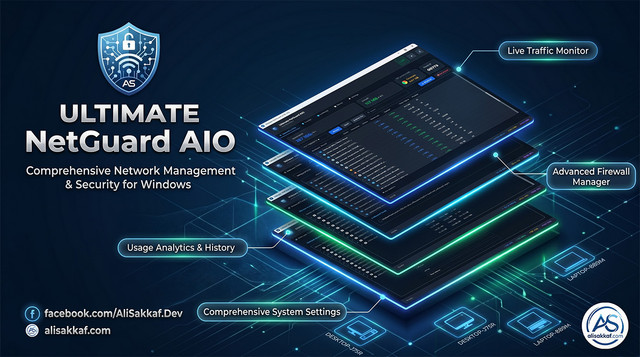
A professional-grade, all-in-one network security suite that combines real-time packet-level traffic monitoring, Windows Firewall management, hardware system monitoring, and a sleek taskbar overlay — all built natively in C++ with zero external dependencies.
📥 Download Latest Release · 📖 Full Features List (English) · 📖 Full Features List (Arabic) · 🌐 Website & Article · 💬 Facebook · 🐛 Report Bug
- About
- Key Features
- What's New in v1.3.0
- What's New in v1.2.1
- What's New in v1.2.0
- What's New in v1.1.0
- Screenshots
- Pre-Built Firewall Rule Profiles
- System Requirements
- Installation
- Building from Source
- Project Architecture
- Module Deep Dive
- Supported Protocols
- Windows APIs Used
- Security & Privacy
- Disclaimer
- FAQ
- Contributing
- License
- Support the Developer
- Author
Ultimate NetGuard AIO is a comprehensive network security and system monitoring application built from the ground up for Windows. Unlike other tools that rely on third-party packet capture libraries (like WinPcap or Npcap), Ultimate NetGuard AIO uses native Windows raw sockets (SIO_RCVALL) for packet capture, making it completely self-contained with zero external dependencies.
The application is designed for:
- Network Administrators who need real-time visibility into network traffic
- Security Professionals who want to monitor and control application network access
- Power Users who want to understand what their applications are doing on the network
- IT Support Teams who need a portable, no-install monitoring solution
- Privacy-Conscious Users who want to see and control every byte leaving their machine
| Feature | Ultimate NetGuard AIO | GlassWire | NetLimiter | Wireshark |
|---|---|---|---|---|
| Per-process traffic monitoring | ✅ | ✅ | ✅ | ❌ |
| Built-in firewall manager | ✅ | ✅ | ✅ | ❌ |
| Hardware monitoring | ✅ | ❌ | ❌ | ❌ |
| Taskbar overlay | ✅ | ❌ | ❌ | ❌ |
| Zero dependencies | ✅ | ❌ | ❌ | ❌ |
| No driver installation | ✅ | ❌ | ❌ | ❌ |
| Portable executable | ✅ | ❌ | ❌ | ❌ |
| Open source | ✅ | ❌ | ❌ | ✅ |
| Free forever | ✅ | ❌ | ❌ | ✅ |
| Whitelist lockdown mode | ✅ | ❌ | ❌ | ❌ |
| Module | Description | Highlights |
|---|---|---|
| 🌐 Network Monitor | Real-time packet capture & analysis | Raw sockets, IPv4/IPv6, per-process tracking, Smart Auto-Detect |
| 🛡️ Firewall Manager | Windows Firewall COM API integration | Block/Allow, Whitelist Lockdown, Drag & Drop, Rule Import/Export |
| 💻 Hardware Monitor | CPU, RAM, GPU, Disk monitoring | WMI + PDH, temperature sensors, circular gauges |
| 📊 Usage History | Per-app daily bandwidth tracking | JSON persistence, CSV export, time filters, full icon resolution |
| 🖥️ Taskbar Overlay | Live hardware dashboard on Windows taskbar | CPU, RAM, GPU, Temps, Multi-GPU DXGI, Free Positioning, Top-Most |
| 🎨 Theme System | Dark & Light modes | Live toggle, full QSS coverage |
| 🔔 System Tray | Activity indicator & quick controls | Dynamic icon, speed tooltip |
| ⚙️ Settings | Comprehensive configuration | Startup, overlay customization, persistence |
| 🔄 Auto-Updater | Silent OTA update checker | Semantic version comparison, changelog dialog |
| 📦 Self-Installer | Auto-deploy to Program Files | Desktop shortcut, registry startup, kill-and-replace |
🔒 VPN Stability & Zero-Crash Protection · ⚙️ Windows Services Control · ℹ️ WordWrap Properties Dialog ·
⚠️ 1-Click Reset Settings · 📦 Embedded Ready_JsonProfiles Auto-Extraction
- Thread-Safe Mutex Lock: Thread-safe
m_cacheMutexlocking protectsm_localIPsfrom data races during VPN tunnel connections or dynamic network interface changes. - WinSock Buffer Overflow & Null Guard: Handles
ERROR_BUFFER_OVERFLOWinGetAdaptersAddressesand enforces socket checks to prevent crashes.
- Service vs Application Resolution: Smartly differentiates between standard
.exeapplications and Windows Services (Service: <ServiceName>). - Service Control Actions: Context menu provides Stop Service, Restart Service, Disable Service, and Start / Enable Service for services, while preserving Kill Process (End Task) for regular applications.
- WordWrap Text Formatting: Enabled multi-line text wrapping (
setWordWrap(true)) for long process/service names and file paths to prevent text truncation. - Crisp Icon Display: Expanded process icon display to 128x128.
- Reset Button: Added
btnResetAllSettingsin General Settings tab to clear QSettings, purge registry startup keys/tasks, and restore default configurations.
- Resource Bundle: All 7 pre-built firewall JSON profiles are compiled directly inside
resources.qrc. - Automatic Disk Extraction: Automatically extracts profiles to
Ready_JsonProfiles/directory next toUltimateNetGuard.exeupon installation or launch.
🌐 Multi-Socket
Select AllCapture · 📡 Multicast Traffic Filter · ⚡ Zero-Spike Speed Engine · 🛡️ Elevated Task Scheduler AutoStart
- Multi-Socket Capture Array: Binds raw promiscuous sockets (
s4,s6) to every active local IP address on the system simultaneously. - Zero Packet Loss: Captures and routes 100% of real-time TCP and UDP data streams across all active network adapters (Ethernet, Wi-Fi, VPN) without dropped packets or
0.0.0.0WinSock driver limitations.
- Smart LAN Multicast Filter: Identifies local multicast/broadcast addresses (
224.0.0.0/4,239.255.255.250,255.255.255.255,ff00::/8) used by SSDP, mDNS, and LLMNR. - Zero Fake Upload Spikes: Prevents incoming local network multicast bursts from being incorrectly classified as external internet uploads under
System Services / Network Overhead.
- Adapter Index Deduplication: Queries
GetIfEntry2strictly once per unique interface index (QSet<quint32> processedIndexes), eliminating 5x-10x duplicate speed spikes. - 100% UI Metric Alignment: Synchronizes top header cards, status bar, and Taskbar Overlay totals directly with process table totals (
getTotalRxSpeed(),getTotalTxSpeed()).
- Windows Task Scheduler Integration: Creates native logon task
NetGuardAutoStartwith/rl HIGHEST, allowing NetGuard to launch elevated on Windows startup without UAC prompts. - Safe Native Pathing: Full native pathing with quote protection for installation directories with spaces (e.g.
C:\Program Files\...).
- User Preference: Added
chkFilterVirtualAdapterscheck box in Settings Tab UI (Network/FilterVirtualAdapters). - Flexible Adapter View: Users can toggle virtual adapter filtering on or off at any time.
⚡ Smart Auto-Detect Adapter Engine · Free-Form Overlay Placement · Direct Taskbar Network Control · 100% Icon Engine
- Active Byte & Route Inspection: Evaluates active traffic bytes (
InOctets + OutOctets) viaGetIfEntry2, queries active routing table viaGetBestInterface(IPv4) &GetBestRoute2(IPv6). - Virtual Adapter Filtering: Automatically excludes virtual interfaces (
VMware,VirtualBox,Radmin,ZeroTier,Hamachi,TAP/TUN,WSL,vEthernet). - Dynamic Auto-Adaptation: Automatically selects the active internet-connected physical NIC on startup and dynamically adapts when network interfaces change (Wi-Fi, Ethernet, VPN).
- Default Selection: Available as Option #1 (
⚡ Smart Auto-Detect (Auto)) in dashboard and taskbar dropdowns.
- Integrated
🌐 Select Network Adaptersubmenu directly inside the Taskbar Overlay right-click context menu. - Enables instant 1-click adapter switching or Smart Auto-Detect triggering directly from the taskbar widget without needing to open the main window.
- Position the Taskbar Overlay anywhere on the desktop, screen edges, or taskbar (
Change_Postion_EveryWhere.png). - Maintains Top-Most Z-order (
Qt::WindowStaysOnTopHint,HWND_TOPMOST) above all windows. - Added 🔄 Reset Position action in context menu (
Reset_Postion.png) to restore default taskbar notification area positioning instantly.
- Resolves and displays all active Windows service display names running under the same
svchost.exePID (joined with+, e.g.,Windows Update + Background Intelligent Transfer Service). - Guarantees 100% accurate Upload vs Download classification even under heavy packet bursts, VPN tunnels, or local socket loopbacks.
- Deep icon resolution via
SHGetFileInfoW(SLGP_UNCPRIORITY),QtWin::fromHICON, environment variable expansion (ExpandEnvironmentStringsW), andSystem32fallbacks. - Correctly extracts and caches real icons for
.lnkshortcuts, system services, offline applications, and closed processes across Network Traffic, Firewall, and Bandwidth History tables.
🚀 Taskbar Overlay 2.0 — Complete Overhaul
Real-Time Hardware Intelligence · Multi-GPU Detection · Smart Auto-Layout · Drag & Drop Positioning
The taskbar overlay supports four independent hardware monitoring modules, each controlled by its own toggle in Settings → Taskbar Overlay Customization:
| Module | Icon | Color | Data Source | Description |
|---|---|---|---|---|
| CPU Usage | C |
Amber #FBBF24 |
Windows PDH | Real-time processor utilization % |
| RAM Usage | R |
Emerald #34D399 |
GlobalMemoryStatusEx() |
Live memory with 3 display formats |
| GPU Usage | G |
Orange #FB923C |
WMI GPUEngine Counters | Per-GPU load with multi-adapter filtering |
| Temperature | T |
Red #F87171 |
ACPI + WMI Thermal Zones | Combined CPU°/GPU° (e.g., 72/65°) |
│ ↓ 5.8 MB/s │ R 12/16 GB │ │ ← Row 1 └──────────────────────────────────────────────────────┘
### 🔍 Multi-GPU Auto-Detection & Selection (DXGI)

- **DXGI-Based Enumeration** — Uses `CreateDXGIFactory()` + `IDXGIFactory::EnumAdapters()` to detect all installed GPUs by their **real hardware name**
- **GPU Selection Combo Box** — Choose between `Auto (All GPUs Combined)` or individual GPUs (e.g., `Intel(R) UHD Graphics 630`, `NVIDIA GeForce RTX 3080`)
- **WMI Adapter Filtering** — Filters by `phys_N_` keyword pattern for precise per-GPU monitoring
- **Thread-Safe Updates** — GPU index changes protected by `QMutex`

#### DXGI Detection Example
```cpp
// Real-world output examples:
// Index 0: "Intel(R) UHD Graphics 630"
// Index 1: "NVIDIA GeForce RTX 3080"
// Index 2: "Microsoft Basic Render Driver"
WMI GPUEngine Name Format:
"pid_1234_luid_0x00000000_0x0000ABCD_phys_1_eng_0_engtype_3D"
                                          ↑
                                    Adapter Index
| Mode | Output Example | Best For |
|---|---|---|
| Percentage (%) | 65% |
Quick glance, minimal space |
| Used / Total (MB) | 12045/16384 MB |
Precise memory tracking |
| Used / Total (GB) | 12/16 GB |
Balanced clarity (default) |
Changing the display mode instantly re-renders the RAM label without waiting for the next hardware snapshot cycle.
- Free-Form Placement — Left-click and drag the overlay to any position on the taskbar
- Persistent Offsets — Position preserved across app restarts, taskbar resizes, resolution & DPI changes
- Quick Reset — New 🔄 Reset Position action in right-click context menu
- Protective Text Shadows —
QGraphicsDropShadowEffecton all labels guarantees 100% legibility over any taskbar background - Dynamic Auto-Resizing (Smart Hug) — No hardcoded widths; overlay perfectly hugs text content in real-time
- Pixel-Perfect Grid Spacing — 4px icon-to-value gap, 8px inter-group gap, 0px vertical spacing
- Synchronized UI Scaling — Font size changes trigger complete
setCustomStyle()→rebuildLayout()→adjustSize()pipeline - Enhanced Hover Stats Popup — Now shows 5 rows: Download/Upload, Session Totals, CPU/RAM, GPU/RAM Detail, CPU Temp/GPU Temp
| Registry Key | UI Widget | Type | Default | Description |
|---|---|---|---|---|
Overlay/ShowCpu |
chkOverlayCpu |
bool |
false |
Show CPU usage on overlay |
Overlay/ShowRam |
chkOverlayRam |
bool |
false |
Show RAM usage on overlay |
Overlay/ShowGpu |
chkOverlayGpu |
bool |
false |
Show GPU usage on overlay |
Overlay/ShowTemps |
chkOverlayTemps |
bool |
false |
Show temperatures on overlay |
Overlay/RamDisplayMode |
cmbOverlayRamFormat |
int |
2 |
RAM format: 0=%, 1=MB, 2=GB |
Overlay/GpuIndex |
cmbOverlayGpuSelect |
int |
0 |
GPU selection: 0=Auto, 1+=specific |
| Issue | Resolution |
|---|---|
| Context Menu Clipping | Right-click QMenu now maps global coordinates strictly above the widget |
| Taskbar Icon Collision | Dynamic shrink-to-fit margins + manual drag offset system |
| GPU Load Over-Reporting | Now correctly filters by selected adapter when a specific GPU is chosen |
| RAM Label Jitter | Eliminated with adjustSize() after every update |
┌─────────────────────┐    1 sec    ┌──────────────────────┐
│  HardwareMonitor    │ ──────────→ │  HardwareSnapshot    │
│  (Background Thread)│   emit      │  {cpu, ram, gpu,     │
│                     │  snapshotReady │  temps, gpuName}   │
└─────────────────────┘             └──────────┬───────────┘
                                               │
                    ┌──────────────────────────┼──────────────────────┐
                    ↓                          ↓                      ↓
          ┌─────────────────┐      ┌───────────────────┐   ┌─────────────────┐
          │  MainWindow     │      │  TaskbarOverlay   │   │  HardwareWidget │
          │  (Status Bar)   │      │  (Taskbar Widget) │   │  (Gauges Tab)   │
          └─────────────────┘      └───────────────────┘   └─────────────────┘
| File | Type | Changes |
|---|---|---|
src/ui/mainwindow.ui |
Qt Designer | Added cmbOverlayRamFormat, cmbOverlayGpuSelect and labels |
src/hardware/hardwaremonitor.h |
C++ Header | Added enumerateGpuNames(), setGpuIndex(), gpuName in snapshot |
src/hardware/hardwaremonitor.cpp |
C++ Source | DXGI GPU enumeration, GPU-filtered queryGpuLoad() |
src/taskbar/taskbaroverlay.h |
C++ Header | Added RamDisplayMode enum, display mode methods |
src/taskbar/taskbaroverlay.cpp |
C++ Source | RAM format switching, drag & drop, text shadows, dynamic layout |
src/core/mainwindow.cpp |
C++ Source | New combo signals, GPU list population, new settings |
UltimateNetGuard.pro |
qmake Project | Added -ldxgi to Windows system libraries |
| Library | Purpose | Linkage |
|---|---|---|
dxgi.lib |
DXGI GPU adapter enumeration | -ldxgi in .pro |
| Component | Technology |
|---|---|
| GPU Enumeration | DXGI (CreateDXGIFactory, IDXGIAdapter) |
| GPU Load | WMI (Win32_PerfFormattedData_GPUPerformanceCounters_GPUEngine) |
| CPU Load | PDH (\\Processor(_Total)\\% Processor Time) |
| RAM Usage | Win32 API (GlobalMemoryStatusEx) |
| CPU Temperature | WMI/ACPI (MSAcpi_ThermalZoneTemperature + fallbacks) |
| Settings Storage | Windows Registry via QSettings |
| Thread Safety | QMutex for cross-thread GPU index updates |
Important: After pulling this update, you must regenerate the Makefile:
qmake UltimateNetGuard.pro
make clean
make -j$(nproc)
This is required because
UltimateNetGuard.prowas modified to include the new-ldxgilibrary dependency.
| 🌑 Dark Theme (Main Interface) | ☀️ Light Theme (Main Interface) |
|---|---|
 |
 |
| 🌐 Real-Time Network Traffic Monitor | ⚡ Smart Auto-Detect Network Selection |
|---|---|
 |
 |
| 🛡️ Firewall Manager (NetGuard Core Rules) | 🛡️ Firewall Manager (System Rules) |
|---|---|
 |
 |
| 💻 Hardware System & Thermal Monitor | 📊 Bandwidth Usage History |
|---|---|
 |
 |
| 🖥️ Taskbar Overlay Dashboard | 🌐 1-Click Taskbar Adapter Switching |
|---|---|
 |
 |
| 🖱️ Free-Form Positioning Anywhere (Top-Most) | 🔄 Reset Position Context Menu |
|---|---|
 |
 |
| ⚙️ Settings Panel |
|---|
 |
| Requirement | Minimum | Recommended |
|---|---|---|
| Operating System | Windows 7 SP1 | Windows 10/11 |
| Architecture | x86 (32-bit) | x86 or x64 |
| RAM | 64 MB | 128 MB |
| Disk Space | 15 MB | 25 MB |
| Permissions | Administrator (required) | Administrator |
| Runtime Dependencies | None (static Qt build) | None |
| Network | At least one active network adapter | Ethernet or Wi-Fi |
Important: Administrator privileges are required for raw socket packet capture and Windows Firewall management. The application will automatically request elevation via UAC if not already running as administrator.
- Go to the Releases page
- Download
UltimateNetGuard-v1.1.0-win32.zip - Extract to any folder
- Run
UltimateNetGuard.exeas Administrator - That's it — no installation required!
See Building from Source below.
| Tool | Version | Download |
|---|---|---|
| Qt | 5.14.2 | qt.io/download |
| MinGW | 7.3.0 (32-bit) | Included with Qt installer |
| Git | Latest | git-scm.com |
# 1. Clone the repository
git clone https://github.com/alisakkaf/Ultimate-NetGuard-AIO.git
cd Ultimate-NetGuard-AIO

# 2. Open Qt Creator and load UltimateNetGuard.pro
#    OR build from command line:

# 3. Set up the environment (adjust path to your Qt installation)
set PATH=C:\Qt\5.14.2\mingw73_32\bin;C:\Qt\Tools\mingw730_32\bin;%PATH%

# 4. Generate Makefile
qmake UltimateNetGuard.pro CONFIG+=release

# 5. Build
mingw32-make -j%NUMBER_OF_PROCESSORS%

# 6. The output binary is: release/UltimateNetGuard.exe# For a fully portable executable with no Qt DLL dependencies:
qmake UltimateNetGuard.pro CONFIG+=release CONFIG+=static
mingw32-make -j%NUMBER_OF_PROCESSORS%Ultimate_NetGuard_AIO/
│
├── 📁 src/
│ ├── 📁 core/ # Application Core
│ │ ├── mainwindow.h/cpp # Main window controller, history engine, settings
│ │ ├── apptheme.h/cpp # Full QSS stylesheets for Dark & Light themes
│ │ ├── stylemanager.h/cpp # Singleton theme manager with signal emission
│ │ └── version.h # Centralized version & publisher constants
│ │
│ ├── 📁 network/ # Network Monitoring Engine
│ │ ├── networkmonitor.h/cpp # Raw socket capture thread (IPv4+IPv6)
│ │ ├── networkmodel.h/cpp # Custom QAbstractItemModel tree model
│ │ ├── networkwidget.h/cpp # Network tab UI, context menus, process dialogs
│ │ └── packetparser.h/cpp # Wire-format packet structs & protocol resolver
│ │
│ ├── 📁 firewall/ # Firewall Management
│ │ ├── firewallmanager.h/cpp # Windows COM API (INetFwPolicy2) integration
│ │ ├── firewallmodel.h/cpp # QAbstractTableModel for firewall rules
│ │ └── firewallwidget.h/cpp # Firewall tab UI, drag-drop, import/export
│ │
│ ├── 📁 hardware/ # Hardware Monitoring
│ │ ├── hardwaremonitor.h/cpp # WMI + PDH monitoring thread
│ │ └── hardwarewidget.h/cpp # Circular gauges, temp bars, network I/O
│ │
│ ├── 📁 taskbar/ # Taskbar Integration
│ │ ├── taskbaroverlay.h/cpp # Transparent taskbar speed widget + hover popup
│ │ └── systemtrayicon.h/cpp # System tray icon with dynamic activity dot
│ │
│ ├── 📁 ui/ # Qt Designer Forms
│ │ ├── mainwindow.ui # Main window layout (575 lines)
│ │ ├── networkwidget.ui # Network tab layout
│ │ ├── firewallwidget.ui # Firewall tab layout
│ │ └── hardwarewidget.ui # Hardware tab layout
│ │
│ ├── 📁 Info/ # Documentation & Resources
│ │ ├── FEATURES_EN.md # Complete English feature list
│ │ ├── FEATURES_AR.md # Complete Arabic feature list
│ │ └── 📁 github/ # GitHub repository files
│ │
│ └── main.cpp # Entry point, admin elevation, single-instance
│
├── 📁 icons/ # Application icons (ICO + PNG)
│ ├── app.ico # Windows icon
│ └── Ultimate_NetGuard_AIO.png # High-res PNG icon
│
├── appicon.rc # Windows resource script (VERSIONINFO + icon)
├── app.manifest # UAC manifest (requireAdministrator)
├── resources.qrc # Qt resource compilation file
├── UltimateNetGuard.pro # qmake project file
└── releases.md # Version release notes & changelog
graph TD
    A[main.cpp] --> B[MainWindow]
    B --> C[NetworkWidget]
    B --> D[FirewallWidget]
    B --> E[HardwareWidget]
    B --> F[TaskbarOverlay]
    B --> G[SystemTrayIcon]
    B --> H[StyleManager]
    C --> I[NetworkMonitor Thread]
    C --> J[NetworkTreeModel]
    I --> K[PacketParser]
    D --> L[FirewallManager COM]
    D --> M[FirewallModel]
    E --> N[HardwareMonitor Thread]
    H --> O[AppTheme QSS]
The network monitor is the heart of Ultimate NetGuard AIO. It provides deep, per-process visibility into all network traffic on your machine.
-
Raw Socket Creation: The monitor creates two raw sockets — one for IPv4 (
AF_INET) and one for IPv6 (AF_INET6) — bound to the active network adapter. -
Promiscuous Mode: Using
SIO_RCVALL, both sockets are set to capture ALL traffic passing through the adapter (not just traffic destined for the local machine). -
Adapter Selection: The
pickBestAdapter()function queries the Windows routing table viaGetBestInterface()to find the adapter handling internet traffic. It then cross-references this withGetAdaptersAddresses()to get the adapter's IP addresses, explicitly filtering out virtual adapters (VMware, VirtualBox, Radmin, ZeroTier, etc.). -
Packet Parsing: The
PacketParserclass defines C-style wire-format structs for:- IPv4 header (20+ bytes)
- IPv6 header (40 bytes)
- TCP header (20+ bytes)
- UDP header (8 bytes)
- ICMP header (8 bytes)
-
Process Resolution: A background cache thread maintains two data structures:
- Extended TCP Table (
GetExtendedTcpTablewithTCP_TABLE_OWNER_PID_ALL) — maps TCP connections to PIDs - Extended UDP Table (
GetExtendedUdpTablewithUDP_TABLE_OWNER_PID) — maps UDP listeners to PIDs - Both IPv4 and IPv6 variants are queried
- Extended TCP Table (
-
Service Resolution: For
svchost.exeprocesses, the monitor callsEnumServicesStatusEx()to identify the specific Windows service running under that PID. -
Tree Model: The custom
NetworkTreeModel(inheritingQAbstractItemModel) organizes data as:Process Name (aggregated stats) ├── Connection 1 (source:port → dest:port, protocol, speed) ├── Connection 2 └── Connection 3 -
Performance: Packets are batched (every 250ms or 3000 packets, whichever comes first) to minimize GUI thread overhead. Speed is calculated per-second using delta byte tracking.
| # | Column | Description | Sort Type |
|---|---|---|---|
| 0 | Application / Protocol | Process name or protocol name | Alphabetical |
| 1 | Source | Source IP:Port | Alphabetical |
| 2 | Destination | Destination IP:Port | Alphabetical |
| 3 | Service | Resolved service name (HTTP, DNS, etc.) | Alphabetical |
| 4 | Download Speed | Current RX speed (auto-scaled) | Numeric (UserRole+5) |
| 5 | Upload Speed | Current TX speed (auto-scaled) | Numeric (UserRole+5) |
| 6 | Total Bytes | Cumulative bytes transferred | Numeric (UserRole+5) |
| 7 | Packets | Total packet count | Numeric (UserRole+5) |
| Action | Description | Implementation |
|---|---|---|
| Kill Process | Terminate the selected process | OpenProcess() + TerminateProcess() |
| Process Properties | Show detailed info dialog | Custom QDialog with icon, path, stats |
| Open File Location | Open Explorer at process path | QDesktopServices::openUrl() with /select, |
| Copy Connection Info | Copy src:port to clipboard | QApplication::clipboard()->setText() |
The firewall module provides direct COM API access to Windows Firewall (Windows Defender Firewall with Advanced Security).
FirewallManager
    ├── CoInitializeEx(COINIT_APARTMENTTHREADED)
    ├── CoCreateInstance(NetFwPolicy2)
    │   └── INetFwPolicy2 *m_fwPolicy
    │       └── get_Rules()
    │           └── INetFwRules *m_fwRules
    │               ├── Add(INetFwRule*)
    │               ├── Remove(BSTR name)
    │               ├── Item(BSTR name, INetFwRule**)
    │               └── get__NewEnum() → IEnumVARIANT
    └── Netsh Fallback (QProcess → netsh advfirewall)
User selects app.exe → expandAndCleanPath() → resolveShortcut() (if .lnk)
    → makeRuleName("NetGuard_AppName_BLOCK_OUT")
    → CoCreateInstance(CLSID_NetFwRule)
    → put_Name(), put_ApplicationName(), put_Action(), put_Direction()
    → m_fwRules->Add(rule)
    → emit rulesChanged()
When enabled, the lockdown mode:
- Forces Windows Firewall ON across all profiles
- Sets default outbound action to BLOCK for Domain, Private, and Public profiles
- Iterates all existing rules and disables any outbound ALLOW rule not prefixed with
NetGuard_ - Creates ALLOW rules for
svchost.exeandSystemto prevent OS breakage - Uses
netsh advfirewall set allprofiles firewallpolicy blockinbound,blockoutboundas reinforcement
HardwareMonitor Thread (1-second loop)
    ├── collectPdh()        → CPU Load %, Disk Activity %
    ├── collectRam()        → Used/Total MB, Load %
    ├── collectNetwork()    → RX/TX bytes per second
    ├── queryGpuLoad()      → GPU 3D engine utilization % (per-adapter via DXGI index)
    └── collectTemperatures()
        ├── Disk Temp    ← MSFT_StorageReliabilityCounter (ROOT\Microsoft\Windows\Storage)
        ├── CPU Temp     ← MSAcpi_ThermalZoneTemperature (ROOT\WMI) [Kelvin→Celsius]
        │   Fallback A:  ← Win32_TemperatureProbe (ROOT\CIMV2)
        │   Fallback B:  ← Win32_PerfFormattedData_Counters_ThermalZoneInformation
        ├── GPU Temp     ← WMI GPU sensor queries
        └── MB Temp      ← Lowest ACPI thermal zone reading
| Namespace | Purpose | Classes Used |
|---|---|---|
ROOT\CIMV2 |
Standard hardware info | Win32_PerfFormattedData_GPUPerformanceCounters_GPUEngine, Win32_TemperatureProbe, Win32_PerfFormattedData_Counters_ThermalZoneInformation |
ROOT\WMI |
ACPI thermal zones | MSAcpi_ThermalZoneTemperature |
ROOT\Microsoft\Windows\Storage |
Disk health | MSFT_StorageReliabilityCounter |
The CircularGauge widget uses custom QPaintEvent rendering:
- Arc Angle: 270° sweep (from 7 o'clock to 5 o'clock)
- Color Logic: Blue (#3B82F6) < 60%, Amber (#F59E0B) < 85%, Red (#EF4444) ≥ 85%
- Typography: Segoe UI 18pt bold for percentage, 8pt for temperature
- Theme Awareness: Uses
QPalette::WindowTextfor automatic Dark/Light adaptation
NetworkTreeModel (live data)
    → MainWindow::onHistoryTick() [every 1 second]
    → Extract per-app RX/TX bytes
    → Accumulate in m_historyData[date][appName]
    → Auto-save to JSON every 60 seconds
    → UI refresh when History tab is active
{
    "2026-04-18": {
        "chrome.exe": { "rx": 15728640, "tx": 2097152 },
        "discord.exe": { "rx": 5242880, "tx": 1048576 }
    },
    "2026-04-17": {
        "firefox.exe": { "rx": 31457280, "tx": 4194304 }
    }
}| Setting | Storage | Key |
|---|---|---|
| Dark/Light Theme | QSettings (Registry) | theme |
| Run at Startup | Registry HKCU\...\Run |
UltimateNetGuard |
| Start Minimized | QSettings | startMinimized |
| Overlay Enabled | QSettings | overlayEnabled |
| Overlay Font Size | QSettings | overlayFontSize |
| Overlay Opacity | QSettings | overlayOpacity |
| Overlay Text Color | QSettings | overlayTextColor |
| Overlay BG Color | QSettings | overlayBgColor |
| Overlay Show CPU | QSettings (Registry) | Overlay/ShowCpu |
| Overlay Show RAM | QSettings (Registry) | Overlay/ShowRam |
| Overlay Show GPU | QSettings (Registry) | Overlay/ShowGpu |
| Overlay Show Temps | QSettings (Registry) | Overlay/ShowTemps |
| Overlay RAM Format | QSettings (Registry) | Overlay/RamDisplayMode |
| Overlay GPU Index | QSettings (Registry) | Overlay/GpuIndex |
The overlay uses several Windows API tricks to stay visible on the taskbar:
- Window Flags:
Qt::Tool | Qt::FramelessWindowHint | Qt::WindowStaysOnTopHint | Qt::WindowDoesNotAcceptFocus - Extended Style:
WS_EX_TOOLWINDOW | WS_EX_NOACTIVATE(prevents taskbar entry and focus stealing) - Parenting:
SetWindowLongPtr(GWLP_HWNDPARENT, Shell_TrayWnd)— makes the overlay a child of the taskbar - Z-Order:
SetWindowPos(HWND_TOPMOST)every 500ms to maintain visibility - Position: Calculated relative to
TrayNotifyWnd(the system tray area), positioned to the left of the notification area - Explorer Restart: Detects parent window loss and re-parents automatically
The hover popup shows 6 live metrics in a 3×2 grid:
| Row | Left Column | Right Column |
|---|---|---|
| 1 | ↓ Download Speed | ↑ Upload Speed |
| 2 | 📥 Session Total DL | 📤 Session Total UL |
| 3 | 💻 CPU Load % | 🧠 RAM Load % |
The system tray icon provides:
- Dynamic Icon: Loads from
:/icons/Ultimate_NetGuard_AIO.pngwith fallback to:/icons/app.ico - Activity Dot: A 5×5 pixel circle drawn at (10,10) on the 16×16 icon
- Green (#34D399) when traffic detected (rxBps > 0 || txBps > 0)
- Gray (#71717A) when idle
- Tooltip: Updates with current download/upload speeds
- Context Menu: Show NetGuard / Quit NetGuard
| Element | Color | Hex |
|---|---|---|
| Background | Zinc 900 | #18181B |
| Surface | Zinc 800 | #27272A |
| Border | Zinc 700 | #3F3F46 |
| Text Primary | Zinc 200 | #E4E4E7 |
| Text Secondary | Zinc 400 | #A1A1AA |
| Primary | Blue 500 | #3B82F6 |
| Primary Hover | Blue 400 | #60A5FA |
| Success | Emerald 500 | #10B981 |
| Warning | Amber 500 | #F59E0B |
| Danger | Red 500 | #EF4444 |
| Element | Color | Hex |
|---|---|---|
| Background | Zinc 100 | #F4F4F5 |
| Surface | White | #FFFFFF |
| Border | Zinc 300 | #D4D4D8 |
| Text Primary | Zinc 800 | #27272A |
| Primary | Blue 600 | #2563EB |
| Selection | Blue 100 | #DBEAFE |
On first launch (or when run from outside Program Files\NetGuard), the application:
- Elevates to Administrator via UAC
- Copies itself to
C:\Program Files\NetGuard\UltimateNetGuard.exe - Sets strict file permissions (Read/Write/Execute)
- Creates a professional desktop shortcut (
NetGuard AIO.lnk) viaIShellLinkCOM - Writes
version.datto track the installed version - Relaunches from the installed location and exits the original instance
2 seconds after startup, the application silently fetches a remote version file from a Pastebin URL:
- Version Comparison: Intelligent semantic comparison (
major.minor.patch) — only triggers when the remote version is strictly higher - Update Dialog: A frameless, draggable, theme-aware
QDialogdisplays the new version, changelog, and offers "Skip" and "Update Now" buttons - Update Flow: Redirects the user to the official download page on the developer's website
Uses QSharedMemory to prevent multiple instances. If a second instance is launched, it finds the existing window via FindWindowW and restores/focuses it.
Ultimate NetGuard AIO ships with 6 professionally curated firewall rule profiles (JSON files) that can be imported with one click via the Firewall tab's Import button. Each profile is a ready-to-use security stance:
| # | Profile Name | File | Use Case |
|---|---|---|---|
| 1 | 🏢 Global Workspace Shield | Global_Workspace_Shield.json |
Professional office environments. Allows browsers, video conferencing, cloud storage, and project management tools. Blocks unauthorized background apps. |
| 2 | 🚀 Ultimate Esports Nexus | Ultimate_Esports_Nexus.json |
Pro gamers & streamers. Prioritizes ultra-low ping by blocking Windows updates and background noise. Allows game launchers, voice chat, streaming tools, and anti-cheat engines. |
| 3 | 💻 Master Developer Sandbox | Master_Developer_Sandbox.json |
Software engineers. Unrestricted access for IDEs (Qt Creator, VS Code, Visual Studio), Docker, database tools, trading bots, and AI coding assistants. |
| 4 | 🔒 ZeroTrust Privacy Citadel | ZeroTrust_Privacy_Citadel.json |
Maximum anti-tracking. Allows only privacy browsers, Tor/I2P, VPN clients, and E2E encrypted messaging. Blocks everything else. |
| 5 | 📥 P2P Media Vanguard | P2P_Media_Vanguard.json |
Download stations. Exclusively permits download managers (IDM), all P2P/Torrent clients, and internet-streaming media players. |
| 6 | 🚫 Offline Isolation Blacklist | Offline_Isolation_Blacklist.json |
Forces Adobe, Autodesk, Corel, and similar engineering/design suites into offline mode to preserve local licenses and block telemetry. |
How to use: Open the Firewall tab → Click Import → Select any
.jsonprofile → Rules are instantly applied.
| Protocol | Port | Category | Description |
|---|---|---|---|
| HTTP | 80 | Web | Hypertext Transfer Protocol |
| HTTPS | 443 | Web | HTTP over TLS/SSL |
| HTTP/2 | 8080 | Web | Alternative HTTP port |
| DNS | 53 | Network | Domain Name System |
| DoH | 853 | Network | DNS over HTTPS |
| DHCP | 67, 68 | Network | Dynamic Host Configuration Protocol |
| NTP | 123 | Network | Network Time Protocol |
| SSH | 22 | Remote | Secure Shell |
| FTP | 20, 21 | File Transfer | File Transfer Protocol |
| FTPS | 990 | File Transfer | FTP over TLS |
| SFTP | 115 | File Transfer | SSH File Transfer Protocol |
| SMTP | 25, 587 | Simple Mail Transfer Protocol | |
| SMTPS | 465 | SMTP over TLS | |
| IMAP | 143 | Internet Message Access Protocol | |
| IMAPS | 993 | IMAP over TLS | |
| POP3 | 110 | Post Office Protocol v3 | |
| POP3S | 995 | POP3 over TLS | |
| MySQL | 3306 | Database | MySQL Database |
| PostgreSQL | 5432 | Database | PostgreSQL Database |
| MongoDB | 27017 | Database | MongoDB NoSQL Database |
| Redis | 6379 | Database | Redis Key-Value Store |
| MSSQL | 1433 | Database | Microsoft SQL Server |
| RDP | 3389 | Remote | Remote Desktop Protocol |
| VNC | 5900 | Remote | Virtual Network Computing |
| Telnet | 23 | Remote | Telnet Protocol |
| LDAP | 389 | Directory | Lightweight Directory Access Protocol |
| LDAPS | 636 | Directory | LDAP over TLS |
| NetBIOS | 137-139 | Windows | NetBIOS Name/Datagram/Session |
| SMB | 445 | Windows | Server Message Block |
| Kerberos | 88 | Auth | Kerberos Authentication |
| SNMP | 161, 162 | Monitoring | Simple Network Management Protocol |
| Syslog | 514 | Monitoring | System Logging Protocol |
| IKE | 500 | VPN | Internet Key Exchange |
| OpenVPN | 1194 | VPN | OpenVPN Protocol |
| WireGuard | 51820 | VPN | WireGuard VPN |
| SIP | 5060, 5061 | VoIP | Session Initiation Protocol |
| STUN | 3478 | VoIP | Session Traversal Utilities for NAT |
| ICMP | — | Network | Internet Control Message Protocol |
| ICMPv6 | — | Network | ICMP for IPv6 |
| TCP | — | Transport | Transmission Control Protocol |
| UDP | — | Transport | User Datagram Protocol |
| IGMP | — | Multicast | Internet Group Management Protocol |
| GRE | — | Tunneling | Generic Routing Encapsulation |
| API | Header | Purpose |
|---|---|---|
WSASocket / WSAIoctl |
winsock2.h |
Raw socket creation and SIO_RCVALL |
GetExtendedTcpTable |
iphlpapi.h |
Map TCP connections → PIDs |
GetExtendedUdpTable |
iphlpapi.h |
Map UDP listeners → PIDs |
GetBestInterface |
iphlpapi.h |
Find active internet adapter |
GetAdaptersAddresses |
iphlpapi.h |
Enumerate network adapters |
GetIfTable / GetIfEntry2 |
iphlpapi.h |
Network interface statistics |
EnumServicesStatusEx |
winsvc.h |
Identify svchost.exe services |
OpenProcess / TerminateProcess |
windows.h |
Process management |
SHGetFileInfoW |
shellapi.h |
Extract application icons |
ShellExecuteExW |
shellapi.h |
UAC elevation |
CreateMutexW |
windows.h |
Single-instance enforcement |
CoCreateInstance |
objbase.h |
COM object instantiation |
INetFwPolicy2 / INetFwRules |
netfw.h |
Windows Firewall COM API |
IShellLinkW |
shobjidl.h |
Shortcut (.lnk) resolution |
ExpandEnvironmentStringsW |
windows.h |
Environment variable expansion |
IWbemLocator / IWbemServices |
wbemidl.h |
WMI queries |
PdhOpenQuery / PdhAddCounter |
pdh.h |
Performance Data Helper counters |
GlobalMemoryStatusEx |
windows.h |
RAM usage statistics |
FindWindowW / SetWindowPos |
windows.h |
Taskbar overlay positioning |
SetWindowLongPtr |
windows.h |
Window style modification |
AdjustTokenPrivileges |
advapi32.h |
Enable SeDebugPrivilege |
IsUserAnAdmin |
shlobj.h |
Admin privilege check |
CreateDXGIFactory / EnumAdapters |
dxgi.h |
GPU adapter enumeration & identification |
- No Telemetry: The application does NOT collect, transmit, or store any user data outside the local machine
- No Internet Access: The application itself makes ZERO outbound network connections
- Local Storage Only: All data (history, settings) is stored locally in
%AppData%and Windows Registry - No Cloud: No cloud services, no accounts, no registration
- Open Source: Full source code available for audit
- No Drivers: Unlike competing products, no kernel-mode drivers are installed
- Admin Required: Requires administrator privileges for raw socket access and firewall management — this is a Windows security requirement, not a design choice
IMPORTANT LEGAL NOTICE
This software is provided "AS IS" without warranty of any kind. The author (Ali Sakkaf) is NOT responsible for any damage, data loss, network issues, or system problems that may arise from using this software.
This tool is intended for:
- ✅ Monitoring YOUR OWN network traffic on YOUR OWN computer
- ✅ Managing YOUR OWN Windows Firewall rules
- ✅ Educational and learning purposes
- ✅ Network administration on systems you own or have permission to monitor
This tool is NOT intended for:
- ❌ Intercepting other people's network traffic
- ❌ Bypassing network security policies
- ❌ Any illegal or unauthorized monitoring activities
- ❌ Any malicious purposes
By using this software, you agree that:
- You will only use it on systems you own or have explicit authorization to monitor
- You are solely responsible for compliance with all applicable local, state, national, and international laws
- The author bears no liability for misuse of this tool
See DISCLAIMER.md for the full legal disclaimer.
Q: Why does the app require Administrator privileges?
Windows requires Administrator privileges for:
- Raw socket packet capture (
SIO_RCVALL) — this is a Windows kernel-level restriction - Windows Firewall management — modifying firewall rules requires elevation
- Process information access — reading information about system processes requires
SeDebugPrivilege
This is not a design choice but a Windows security requirement.
Q: Is this a virus or malware?
Absolutely not. The source code is 100% open and available for review. Some antivirus software may flag it because:
- It uses raw sockets (a technique also used by network scanning tools)
- It modifies Windows Firewall rules
- It injects itself as a startup program
These are all legitimate features for a network monitoring tool. You can build the application from source yourself to verify.
Q: Why is my antivirus flagging this?
False positives are common for network monitoring tools because they use APIs that are also used by malicious software (raw sockets, firewall modification, process enumeration). You can:
- Review the source code
- Build from source yourself
- Add an exception in your antivirus
- Submit the binary to your AV vendor for re-analysis
Q: Does this capture HTTPS content?
No. This tool captures network packets at the IP layer, which means it can see:
- Source and destination IP addresses
- Source and destination ports
- Protocol type
- Packet sizes
It cannot see the encrypted content of HTTPS traffic. It only sees that traffic is going to/from a specific IP on port 443.
Q: Can I use this on a network I don't own?
Only with explicit authorization. This tool is designed for monitoring your own machine's traffic. Using it to monitor traffic on networks or machines without authorization may violate local laws.
Q: Why no temperature readings for my CPU?
CPU temperature via WMI depends on BIOS/UEFI support. Many modern motherboards don't expose temperature data through the MSAcpi_ThermalZoneTemperature WMI class. The application has 3 fallback mechanisms, but if none work, it will show "N/A". For accurate temperature readings, consider using hardware-specific tools like HWiNFO or Core Temp alongside this tool.
Contributions are welcome! Please read the CONTRIBUTING.md before submitting pull requests.
- Fork the repository
- Create a feature branch (
git checkout -b feature/amazing-feature) - Commit your changes (
git commit -m 'Add amazing feature') - Push to the branch (
git push origin feature/amazing-feature) - Open a Pull Request
This project is licensed under the MIT License — see the LICENSE file for details.
MIT License

Copyright (c) 2026 Ali Sakkaf

Permission is hereby granted, free of charge, to any person obtaining a copy
of this software and associated documentation files (the "Software"), to deal
in the Software without restriction, including without limitation the rights
to use, copy, modify, merge, publish, distribute, sublicense, and/or sell
copies of the Software, and to permit persons to whom the Software is
furnished to do so, subject to the following conditions:

The above copyright notice and this permission notice shall be included in all
copies or substantial portions of the Software.
| Crypto Asset | Network | Wallet Address (Copy) | Quick Scan |
|---|---|---|---|
 |
TRC20 | TYLBeDA5aGNcc3WkVqf3xWPHXmsZzs2p28 |
 |
|
BEP20 | 0x67cf27f33c80479ea96372810f9e2ee4c3b095c5 |
|
 |
Bitcoin | bc1q97dr37h37npzarmmrv0tjz2nm50htqc7pfpzj6 |
|
 |
ERC20 | 0x67cf27f33c80479ea96372810F9e2EE4C3b095C5 |
|
 |
Solana | Cbesgr4tvo4T1inNMFe46GSym2qMYjkmofbXFc77rDNK |
|
 |
ERC20 | 0x67cf27f33c80479ea96372810f9e2ee4c3b095c5 |
|
|
SPL | Cbesgr4tvo4T1inNMFe46GSym2qMYjkmofbXFc77rDNK |
|
|
BEP20 | 0x67cf27f33c80479ea96372810F9e2EE4C3b095C5 |
|
Ali Sakkaf



© 2026 Ali Sakkaf. All Rights Reserved.
Made with ❤️
⭐ If you like this project, please give it a star! ⭐