FlavorBot is a modern, AI-powered desktop application built using JavaFX and integrates with the OpenAI API to help users generate creative and personalized recipes based on their preferences and available ingredients.
- 🔍 AI-Powered Recipe Creation: Enter available ingredients or dietary preferences and get unique recipes instantly.
- 🧠 OpenAI API Integration: Uses natural language understanding to deliver structured and easy-to-follow recipes.
- 📝 Structured Output: Recipes include an ingredient list, preparation steps, and estimated cooking time.
- 💡 Suggestions & Variations: Offers creative twists and substitutions for dietary needs.
- 🖥️ JavaFX UI: Smooth and responsive user interface for seamless desktop experience.


Watch the full walkthrough and demo of the Recipe Generator App on YouTube:
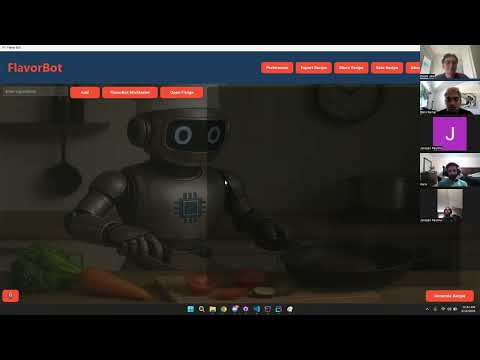
This video showcases:
- How to input ingredients and preferences
- Generating recipes using the AI backend
- Viewing structured results with ingredients, steps, and cook time
- The responsive and user-friendly JavaFX interface
- Java 17+
- JavaFX 17+
- OpenAI API (ChatGPT or GPT-4 based)
- Java JDK 17 or higher installed
- Maven or Gradle (for dependency management)
- An OpenAI API key
git clone https://github.com/yourusername/recipe-generator-app.git
cd recipe-generator-app- Open the file
src/main/resources/config.properties(or your environment config file). - Add your OpenAI API key:
openai.api.key=your_openai_api_key_here
Alternatively, use environment variables if preferred.
mvn clean install
mvn javafx:run./gradlew run- Launch the app.
- Enter ingredients you have (e.g., "chicken, rice, garlic").
- Add optional dietary preferences (e.g., "gluten-free", "vegan").
- Click Generate Recipe.
- View the generated recipe with ingredients, steps, and cook time.
Ensure your OpenAI API key is kept private and do not commit it to source control.
- Haris Akbar – https://github.com/ha.akbar03
- Jonatan Paulino - https://github.com/JPR420
- Andrew Escorcia - https://github.com/aescorcia65
- Sahil Kamal - https://github.com/sahilkamalny
For support or inquiries, please open an issue on GitHub.
Happy cooking! 👨🍳👩🍳