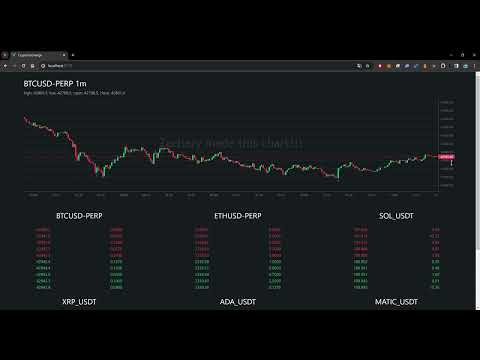
Frontend Framework: vue 3
CSS Preprocessor: scss
UI Library: lightweight-charts
State Management: pinia
Build Tool: vite
WebSocket API source: Crypto.com
├── src
|    │ App.vue
|    │ main.js
|    │
|    ├─assets
|    │   logo.svg
|    │   main.css
|    │
|    ├─components
|    │   Candles.vue
|    │   OrderBook.vue
|    │
|    ├─stores
|    │   candles.js
|    │   orderBook.js
|    │   ws.js
sequenceDiagram
  actor User
  participant Web Client
  participant Crypto.com
  User ->>+ Web Client: Enter page
  Web Client ->>+ Crypto.com: Establish websocket connection
  opt socket.onopen = () => {}
  Web Client->>+ Crypto.com: Send message { id: 1, method: 'subscribe', params: { channels: ['book.BTCUSD-PERP.10'] } }
  Web Client->>+ Crypto.com: Send message { id: 2, method: 'subscribe', params: { channels: ['candlestick.1m.BTCUSD-PERP'] } }
  end
  opt socket.onmessage = () => {}
  Crypto.com->>+ Web Client: Send message { code, id, method, channel?, result?}
  Note over Web Client: Check if code = 0 (success)
  Web Client->>+ Web Client: Proceed
  Note over Web Client: Check if method = 'public/heartbeat'
  Web Client->>+ Crypto.com: Send message { id, method: 'public/respond-heartbeat' }
  Note over Web Client: Check if id = -1 (updated) and result != null
  Web Client->>+ Web Client: Assign result.data to different stores (base on channel)
  Web Client->>+ User: Re-render component
  end
  opt socket.onclose = () => {}
  Web Client->>+ Crypto.com: Reconnect websocket
  end
  opt Switch Timeframe
  User->>+ Web Client: Click timeframe option
  Web Client->>+ Crypto.com: Send message { id: 2, method: 'unsubscribe', params: { channels: ['candlestick.1m.BTCUSD-PERP'] } }
  Web Client->>+ Crypto.com: Send message { id: 2, method: 'subscribe', params: { channels: ['candlestick.5m.BTCUSD-PERP'] } }
  Web Client->>+ User: Re-render component
  end
npm installnpm run devLint with ESLint
npm run lintnpm run buildnpm run deploynpm install -g serveserve -s dist