A sleek and customizable loot notification addon for Turtle WoW (1.12.1) that displays fading notifications with real item icons when you loot items or coins.
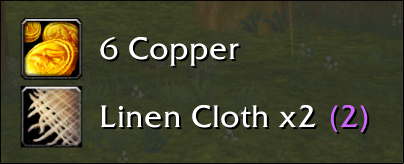


- Real-time Loot Detection — Automatically detects when you loot items or coins
- Authentic Item Icons — Shows actual game icons by searching your bags
- Coin Support — Displays copper, silver, and gold coins with proper icons
- Smart Stacking — Multiple identical items show as "Item Name x3"
- Quality Colors — Items display in their proper quality colors (white/green/blue/purple/orange)
- Animation Styles — Choose from fade, slide, or bounce animations
- Quest Item Glow — Optional yellow pulsing glow around quest item notifications
- Compact Design — Clean, non-intrusive notifications
- Customizable Positioning — Drag and drop to reposition anywhere on screen
- Scalable — Resize notifications from 50% to 200%
- Quality Filter — Show only items of certain quality tiers (e.g. hide all gray/white loot)
- Minimum Quality — Set a threshold, only show items at or above that quality
- Blacklist — Hide specific items you never want to see
- Whitelist — Always show specific items, overriding all other filters
- Loot History — Tracks all looted items with timestamps (configurable size, default 100)
- Session Stats — Keeps count of total items looted this session
- Total Count Display — Shows how many of a looted item you have in your bags
- Hover for Tooltip — Mouse over a notification to see the item tooltip
- Click to Link — Click a notification to insert the item link into chat
- Minimap Button — Draggable minimap button for quick settings access with session stats tooltip
- GUI accessible via
/lmor/lootmonitor - Timing controls (fade in, display duration, fade out)
- Animation style selection
- Quality filter configuration
- Blacklist/whitelist management
- Download the latest release from GitHub
- Extract the
LootMonitorfolder to yourInterface/AddOns/directory - Restart WoW or reload UI (
/reload)
The folder structure should be:
Interface/AddOns/LootMonitor/
├── LootMonitor.lua
├── LootMonitor.toc
└── README.md
| Command | Description |
|---|---|
/lm or /lootmonitor |
Open settings panel |
/lm toggle |
Toggle notifications on/off |
/lm clear |
Clear active notifications |
/lm test |
Create test notification |
/lm move |
Enter move mode to reposition |
/lm settings |
Open settings panel |
/lm help |
Show all commands |
Access via /lm to customize:
- Enable/Disable — Toggle notifications
- Scale (0.5x–2.0x) — Resize notifications
- Fade In Time (0.1s–2.0s)
- Display Time (1.0s–10.0s)
- Fade Out Time (0.5s–3.0s)
- Animation Style — fade, slide, or bounce
- Quest Item Glow — Toggle glow effect for quest items
- Show Total Count — Show bag count alongside notification
- Quality Filtering — Filter notifications by item quality tiers
- Blacklist/Whitelist — Hide junk, always show valuables
- Loot History — Persistent tracking of all looted items
- Session Stats — Items looted counter
- Click Interactions — Hover tooltip + click to link in chat
- Minimap Button — Draggable quick access with stats tooltip
- Animation Styles — Fade, slide, and bounce
- Performance — Local references, precompiled patterns, API caching
- Quest item glow effect
- Total count display
- Redesigned settings panel
- Enhanced reset functionality
- Initial release — fading loot notifications with item icons
- WoW Version: Turtle WoW (1.12.1)
- Dependencies: None
CHAT_MSG_LOOT— Item loot detectionCHAT_MSG_MONEY— Coin loot detectionCHAT_MSG_SYSTEM— System loot messagesADDON_LOADED— InitializationPLAYER_LOGOUT— Save position on logout
- Local references for all string/table/math functions (Lua 5.0 optimization)
- Precompiled regex patterns
- Rate limiting on message processing
- OnUpdate frame cap to prevent resource exhaustion
- Automatic cleanup of old notifications and history entries
This addon was inspired by the LootDisplay WeakAura but built for Turtle WoW compatibility.
Contributions are welcome. Please:
- Report bugs via GitHub Issues
- Suggest features or improvements
- Submit pull requests
MIT — See LICENSE for details.
- GitHub Issues: Report bugs or request features
- Turtle WoW Forums: Forum post
- Discord: Find me on the Turtle WoW Discord
Enjoy your enhanced looting experience! 🎉