This report is part of an internship at ZDigBw.
To run this project poetry has to be installed.
With the exponential growth of digital data, the need for efficient and effective processing of nearly unlimited information has become more pressing than ever before. In the realm of Cyber Threat Intelligence (CTI), one of the key challenges is identifying the interesting parts of large volumes of fluent text data. Having stated this particular problem, Named Entity Recognition (NER) is a crucial tool in this process, enabling analysts to automatically identify and name entities such as persons, dates, organizations, and locations appearing in unstructured text. However, Named Entity Recognition of Cyber Threat Intelligence (NER-CTI) differs from standard NER as it requires domain adaptation of the labels, which may differ from the standard labels for entities in the real word.
While traditional NER tools can be complex and time-consuming, spaCy provides an end-to-end solution that offers fast and efficient NER and other NLP tasks. One of the advantages of spaCy is its flexibility for domain adaptation, allowing users to train their own models on custom labels and text data. This is a critical advantage in CTI, where the ability to adapt to new and evolving threats are essential.
In comparison, academic projects like CoreNLP may be less flexible when it comes to domain adaptation, as they are often designed with a specific set of labels and data in mind. While these tools may be better suited for academic research and development, they may not be as effective in real-world CTI scenarios where rapid adaptation is key. CTI data generally comes from the Cyberspace which is protected by organizations like the Commando Cyber Information Room (Cdo CIR). In the mindset of this report, parts of CIR are responsible for collecting, analyzing, and disseminating information related to cyber threats.
These information can take the form of digital reports from a variety of sources, including domain experts, cyber security facilities, new reports, and other digital sources. Processing these reports are essential in getting a global perspective of a situation, and this is where spaCy comes in. With its pre-trained models for 23 languages including also the ability to process multi-lingual data, analysts can easily start processing and analyzing reports without needing to invest time in building their own NLP pipelines. Moreover, spaCy's focus on deep learning and neural networks puts it at the cutting edge of NLP research, offering the latest and most advanced techniques for NER and other NLP tasks.
One of the advantages of spaCy is its extensive command line interface (CLI), which allows users to access a wide range of NLP tasks without needing to write code. This CLI makes it particularly attractive for industry situations, where ease of use and deploy-ability are key concerns. In contrast, academic projects often require more customization and fine-tuning, which can make these NER tools more inappropriate when it comes to a industry-scale applications and specialized domains like CTI evolving especially in data volume over time. However, for analysts working in the fast-paced world of military intelligence (MI), spaCy's efficiency and ease of use make it an invaluable tool for processing and analyzing large volumes of CTI data.
In general, for MI and CTI, the ability to process large amounts of information quickly and accurately is critical, and writing nearly the same code over and over again, for every single subdomain and associated subset of the available dataset seems almost unfeasible for military applications. By leveraging the power of spaCy, analysts can streamline their workflow and focus on analysis rather than technicalities. This report explores the exciting world of spaCy and how it is leading the charge in the fight against cyber attacks or to simply introduce a push-button playground for analysts of Cdo CIR dealing with NLP problems.
With this horizon in mind, Cdo CIR serves critical parts of MI operations, tasked with monitoring and responding to cyber threats. By collecting and analyzing data from a variety of sources, the Cdo CIR provides a comprehensive view of the cyber threat landscape and enables analysts to take proactive measures to defend against attacks. Straightforward, this report focus on the cutting-edge technology spaCy and its potential use for military intelligence and its benefits for monitoring by Cdo CIR.
Named Entity Recognition (NER) is a fascinating field of Natural Language Processing (NLP) that involves the automatic identification and classification of specific named entities such as people, places, organizations, and other objects of interest mentioned in text. This process involves sequence labeling at the token level, where each word in a given text, is analyzed for its context and syntax to determine whether it represents a named entity. NER can be performed using various techniques, including rule-based approaches, Conditional Random Fields (CRFs), and deep neural networks, each with its own advantages and limitations.
State-of-the-art NER systems, however, rely on advanced machine learning algorithms, such as Convolutional Neural Networks (CNNs), Recurrent Neural Networks (RNNs), and Transformer models like BERT and GPT, to achieve high accuracy and efficiency. Speaking about the performance, NER is often evaluated using standard benchmarks such as CoNLL datasets, which uses the BIO format to annotate named entities and their boundaries in text. Another related dataset for benchmarking NER systems is OntoNotes.
The BIO notation is a commonly used labeling scheme in NER tasks. In this format, each token in a text is labeled with a prefix indicating whether it belongs to a named entity and, if so, what type of entity it is. The prefix is either "B", "I", or "O", where: B (Beginning) indicates that the token is the beginning of a named entity. I (Inside) indicates that the token is inside a named entity. O (Outside) indicates that the token is not part of a named entity. This is an example of how BIO might look in a sentence:
John   lives in  New   York  City
B-PER  O     O   B-LOC I-LOC I-LOC
In this example, "John" is the beginning of a person (PER) entity, "New York" is the beginning of a location (LOC) entity, and "City" is inside the same location entity.
Please note: The Zipfian distribution (also known as Zipf's law) is a statistical phenomenon that describes the relationship between the frequency of a word in a corpus and its rank in that corpus. According to Zipf's law, the frequency of a word is inversely proportional to its rank: the most frequent word occurs roughly twice as often as the second most frequent word, three times as often as the third most frequent word, and so on.
Because named entities are relatively rare compared to other types of words in natural language text, they tend to follow a Zipfian distribution. This means that a small number of entity types (such as "person", "location", and "organization") account for the majority of entities in a corpus, while many other entity types occur very infrequently.
In the BIO format, this Zipfian distribution of entity types can lead to an imbalanced dataset. Specifically, there will be many more tokens labeled "O" (outside an entity) than "B" or "I" tokens, because the vast majority of tokens in the corpus are not part of any named entity. This imbalance can pose a challenge for machine learning models trained on BIO-labeled data, as they may struggle to learn the patterns that distinguish entity tokens from non-entity tokens.
The CoNLL format is a standard format for representing labeled sequences of tokens, often used for tasks like NER. The format is named after the Conference on Natural Language Learning (CoNLL), which was first introduced it in 2000 and since then proposes challenges whose solutions in turn define the state-of-the-art for NLP. In the CoNLL format was introduced for the tasks of language-independent named entity recognition in 2002 and 2003, and each line of a text file represents a single token and its associated label. The first column contains the token itself, while subsequent columns contain labels for various linguistic features. For example:
John  B-PER
lives O
in  O
New B-LOC
York  I-LOC
City  I-LOC
Named Entity Recognition with Cyber Threat Intelligence (NER-CTI) is a specialized application of Named Entity Recognition (NER) in the field of cybersecurity. NER-CTI involves the automatic identification and classification of specific named entities in cyber threat intelligence data, such as indicators of compromise, malware names, IP addresses, domain names, and other cyber threat-related entities, often represented using the Structured Threat Information Expression (STIX) format. The goal of NER-CTI is to extract actionable insights from large volumes of unstructured threat intelligence data to improve cybersecurity defenses and response. NER-CTI techniques typically involve the use of machine learning algorithms, including deep neural networks, to analyze and classify threat intelligence data. NER-CTI is an emerging area of research and has the potential to significantly enhance the capabilities of cybersecurity analysts in detecting, mitigating, and responding to cyber threats.
Because NER-CTI is a downstream task of NER, the associated labels differ from the standard entities like "GPE, ORG, LOC, PERCENT a.s.o." in total. The custom label set for NER-CIT follows the definitions of STIX and therefore requires a given NLP tool to adapt to this specialized domain.
Beside the technical requirements, having a closer look at STIX might also be interesting to find other CTI-datasets also including relationships. Additionally, STIX adds an interesting turn in working with CTI-data by introducing not only entities and relations but also sightings defined as: "belief that something in CTI (e.g., an indicator, malware, tool, threat actor, etc.) was seen". This is especially fascinating, because a relation like "Kaspersky Lab detected Trojan.Win32.Agent" can be seen as the facts of having a CTI already broke the system.
In contrast, a sighting is information streamed in real-time data not proven to be true or false, thus making the task of detecting cyberattacks especially difficult since the ground truth for a given NLP tool is not based on truth, but speculation. Consequently, analysts should also be aware that a NER-CTI system is trained on cases where cyber threats are truly detected and thus rely on a factual data. Hence, the ability to generalize of such system might be a critical aspect before and while deployment.
CyNER is an open-source dataset for CTI and was introduced by IBM T. J. Watson Research Center. The CyNER dataset is a new dataset for NER-CTI, which consists of 4,372 cybersecurity-related sentences manually annotated with 6 types of entities, such as "Malware," "Vulnerability," and "Indicator." The dataset was created to address the lack of cybersecurity-specific NER datasets and to facilitate the development of more accurate and effective NER models for cybersecurity applications. In addition, the paper provides detailed statistics about the dataset, an analysis of its characteristics, and a baseline performance of 76.66% macro-F1 achieved with XML-RoBERTa-large.
Token Distribution:
| CyNER | Token | Unique | Documents |
|---|---|---|---|
| Train | 68.191 | 7.954 | 2.811 |
| Dev | 19.530 | 3.370 | 813 |
| Test | 19.270 | 3.602 | 748 |
Label Distribution:
| CyNER | Malware | Indicator | System | Organization | Vulnerability |
|---|---|---|---|---|---|
| Train | 705 | 1.252 | 838 | 288 | 48 |
| Dev | 254 | 247 | 182 | 92 | 9 |
| Test | 242 | 301 | 249 | 134 | 10 |
Performance XLM-RoBERTa-large on test set:
| CyNER | Malware | Indicator | System | Organization | Vulnerability |
|---|---|---|---|---|---|
| Prec. | 79.82 | 78.34 | 70.36 | 70.64 | 100.0 |
| Rec. | 75.11 | 86.62 | 79.93 | 60.16 | 80.00 |
| F1 | 77.39 | 82.27 | 74.84 | 64.98 | 88.89 |
Data-Format: CoNLL
Entity-Notation: (B I O)
Entity-Labels (STIX): 'Organization', 'System', 'Malware', 'Indicator', 'O', 'Vulnerability'
Repository: https://github.com/aiforsec/CyNER
Example:
This malicious APK is 334326 bytes file , MD5 :
O    O         O   O  O      O     O    O O   O

0b8806b38b52bebfe39ff585639e2ea2 and is detected
B-Indicator                      O   O  O

by Kaspersky      Lab            products   as
O  B-Organization I-Organization O          O

" Backdoor.AndroidOS.Chuli.a " .
O B-Indicator                O O
This example shows significant differences in expression of a labels meaning. Here, files like 0b8806b38b52bebfe39ff585639e2ea2 or Backdoor.AndroidOS.Chuli.a (Indicator) are detected by Kaspersky Lab (Organization). As this data do no cover relations between entities, the relation "detected by" is not of further interest.
When it comes to NLP, there are many libraries and tools to choose from. However, one library that stands out from the rest is spaCy.
But what makes SpaCy so special? For starters, it's built with efficiency in mind, allowing it to handle large volumes of text data with ease. Its advanced machine learning algorithms and statistical models also enable it to produce highly accurate results, making it a reliable choice for even the most complex NLP tasks.
And if that's not enough, spaCy's flexibility and extensibility allow it to be tailored to specific needs, making it a truly customizable solution. Finally, by choosing SpaCy, offers the opportunity to introduce a new and innovative tool to NLP workflows. Plus, since it's not yet used by Cdo CIR, it can be at the forefront of adopting cutting-edge technology in such fast-living organizations. The spaCy pipeline is a sequence of NLP components that are applied to a text document in order to extract meaning and structure from the text, including a tokenizer, a part-of-speech tagger (POS), a dependency parser, NER, and all follow-up tasks like text categorization.

At its core is the nlp object, which represents the pipeline itself.
The pipeline starts by tokenizing the text, or breaking it up into individual words or sub-word units. Then, the POS tagger assigns a part-of-speech tag to each token, such as noun, verb, adjective, etc. Next, the dependency parser analyzes the relationships between the tokens in the sentence, identifying the grammatical structure and dependencies between words. Consequently, the NER component then identifies and extracts named entities, such as people, organizations, and locations, from the text.
This capability in turn can be used to extract structured data from unstructured text, such as building a knowledge graph or database or even perform entity linking, indicating relationships between like "Kairo located_in Egypt".
Also it's worth noting that the components of the spaCy pipeline are designed to be flexible and modular, so developers can choose to use all or some of them, or even add custom components as needed.
Overall, a pipeline returns a so-called Doc object representing a processed document of text, that contains a sequence of Token objects represent individual words or other elements of the text, such as punctuation or whitespace. Each Token object has a variety of properties and annotations, such as its lemma, part-of-speech tag, and named entity labels. The nlp object also provides a range of convenient methods and attributes for working with processed documents, such as accessing specific tokens or entities, visualizing the document structure, or performing similarity calculations between documents.
All of spacy's pipeline components, can listen to a text representation components tok2vec or transformers to extract useful features for their respective tasks. These features are learned through pre-training on large corpora of text, and can capture important semantic and syntactic relationships between words. By using pre-trained vectors, the text representation component can improve the accuracy and robustness of these downstream components, as they can better capture the nuances of natural language.
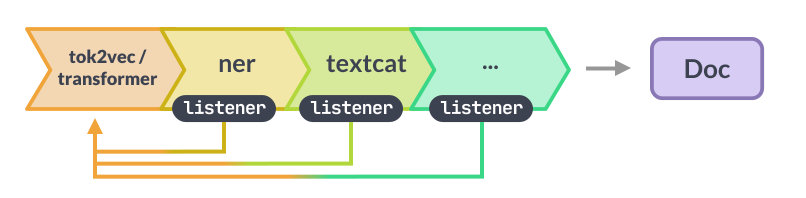
The tok2vec component in spacy's pipeline uses a convolutional neural network (CNN) architecture to generate word embeddings that capture local context information. These embeddings are pre-trained on a large corpus of text using a self-supervised learning approach. Specifically, the CNN is trained to predict the word that appears in the center of a fixed-size window of surrounding words. By doing so, the model learns to capture important local context information that is useful for downstream tasks such as part-of-speech tagging and named entity recognition.
The transformers component, on the other hand, uses a self-attention mechanism to generate contextualized word embeddings that capture both local and global context information. The model is pre-trained on large corpora of text using a self-supervised learning approach known as masked language modeling (MLM). Specifically, the model is trained to predict the masked words in a sentence by attending to the surrounding words in the context. This approach allows the model to learn rich contextual representations that capture complex relationships between words and are useful for a wide range of NLP tasks.
When encountering out-of-distribution words, tok2vec and transformers handle them in different ways. For tok2vec, these words are treated as unknown and assigned a zero vector. However, this can sometimes lead to poor performance (around 50% (P, R, F1)) on tasks that require handling of rare or unseen words. To address this, spaCy provides options to fine-tune the tok2vec component on domain-specific data to better handle out-of-distribution words. Transformers, on the other hand, use a contextualized approach that allows the model to generate a representation for any word in the context of the surrounding text. This means that even if a word is out of distribution, the transformer can still generate a meaningful representation based on the context in which the word appears.
In STIX, the focus is on representing and sharing threat intelligence across different organizations and industries. While STIX includes a number of entity types that are relevant to threat intelligence, it does not provide built-in tools for training custom named entity recognizers. As a result, organizations that want to create their own custom NER models for STIX data would need to use external tools or libraries, such as Python's scikit-learn or TensorFlow, to train and evaluate their models.
In contrast, spaCy provides built-in tools for training custom NER models using its machine learning library. This allows organizations to train models that are specifically tailored to their own domain or industry, and can recognize entities that are not present in spaCy's default NER model.
As a reminder, spaCy's default NER model includes several entity types, such as PERSON, ORG, GPE, DATE, TIME, MONEY, and PERCENT. These entities are commonly found in natural language text and are therefore included in the default model to provide a general-purpose solution for named entity recognition. The default entity recognizer in spaCy is trained on large amounts of general text data, and as such, it may not perform as well on more specialized or domain-specific texts.
Somehow, a general purpose NER system is not enough. In such cases, domain adaptation becomes crucial to improve the model's performance on specific entities in a particular domain. For example, a company that specializes in healthcare data could train a custom NER model to recognize medical terms and drug names, while a legal firm could train a model to recognize legal terms and case names. Altogether, spaCy's approach to domain adaptation involves using transfer learning and fine-tuning techniques to train custom models based on pre-existing models. This allows organizations to leverage the knowledge and expertise of spaCy's default models, while adapting them to their own domain-specific needs.
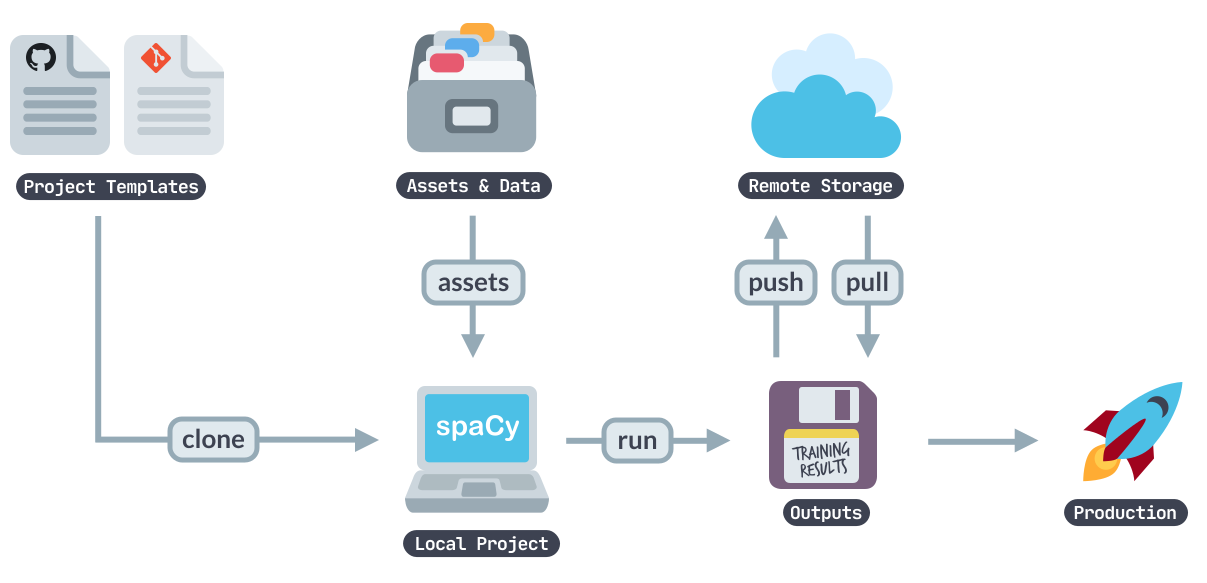
The spaCy project template is a set of starter code and directory structure that can be used to quickly start building an NLP project. A standard directory structure is included to help with organizing code and data, including directories for data, models, and code, as well as subdirectories for specific tasks, such as storing assets like training data, annotations, and preprocessed data. The template also includes configuration files that define the settings for various push-button components of the spaCy pipeline that can be configured online. The configuration files can be modified or extended to adjust the behavior of the pipeline. The spaCy project template also contains comfort functions for common NLP tasks, such as loading and converting data, training models, evaluating models, and generating debug information on new data. This code can be customized to suit specific use cases. Further, this documentation provides guidance on installing spaCy, setting up the project, and running the code and also offers examples of how to use the code.
To train a model in spaCy, the training data needs to be prepared in the format expected by spaCy, which includes a text input and a dictionary of annotations such as named entities or part-of-speech tags.
Once the training data is ready, the spaCy training API can be used to train a custom model. The training API allows users to specify various hyperparameters, such as the number of iterations, the learning rate, and the dropout rate. These hyperparameters have a significant impact on the performance of the model, so it's important to experiment with different values to find the optimal configuration.
During the training process, spaCy updates the model's weights based on the training examples and the specified hyperparameters. This process continues for a specified number of iterations or until the model's performance on a validation set stops improving.
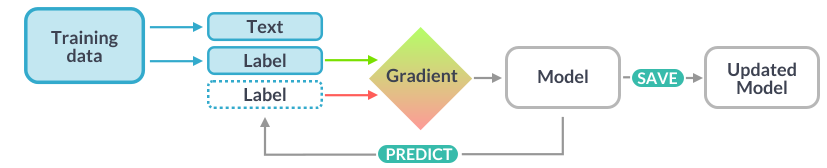
After training, the performance of the model can be evaluated using spaCy's evaluation API, which allows users to measure metrics such as accuracy, precision, and recall. The model can also be used to make predictions on new data using spaCy's prediction API.
One of the benefits of spaCy's training process is the ability to fine-tune pre-existing models to improve their performance on specific tasks or domains. This is known as transfer learning and can save a lot of time and effort compared to training a model from scratch.
The required GPU memory for training a spaCy model will vary depending on the size of the model and training data. Generally, spaCy recommends a minimum of 10GB of GPU memory for most tasks, with larger models and datasets might require 16GB or more.
Google Colab offers a free platform for training machine learning models, including spaCy models, using a Tesla T4 GPU with 16GB of memory for up to 12h. However, it might happen that the access might be denied as free use of GPU depends on the overall usage and free resources at Google. This is usually sufficient for most spaCy models. Nonetheless, if one needs more memory, Colab also offers paid plans with access to more powerful GPUs, such as the NVIDIA P100 and 24h+ guaranteed usage per run. Following the usage of training a pipeline for NER with tok2vec and transformers is shown:
Environment: Google-Colab
GPU 0: Tesla T4 (UUID: GPU-616858e9-5652-63ea-cf1a-e7df8574dc8e)
Used: ~13.3 of 16 GB GPU for training over 1h and 40 minutes.

+-----------------------------------------------------------------------------+
| NVIDIA-SMI 525.85.12    Driver Version: 525.85.12    CUDA Version: 12.0     |
|-------------------------------+----------------------+----------------------+
| GPU  Name        Persistence-M| Bus-Id        Disp.A | Volatile Uncorr. ECC |
| Fan  Temp  Perf  Pwr:Usage/Cap|         Memory-Usage | GPU-Util  Compute M. |
|                               |                      |               MIG M. |
|===============================+======================+======================|
|   0  Tesla T4            Off  | 00000000:00:04.0 Off |                    0 |
| N/A   44C    P0    24W /  70W |      0MiB / 15360MiB |      0%      Default |
|                               |                      |                  N/A |
+-------------------------------+----------------------+----------------------+

+-----------------------------------------------------------------------------+
| Processes:                                                                  |
|  GPU   GI   CI        PID   Type   Process name                  GPU Memory |
|        ID   ID                                                   Usage      |
|=============================================================================|
|  No running processes found                                                 |
+-----------------------------------------------------------------------------+

Architecture:                    x86_64
CPU op-mode(s):                  32-bit, 64-bit
Byte Order:                      Little Endian
Address sizes:                   46 bits physical, 48 bits virtual
CPU(s):                          2
On-line CPU(s) list:             0,1
Thread(s) per core:              2
Core(s) per socket:              1
Socket(s):                       1
NUMA node(s):                    1
Vendor ID:                       GenuineIntel
CPU family:                      6
Model:                           85
Model name:                      Intel(R) Xeon(R) CPU @ 2.00GHz
Stepping:                        3
CPU MHz:                         2000.212
BogoMIPS:                        4000.42
Hypervisor vendor:               KVM
Virtualization type:             full
L1d cache:                       32 KiB
L1i cache:                       32 KiB
L2 cache:                        1 MiB
L3 cache:                        38.5 MiB
NUMA node0 CPU(s):               0,1
Vulnerability Itlb multihit:     Not affected
Vulnerability L1tf:              Mitigation; PTE Inversion
Vulnerability Mds:               Vulnerable; SMT Host state unknown
Vulnerability Meltdown:          Vulnerable
Vulnerability Mmio stale data:   Vulnerable
Vulnerability Retbleed:          Vulnerable
Vulnerability Spec store bypass: Vulnerable
Vulnerability Spectre v1:        Vulnerable: __user pointer sanitization and use
                                 rcopy barriers only; no swapgs barriers
Vulnerability Spectre v2:        Vulnerable, IBPB: disabled, STIBP: disabled, PB
                                 RSB-eIBRS: Not affected
Vulnerability Srbds:             Not affected
Vulnerability Tsx async abort:   Vulnerable
Flags:                           fpu vme de pse tsc msr pae mce cx8 apic sep mtr
                                 r pge mca cmov pat pse36 clflush mmx fxsr sse s
                                 se2 ss ht syscall nx pdpe1gb rdtscp lm constant
                                 _tsc rep_good nopl xtopology nonstop_tsc cpuid
                                 tsc_known_freq pni pclmulqdq ssse3 fma cx16 pci
                                 d sse4_1 sse4_2 x2apic movbe popcnt aes xsave a
                                 vx f16c rdrand hypervisor lahf_lm abm 3dnowpref
                                 etch invpcid_single ssbd ibrs ibpb stibp fsgsba
                                 se tsc_adjust bmi1 hle avx2 smep bmi2 erms invp
                                 cid rtm mpx avx512f avx512dq rdseed adx smap cl
                                 flushopt clwb avx512cd avx512bw avx512vl xsaveo
                                 pt xsavec xgetbv1 xsaves arat md_clear arch_cap
                                 abilities
The final model can be traced in ./models/. Please note that some files are missing due to their size and hence the models can not be used for prediction but for inspection.
To get the binaries, files or if you have other problems please contact: marc.feger@icloud.com.
The project.yml defines the data assets required by the
project, as well as the available commands and workflows. For details, see the
spaCy projects documentation.
The following commands are defined by the project. They
can be executed using spacy project run [name].
Commands are only re-run if their inputs have changed.
| Command | Description |
|---|---|
info |
Creates the README.md of this project. |
brace-yourself-data-is-coming |
Convert the CyNER data present in CoNLL format to .spacy format. |
initialize-configurations |
Initialize the training configurations for both models. |
debug-data-classic-model |
This method evaluates train and dev against the configuration of the classic model. |
train-classic-model |
This will run the training of the model as specified in training_classic_model_config.cfg. |
evaluate-classic-model |
This will evaluate models/classic/model-best with the held-out data for objectively testing the model performance. |
debug-data-foundation-model |
This method evaluates train and dev against the configuration of the foundation model. |
train-foundation-model |
This will run the training of the model as specified in training_foundation_model_config.cfg. Note: GPU with min. of 10GB memory required. |
evaluate-foundation-model |
This will evaluate models/foundation/model-best with the held-out data for objectively testing the model performance. |
The following workflows are defined by the project. They
can be executed using spacy project run [name]
and will run the specified commands in order. Commands are only re-run if their
inputs have changed.
| Workflow | Steps |
|---|---|
preparation |
info → brace-yourself-data-is-coming → initialize-configurations |
classic-model |
debug-data-classic-model → train-classic-model → evaluate-classic-model |
foundation-model |
debug-data-foundation-model → train-foundation-model → evaluate-foundation-model |
The following assets are defined by the project. They can
be fetched by running spacy project assets
in the project directory.
| File | Source | Description |
|---|---|---|
assets/CyNER/train.txt |
URL | The training data of CyNER. |
assets/CyNER/valid.txt |
URL | The valid data of CyNER. This will be renamed to dev after calling convert. |
assets/CyNER/test.txt |
URL | The test data of CyNER. |