Build • Publish • Distribute Incus Custom Images
ScottiBYTE Incus Forge is a lightweight Home Lab focused web application for publishing, managing, and distributing custom Incus images through SimpleStreams repositories.
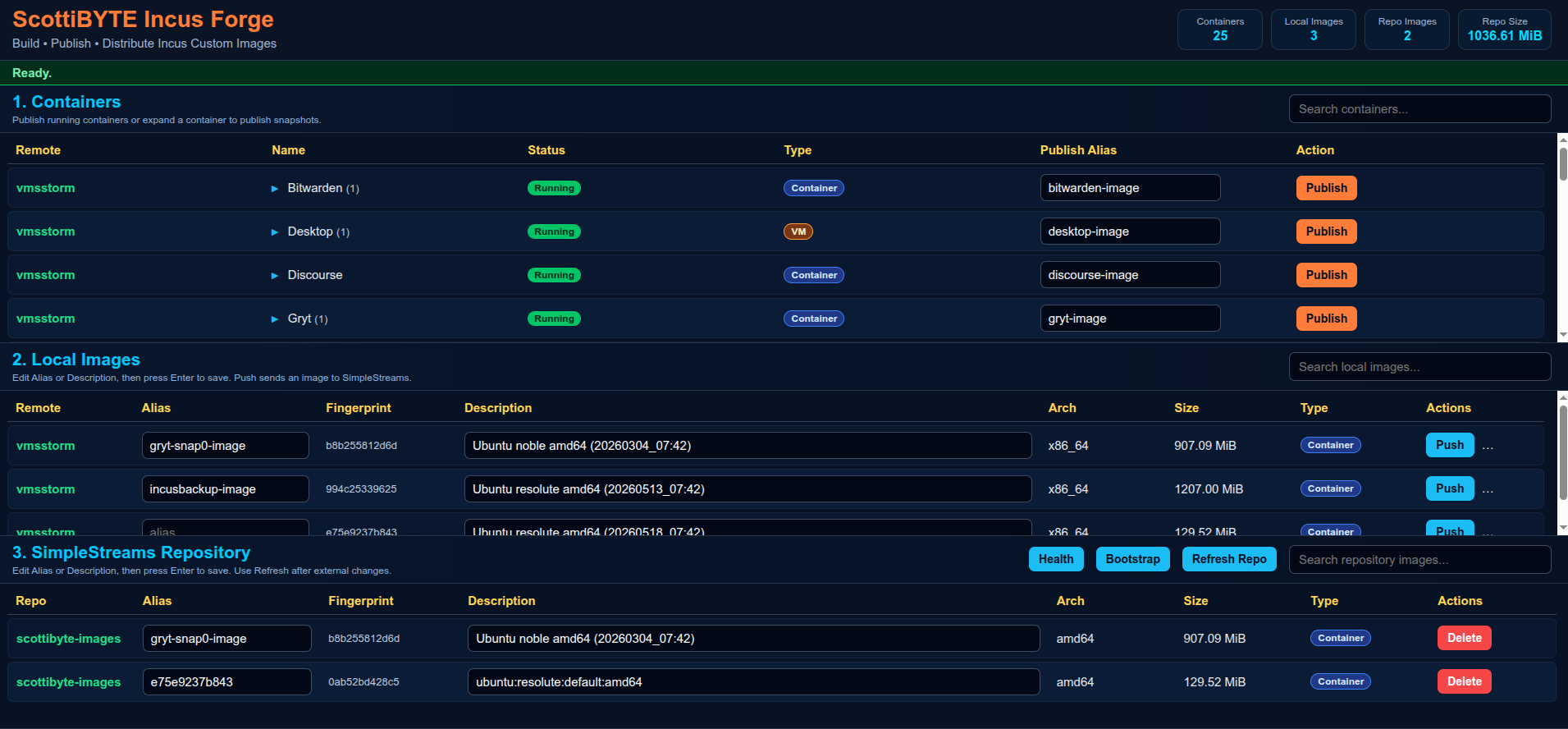
Incus Forge allows Home Labbers and administrators to:
- Publish running Incus containers as reusable images
- Publish snapshots directly from the UI
- Push images into SimpleStreams repositories
- Manage local Incus images
- Maintain centralized image repositories
- Distribute reusable Incus images across multiple environments
The platform is intentionally designed to remain:
- Lightweight
- Docker deployable
- Home Lab friendly
- Native Incus focused
- Understandable
- Minimal dependency
- Database free
- Publish running containers
- Publish snapshots
- Snapshot expansion rows
- Custom image aliases
- Push images to SimpleStreams repositories
- Delete repository images
- Refresh repository metadata
- Repository health validation
- Repository bootstrap support
- Live statistics cards
- Container and VM badges
- Responsive layout
- Async publishing operations
- Lightweight interface design
- Full Docker deployment
- Portable configuration
- Native Incus client integration
- SSH based repository synchronization
Recommended deployment model:
| System | Purpose |
|---|---|
| IncusForge | Web UI and image management |
| IncusSimplestreams | SimpleStreams repository |
| Existing Incus Hosts | Source containers and VMs |
Benefits:
- Cleaner separation
- Easier upgrades
- Improved security
- Easier troubleshooting
- Better disaster recovery
- Simpler scaling
incus launch images:ubuntu/26.04 IncusForgeEnter shell:
incus shell IncusForgeFrom the IncusForge container:
incus remote add vmsstorm https://vmsstorm:8443Accept the certificate.
Enter trust password or token.
Verify:
incus remote listExample:
+-------------------+------------------------------------+
| NAME              | URL                                |
+-------------------+------------------------------------+
| vmsstorm          | https://vmsstorm:8443             |
| scottibyte-images | https://images.scottibyte.com     |
+-------------------+------------------------------------+
Incus Forge synchronizes images to the SimpleStreams repository using SSH and rsync.
Generate SSH key if needed:
ssh-keygen -t ed25519Copy key to repository server:
ssh-copy-id scott@192.168.80.88Verify access:
ssh scott@192.168.80.88 "hostname && whoami"Expected:
IncusSimplestreams
scott
mkdir -p ~/incusforge

cd ~/incusforgenano config.jsonPaste:
{
  "port": 3030,
  "simplestreams": {
    "name": "scottibyte",
    "publicUrl": "https://images.mydomain.com",
    "sshHost": "172.16.2.111",
    "sshUser": "scott",
    "webRoot": "/var/www/html",
    "imageDir": "/var/www/html/images",
    "streamsDir": "/var/www/html/streams"
  }
}
Save file.
nano docker-compose.ymlPaste:
services:
  incusforge:
    image: scottibyte/incusforge:latest

    container_name: incusforge

    restart: unless-stopped

    ports:
      - "3030:3030"

    environment:
      PORT: "3030"
      HOME: /home/scott
      INCUS_CONF: /incus-client
      CONFIG_PATH: /app/config.json

    volumes:
      - ./config.json:/app/config.json:ro
      - ${HOME}/.config/incus:/incus-client:ro
      - ${HOME}/.ssh:/home/scott/.ssh:ro
Save file.
docker compose up -dVerify logs:
docker logs -f incusforgeExpected:
ScottiBYTE Incus Forge running on port 3030
Open browser:
http://YOUR-IP:3030
Create repository container:
incus launch images:ubuntu/26.04 IncusSimplestreamsEnter shell:
incus shell IncusSimplestreamsnano bootstrap-simplestreams.shPaste:
#!/usr/bin/env bash
set -euo pipefail

WEB_ROOT="${WEB_ROOT:-/var/www/html}"
IMAGE_DIR="${IMAGE_DIR:-$WEB_ROOT/images}"
STREAMS_DIR="${STREAMS_DIR:-$WEB_ROOT/streams}"
REPO_USER="${REPO_USER:-$USER}"

echo "=== ScottiBYTE Incus Forge SimpleStreams Bootstrap ==="

echo "[1/8] Installing required packages..."
sudo apt update
sudo apt install -y nginx xz-utils python3 python3-yaml incus-extra openssh-server curl ca-certificates rsync jq

echo "[2/8] Enabling SSH..."
sudo systemctl enable --now ssh || sudo systemctl enable --now sshd

echo "[3/8] Enabling nginx..."
sudo systemctl enable --now nginx

echo "[4/8] Creating repository directories..."
sudo mkdir -p "$IMAGE_DIR"
sudo mkdir -p "$STREAMS_DIR/v1"

echo "[5/8] Setting ownership and permissions..."
sudo chown -R "$REPO_USER:$REPO_USER" "$WEB_ROOT"
sudo chmod -R 775 "$WEB_ROOT"

echo "[6/8] Creating metadata files..."

if [ ! -f "$STREAMS_DIR/v1/index.json" ]; then
cat > "$STREAMS_DIR/v1/index.json" <<'JSON'
{"index":{"images":{"datatype":"image-downloads","path":"streams/v1/images.json","products":[],"format":"products:1.0"}},"format":"index:1.0"}
JSON
fi

if [ ! -f "$STREAMS_DIR/v1/images.json" ]; then
cat > "$STREAMS_DIR/v1/images.json" <<'JSON'
{"content_id":"images","datatype":"image-downloads","format":"products:1.0","products":{}}
JSON
fi

echo "[7/8] Validating repository..."
command -v incus-simplestreams >/dev/null
command -v xz >/dev/null
command -v nginx >/dev/null

echo "[8/8] Bootstrap complete."

echo
echo "Repository ready."
echo
echo "Next step:"
echo "ssh-copy-id $REPO_USER@<repository-ip>"
Save file.
chmod +x bootstrap-simplestreams.sh

REPO_USER=scott WEB_ROOT=/var/www/html ./bootstrap-simplestreams.shOpen browser:
http://YOUR-REPOSITORY-IP/images
Verify metadata:
curl http://YOUR-REPOSITORY-IP/streams/v1/index.jsonincus remote add scottibyte-images \
https://images.scottibyte.com \
--protocol=simplestreamsVerify:
incus remote list- Expand container row
- Enter image alias
- Click Publish
- Expand container snapshots
- Enter snapshot image alias
- Click Publish Snapshot
- Locate image in Local Images
- Click Push
- Repository metadata updates automatically
incus image list scottibyte-images:- Incus trust relationships use native Incus certificates
- SSH synchronization uses standard user SSH keys
- No database exposure
- No direct repository write APIs
- Native Linux file permissions
- Repository synchronization isolated through SSH
Error:
xz: executable file not found
Fix:
sudo apt install xz-utilsdocker exec -it incusforge bash
incus remote listssh scott@192.168.80.88docker logs -f incusforgeincus image list scottibyte-images:- Multiple repository profiles
- Repository selection drop-down
- Repository authentication profiles
- Background task queue
- Remote repository synchronization
- Repository replication
- Job history
- Enhanced async progress indicators
If you find Incus Forge useful:
- Subscribe to the ScottiBYTE YouTube channel
- Join the community discussions
- Share feedback and ideas
- Open issues and feature requests
https://youtube.com/@ScottiBYTE