This is source code of the program which checks prepared AdHoc protocol description file, pack and upload it. Then waiting for server reply, download and unpack it.
Other function is to convert Protocol Buffers .proto files to some, closest to the AdHoc protocol description file format.
As transport, AdHocAgent can use raw TCP / HTTP.
At the beginning stage of your protocol project, when it changes frequently and getting the generated code faster is important, just ask code generation.
Later, when your project becomes mature, stabilizes and the confidence in the generated code becomes more important, in addition to code generation,
possible to order testing of the generated code, and yes, it takes a longer time.
In AdHocAgent source directory there is the AdHocAgent.properties file.
Update it content:
server option let to point server generator host, port and protocol ( HTTP, if it starts with http://)
Set login property to your identifier.
Option description_file_path contains path to your project description file, If this path ends with !(exclamation) generated code will be tested.
This path can be provide as argument of the command line.
If provided via command line path point to the file with .proto extension, this file will be uploaded and converted by server to closest to AdHoc protocol description file format**
The classpath option contains , (comma) delimited paths to:
- the directory with
org, top AdHoc annotations directory inside. Same annotations used to compose the protocol description, - other folders where imported sources are located.
Any delimiter / or \ , absolute and relative paths are supported.
Before run AdHocAgent:
Ensure JDK 8 is installed, javac is in the path and available in console.
Compile AdHocAgent by yourself or take ready one jar in the bin directory.
After you complete your protocol description file, run AdHocAgent with command line:
java -jar /path/to/AdHocAgent.jar /path/to/protocol_descriptor.javato generate code only
or
java -jar /path/to/AdHocAgent.jar /path/to/protocol_descriptor.java!to generate code with testing
The AdHocAgent utility will search AdHocAgent.properties file in the following order:
If path to protocol description file provided:
- in the folder of the description file, by name
description_file_name.properties - in the folder of the description file, by name
AdHocAgent.properties - in the current/working directory, by name
description_file_name.properties
and then:
- in the current/working directory, by name
AdHocAgent.properties - self utility binary class folder, by name
AdHocAgent.properties
Before upload the description file, AdHocAgent recognize the current workflow stage and:
- If this file version was never sent: compile, parse and check all used in the description names.
-
Names that are a keyword of any programming languages,
AdHocsupported, or with_(underscore) as first/last char is prohibited -
Packets, enums and channels names should be unique in project scope
-
Channels, by
extendskeyword have to haveStdProtocolorAdvProtocoltype and byimplementsconnect two communication interfaces -
Imported in the project file, packs should have to have predefined unique
idin project scope -
The root project description file packs, without
idannotation, will be assigned by the server automatically
-
- If the check names phase is passed, the program composes message with file inside and upload it to the server.
- Then waiting for server reply, receiving, expand generated code in the current/working directory of the AdHocAgent process.
After that starting the deployment process. At this stage utility reading AdHocAgent.properties Deployment section where each line is the copy command.
It is starting with a path to a host source code, till : symbol, and then, ,comma-separated enumeration of deployment folders.
java -jar /path/to/AdHocAgent.jar /path/to/convert_to_adhoc_format.proto
AdHocAgent will upload Protocol Buffers .proto file and receive converted to AdHoc format version.
For example .proto file:
// See README.txt for information and build instructions.
//
// Note: START and END tags are used in comments to define sections used in
// tutorials.  They are not part of the syntax for Protocol Buffers.
//
// To get an in-depth walkthrough of this file and the related examples, see:
// https://developers.google.com/protocol-buffers/docs/tutorials

// [START declaration]
syntax = "proto3";
package tutorial;
// [END declaration]

// [START java_declaration]
option java_package = "com.example.tutorial";
option java_outer_classname = "AddressBookProtos";
// [END java_declaration]

// [START csharp_declaration]
option csharp_namespace = "Google.Protobuf.Examples.AddressBook";
// [END csharp_declaration]

// [START messages]
message Person {
  string name = 1;
  int32 id = 2;  // Unique ID number for this person.
  string email = 3;

  enum PhoneType {
    MOBILE = 0;
    HOME = 1;
    WORK = 2;
  }

  message PhoneNumber {
    string number = 1;
    PhoneType type = 2;
  }

  repeated PhoneNumber phones = 4;
}

// Our address book file is just one of these.
message AddressBook {
  repeated Person people = 1;
}
// [END messages]
will be transpiled into
// [END declaration]

// [START java_declaration]


// [END java_declaration]

// [START csharp_declaration]

// [END csharp_declaration]

// [START messages]
class Person {
	@__(32767) String name;
	@I_        int    id;// Unique ID number for this person.
	@__(32767) String email;

	enum PhoneType {
		;
		final int MOBILE = 0;
		final int HOME   = 1;
		final int WORK   = 2;
	}


	class PhoneNumber {
		@__(32767) String number;
		PhoneType type;
	}


	@D(32767) PhoneNumber phones;
}


// Our address book file is just one of these.
class AddressBook {
	@D(32767) Person people;
}
// [END messages]
Converted packs declarations have to be distributed among communication interfaces of the AdHoc network.
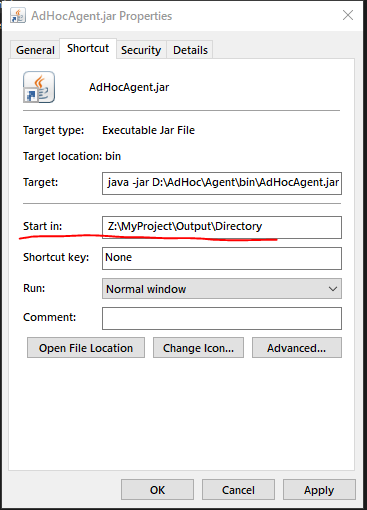
On windows OS, if you create shortcut to run AdHocAgent, provide working directory, the place where generated code will be extracted, as shown on the picture.
When the server receives your specification it will checks their correctness, generates requested source code in specified languages, plus if requested generate several tests and run. If all tests passed, compose the reply with
- generated protocol handler API code
- code to simplify export/import data between a network and your data structures
- last generated test
- example of using generated API
If any error occurred, you will be notified of a possible delay and the AdHoc team will deal with the problems.