Manage your Bambu Lab printers — one or a whole farm — from any device.
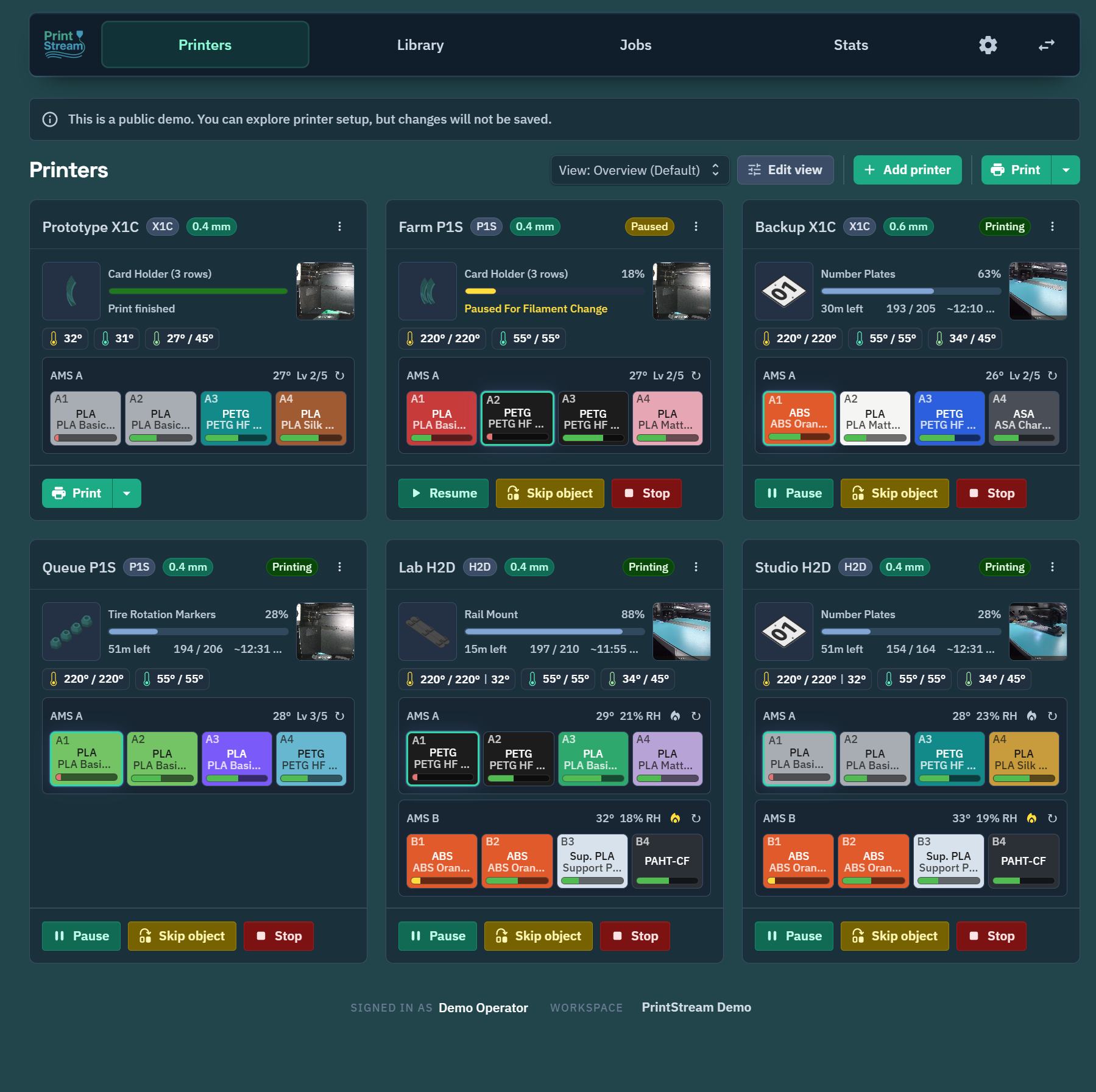
PrintStream is a self-hosted web app for monitoring and controlling Bambu Lab printers. Open it on your phone, tablet, or desktop, see every printer live, and send prints from a shared file library. It's built phone-first, installs like an app (PWA), and runs on your own hardware.
Smaller, simpler, and more touch-friendly than the alternatives. Self-hosted and plugin-extensible.
Website: printstream.app — the product site, with a full feature tour, screenshots, and an optional hosted version you don't have to run yourself.
Beta — read before you rely on it. PrintStream is in active beta. It has been tested with the Bambu Lab P1P, P1S, and H2D. Other Bambu Lab models should work, but this hasn't been confirmed yet — expect to verify behavior on untested hardware, and please report what you find. See Safety & liability before connecting printers.
- Live dashboard — every printer at a glance: progress, temperatures, ETA, layer count, AMS contents, camera view, and error alerts.
- Full control — pause, resume, stop, lights, calibration, skip objects mid-print, AMS and spool management.
- Shared print library — upload 3MF / G-code / STL / STEP files into folders, browse plates and previews, keep version history, and restore from a recycle bin.
- Send prints anywhere — pick a file, map filaments to AMS slots, and queue it to one or many printers, with automatic compatibility checks (printer model, plate type, nozzle).
- Slice in your browser (optional) — a slicer service runs real Bambu Studio / OrcaSlicer versions server-side, so you can go from plain 3MF to printable file without leaving the app.
- 3D editor (optional) — arrange models, edit supports and materials, paint colors, and save multi-plate projects right in the browser.
- Jobs & stats — print history with snapshots, success rates, print hours, and filament usage per printer and per workspace.
- Production orders (optional) — define what needs printing and track completion across many prints.
- Notifications — browser push, Discord, or ntfy, with camera snapshots attached.
- Firmware updates — check release notes and install printer firmware over your LAN.
- Home Assistant — a companion integration exposes printers, AMS units, cameras, and dashboard cards (PrintStreamApp/printstream-home-assistant).
- Multi-user (optional) — passkey or SSO sign-in with roles and permissions, or run it wide open on a trusted LAN.
PrintStream has two parts:
- The server — the web app, API, and database. Run it anywhere: a home server, NAS, Raspberry Pi, or a VPS in the cloud.
- The bridge — a small agent that runs on the same network as your printers. It discovers printers automatically, talks to them over LAN (MQTT/FTPS/camera), and connects outbound to your server — no ports to open at the printer site.
If your server runs on the same LAN as your printers, both pieces can run on one machine with one command.
You need Docker and about five minutes.
No clone required — download the two example files (or copy their contents), then start:
curl -fsSL https://raw.githubusercontent.com/PrintStreamApp/printstream/main/compose.server.example.yml -o compose.yml
curl -fsSL https://raw.githubusercontent.com/PrintStreamApp/printstream/main/.env.server.example -o .env   # defaults work for a LAN install
docker compose up -d
This pulls the combined app image (ghcr.io/printstreamapp/printstream) and the slicer image from GHCR and starts everything.
On arm64 hosts (Raspberry Pi, ARM NAS): the app and bridge images are multi-arch and run natively. The optional slicer image is amd64-only — it bundles the x86 Bambu Studio CLI — so start the stack without it: docker compose up -d --scale slicer=0 (or delete the slicer service from compose.yml to make it permanent). Server-side slicing is then unavailable; everything else works.
git clone https://github.com/PrintStreamApp/printstream.git
cd printstream
cp .env.server.example .env
cp compose.server.example.yml compose.yml
If the build: blocks in compose.yml are commented out, uncomment them first; then docker compose up -d --build.
Then open http://<your-server>:8080. A default workspace is created automatically on first start, and the bundled bridge comes online and pairs itself — there's no secret to set and no pairing step. Add your printers and go.
- Printers must have LAN mode enabled with their access code handy (Bambu printer screen → Settings → LAN Only Mode / access code).
- Full details, reverse-proxy notes, the optional slicer service, and running the bridge on a separate machine: docs/deployment.md. All settings: docs/configuration.md.
Optional features ship as plugins you can switch on per workspace: sign-in providers (passkeys/email codes, OAuth/OIDC), the 3D model studio (project editor + previews), server-side slicing helpers, production orders, notifications (browser push, Discord, ntfy), firmware updates, plate-clearing confirmation, and the Home Assistant bridge. Third-party plugins can be uploaded from the plugin manager.
- Direct printing is limited to
.gcodeand.gcode.3mffiles; plain.3mfprojects stay browsable (and sliceable) but are never dispatched raw. - The print dialog blocks hard mismatches (wrong printer model, wrong nozzle) and asks before overriding softer ones.
- Printer file transfers are serialized and retried carefully so flaky LAN connections don't wedge a printer.
- Destructive actions (deleting files, folders, logs) require confirmation, and deleted library files go to a recycle bin first.
PrintStream is a TypeScript monorepo: Express + Prisma + MQTT/WebSockets on the back, Vite + React + Joy UI on the front, shared Zod contracts in between, and a plugin system on both sides.
- ARCHITECTURE.md — how the pieces fit together
- docs/development.md — dev setup (devcontainer or host) and testing
- docs/deployment.md — production deployment reference
- docs/configuration.md — every environment variable
PrintStream controls physical hardware that involves heat, motion, electrical components, and materials. It is a tool to help you coordinate and monitor your printers — it does not replace local supervision, manufacturer guidance, machine maintenance, material safety practices, or your own judgment. Always confirm that the printer, plate, toolhead, material, file, and surroundings are safe before starting a print, and monitor your printers and respond to errors, alarms, or unsafe conditions.
The software is provided "as is", without warranty of any kind. To the fullest extent permitted by law, the authors and contributors accept no responsibility or liability for any damage, injury, loss, failed prints, material waste, equipment damage, or business interruption arising from its use — whether you run it yourself or use the hosted version. See LICENSE for the full disclaimer and limitation of liability, and the Terms of Service for the hosted product.
PrintStream's source is licensed under the PolyForm Noncommercial License 1.0.0 (see LICENSE). You may use, modify, and share it for any noncommercial purpose; all commercial rights are reserved. For a commercial license, contact the copyright holder. This is a source-available license, not an OSI-approved open-source license.
PrintStream bundles and depends on third-party open-source software under its own separate licenses:
- npm dependencies — attribution and full license text for each bundled package are generated per distributable into
apps/web/public/THIRD-PARTY-NOTICES.txt(served at/THIRD-PARTY-NOTICES.txt),apps/api/THIRD-PARTY-NOTICES.txt,apps/slicer/THIRD-PARTY-NOTICES.txt, andapps/bridge/THIRD-PARTY-NOTICES.txt. Regenerate them withnpm run noticesafter changing production dependencies. These are mostly permissive (MIT/ISC/BSD/Apache-2.0); notable weak-copyleft deps areocct-import-js(LGPL-2.1, bundling OpenCASCADE) andweb-push(MPL-2.0). - Slicer engines — the slicer sidecar invokes Bambu Studio (and optionally OrcaSlicer), which are licensed under AGPL-3.0. They are separate programs run at arm's length, so PrintStream's own code is not a derivative of them. The required attribution and corresponding-source offer are in
apps/slicer/THIRD-PARTY-SLICERS.md, and that file ships inside the slicer Docker image under/app/licenses.