Open-source AI website builder. Describe your business in plain language and VoxelSite generates a complete, self-hosted website — pages, layout, copy, styling, and forms. Plain PHP and SQLite, no framework, no SaaS, no vendor lock-in. You own every file.
- Website: voxelsite.com
- Documentation: voxelsite.com/docs
- Live demo: voxelsite.com/demo
- Source and issues: github.com/NowSquare/VoxelSite
VoxelSite is open source under the GNU Affero General Public License v3.0 — see LICENSE. Use it, modify it, and self-host it freely, for yourself or for clients, on as many installs as you want.
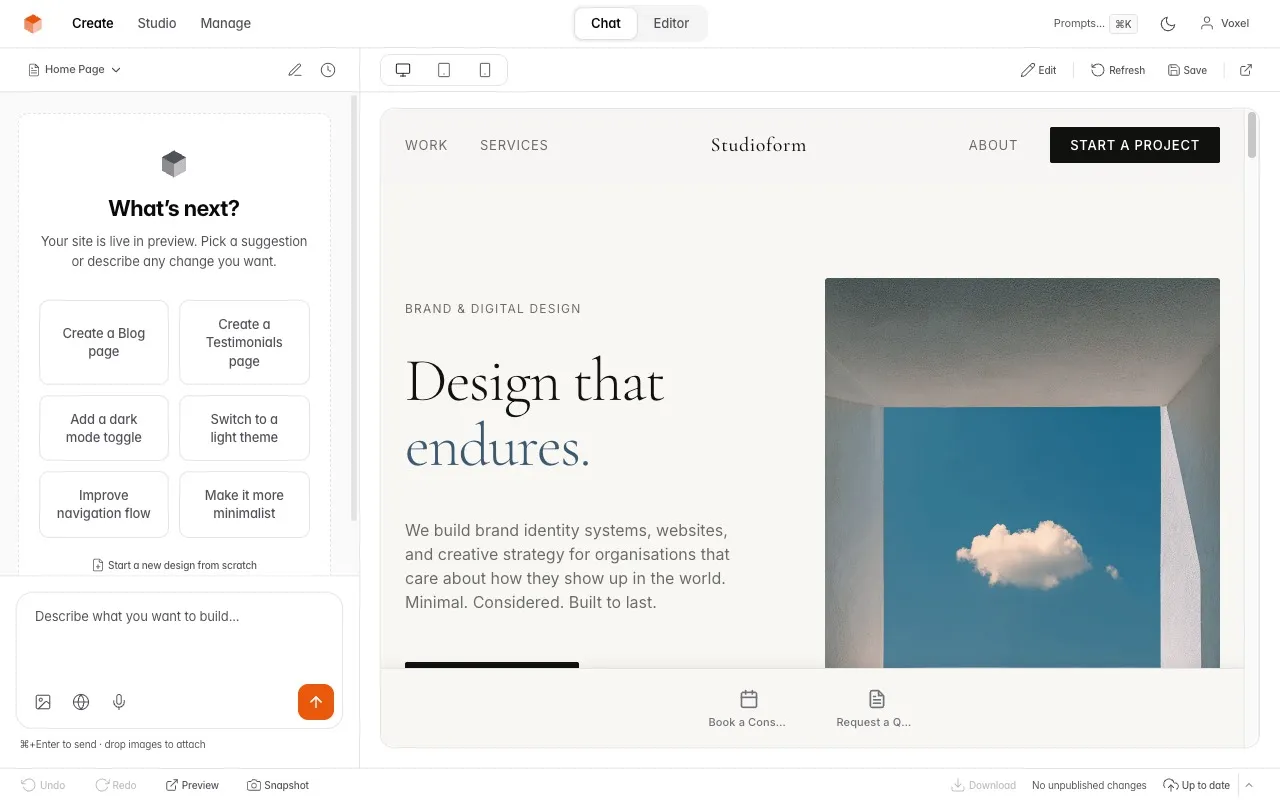
- AI Studio — a chat-driven interface to create and edit multi-page websites in plain language
- Code Editor — built-in Monaco editor with file explorer, multi-tab editing, and create/delete
- Site — a structural graph of pages, partials, routes, tokens, and assets, with impact analysis, blast-radius queries, page management (rename, change URL, move, delete with automatic reference cleanup), and an AI orchestration console for site-wide changes you review and apply transactionally
- Visual Editor — click-to-edit text, swap images, adjust styles, reorder sections, add sections from a picker, and describe changes with AI — all on the live preview
- Live Preview — see every change before publishing
- Undo/Redo — full revision history with a safe editing workflow
- Website References — paste any public URL as design inspiration to create or restyle sites
- Snapshots — save and restore entire site states
- Design Library — save, compare, and switch between entirely different designs
- Notes — a private scratchpad that doubles as AI prompts
- Board — a kanban task tracker with cards, drag-and-drop, and linked pages
- Asset Manager — upload images, files, and fonts
- Actions — define interactions (reservations, signups, inquiries) that serve both human visitors (a form bar with file uploads) and AI agents (MCP tools) at once
- Forms — submission handling with validation, spam protection, and email notifications
- Agent API — authenticated REST endpoints for external AI agents and automation tools (Zapier, Make.com, n8n) to manage pages, settings, assets, publishing, and prompts
- Team — invite editors and viewers with role-based access
- AEO — built-in AI discoverability (
llms.txt, schema, MCP endpoint)
Anthropic Claude (recommended), OpenAI, Google Gemini, DeepSeek, or any OpenAI-compatible endpoint. You bring your own key; keys are encrypted at rest.
Everything VoxelSite needs to run ships in the repository. Clone it and it runs as-is — no build step, no composer install, no Node.js on your server.
| Included | Notes |
|---|---|
| PHP source + engine | Plain PHP, custom micro-router — no Laravel or Symfony |
vendor/ |
Composer dependencies, committed and ready |
| Compiled Studio assets | _studio/ui/dist/ CSS and JS, pre-built — no Node.js required |
| SQLite database | Created by the installer — no database server to set up |
| Migrations | Applied automatically on every Studio load |
The websites VoxelSite generates are standard HTML, CSS, PHP, and vanilla JavaScript — they keep running even if you delete the Studio.
| Requirement | Minimum |
|---|---|
| PHP | 8.2+ |
| Web server | Apache or LiteSpeed (.htaccess included), Nginx, or any PHP host |
| Database | SQLite — bundled with PHP, nothing to install |
Required PHP extensions: pdo_sqlite openssl json curl mbstring gd zip
Most shared hosts include all of these. The installer's system check confirms every requirement before you continue.
Three steps: get the files, point your web server at the project, and open the Studio. The first visit launches a short setup wizard that creates your database and configuration for you. Nothing to compile, no config file to edit by hand.
Clone the repository into your web root (a VPS, or any shared host with SSH and Git):
git clone https://github.com/NowSquare/VoxelSite.git .The clone includes vendor/ and the pre-built Studio assets, so it runs immediately — no composer install, no npm install.
No SSH or Git on your host? Download the latest release archive, extract it, and upload the contents with FTP/SFTP or your control panel's file manager. The result is identical.
VoxelSite serves from the project root — not a public/ subfolder, because it is not a Laravel app. Put the files in your document root (typically public_html/). The bundled .htaccess handles clean URLs and protects the Studio, data, and uploads on Apache and LiteSpeed.
On Nginx, add the one-time clean-URL rules from the installation guide — there is no .htaccess equivalent for Nginx.
Make these directories writable by the web server (755 or 775): _studio/data, _studio/preview, assets.
Open yourdomain.com/_studio/. With no configuration yet, VoxelSite takes you straight to the installer — there is no special URL to remember. The wizard takes about a minute:
| Step | What happens |
|---|---|
| System check | Verifies your PHP version, required extensions, and writable directories |
| AI provider | Pick a provider and paste your API key (encrypted at rest) |
| Admin account | Creates your Studio login |
| Site name | Names your site and finishes setup |
When it finishes you land in the Studio. Describe the website you want and VoxelSite builds it.
Your site's root URL returns 403 until your first publish — that is expected. Work in
/_studio/and publish when you are ready.
Update from Studio → Settings, on two paths.
- Git updates (recommended for Git installs). When VoxelSite is a Git checkout, Settings shows a Git Updates card. It reports your branch and whether a new version is available, then applies it in one click — it pulls the latest release and runs any pending database migrations. It refuses to run if you have local changes or are ahead of the repository, and never touches your pages, database, settings, or uploads.
- Release archive (for shared hosting without Git). Upload the latest release archive from the same Update card, or drop it in
/dist/via FTP and apply it there. VoxelSite replaces system files only.
Your pages, settings, SQLite database, and uploaded files are preserved on both paths. The full guide, including the shell git fetch --tags / git checkout <tag> workflow for pinning a version, is in the Updating documentation.
/                   → Your live website (generated by AI)
/_studio/           → Admin Studio, installer, engine, compiled UI
/_partials/         → Shared site partials (header, footer, nav)
/assets/            → CSS, JS, images, fonts, data, forms
/_data/             → Form submissions and uploads (private)
/vendor/            → PHP dependencies (required — do not delete)
Show the Studio to others without giving them real access:
- Create a
.demofile in the project root:touch .demo - The login page pre-fills demo credentials (
demo@example.com/welcome3210) - The Studio runs in read-only mode — write operations (publish, delete, AI generation) are blocked. The preview Actions Bar stays interactive but uses a safe stub that writes no real data
- A persistent DEMO badge appears in the top bar
- Your site's root URL serves a complete, styled demo website with an interactive Actions Bar
- The Designs gallery shows curated, industry-specific landing pages
- To disable:
rm .demo(instant, no restart)
Hide chrome for screenshots: add hide_banner=true to the .demo file to suppress the DEMO badge and login chrome while keeping read-only enforcement active.
Demo mode never modifies your live workspace — it reads shipped fixture data. Real owner login still works alongside the demo session.
The
.demofile is an installation-wide switch. While it exists, all Studio writes and allsubmit.phpform submissions are blocked. If your site is published, unpublish first so the liveindex.php(with demo detection) is restored and live forms keep working.
| Problem | Fix |
|---|---|
| Root URL returns 403 | Normal before your first publish. Go to yourdomain.com/_studio/ instead |
| Installer says "Cannot reach server" | Apache: enable mod_rewrite and AllowOverride All. Any server: verify PHP 8.2+ runs and .php files are processed |
| Blank page / 500 error | Verify PHP 8.2+ is active and the required extensions are installed |
| Permission errors | Make _studio/data, _studio/preview, and assets writable (755 or 775) |
| Routes return 404 (Apache) | Enable mod_rewrite and AllowOverride All |
| Pages show the homepage (Nginx) | Add clean-URL rewriting to your Nginx config — see Installation → Nginx |
| AI not responding | Check your API key in Settings; verify cURL and outbound HTTPS work |
| Upload fails (file size) | Increase upload_max_filesize and post_max_size in PHP settings |
| Generation stops early, missing CSS/JS | PHP execution timeout is too low. Set max_execution_time, request_terminate_timeout, and fastcgi_read_timeout to at least 600 — see Server timeouts |
- The Studio is protected by login, session tokens, and CSRF checks
- Use HTTPS in production
- Keep regular backups of
_studio/data/,assets/, and_data/ - Do not remove the shipped
.htaccessfiles — they protect the Studio, data, and uploads
| Layer | Technology |
|---|---|
| Backend | PHP 8.2+ — custom micro-router, no Laravel or Symfony |
| Database | SQLite 3 (via PDO) |
| Studio frontend | Vanilla JavaScript (ES modules, bundled with esbuild) |
| Studio styling | Tailwind CSS (compiled with @tailwindcss/cli) |
| Code editor | Monaco Editor |
| Generated websites | HTML, CSS (Tailwind utilities compiled to static CSS), PHP, vanilla JavaScript |
No Node.js or Composer is needed at runtime. The full Studio source and build system ship in the repo, so you can modify and rebuild the interface if you want — see the Tech Stack docs.
Documentation lives at voxelsite.com/docs. For bugs and questions, open an issue at github.com/NowSquare/VoxelSite/issues with your PHP version, hosting type, and the exact error or a screenshot.